On Sale: GamesAssetsToolsTabletopComics
Indie game storeFree gamesFun gamesHorror games
Game developmentAssetsComics
SalesBundles
Jobs
TagsGame Engines

Contraption will not hold values typed into attribute fields

A topic by treegravy created 18 days ago Views: 132 Replies: 4
Viewing posts 1 to 2
(1 edit) (+2)

(note: Even if there is another contraption out there that someone’s already made that does exactly what this does and more, that’s nice, but I don’t care about that right now; I want to know the solution to this problem so that I can learn how to script things myself.)

I feel really silly for asking this, but for whatever reason, I cannot for the life of me figure this out. I’m trying to make a contraption that will draw colored text on a colored background using a canvas, because I’m working on a project where I wanted to add a bunch of text boxes all formatted in this way. Just effectively plain field widgets, except they can have different background colors. Using the Decker and Lil documentation, as well as referencing some other pre-built contraptions, I managed to get the contraption set up with custom attribute fields that can be used to edit the contents, and all of that. However, when I placed my contraption, filled in the attributes, then tested it, nothing happened; it remained as a blank canvas. When I went back to check the attribute fields, the values that I had just put in were also completely gone.

I’m assuming the problem is that I’ve failed to “grab onto” the values put into the attributes somehow in the contraption’s code. In trying to fix this, I have been trying to use the “get” and “set” functions, assuming that maybe I have to use those to grab the values entered into the attributes first. But to be quite honest, I don’t really understand the difference between them at all. I saw that the keyword itself of “value” in Decker scripts references the data of non-Canvas widgets, such as a button’s “value” being a boolean for whether or not it is pressed, but I was confused as to whether or not this applies to the attributes, and/or referencing them?

Also, in Decker’s documentation, I see both “value” and “val” being used seemingly interchangeably? Are “value” and “val” two ways of writing the same variable, or am I misinterpreting this, and “val” just its own variable being used and set for tutorial purposes?

(edit: to clarify, the code I note as working in a card script was also just copy-pasted as is into the contraption, with the reference names for the attributes substituted into it)
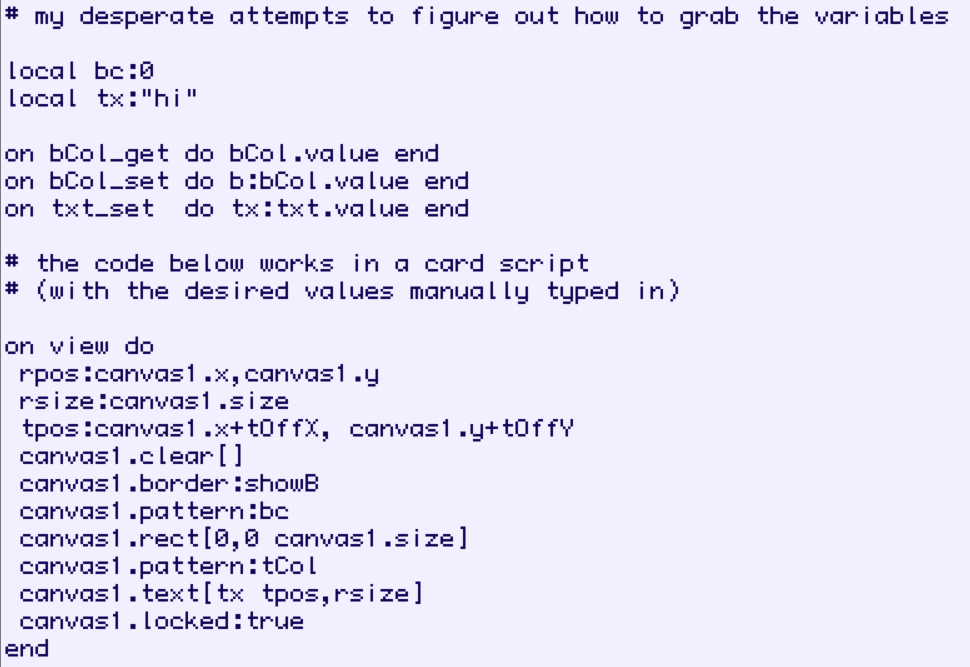
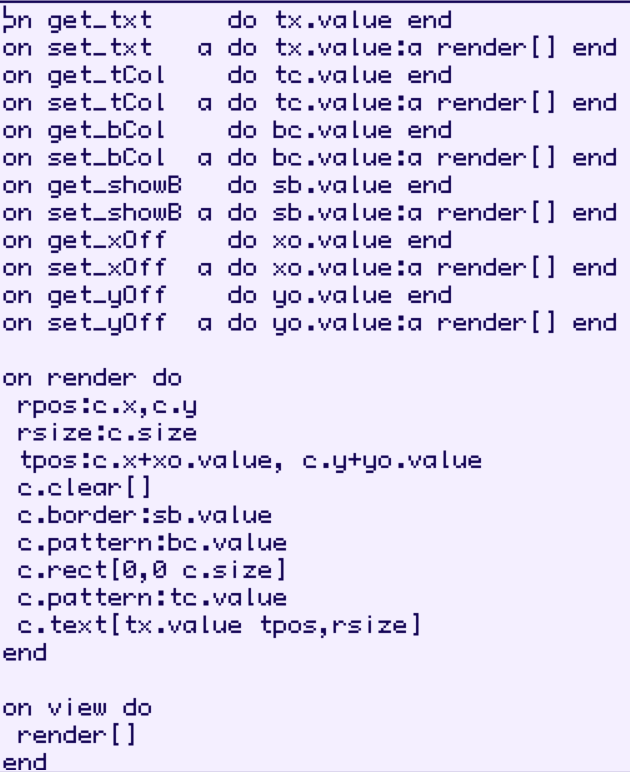
image.png

Developer (1 edit) (+2)

You're sort of on the right track here. I'll see if I can explain it better.

Inside a contraption, any settings we want to remember will need to be stored in widgets inside the contraption. These widgets will often be invisible; just for internal use by scripts.

An ordinary widget has "attributes", like the "text" attribute of a field which can be read from or written to by scripts; I'm sure you've done this many times:

myField.text:"welp"   # write to the text attribute of the field widget myField
myField.text          # read the text attribute of the field widget myField

In contraptions, we need to tell Decker what should happen when an attribute is read from or written to by defining appropriately-named event handlers.

If you wanted to be able to manipulate a contraption from an external script like this:

myThing.textColor:23 # write to the textColor attribute of the contraption myThing
myThing.textColor    # read from the textColor attribute of the contraption myThing

Inside the contraption you'd need to have a widget to keep track of that text color setting. Let's say the internal "storage" widget for the textColor attribute  is a slider widget named "gringus" set up to store an integer between 0 and 255. The contraption prototype's script would then need to include something like the following to wire up the attribute to the storage:

# handle reading from the .textColor attribute, retrieving the value from gringus:
on get_textColor do
 gringus.value
end
 
# handle writing to the .textColor attribute, storing the new value (x) in gringus:
on set_textColor x do
 gringus.value:x
end

The "get_textColor[]" event handler is called on a read, and the "set_textColor[]" event handler is called on a write. If only a "get_textColor[]" handler is written, the attribute is read-only. If only a "set_textColor[]" event handler is written, the attribute is write-only (which is a bit unusual). In your example it looks like you have the naming convention backwards; for example you have "bCol_set" instead of "set_bCol".

To actually do something with that "textColor" attribute aside from storing it, you'd also probably have a view[] event handler in that contraption prototype script along the lines of your example. You can freely choose between retrieving the text color setting directly from "gringus" or by calling "get_textColor[]":

on view do
 canvas1.clear[]
 canvas1.pattern:gringus.value    # this works
 canvas1.pattern:get_textColor[]  # equivalent to the above
 # etc...
end

In some cases you may want writing to a contraption attribute to have a "side-effect" in addition to storing the new setting. For example, after recording the new textColor we could call the view[] event handler to immediately update the appearance of the contraption to reflect the change:

on set_textColor x do
 gringus.value:x
 view[]
end

(There's a bit of subtlety here for complex contraptions, as the scripts triggered by a get_ or set_ have to finish quickly; I'd be happy to expand on this later if needed, and there's some general advice in the reference manual. For simple contraptions this approach is fine.)

The "Prototype Attributes" panel is how you tell Decker that certain attributes are meant to be manually-editable in the properties pane of each instance of the contraption, and how they should look. These will only work properly if there are underlying get_ and set_ event handlers in the prototype script corresponding to the "name" of each attribute in this list.

In the Decker Reference Manual, the example describes building a prototype which externally exposes an attribute named "value", accessed like "counter1.value", which is stored in an internal field named "val", and wired up with internal event handlers named "get_value" (which reads from the "val" field) and "set_value" (which writes to the "val" field). I can see how the similarity in these names might get a little confusing; I'll consider rewriting some sections of that tutorial.

Is this explanation any clearer?

(+2)

Yes, thank you so much! What I hadn’t understood was the concept of creating additional widgets within the same contraption purely for the sake of holding variables within them; maybe that should’ve been obvious, but my prior coding experience is entirely self-taught, so I end up missing some pretty basic stuff sometimes… After trying to build it again with this in mind, it worked exactly how I wanted it to. image.png image.png

Developer(+2)

Excellent; Looking forward to seeing what you're cooking up!

The idea of explicitly storing the state of contraptions (and, more broadly, the state of applications built as decks) in widgets is an unusual feature of Decker that many beginners trip over, and I'm still trying to improve the way I explain it in the docs and tutorial materials.

I call it an "embodied data model": everything important about the state of a program in Decker has a "physical" storage location somewhere in the deck. Different widget types are designed to store different types of data: booleans in checkboxes, text in fields, etc. The ".data" attribute of fields is a sort of catchall for complex structured data, and contraptions make it possible to build custom "containers" for new kinds of data, like how all the contraptions in WigglyKit are designed to store animations. Every time Decker is finished processing an event- whether it's a change[] event triggered by a user typing in a field or a view[] event generated by Decker itself- the deck can be treated as a complete "save-state" for everything that's going on.

This model means that if you edit a script, modify the structure of a deck, or even edit a prototype definition, there's a very clear and straightforward way of understanding what information will be retained: widgets on a card retain their contents unless they're edited or removed, and the primitive widgets inside a contraption retain their "value" attributes (.value, .scroll, .row, .col, and the image on a canvas) if they've ever been modified since the contraption was created, and everything else is "inherited" from the prototype.

If there were true mutable global variables or hidden backing storage for contraption attributes, the lifespan of that information would be less clear over the course of editing, and might behave differently when loading a deck into a fresh session versus working with a deck that has been built up and edited live over the course of a session, which would be very error-prone. Everything about the design of Decker is sort of coiled around the concerns of maintaining a coherent view of the world while you build and reshape things.

Hopefully that makes some amount of sense. :)

(+2)

Yes, now that I understand how it works, I think it makes a lot of sense. It seems like a really cool and practical way of doing things, and it makes me want to try to get more ambitious with future Decker creations. :-D