
Indie game storeFree gamesFun gamesHorror games
Game developmentAssetsComics
SalesBundles
Jobs
TagsGame Engines

Hi! 

I've been trying to connect my Huion Drawing Pad to Pixelorama and it doesn't seem to work?

The app detects the pen as the cursor works fine and can even select the tools and settings but when I try to draw, it doesn't do anything.

I've tried changing the Tablet Drivers and checked my Huion Driver and double checked if I'm on the right layer or using the brush pen or if my opacity is fine and the sort and all seems in order.

I would appreciate the help!
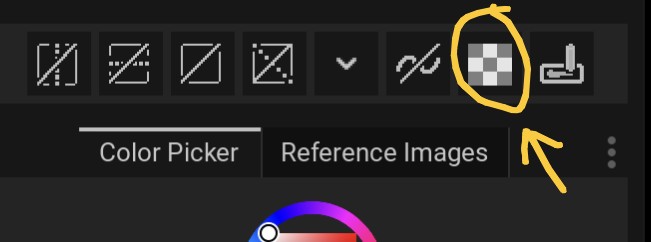
You may have accidentally enabled alpha lock

Can you check if there is a lock icon on it or not?

I've checked and its turned off. 

The pen is still not drawing anything even if it moves the cursor

I've also checked the browser version and the pen works fine there

Hello! Just to make sure, assuming you are on Windows, have you tried changing your tablet drivers from Pixelorama's preferences? https://pixelorama.org/troubleshooting/#my-drawing-tablet-is-not-working

Yes. I've tried changing the Drivers in Preferences in Pixelorama and even disabled Windows Ink my Huion Driver.

The cursor moves just fine with the pen and can be used to interact with the settings and the sort but it won't draw.