


Hi everyone,
I wanted to give you an update on where my BASIC interpreters stand. A lot has happened.
1. NeoBASIC
As far as I'm concerned, this interpreter is usable in its current state. Further development is on hold for now (see Retro-Q below). I know a release is still pending, but I don't have a schedule for it at the moment, since I want to focus on Retro-Q.
2. RetroQ – the JavaScript transpiler
Development has ended, because Retro-Q is now being built as a real bytecode compiler/interpreter. See point 4.
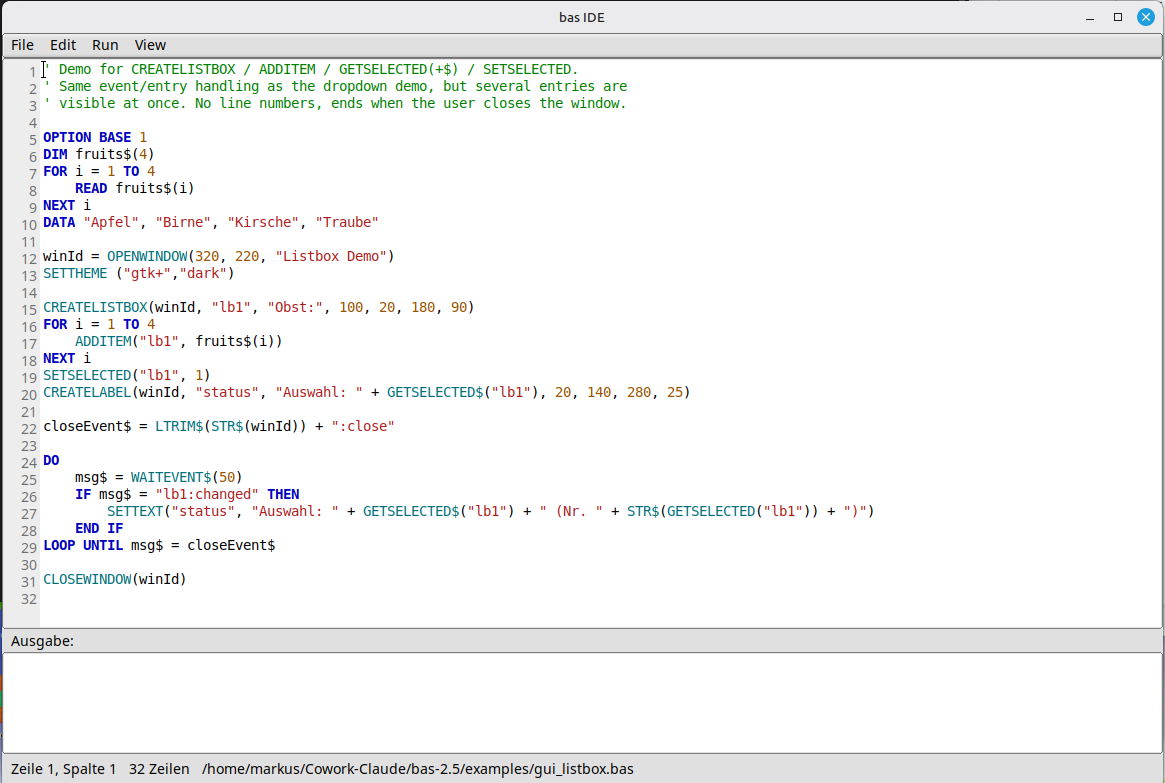
3. bas-2.5 GUI extension
This one is fairly new and hasn't been announced yet. It's based on the BAS interpreter from here: https://www.moria.de/~michael/bas/
I've added a number of extensions in the form of GUI elements built on FLTK. It now also builds on macOS and Windows, not just Linux.
The screenshot shows the editor (written in bas itself) along with some sample code.
Development is ongoing. The idea is that you'll be able to write small tools with it. Executables already can be created.
4. Retro-Q
The current flagship!
It's entirely inspired by RapidQ by William Yu. I've made, and will keep making, a few changes and improvements, so the interpreter won't be 100% source-compatible.
RapidQ was originally developed in Borland Delphi. Retro-Q takes the Free Pascal/Lazarus route instead, which is what makes it possible to reproduce RapidQ's behavior quite closely.
The GUI will be fully integrated. Here's an example with checkboxes and radio buttons:
DIM Clicks AS LONG
Clicks = 0
CREATE Form AS QFORM
   .Caption = "Retro-Q - Phase 9k: QCHECKBOX / QRADIOBUTTON"
   .Width = 360
   .Height = 240
   .Center
    CREATE AgreeCheck AS QCHECKBOX
     .Left = 20
     .Top = 20
     .Width = 300
     .Height = 20
     .Caption = "I agree"
     .Hint = "Tick or untick"
     .ShowHint = TRUE
     .Checked = FALSE
     .OnClick = @AgreeClicked   ' required - "@" prefix, see QBUTTON.OnClick's own note
   END CREATE
   CREATE RedRadio AS QRADIOBUTTON
     .Left = 20
     .Top = 60
     .Width = 300
     .Height = 20
     .Caption = "Red"
     .Checked = TRUE
     .OnClick = @ColourClicked
   END CREATE
   CREATE GreenRadio AS QRADIOBUTTON
     .Left = 20
     .Top = 85
     .Width = 300
     .Height = 20
     .Caption = "Green"
     .OnClick = @ColourClicked
   END CREATE
   CREATE BlueRadio AS QRADIOBUTTON
     .Left = 20
     .Top = 110
     .Width = 300
     .Height = 20
     .Caption = "Blue"
     .OnClick = @ColourClicked
   END CREATE
  CREATE StatusLabel AS QLABEL
     .Left = 20
     .Top = 150
     .Width = 300
     .Height = 40
     .Caption = "No clicks yet."
   END CREATE
 END CREATE
PRINT "Opening a native window - click the checkbox and the radio buttons, then close the window..."
Form.ShowModal
PRINT "Window closed. Total clicks seen: "; Clicks
SUB AgreeClicked
   Clicks = Clicks + 1
   IF AgreeCheck.Checked THEN
     StatusLabel.Caption = "Click #" + STR$(Clicks) + ": checked"
   ELSE
StatusLabel.Caption = "Click #" + STR$(Clicks) + ": unchecked"
   END IF
 END SUB
SUB ColourClicked
   Clicks = Clicks + 1
   ' Each radio button shares this handler; Checked tells us which one is on now.
   IF RedRadio.Checked THEN
     StatusLabel.Caption = "Click #" + STR$(Clicks) + ": red selected"
   ELSEIF GreenRadio.Checked THEN
     StatusLabel.Caption = "Click #" + STR$(Clicks) + ": green selected"
   ELSE
     StatusLabel.Caption = "Click #" + STR$(Clicks) + ": blue selected"
   END IF
 END SUB
There are still quite a few widgets to implement. What already works, and this is the really exciting part, is binding to external DLLs on Windows, .so and .dylib files on Linux/macOS. That's why I think NeoBASIC may become obsolete: you can simply call Raylib (or SDL3 or anything) straight from Retro-Q.
Example with Raylib:
$IMPORT "raylib.inc"
FUNCTION RGBA (R, G, B, A)
    RGBA = R OR (G * 256) OR (B * 65536) OR (A * 16777216)
END FUNCTION
RAYWHITE = RGBA(245, 245, 245, 255)
DARKGRAY = RGBA(80, 80, 80, 255)
RED      = RGBA(230, 41, 55, 255)
InitWindow(800, 450, "Retro-Q + raylib")
SetTargetFPS(60)
WHILE WindowShouldClose() = FALSE
   BeginDrawing()
   ClearBackground(RAYWHITE)
   DrawText("Retro-Q talks to raylib!", 190, 200, 20, DARKGRAY)
   DrawFPS (10,10)
   DrawCircle(400, 260, 40.0, RED)
   EndDrawing()
WEND
CloseWindow()
Executables can already be created today, and it all works on Linux, macOS and Windows.
Planned next are bindings for SQLite and possibly PostgreSQL, as well as a reporting option.
So once it's finished, Retro-Q should cover everything you'd want from a BASIC interpreter. It's meant to be all-purpose, whether that's a game, a console program or full-blown business software (within reason).