

Major Update
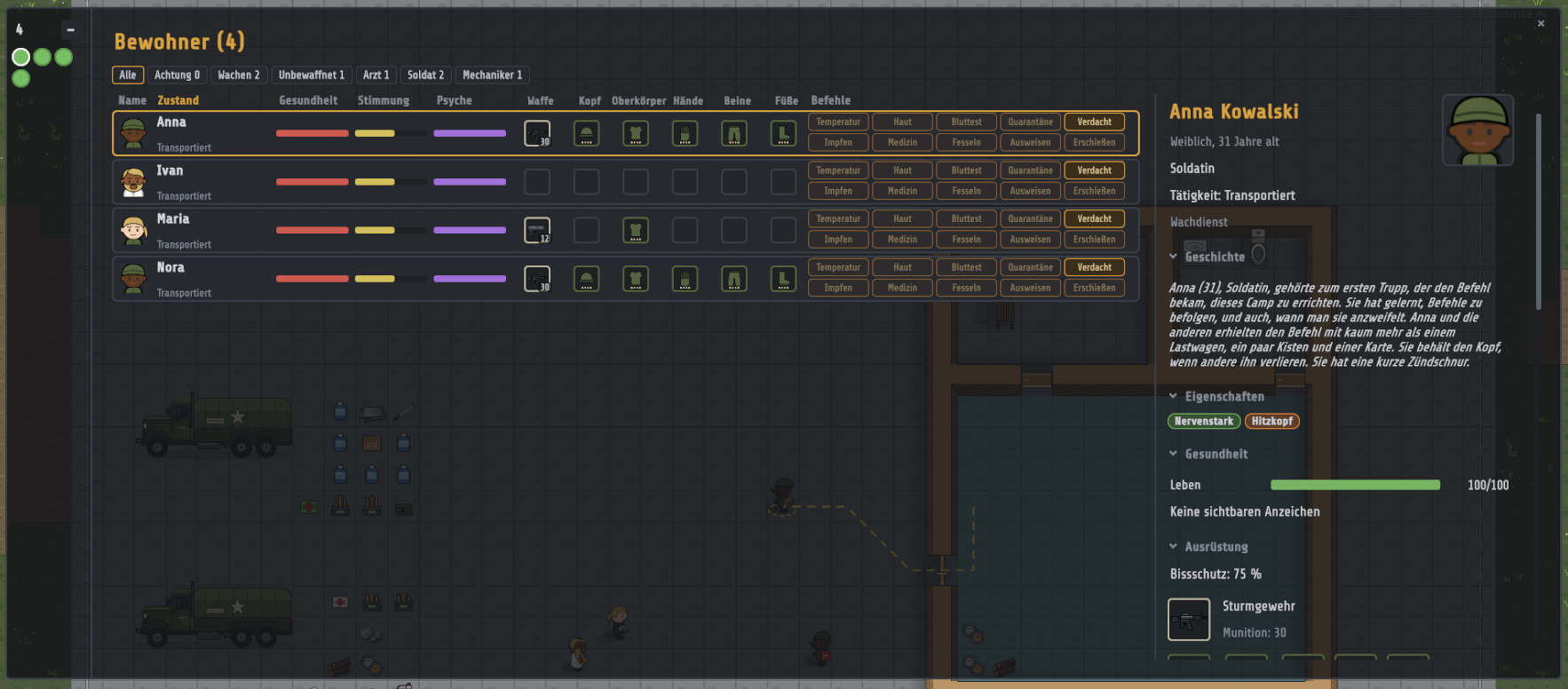
New resident overview
- The list on the left and the side panel have been replaced by a dot strip and a wide resident window.
- The dots show a resident’s status at a glance: green = nothing known, yellow = suspicion or signs, red = known infection, grey = away. An orange ring means something else needs attention, and a double-click opens that resident.
- The window has a sortable table with filters (guards, unarmed, professions) and columns for health, mood, psyche, weapon and equipment.
- The detail pane is split into collapsible sections (traits, equipment, health with signs and examinations, diary, story).
Residents with their own story
- Traits appear as chips.
- Diary, couples and quarrels: residents keep a diary, get together and fall out with each other.
- Biography and obituary: every resident has a biography, and an obituary is shown at the grave. The first team shares a common founder story.
Minor Update
Looks
- 13 hairstyles and a separate beard layer with 5 beard types. Younger residents (under 45) no longer get receding hairlines or bald heads.
- Zombie kinds now look clearly different (runner, brute, screamer), each with its own face and body overlay.
- New trees: birch and dead tree. All trees have been redrawn with more realistic geometry.
Zombies
- When feeding, they now kneel and lean over their prey with arms and head, with flesh scraps and the new eating sound.
Residents in daily life
- Eating at a table: the resident sits in the middle of the chair at seat height and faces the table. The chair turns towards the table, and from behind the body hides the food.
- Shower: residents stand a little closer to the wall while showering. The shower head stays where it is and is no longer covered.
Note on old saves
- This update may prevent old saves from loading.
Gamepage: https://maxmakes.itch.io/conplan-z