

On Sale: GamesAssetsToolsTabletopComics
Indie game storeFree gamesFun gamesHorror games
Game developmentAssetsComics
SalesBundles
Jobs
TagsGame Engines

Thanks, that is super useful. I can imagine, it could be something like that but what causes me most headache is that each platform also has its own quirks. The native versions for windows and linux run way more smoothly for example than the web version.

I will investigate this for sure, the tooltip and specific situation you mention are good starting points. There are already quite some optimizations in the game. UI elements are only refreshed at 10Hz for example and the star map is layered depending on how often the elements should be redrawn (hexes vs. labels vs. animations).
(+1)

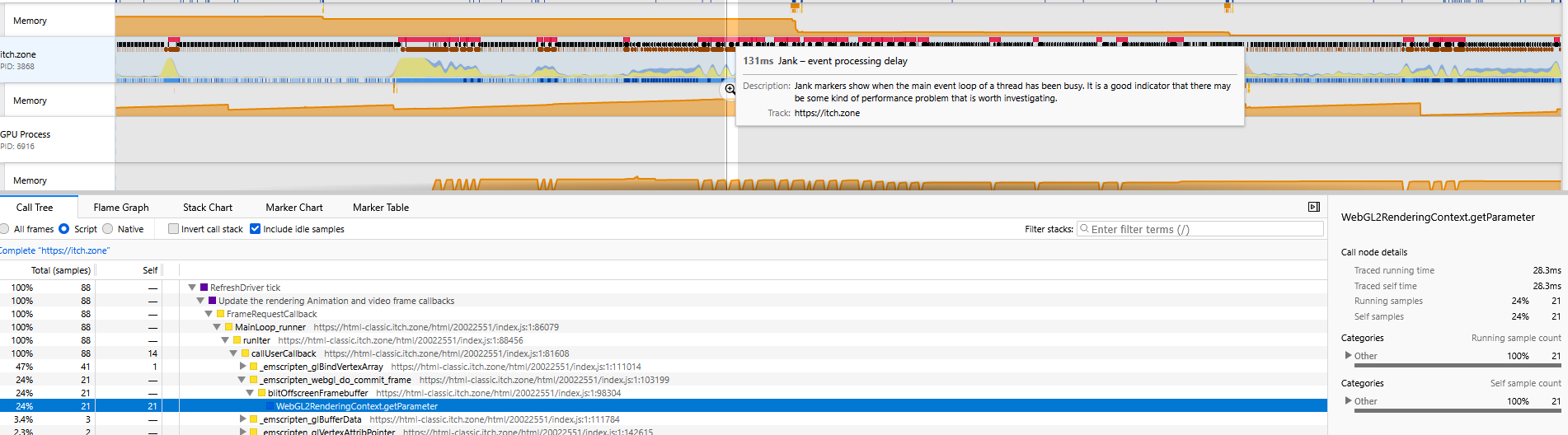
If you really don't find the solution with quick random guess, then the best option is prolly to use a profiler, I took a screenshot of me profiling a laggy moment (the par with lots of red square is when I switch to map view), I don't want to send the trace because I have no idea if it might contain sensitive information, but just redo that on your end localy, use a profiler like fire dev, go to performance, start recording wait a few sec when it's laggy, I think if you use a local version you might even be able to have info about javascript function or w/e is causing the issue, I don't remember detail but I know I used it with success in my previous web game.

(+1)

Thanks, I found the problem you described. Each upgrade of a refinery or drone in a system triggered a redraw of the map, in your case multiple per frame, which definitely is not necessary. I am developing this game in Godot and have been using the internal Profiler to look at performance bottlenecks.