Indie game storeFree gamesFun gamesHorror games
Game developmentAssetsComics
SalesBundles
Jobs
TagsGame Engines

AnimLab

FREE premiere animation software suite · By Keves

Please report any bugs here! Sticky

A topic by Keves created 81 days ago Views: 955 Replies: 73
Viewing posts 1 to 20 of 25 · Next page · Last page
Developer(+1)

AnimLab is a pretty huge system and has a lot of moving parts, so bugs can happen. Please report them here and I'll get to them!

(2 edits)

This kinda makes sense as to why it is happening, but it is annoying. When you have the stabilizer on high or max and use the eraser for a little too long, it starts lagging really badly. Also, a little before, I experienced another issue where it broke, as the screen part that shows the image went black, and the mini playback part disappeared with text in its place saying rendering error or something. I cannot recreate this issue, but what I was doing was duplicating a layer and using my XP-Pen to erase some of it, and then it happened. I had to close and reopen the whole thing to fix it. I also lost my progress, although I did not have much done yet. Edit: it happened agian, but this time I was just using the eraser with my mouse, and it still happened. Edit2: also this is not a bug, but it would be nice if the thing you can use to move the image only moves the drawing that frame unless you want it to move all the frames or smthn.

Developer

Thanks for the report! Would you mind sharing your device specs, it helps a lot to debug. You can find them using the bug report option in the Help tab!

(1 edit)

My computer has a 4050, and 16 gbs of ram, and the screen res is 1920 x 1080, is thaat what you meant?

Developer

That's perfectly fine. I'll see about investigating these things. One of them I have a fix for already prepped for the next build, luckily! I keep progress on the discord but you'll see changes in the next devlog as well. Thank you for reporting, it helps a lot!

Developer

Hey, I dug out that bug and put in a fix today, let me know if it feels better. I appreciate you finding it!

https://files.catbox.moe/8xipdb.mp4

the app is lagging heavily after few strokes, I have intergraded graphics of ryzen 5 5600, which is very basic Ik but I run moho 14.5 very smoothly in it, also other animation apps but no app does this 

Developer

Hello, thank you for the report! I put out a fix today that should take care of that. Thank you!

dint really fix the issue, its still unusable and very laggy  for me, linked the errors and lag's video 

https://files.catbox.moe/tlh8na.mp4
https://files.catbox.moe/f32xva.mp4
https://files.catbox.moe/5iv0x7.mp4

Developer

That is pretty weird if you are still getting it. Would you mind going into this panel and getting this info? You can send it to me privately if you like, via DM or on discord (you can find the discord link from the top of the itch page).

(+1)

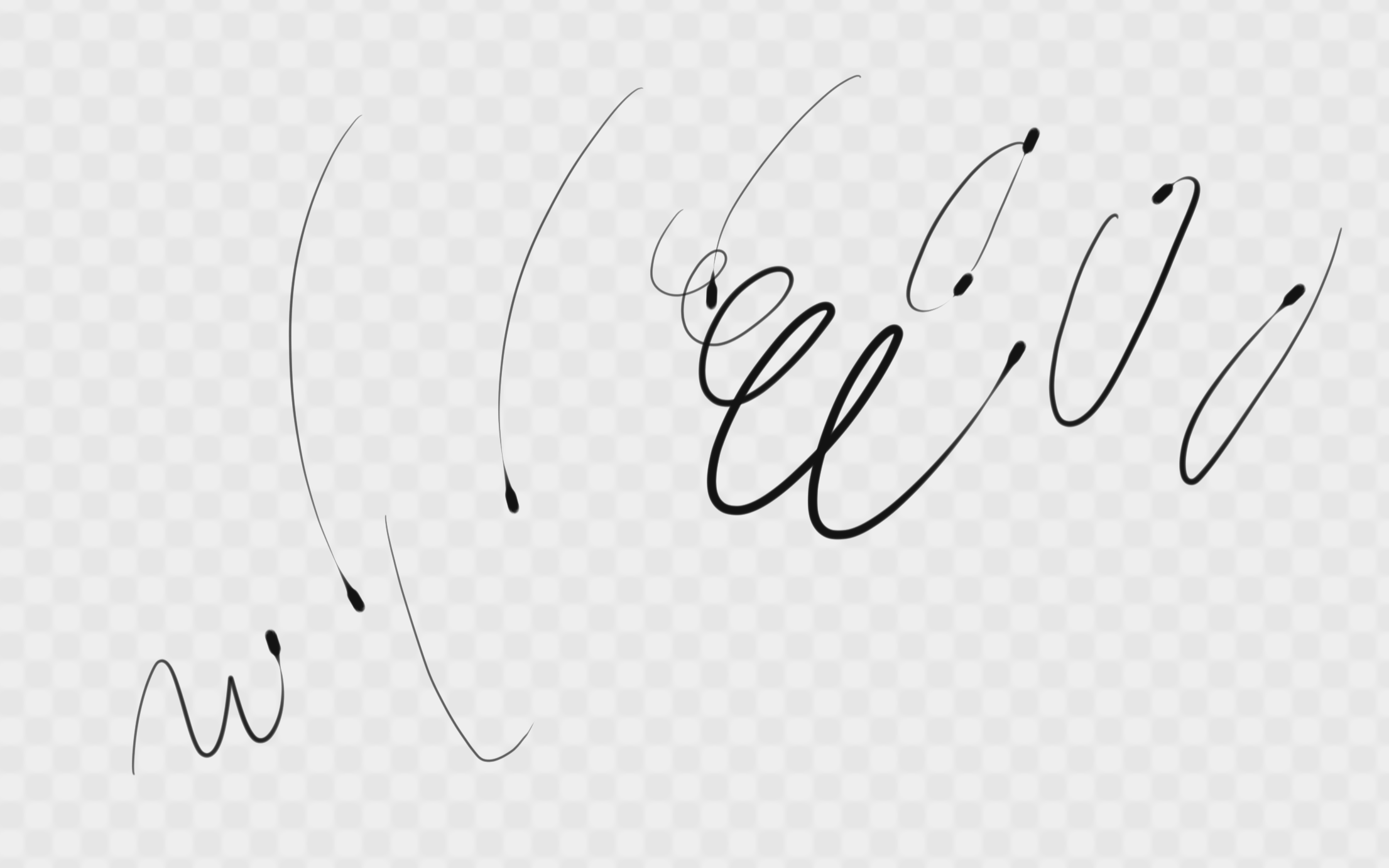
Doing a test. My tablet is detected as well as pressure, but when doing quick strokes, the end of said stroke shoots up to 100%. 
Developer(+2)

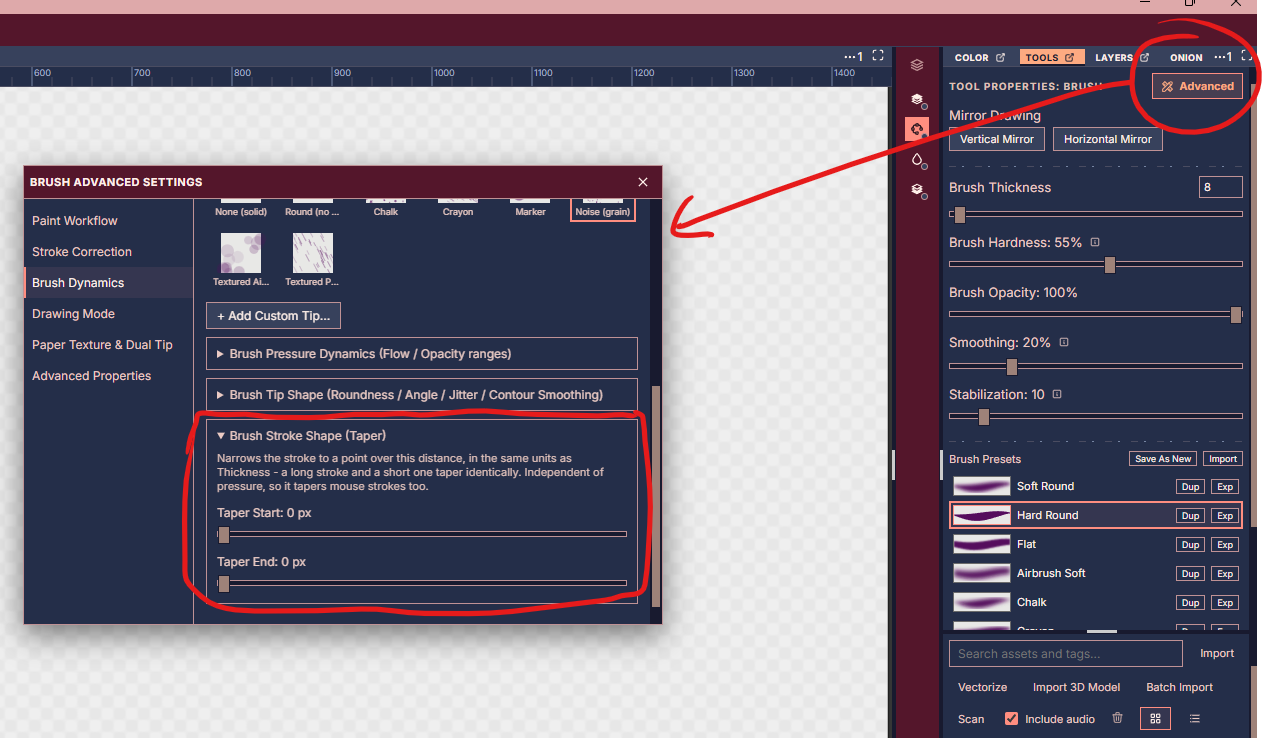
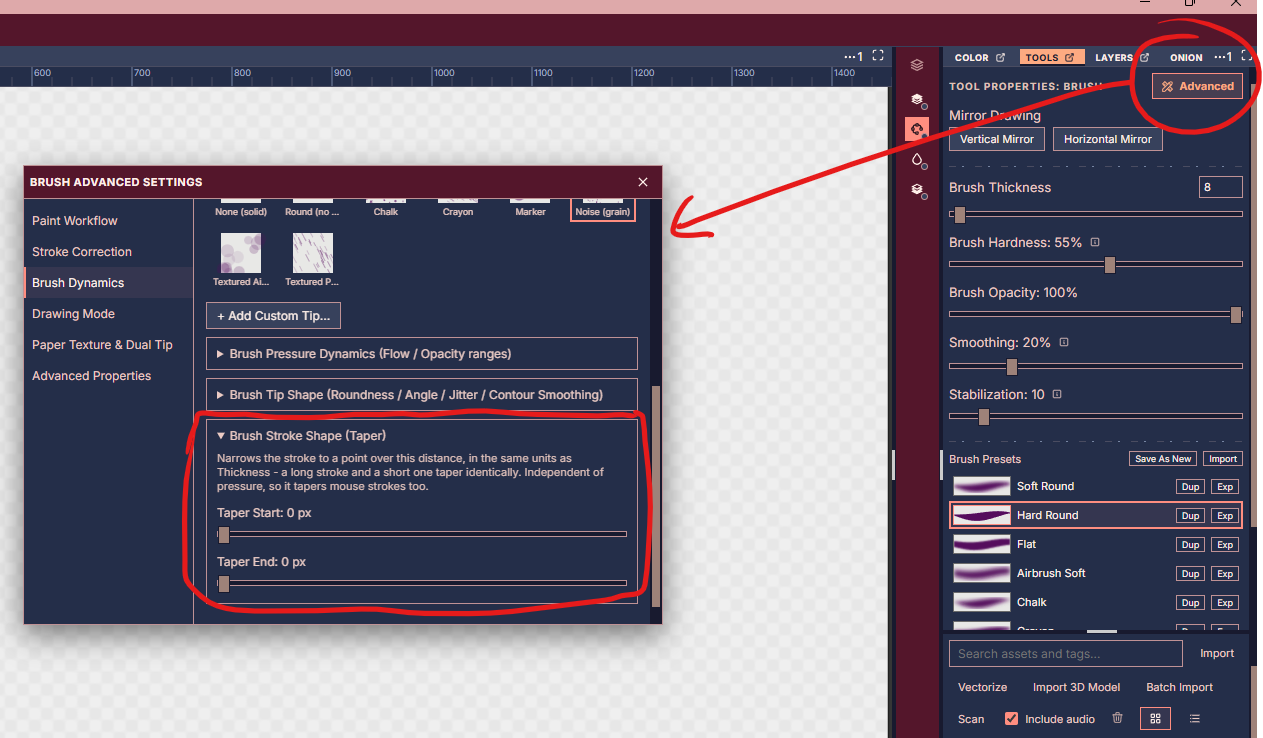
Hey there! Would you mind having a look at your taper settings? It seems like your end taper might be too high. If playing with the settings doesn't help, could you use the Help-> Bug Report feature to drop your device info? That'd help a lot!

(+1)

Hey it worked out! When it's at 0, it does that funny bug but any higher past a point and it's gone! Thank you! Didn't think there's a nifty setting for this! :)

I'll come back if I find other issues!

Developer(+2)

Perfect! That's what those are for, glad it worked!

Not sure if it's a missing functionality, but is there a way to save the settings including scene layout and tools?

Developer

Saves automatically!

It does? Taper settings and window, among other things revert back to default.

Developer(+1)

OH well you found a bug then! I'll get on that!

Developer(+1)

Hey there, just a quick update, I have this patched and the fix will be in the next release!

Wonderful! I'll test it out when it comes out! Thank you for keeping me and us updated! :)

Gave it a test again and I am happy to confirm it saves the layout and settings. Thank you again! If I find more, I'll be sure to let you know! :D

hi hello!  today after installing the program I got the following error:
{

"build": "android-gpu-investigation-v1",

"error": "Failed to request WebGPU device: RequestDeviceError { inner: WebGpu(\"JsValue(OperationError: Failed to execute 'requestDevice' on 'GPUAdapter': DynamicLib.Open: dxcompiler.dll Windows Error: 87\\n at EnsureDXCLibraries (..\\\\..\\\\third_party\\\\dawn\\\\src\\\\dawn\\\\native\\\\d3d12\\\\PlatformFunctionsD3D12.cpp:224)\\n\\nOperationError: Failed to execute 'requestDevice' on 'GPUAdapter': DynamicLib.Open: dxcompiler.dll Windows Error: 87\\n at EnsureDXCLibraries (..\\\\..\\\\third_party\\\\dawn\\\\src\\\\dawn\\\\native\\\\d3d12\\\\PlatformFunctionsD3D12.cpp:224)\\n)\") }",

"attempt": 4,

"userAgent": "Mozilla/5.0 (Windows NT 10.0; Win64; x64) AppleWebKit/537.36 (KHTML, like Gecko) Chrome/157.0.0.0 Safari/537.36 Edg/157.0.0.0",

"secureContext": true,

"embedded": false,

"devicePixelRatio": 1

}  
absolutely let me know if there's anything I need to do on my end or anything else you might need to know ^_^ thanks so much for all the effort put into this program! 

Developer

Ooo webgpu crash. What's your GPU model?

(1 edit)

i have two installed, an Intel UHD Graphics 630, and Radeon RX 550 ^-^ after seeing ur comment i tried troubleshooting and changing the graphics preference manually between the two gpus after the default was already set to "Let Windows decide" just in case but i got the same error twice as the first time around.  tacking that on here in case that's helpful at all.  

Developer

Ah okay! I'm investigating it now and I'll update you shortly.

android: can't export a png seq and a video. add gif export

Developer

PNG and video export ought to work, are you getting an error? Can I ask what's happening to interrupt export?

Hello, I've been trying to learn this software for a few hours but the autosave feature isn't working. The logs keep saying that there's an issue with my file path. Is there any way to resolve this issue?


== Device ==

User agent: Mozilla/5.0 (Windows NT 10.0; Win64; x64) AppleWebKit/537.36 (KHTML, like Gecko) Chrome/157.0.0.0 Safari/537.36 Edg/157.0.0.0

Screen: 1366x768 Viewport: 1366x745 DPR: 1

Max touch points: 0

== Video Playback ==

No video playback events recorded.

== App Log ==

2026-11-12T04:38:08.368Z [warn] [useMediaTextureSync] skipped sync: engine not ready yet

2026-11-12T04:38:08.536Z [error] [RecoverySnapshot] Could not read the recovery snapshot. forbidden path: C:/Users/diego/OneDrive/Documents/AnimLab Workspace/.recovery/autosave.animlab

2026-11-12T04:38:08.537Z [info] [App] AnimLab WebAssembly Core securely initialized.

2026-11-12T04:38:08.539Z [info] [InputManager] Core Event Listeners securely mounted.

2026-11-12T04:38:08.777Z [info] [InputManager] Native Pointer Events securely attached to Canvas.

2026-11-12T04:46:56.444Z [error] [RecoverySnapshot] Could not write the recovery snapshot to disk. forbidden path: C:/Users/diego/OneDrive/Documents/AnimLab Workspace/.recovery/autosave.animlab

2026-11-12T04:48:14.286Z [error] [RecoverySnapshot] Could not write the recovery snapshot to disk. forbidden path: C:/Users/diego/OneDrive/Documents/AnimLab Workspace/.recovery/autosave.animlab

2026-11-12T04:56:02.804Z [error] [RecoverySnapshot] Could not write the recovery snapshot to disk. forbidden path: C:/Users/diego/OneDrive/Documents/AnimLab Workspace/.recovery/autosave.animlab

Developer

Hello! This should be fixed in the newest release, let me know if you have further issues!

Thank you!

Hello! Just stumbled on this while trying to find a good Harmony replacement post grad and wanted to say thank you so much! In just a short while this is already the most intuitive program I've found.

I'm having a small issue when scrubbing/scrolling using my tablet pen--it works just fine w my mouse/trackpad, but on my tablet it specifically only lets me move or drag items and the cursor for a short bit before it stops responding! I tested this on some other software and I'm not having the same problem, wondering if maybe there's a compatibility issue with XP Pens? (Also very minor but I am struggling to find the canvas rotate tool if you may be able to steer me in the right direction!). 
 

Developer

Glad it's of use! And I'll check that out, I may actually have that fixed in the upcoming release planned next, because I just fixed some stuff with the jogger. You can check it on the discord if you want and/or make an official report, but either way I'll be sure to get this handled.

Hi, I manually put in 72 frames as the length, but now when I try and make it less frames, it doesn't let me, even if I set the stop to 24 seconds and trim it down. I use tahoma2d, so it was a surprise to... have to lengthen all the frames by hand, and when I shortened a frame, it now means it has to be that long, FOREVER. How do I undo this?

OH AND ALSO: attempting to save a project with the same frames recalled multiple times doesn't work

Developer

On my list and getting it worked on, appreciate the report! I'll try and get it fixed in the next release!

using the .deb file on a Kubuntu 26.04 system (2021 HP OMEN laptop, Intel CPU Nvidia GPU, 1920x1080, tablet is a 2015 wacom intuos on built-in kubuntu driver) i haven't gotten pressure sensitivity to work yet, and some clicks are finicky, e.g. selecting the color black/RGB 0,0,0 on bottom left of color picker suddenly highlights a lot of the GUI, as if i wanted to copy and paste text

(i have been having various other issues with my drawing tablet across all of linux tho so i can imagine this is a harder thing to fix lol... most other stuff i tried worked super well already this is so impressive)

Developer

OKAY. I have looked into this. So there's an actual engine bug with Kubuntu where it's web engine doesn't detect pen pressure at all, which is the issue given the app is built into a tauri container (this is what makes it OS agnostic). What I'd like to do is actually cut the middle man and have AnimLab directly talk to your tablet. I'm going to do some work and get a patch build for the next update, and we'll see if that let's you work with pen pressure. 

ohh nice to know about the container! okay sick thank you so much 🙏 

(+1)

helloo!!! i have a problem,,,, maybe this is a me problem but the program doesnt seem to be picking up my pen !! ,, it says no pen tablet detected ,,, i have restarted my computer And drawing tablet itself, restarted the huion app and nothing seems to be working .... it looks really good otherwise though despite the lack of pen pressure !!! it runs very smoothly apart from this :3

and then the bug report thing ! ;

AnimLab Bug Report

Version: 0.2.23

Runtime: Tauri

Screen: 1536x960

Viewport: 1400x900 DPR: 1.25

Max touch points: 2

CPU: Unknown (not available)

GPU / adapter capabilities: Unknown (not available)

RAM: Unknown (not available)

AnimLab Input Diagnostics Report

User agent: Mozilla/5.0 (Windows NT 10.0; Win64; x64) AppleWebKit/537.36 (KHTML, like Gecko) Chrome/157.0.0.0 Safari/537.36 Edg/157.0.0.0

Samples captured: 50

Pointer type(s) seen: mouse

Pressure range: 0.000 .. 0.500 (last: 0.000)

Tilt X range: 0.000 degrees

Tilt Y range: 0.000 degrees

Last contact geometry (width x height): 1.0 x 1.0

Last event isPrimary: true

getCoalescedEvents() available and returning samples: yes (336 total across buffer)

== Log ==

Full log file: C:\Users\Owner\AppData\Local\com.animlab.studio\logs\animlab.log

== Session log (latest 200 entries) ==

No log entries captured yet.

Developer

Hey there, are you by chance using an xpen? I noticed some issues with them, and certain tablets. I'm working on a fix for that right now. You can follow in the discord if you like, but either way I expect it to be ready by the next release!

nope , im using a huion tablet !! good luck with working on it !! ^_^

Developer

Hello, the fix should be out next week for this! For now try and see if it works with windows ink. Make suer you download the latest version!

hi there! similar to the person above ... i also have no pen pressure / it doesn't detect my tablet. i have a wacom CTH 690! here is my bug report:

AnimLab Bug Report

Version: 0.2.23

Runtime: Tauri

Screen: 1536x864

Viewport: 1400x844 DPR: 1.25

Max touch points: 10

CPU: Unknown (not available)

GPU / adapter capabilities: Unknown (not available)

RAM: Unknown (not available)

AnimLab Input Diagnostics Report

User agent: Mozilla/5.0 (Windows NT 10.0; Win64; x64) AppleWebKit/537.36 (KHTML, like Gecko) Chrome/157.0.0.0 Safari/537.36 Edg/157.0.0.0

Samples captured: 50

Pointer type(s) seen: mouse

Pressure range: 0.000 (last: 0.000)

Tilt X range: 0.000 degrees

Tilt Y range: 0.000 degrees

Last contact geometry (width x height): 1.0 x 1.0

Last event isPrimary: true

getCoalescedEvents() available and returning samples: yes (107 total across buffer)

== Log ==

Full log file: C:\Users\milo\AppData\Local\com.animlab.studio\logs\animlab.log

== Session log (latest 200 entries) ==

No log entries captured yet.

Developer

Hello! Some tablets have specific requirements for their drivers, and this is probably in that list. I'm working on integrating a fix right now. I hope to have it in the next release! You can follow on discord as well if you like for frequent updates.

Hello, I just installed the application and I am getting "Graphics failed to start"

Here is the report I received:

{

"build": "android-gpu-investigation-v1",

"error": "Failed to request WebGPU device: RequestDeviceError { inner: WebGpu(\"JsValue(OperationError: Failed to execute 'requestDevice' on 'GPUAdapter': DynamicLib.Open: dxcompiler.dll Windows Error: 87\\n at EnsureDXCLibraries (..\\\\..\\\\third_party\\\\dawn\\\\src\\\\dawn\\\\native\\\\d3d12\\\\PlatformFunctionsD3D12.cpp:224)\\n\\nOperationError: Failed to execute 'requestDevice' on 'GPUAdapter': DynamicLib.Open: dxcompiler.dll Windows Error: 87\\n at EnsureDXCLibraries (..\\\\..\\\\third_party\\\\dawn\\\\src\\\\dawn\\\\native\\\\d3d12\\\\PlatformFunctionsD3D12.cpp:224)\\n)\") }",

"attempt": 4,

"userAgent": "Mozilla/5.0 (Windows NT 10.0; Win64; x64) AppleWebKit/537.36 (KHTML, like Gecko) Chrome/157.0.0.0 Safari/537.36 Edg/157.0.0.0",

"secureContext": true,

"embedded": false,

"devicePixelRatio": 1

}

And for further context, I am using an AMD Ryzen 7 7700, which has integrated graphics. 

I appreciate any help!

Developer

Hello! Are you by chance using the android apk download on a desktop PC? Which download are you using?

Nope, I used the x64 setup exe

Developer

Hello! Try the latest version. 0.2.27, it has a big performance boost that should fix these!

Hey, thanks for updating me! I'm still having errors with my graphics though . . . I also already installed the latest webview2 runtime as it suggested, however, even after multiple restarts it still won't budge :(( 

I also want to note that I am using a different SSD now, from my kingston to WD green, not sure if that would be significant though.

AnimLab Bug Report

Version: 0.2.27

Runtime: Tauri

Screen: 1920x1080

Viewport: 1400x900 DPR: 1

Max touch points: 0

CPU: AMD Ryzen 7 7700 8-Core Processor, 16 logical cores

GPU / adapter capabilities: AMD, AMD Radeon(TM) Graphics, driver 32.0.21045.16010, WebGPU

RAM: 15477 MB

AnimLab Input Diagnostics Report

User agent: Mozilla/5.0 (Windows NT 10.0; Win64; x64) AppleWebKit/537.36 (KHTML, like Gecko) Chrome/157.0.0.0 Safari/537.36 Edg/157.0.0.0

No pointer events captured yet - move or draw on the canvas, then reopen this dialog.

== Log ==

Full log file: C:\Users\Manta\AppData\Local\com.animlab.studio\logs\animlab.log

== Session log (latest 200 entries) ==

2026-11-21T15:24:23.686Z [error] event=engine_start_failed operation=Start engine code=AL-1016 cause=AL-1032 kind=device_request_rejected stage=device_request failure_class=shader_compiler_unavailable backend_attempted=webgpu navigator_gpu=true webgpu_adapter=true adapter_obtained=true gpu_vendor="AMD" gpu_name=unavailable gpu_driver=unavailable gpu_backend="WebGPU" webview_major=157 attempts=1 version=0.2.27 platform=desktop

2026-11-21T15:24:23.690Z [info] event=device_info operation=device_info_capture cpu_model="AMD Ryzen 7 7700 8-Core Processor" cpu_cores=16 ram_mb=15477 gpu_vendor="AMD" gpu_name="AMD Radeon(TM) Graphics" gpu_driver="32.0.21045.16010" gpu_backend="WebGPU" version=0.2.27 platform=desktop

Graphics Needs a Repair. Error Code: AL-1016 (AL-1032)

{

"code": "AL-1016",

"cause": "AL-1032",

"kind": "device_request_rejected",

"version": "0.2.27",

"platform": "desktop",

"stage": "device_request",

"failureClass": "shader_compiler_unavailable",

"webviewMajor": 157,

"backendAttempted": "webgpu",

"navigatorGpu": true,

"webgpuAdapter": true,

"adapterObtained": true,

"gpu": {

"vendor": "AMD",

"name": null,

"driver": null,

"backend": "WebGPU"

}

}
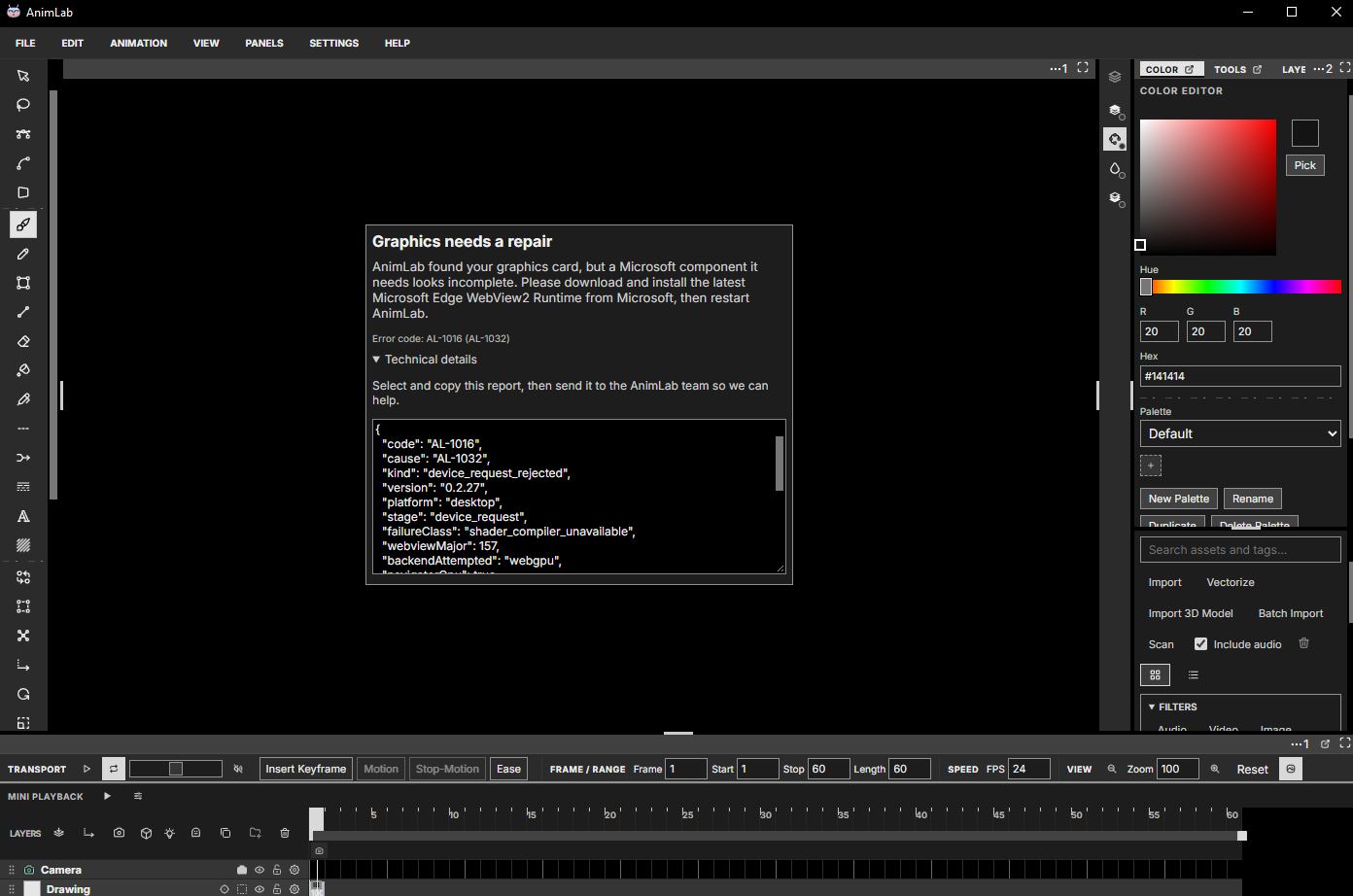
I really want to try this program out because I don't want to keep using my ToonBoom crack just for personal projects ;-; 

Thank you very much for your hard work!!!

Developer

Yeah your gpu driver is still forcing wbgpu: "GPU / adapter capabilities: AMD, AMD Radeon(TM) Graphics, driver 32.0.21045.16010, WebGPU"

That said I am working on a big fix for this exact issue and it will be out probably next week! if you have the latest update it will let you know automatically when it's available when launching. You can also follow in the discord if you want for very regular updates! I will get this fixed though, I got you. Screw big corpo, haha.

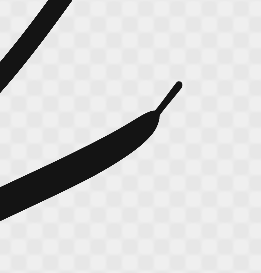
When using a drawing tablet, upon raising the pen from the surface to end the stroke, there's almost always this little thin line at the end (and sometimes also at the start) of the drawn line. Would be great if you could fix that somehow. I'm using the brush tool on windows 11 with a wacom intuos pro medium

Developer

Hello! Try adjusting your taper settings a bit in the brush settings.


(1 edit)

the taper start and end are both at 0. that tiny line at the end should not be there. the rest of the line is thick and I want the stroke to be thick all the way. so I don't think that's a taper setting issue.
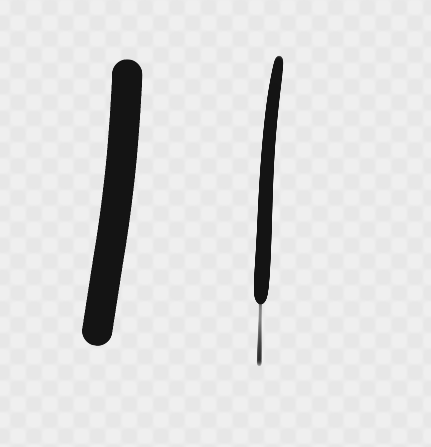
left: mouse line, right: wacom tablet pen line
see how when the line ends, it goes on a little further but super small?
(+2)

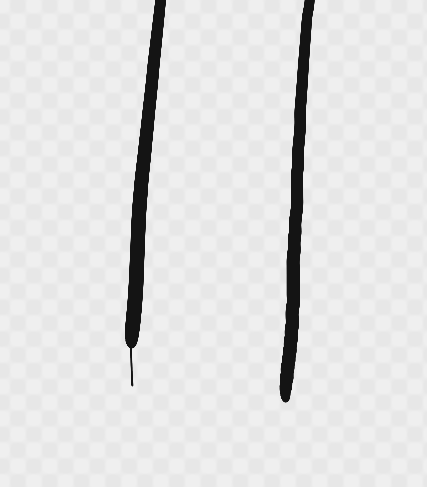
Wait! I know where the bug happens! Stabilization!
left: stabilization 50, right: stabilization 0
when drawing the actual drawn line stays behind too long and when I raise my pen, the rest of the line is added, but very thin
Developer

Hello! Try the latest version. 0.2.27, should be fixed!

still happens, it's just thicker

(4 edits)

Hi, Im on an android tablet (lenovo idea tab pro) and no matter what format its in, images dont import. I love this though 

Edit 2

On further investigation it seems like I can't import anything :/, the browser version works fine but the images come out super blurry

Developer

Hello! Try the latest version. 0.2.27, this should be fixed!

(+1)

Hello! I'm having this odd issue and I'm not sure what's going on?

https://files.catbox.moe/dqnf5e.mp4

My device is the Galaxy s10 fe tablet 

I had this too! For me it was a memory issue.Do you have virtual ram on ? turning it off helped 

Just tried it, no dice :/

Developer

Hello! Try the latest version. 0.2.27, it has a big performance boost that should fix these!

(1 edit) (+1)

Hi!

I sat down to do a quick test animation last night, and a few things came up:

- Turning on onion skinning made drawing considerably laggy toward the end of work when I had a couple layers and frames going on. Turning it off solved the lag entirely.

- The save files AnimLab spits out are enormous, which isn't a surprise given they're JSONs, but the humble 27-frame doodle sitting on my desktop clocks in at a whopping 507 MB with 5-6 layers, each with ten or fewer unique vector drawings. When pretty-printed, that's 74.946.096 lines, and it takes some time to generate when I hit save. I think it'd be a good idea to do binary serialization to cut down on write time, read time, and file size, because as it is right now, it seems like trying to save and load anything complex could turn untenable really fast.

- Speaking of loading, trying to reload that same project freezes the program for a solid 3 minutes and a half, and once that's over, it looks like anything in the main window has stopped rendering entirely. I can interact with the menu bar up top, but none of the work I just loaded displays, and trying to click anything down in the window a few times gives me this error:
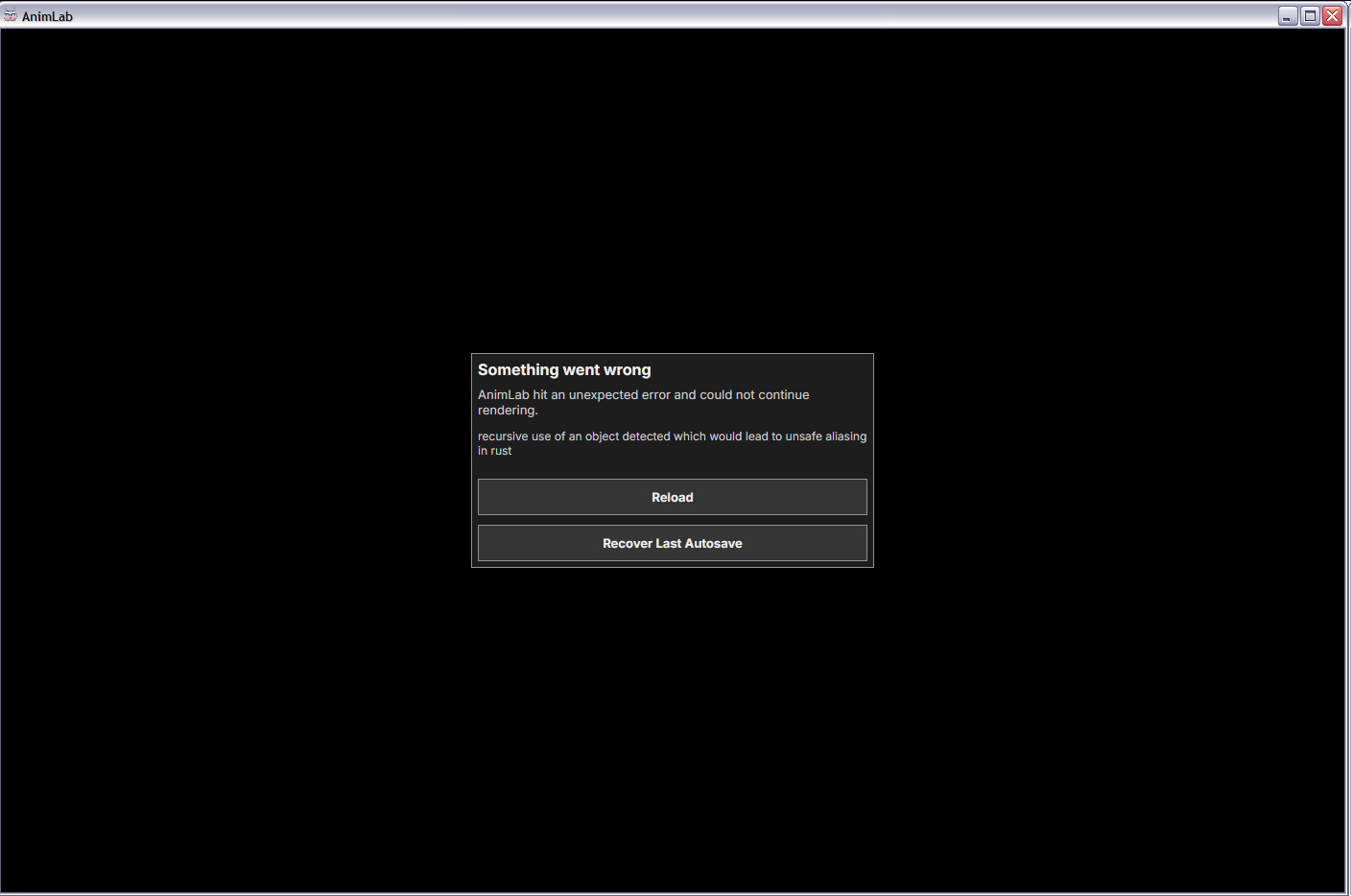
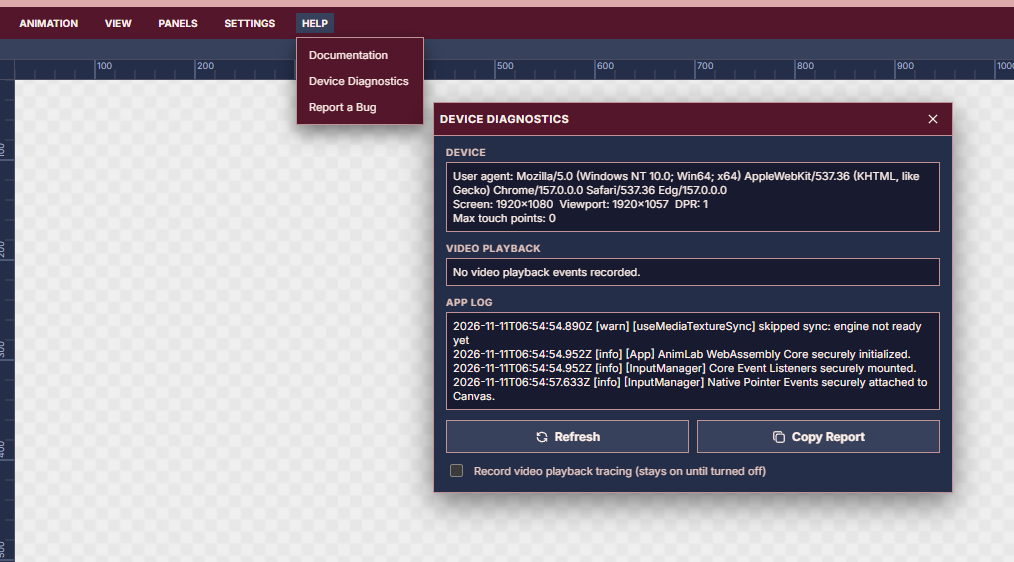
Including the bug report info:

Info

AnimLab Bug Report
Version: 0.2.23
Runtime: Tauri
Screen: 1920x1080
Viewport: 1400x900 DPR: 1
Max touch points: 0
CPU: Unknown (not available)
GPU / adapter capabilities: Unknown (not available)
RAM: Unknown (not available)

AnimLab Input Diagnostics Report
User agent: Mozilla/5.0 (Windows NT 10.0; Win64; x64) AppleWebKit/537.36 (KHTML, like Gecko) Chrome/157.0.0.0 Safari/537.36 Edg/157.0.0.0

Samples captured: 50
Pointer type(s) seen: mouse
Pressure range: 0.000 (last: 0.000)
Tilt X range: 0.000 degrees
Tilt Y range: 0.000 degrees
Last contact geometry (width x height): 1.0 x 1.0
Last event isPrimary: true
getCoalescedEvents() available and returning samples: yes (260 total across buffer)

== Log ==
Full log file: C:\Users\alt_o\AppData\Local\com.animlab.studio\logs\animlab.log

== Session log (latest 200 entries) ==
No log entries captured yet.

Since it doesn't show up there, I'm on a 9800X3D, 9070 XT, and 32 GB of RAM.
Developer

Hello! Try the latest version. 0.2.27, it has a big performance boost that should fix these!

(2 edits)

Not sure if this is a bug as much as an optimization issue. I'm using windows 10 on my Wacom tablet.

A problem I've noticed with almost every animation program (or art program in general, for that matter) is that there is ALWAYS a bit of lag no matter what I do. The brush falls behind my cursor even when I turn stabilizer to 0%. I find this extremely frustrating as I like to work with as little delay as possible, with very fast and loose strokes.
It's possible it could be an issue on my end, but clip studio runs just fine on my computer. Some programs have more delay than others but clip studio is one of the only programs I've managed to get zero delay in. Krita slows me down quite a bit too, but it's at least faster than this.

I tried turning off stabilizer AND smoothing, turned Windows Ink on and off and rebooted the program inbetween, and no change. (I think it might be faster with windows ink on?) This was within the first minute of using the program, I have not touched any other settings or made any new frames, literally just tried the brush bc this is the most important thing to me when it comes to animation programs.
I think maybe some people just don't point it out because they're used to a little stabilizer? But it really bothers me and slows me down. Best of luck with the program, it otherwise looks pretty good and I'll be looking forward to the future. But I pretty much can't use it if there's still this delay. Pressure sensitivity seems to make it way slower, and the program doesn't like me moving fast.

Bug Report Info

AnimLab Bug Report

Version: 0.2.23

Runtime: Tauri

Screen: 1536x864

Viewport: 1536x802 DPR: 2.5

Max touch points: 10

CPU: Unknown (not available)

GPU / adapter capabilities: Unknown (not available)

RAM: Unknown (not available)

AnimLab Input Diagnostics Report

User agent: Mozilla/5.0 (Windows NT 10.0; Win64; x64) AppleWebKit/537.36 (KHTML, like Gecko) Chrome/157.0.0.0 Safari/537.36 Edg/157.0.0.0

Samples captured: 50

Pointer type(s) seen: pen, mouse

Pressure range: 0.000 (last: 0.000)

Tilt X range: 0.000 .. 31.000 degrees

Tilt Y range: 0.000 .. 25.000 degrees

Last contact geometry (width x height): 1.0 x 1.0

Last event isPrimary: true

getCoalescedEvents() available and returning samples: yes (114 total across buffer)

== Log ==

Full log file: C:\Users\Declan\AppData\Local\com.animlab.studio\logs\animlab.log

== Session log (latest 200 entries) ==

No log entries captured yet.

Developer

Hello! Try the latest version. 0.2.27, it has a big performance boost that should fix these!

This project is so good, but sadly unusable for me, because for some reason the shortcuts seem to ignore system keyboard layouts and is defaulted to Qwerty. I am on azerty, but the software detects my a key as q, z as w, etc... it's quite unfortunate

Developer

Hello, that fix should be out next week. :)

Viewing posts 1 to 20 of 25 · Next page · Last page