
Indie game storeFree gamesFun gamesHorror games
Game developmentAssetsComics
SalesBundles
Jobs
TagsGame Engines
(2 edits)

Got a few questions, sorry if they've been asked before 


in a shoot em up solid and deadly blocks both kill you, should solid just stop you moving past it?

how do you change the death animations?

in the horizontal shoot em up, even on an empty screen you die if you reach top or bottom edge of the windowed area, shouldn't the sprite just stop?

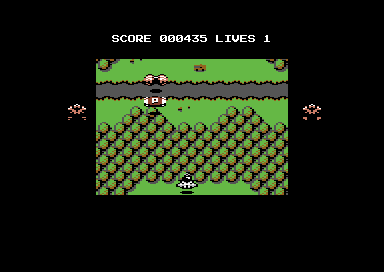
in a vertical shooter, sprites are still displayed when they exit the playing area (both start in the middle then move, map is 12 tiles wide), how can I stop this?

tia

Hi ZXBiNMaN128K,

1. Solid tiles kill in a shoot-em-up.
 

That's on purpose: in shooters any scenery destroys the ship, like the classic scrolling shooters. A "Solid tiles stop the ship" option is a good idea though, I'll add it.

 2. Changing the death animations. 

At the moment shooters use a fixed built-in explosion. The next version adds a "Losing a life" choice for platform, top-down and cave games, where the player catches fire, jumps and falls off the screen in your own pictures. I'll look at letting you draw your own explosion for shooters too.

3. Dying at the top or bottom edge on an empty screen. 

Thanks, that's a bug, and I've reproduced it: it happens when the map is fewer rows than the play window. Until the fix, make the map as tall as the window (or the window shorter) and the ship will stop at the edges as it should.

4. Sprites showing outside a narrow vertical-shooter window. 

Good catch: sprites are only hidden when they leave the whole screen, not a narrower window. I'll fix it so anything past the window's sides is hidden, and enemies that leave the map sideways are removed. I will also make the players ship stop, so you can set the left/right boundary


Many thanks,

Robert