

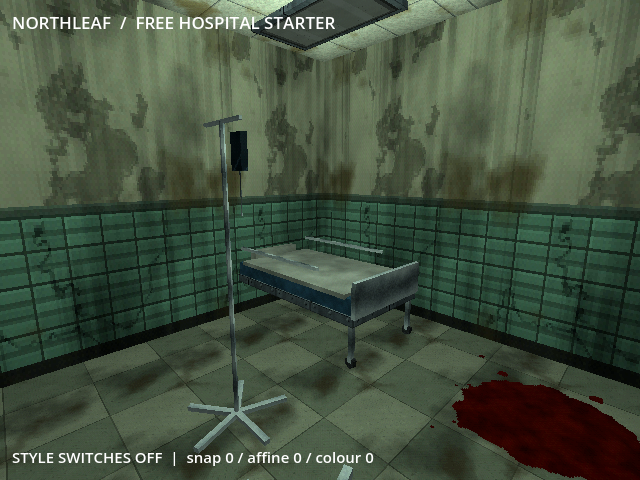
Here is a 4 × 4 m hospital room assembled from Northleaf Studio's nine free modular pieces, rendered in Godot 4.7.2. Both views use the same camera, meshes, textures and light.
Style switches off: vertex snapping, affine texture warp and colour quantization are zero. Nearest texture filtering and vertex lighting stay on.
PSX style on: a 180-pixel vertex grid, full affine interpolation and colour quantization at 32.
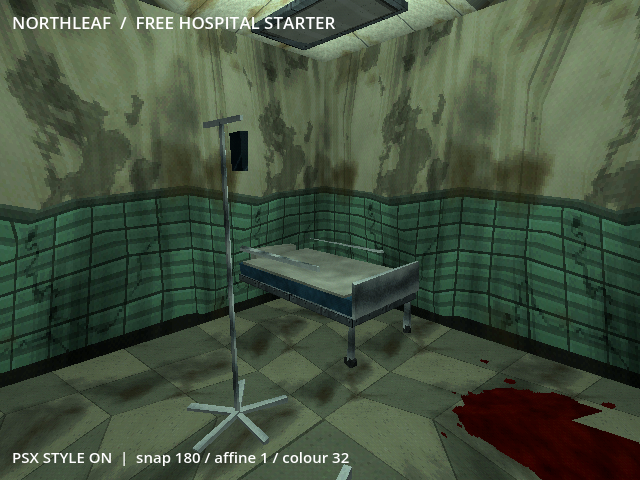
The floor is a useful test surface: large triangles show the texture warp much more clearly than small props. The mesh silhouette also steps across the vertex grid as the camera moves. For a steadier result, try a higher snap resolution and an affine strength between zero and one.
To reproduce the comparison in the free Godot starter, select the scene root with psx_apply.gd and set these exported values in the Inspector before running:
| Setting | Off view | On view |
|---|---|---|
| snap_resolution | 0 | 180 |
| affine_strength | 0 | 1 |
| color_depth | 0 | 32 |
The room's floors cover 2 × 2 m cells and meet at grid corners; the wall and door pieces use the same 2 m grid. The door leaf's origin is at its hinge, so it rotates without sliding sideways.
The free Godot starter and browser corridor demo are here. In the browser demo, P switches its PS1-style effect on and off. The stills above are native Godot captures from the downloadable starter. Its models, textures, shaders and scripts allow commercial games; don't redistribute the models or textures as an asset pack.
Made with AI assistance, as disclosed on the asset page.