

I keep getting this error can someone help me
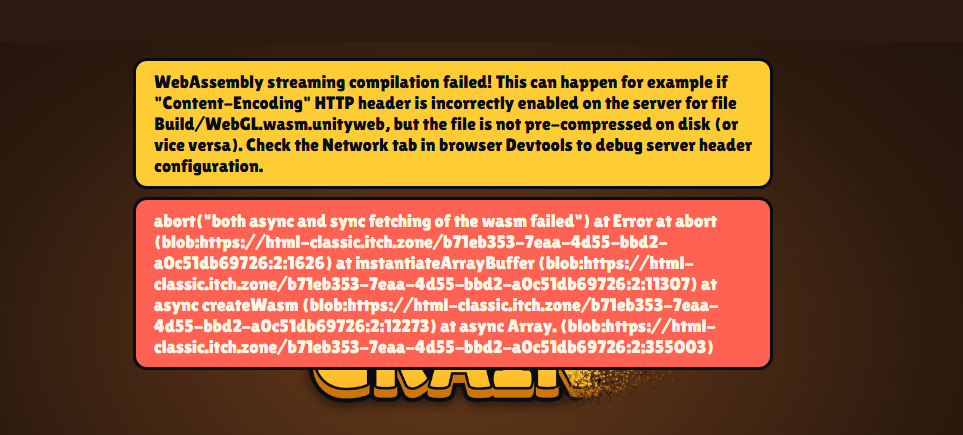
Sorry about that! That error means your browser couldn't start the game's engine (the game itself is fine and runs for others). One of these usually fixes it:
1. Play in Chrome or Firefox on a computer, not on a phone or tablet.
2. In Edge, turn off "Enhance your security on the web" for itch.io; it blocks the game's engine. On a Mac, Safari's Lockdown Mode does the same.
3. Close other tabs and reload the page with Ctrl+F5, since the game needs a fair bit of memory.
If it still won't start, tell us your browser and device and we'll look into it.
Thanks for trying all of that, and sorry it's still not working. Two more things that usually fix this in Chrome:
1. Chrome has a setting that turns WebAssembly off. Open chrome://settings/content/v8 in the address bar and make sure "Sites can use the V8 optimizer" is allowed (or add itch.io and itch.zone as allowed sites).
2. Try the game in an Incognito window (Ctrl+Shift+N). If it works there, one of your extensions (an ad or script blocker, or antivirus web protection) is blocking it.
If neither helps, could you paste the exact error text or a screenshot? That tells us exactly what is failing.
About Discord: the invite works for others, so it's usually the account. Check that your Discord email is verified, and that you're not at the limit of 100 servers. You can also try joining through discord.com in your browser instead of the app.