


hey jonas, you were a big part of me becoming a game developer. Without you i would not of had the motivation i needed to continue game dev. Just want you to know that. You a good dude!
Both true but the biggest price should be growing as a developer and having a good time. :)
Yes there is. You need to build the project with WebGL and then plop the build files into itch.io.
First you open the build settings
Then you switch the platform to WebGL (if it isn’t installed then it will instead ask you to install it)
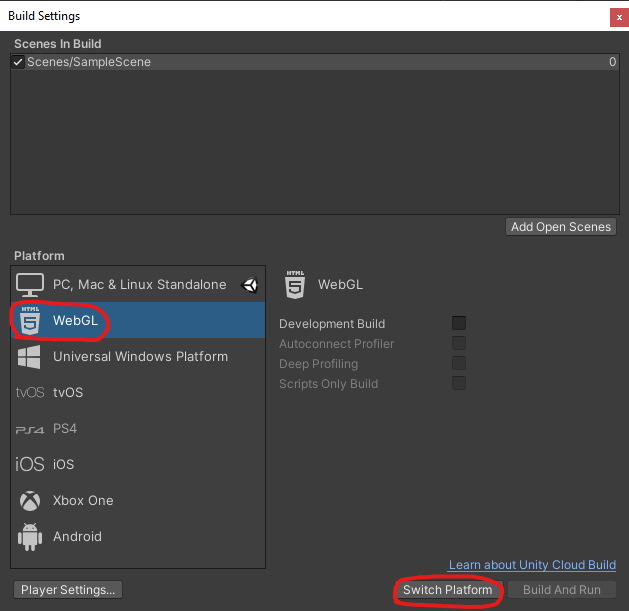
Then you build the game which will take a while…
Afterwards Unity will open the folder which contains all the files, select all those files and make them into a ZIP
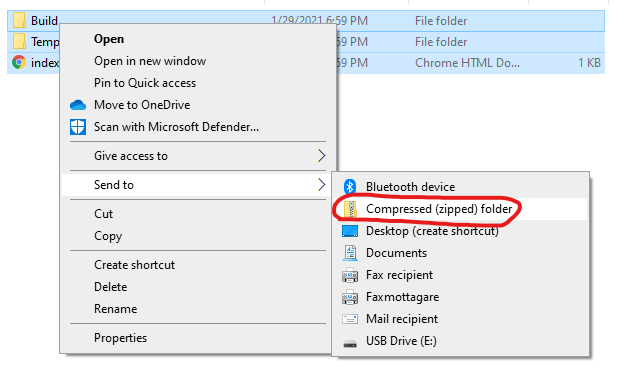
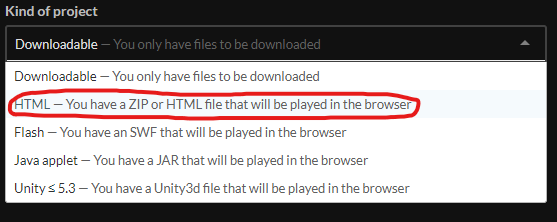
Then on itch change the kind of project to HTML
Lastly, upload the ZIP file on itch and check the “This file will be played in the browser” box to true
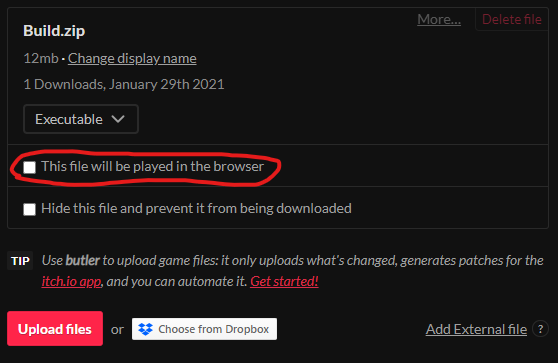
Save and view the game page and you should be good to go! If you have any extra questions just ask me.
it says smt rly longggg:
FileNotFoundException: Could not find file "C:\Users\MatthewZ\OneDrive\Documents\build.bc Runner\Temp\StagingArea\Data\Native\build.bc" System.IO.FileStream..ctor (System.String path, System.IO.FileMode mode, System.IO.FileAccess access, System.IO.FileShare share, System.Int32 bufferSize, System.Boolean anonymous, System.IO.FileOptions options) (at :0) System.IO.FileStream..ctor (System.String path, System.IO.FileMode mode, System.IO.FileAccess access, System.IO.FileShare share) (at :0) (wrapper remoting-invoke-with-check) System.IO.FileStream..ctor(string,System.IO.FileMode,System.IO.FileAccess,System.IO.FileShare) System.IO.File.OpenRead (System.String path) (at :0) System.IO.File.ReadAllBytes (System.String path) (at :0) UnityEditor.WebGL.WebGlBuildPostprocessor.LinkBuild (UnityEditor.Modules.BuildPostProcessArgs args) (at /Users/builduser/buildslave/unity/build/PlatformDependent/WebGL/Extensions/Unity.WebGL.extensions/BuildPostprocessor.cs:470) UnityEditor.WebGL.WebGlBuildPostprocessor.PostProcess (UnityEditor.Modules.BuildPostProcessArgs args) (at /Users/builduser/buildslave/unity/build/PlatformDependent/WebGL/Extensions/Unity.WebGL.extensions/BuildPostprocessor.cs:953) UnityEditor.Modules.DefaultBuildPostprocessor.PostProcess (UnityEditor.Modules.BuildPostProcessArgs args, UnityEditor.BuildProperties& outProperties) (at C:/buildslave/unity/build/Editor/Mono/Modules/DefaultBuildPostprocessor.cs:27) UnityEditor.PostprocessBuildPlayer.Postprocess (UnityEditor.BuildTargetGroup targetGroup, UnityEditor.BuildTarget target, System.String installPath, System.String companyName, System.String productName, System.Int32 width, System.Int32 height, UnityEditor.BuildOptions options, UnityEditor.RuntimeClassRegistry usedClassRegistry, UnityEditor.Build.Reporting.BuildReport report) (at C:/buildslave/unity/build/Editor/Mono/BuildPipeline/PostprocessBuildPlayer.cs:286) UnityEngine.GUIUtility:ProcessEvent(Int32, IntPtr)
I think it’s asking for a file that does not exist, hence the FileNotFoundException. It seems to be missing the “C:\Users\MatthewZ\OneDrive\Documents\build.bc Runner\Temp\StagingArea\Data\Native\build.bc”. See if you can find that file and maybe it will work. You should probably also try googling your error and looking for an answer online.
You'll have 2 days to make games. I might still adjust the end time of the jam a bit, but you'll have at least 48 and at most 72 hours. You can use any engine you want, I just recommend making it easy for people to play the game. If the engine requires any additional downloads for playing games I'd advise against it. :)
The others have hit the nail on the head. Godot, GMS2 or Unity would be your best bet. Unity is best for tutorials and assets but it’s not the best for 2D. I’m using Godot. It’s simple but takes a while to get your head around it, so learning Godot for a total beginner for a Game Jam might not be the best idea. GMS2 is simple and there’s a free trial for 30 days, it’s probably the quickest to game jam with. Jonas uses GMS2 and is using it for Will You Snail I believe.
There are others but I’ve no experience with them so can’t comment. Also, one last thing on Godot: it requires a tiny bit more work to get it working on itch for html but it’s not a huge problem. Do not leave exporting to the last minute if you’re going to use Godot. In fact, just don’t leave exporting and uploading to the last minute at all.
Happy Game jamming no matter what engine you choose :)
Make another project on Itch.io, set type video game, and whatever other settings you need. (Browser, downloadable, etc) After that, put on a good cover image, a description, and put your ZIP file in. That is how I do it, at least. Make sure you submit it to the jam though, and not just to itch.
I hope that made sense, not very good at explaining :p