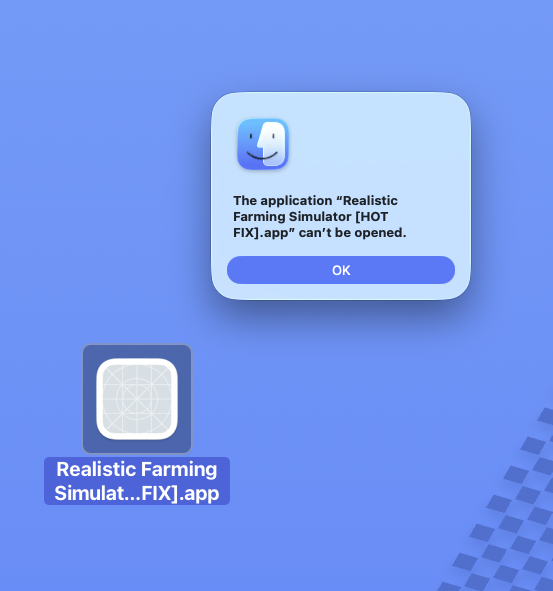
Reminder: Please download the latest approved versions, especially on MacOS as we went through the trouble of getting it signed and approved by Apple Dev. Thanks!
aryaadami
Creator of
Recent community posts
Hi everyone, I thought I'd share how we finally got our game signed by Apple (assuming you create, purchase, and verify and Apple Dev account), step-by-step in case anyone else is stuck:
Step 1 — Open Terminal.
Step 2 — Go to your game build folder using cd "/path/to/Game Build".
Step 3 — Check that Realistic Farming Simulator.app is inside the folder by running ls.
Step 4 — Create the game.entitlements file in that same folder.
Step 5 — Open game.entitlements in a text editor.
Step 6 — Paste this exact entitlement content into the file: <?xml version="1.0" encoding="UTF-8"?><!DOCTYPE plist PUBLIC "-//Apple//DTD PLIST 1.0//EN" "http://www.apple.com/DTDs/PropertyList-1.0.dtd"><plist version="1.0"><dict><key>com.apple.security.cs.allow-jit</key><true/><key>com.apple.security.cs.allow-unsigned-executable-memory</key><true/><key>com.apple.security.cs.disable-library-validation</key><true/></dict></plist>
Step 7 — Save the file.
Step 8 — Check that the entitlements file is valid by running plutil -lint game.entitlements.
Step 9 — You want Terminal to say game.entitlements: OK.
Step 10 — Sign the app by running codesign --deep --force --verify --verbose --timestamp --options runtime --entitlements "game.entitlements" --sign "Developer ID Application: NOBL3 PTY. LTD. (FJBHY2XP3G)" "Realistic Farming Simulator.app".
Step 11 — Verify the signature by running codesign --verify --deep --strict --verbose=2 "Realistic Farming Simulator.app".
Step 12 — Check the app with Gatekeeper by running spctl --assess --type execute --verbose=4 "Realistic Farming Simulator.app".
Step 13 — At this stage, it is okay if Terminal says rejected and source=Unnotarized Developer ID.
Step 14 — Delete any old notarization ZIP by running rm -f "Realistic Farming Simulator.zip".
Step 15 — Create the ZIP for Apple notarization by running ditto -c -k --keepParent "Realistic Farming Simulator.app" "Realistic Farming Simulator.zip".
Step 16 — Store your Apple notarization credentials if you have not already done it by running xcrun notarytool store-credentials "NOBL3-notary" --apple-id "arya.a.adami@gmail.com" --team-id "FJBHY2XP3G".
Step 17 — When Terminal asks for a password, paste your Apple app-specific password, not your normal Apple ID password.
Step 18 — You want Terminal to say Success. Credentials validated. and Credentials saved to Keychain.
Step 19 — Submit the ZIP to Apple by running xcrun notarytool submit "Realistic Farming Simulator.zip" --keychain-profile "NOBL3-notary" --wait.
Step 20 — Wait for Apple’s response.
Step 21 — You want Terminal to say status: Accepted.
Step 22 — If it says Invalid, run xcrun notarytool history --keychain-profile "NOBL3-notary".
Step 23 — Copy the submission ID from the failed submission.
Step 24 — Get the error log by running xcrun notarytool log SUBMISSION_ID_HERE --keychain-profile "NOBL3-notary".
Step 25 — Replace SUBMISSION_ID_HERE with the real submission ID.
Step 26 — If notarization was accepted, staple the notarization ticket to the app by running xcrun stapler staple "Realistic Farming Simulator.app".
Step 27 — Validate the staple by running xcrun stapler validate "Realistic Farming Simulator.app".
Step 28 — You want Terminal to say The validate action worked!.
Step 29 — Do the final Gatekeeper check by running spctl --assess --type execute --verbose=4 "Realistic Farming Simulator.app".
Step 30 — You want Terminal to say Realistic Farming Simulator.app: accepted and source=Notarized Developer ID.
Step 31 — Delete any old final ZIP by running rm -f "Realistic Farming Simulator-macOS.zip".
Step 32 — Create the final ZIP for users by running ditto -c -k --keepParent "Realistic Farming Simulator.app" "Realistic Farming Simulator-macOS.zip".
Step 33 — Distribute Realistic Farming Simulator-macOS.zip.
Step 34 — Do not distribute Realistic Farming Simulator.zip unless you recreate it after stapling.
Step 35 — For future builds, repeat the signing, notarization, stapling, and final ZIP steps.
Step 36 — You do not need to store notarization credentials again unless the Keychain profile stops working, your app-specific password is revoked, or you move to a new Mac.
Hi Game Jam team,
We are facing this strange issue when downloading our MacOS app from itch.io and are concerned this might be happening on Windows too. This is extremely strange because before uploading it (itch.io compresses it) we could the .app on MacOS with no issues at all. When downloading from itch.io and decompressing, the byte size is the exact same as the non-compressed version that runs, but it gives the error below: