
Indie game storeFree gamesFun gamesHorror games
Game developmentAssetsComics
SalesBundles
Jobs
TagsGame Engines

Chris Maltby

118
Posts
6,622
Followers
7
Following
A member registered Jan 03, 2019 · View creator page →

Creator of

Recent community posts

Hi Samuel,

Thanks for this image, it helps narrow down a few things it could be but it's not enough to say for certain

  • Does this also happen for brand new projects or just this specific one?
  • Where are the project files are stored? On your main disk, a USB drive, a network drive, OneDrive? 
  • Does the project folder contain files with the ".new" file extension? Also does the project folder contain files with the ".bak" file extension? Knowing this will explain how far the save process got before failing
  • Do you have write permission to the folder and files, the error (especially the music editor one) seem to imply you maybe don't
  • Do older versions of GB Studio still work for you on that project?
  • Is there anything reading/locking the project files maybe, e.g. is an anti-virus scan running, or you have them open in a text editor
  • Weirdly have you tried rebooting Windows, if something was locking those files it could fix the problem

If you can make a brand new project and it works that would lead me to think it's likely a file permission issue with your project. If the older version of GB Studio works on this project but your new one doesn't then there's something very odd going on.

If possible though can you please move this discussion to a post on  https://github.com/chrismaltby/gb-studio/issues 

Thanks,
Chris

I don't think so, unless someone else has added it. I haven't used Fedora in a long while so not sure how you add software to Bazaar

Sorry about that! A lot of the software that GB Studio depends on has dropped support for older versions of Windows, so I need to drop it too if I want to allow the latest features and important security updates :-( I held out supporting Windows 8.1 for as long as I could!

❤️

I saw this happen on another project with 4.3.0 yesterday, there might be another message in the log saying that a script doesn’t fit into a memory bank. The error isn’t very good but it’s saying that one of your scripts is too long and needs to be reduced in size or split into smaller parts. (Dialogue events now take up slightly more memory to fix a bug that was found)

Check out the second half of this message on GitHub where I see the same issue and gave a fix https://github.com/chrismaltby/gb-studio/issues/2098#issuecomment-4693926923

I’m going to work on improving that error message for the next version.

If you want to look at your project directly you can submit an issue at https://github.com/chrismaltby/gb-studio/issues to share your project files.

You should also be able to still open the project in 4.2 if you want to keep using the older version

Hi Samuel, can you submit a bug report at https://github.com/chrismaltby/gb-studio/issues with more information about what you're doing, and any error messages you're seeing. My guess is you have a project you made with 4.2.0 that you're trying to open in 4.3.0 but now can't save it?

Things that it would be good to know:
- What operating system are you using? Windows? Mac? Linux?
- Which version of GB Studio are you using? 4.3.0?
- Are there any error messages, what do they say?
- Is there anything specific about where your project files are stored? e.g. they're on an iCloud drive? On a USB stick? Or just on your hard drive as normal.
- Can you provide screenshots?
- Can you provide project files so I can reproduce the issue myself?

If you can provide as much information as possible at https://github.com/chrismaltby/gb-studio/issues (Click "New Issue" on that page) I'll do what I can to help.
Thanks,
Chris

Awesome, well done Levi! Is that your Yoshi game? I've just been playing it now, really cool!

The software license is here :-) https://github.com/chrismaltby/gb-studio/blob/main/LICENSE but, yes, pretty much "use it!!! have fun!!!" + "you own everything you make"

Thanks for the feedback I've been working on some improvements since you posted this.

It's now possible to access the keyboard layout for the tracker mode from the menu
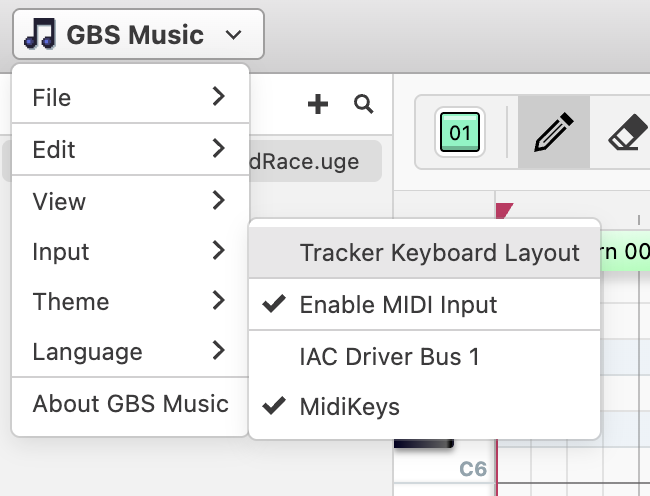


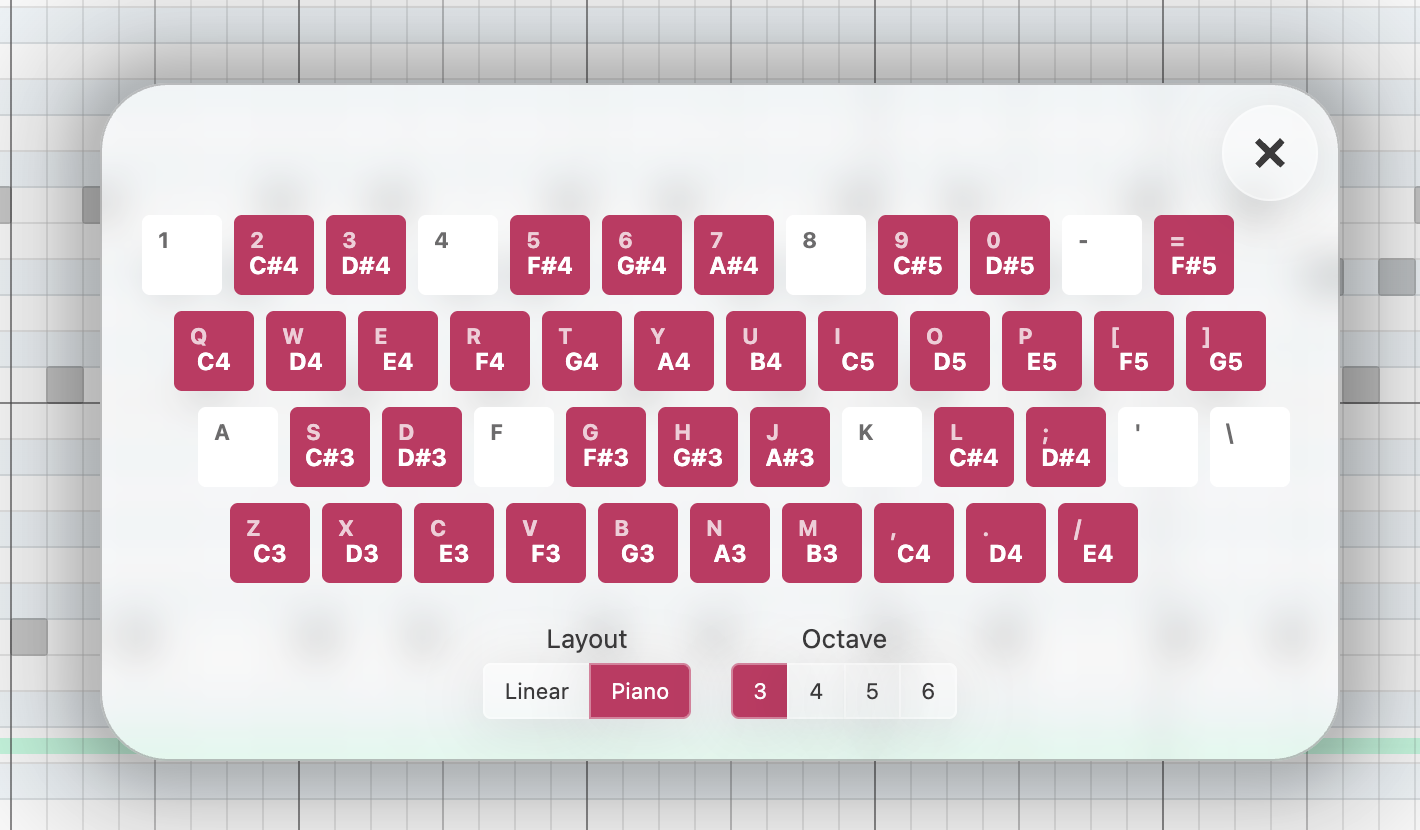
Which gives the choice of two different keyboard layouts


As for how to play notes that aren't completely grid aligned, this requires using Effects, e.g to end a note mid way through a cell you would do something like this. 
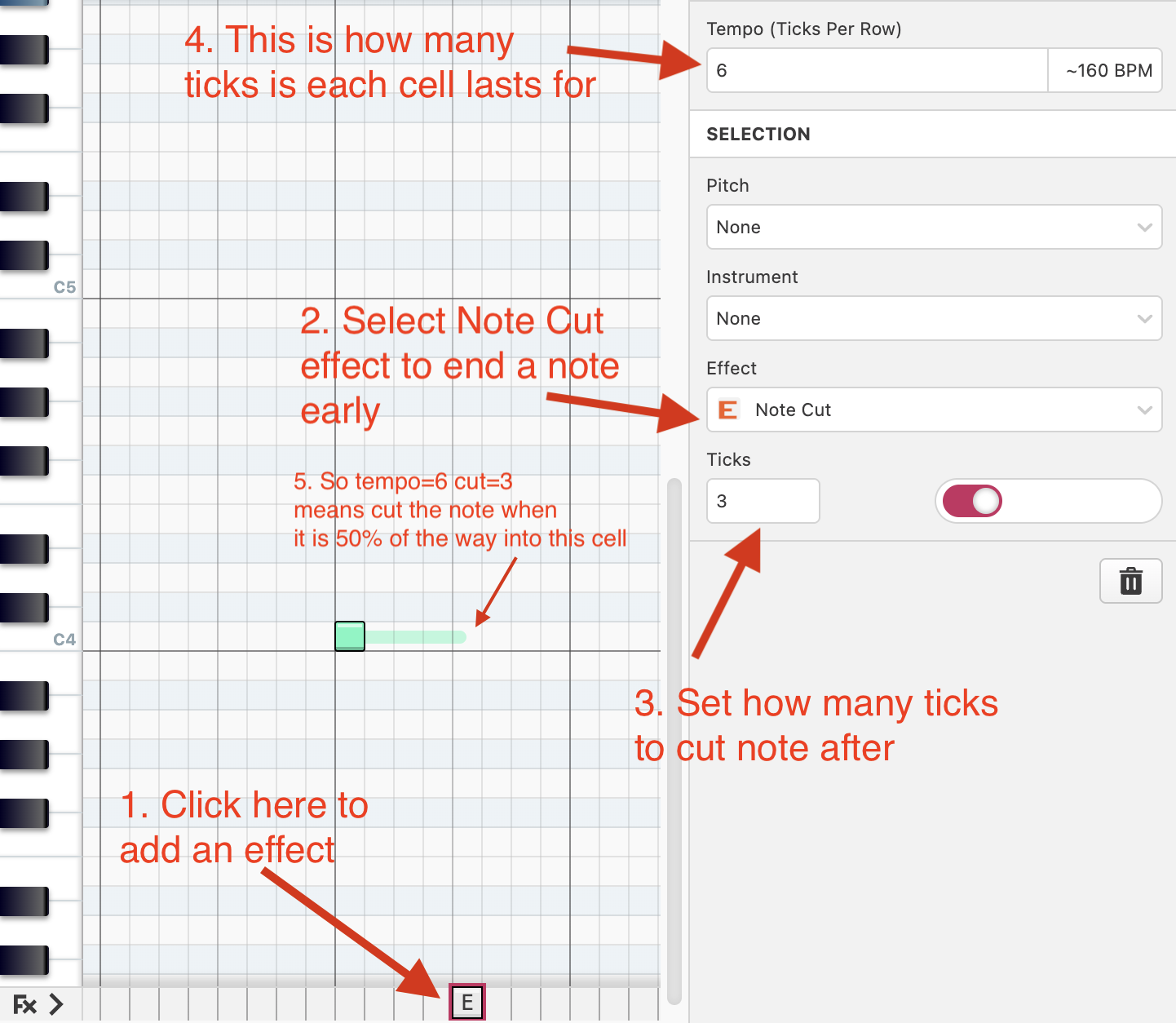
 
There's a similar effect for Note Delay, which you would put at the same column as the note itself to delay playing that note for however many ticks you want.

The effects feature is also how you add Arpeggio, Portamento and a few other effects.
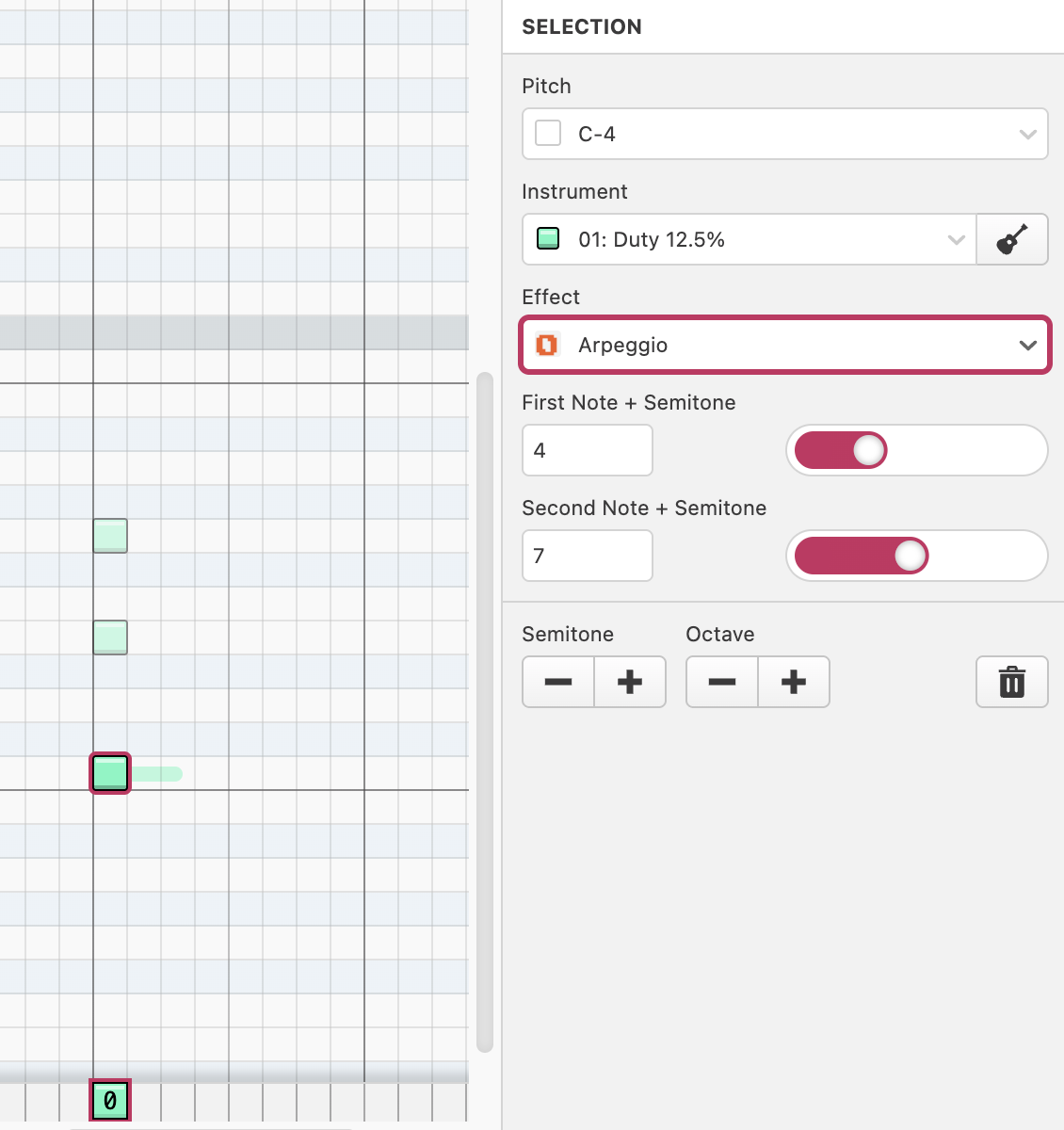

The software itself is based around the format used in hUGETracker so you can see the documentation for the different effects here https://superdisk.github.io/hUGETracker/hUGETracker/effect-reference.html

Hope this helps,
Chris
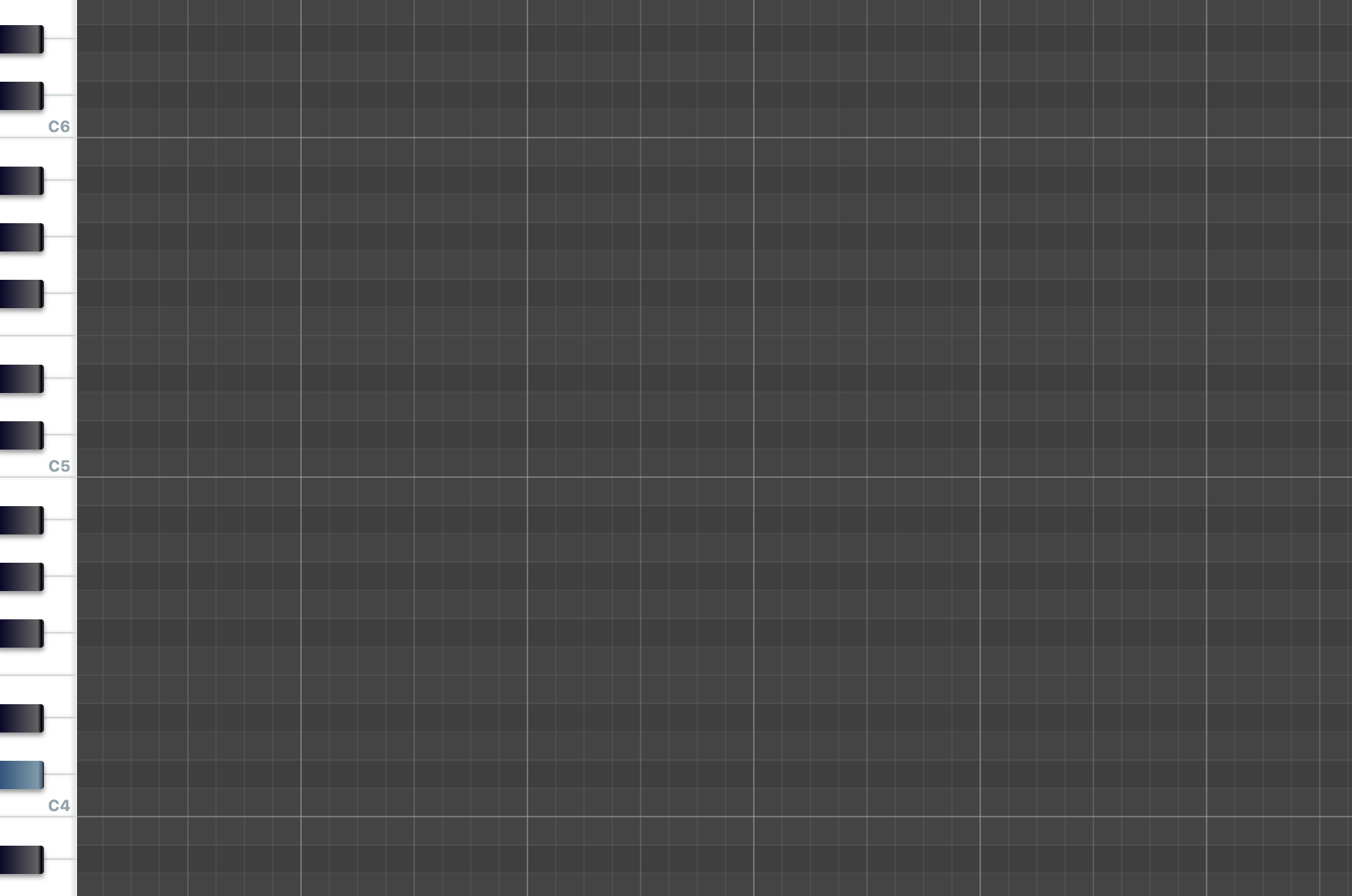
Have you maybe changed web browser? The "Open Folder" feature is only supported in Google Chrome (possibly Microsoft Edge too) at the moment so browsers like Safari and Firefox will just hide that button for now.

That's a good idea, I've just pushed an update so the black keys will have a tinted background :-)

❤️

This is so cool, love some Castlevania! Well done!!

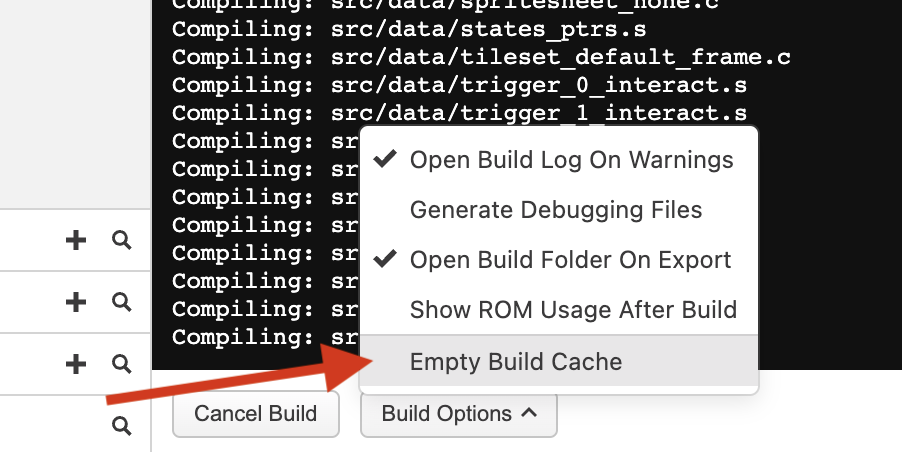
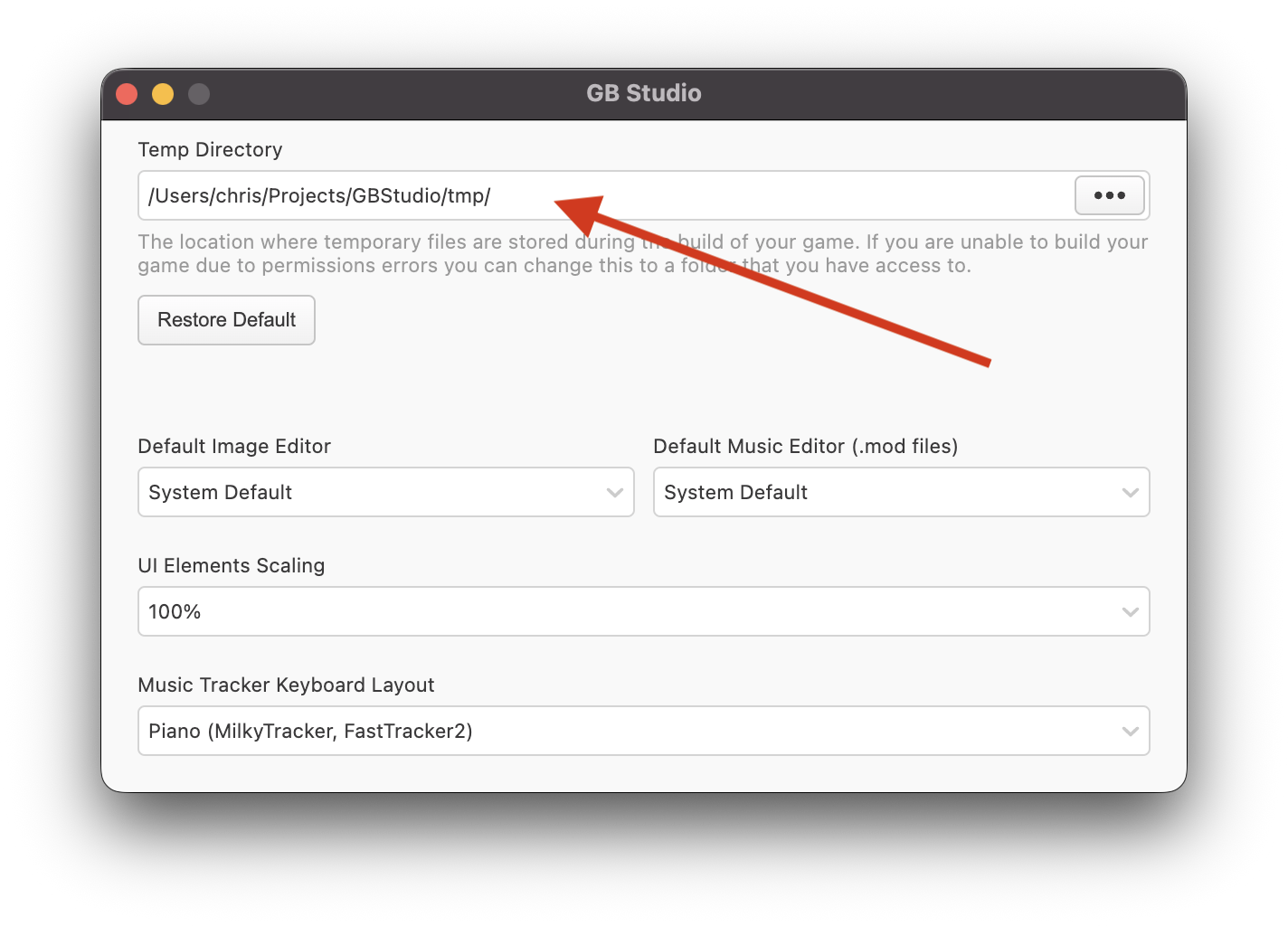
Hi, could you maybe try clearing your build cache or setting a different temporary directory as shown in these screenshots? I've had a few similar reports recently and I'm wondering if there's something causing old cached versions of files to be used when they shouldn't.

Hopefully this works for you, I'm investigating what's going on and will have a fix released as soon as I can figure it out :-)

Which Linux distro are you using on M1, is that Asahi? Considering trying something like that out on my M1 Mac Mini when I get my next desktop Mac :-)

Hi Levi, I think this should be fixed now in 4.2.2 :-)

Thanks Levi, I hadn't seen this before but you're right. I've got a fix in place now which will be included in the next bug fix release :-)

I’m not sure what you mean? It doesn’t track your location and should never ask permission to either. Where are you seeing this? Is this on Windows, Mac or Linux?

Hi @Vertim this should be fixed now in beta3 if you'd like to try! https://chrismaltby.itch.io/gb-studio/devlog/1345546/gb-studio-420-beta-3

Hi @Vertim thanks for reporting this, I'm now seeing the same thing and will work on a fix for the next beta :-)

ooh I actually think you can do that right now (I think since 4.0.0), if you "Shift" + click on event titles they'll become selected, then if you copy/paste it will actually copy paste all events you've currently got selected :-)

I've just released the 4.2.0 Beta today which you can find at https://github.com/chrismaltby/gb-studio/releases/tag/v4.2.0-beta1 (once it's fully ready for release I'll upload to Itch.io)
The Linux ARM64 versions there should be working on Raspberry Pi :-)

Taking longer than expected sorry!!

Very nice!

Yes, you can do whatever you want with the games you make :-) Some people sell them here on Itch.io, I’ve seen some on Steam and there’s even some on the Nintendo Switch!!

Thanks Levi! I've just released 4.1.3 which includes a few more bug fixes and make sure this error appears correctly again :-) The error message now also includes a link that you click to jump to the scene that has the missing background

Hi Levi, I believe the issue you were seeing was this one https://github.com/chrismaltby/gb-studio/issues/1571 which should now be fixed in version 4.1.2 :-)

There shouldn't be any change with multi-part dialogue events with this update. Do you have an example project that's working differently between 4.1 and previous versions? If so could you share at https://github.com/chrismaltby/gb-studio/issues Thanks

Ah perfect! I actually do all the development for GB Studio on a 2020 M1 Mac Mini running Ventura so was pretty sure it should have been working!

Thanks! I definitely try to make the app as easy to use as I can, it’s a challenge for sure and I still think there’s a long way to go but I’m glad you appreciate the effort :-)

I don't own anything that can run Android so it's unlikely, sorry.

I am interested in making a web browser based version but it would be a large project that I can't commit to at the moment.

Hi Levi, do you mind sharing a screenshot of the script you’re using to do the increment + wrap around? If you’ve not tried already the official GB Studio Discord is a great place to chat with other devs to solve problems like this :-)

Perfect, thanks for confirming! I'm going to try updating the app to clear the cache automatically if a build fails like this, that way it would have failed the first time still but would have starting working the next rebuild.

I think you should make one for NDS C_bot, I believe in you! :-) 

Hi L & R Buttons, that's very strange, could you maybe try clicking "Build Options" and selecting "Empty Build Cache" from the menu, and trying to build again? I'm wondering if it's compiled a file incorrectly and is stuck using a cached version of that file for some reason.
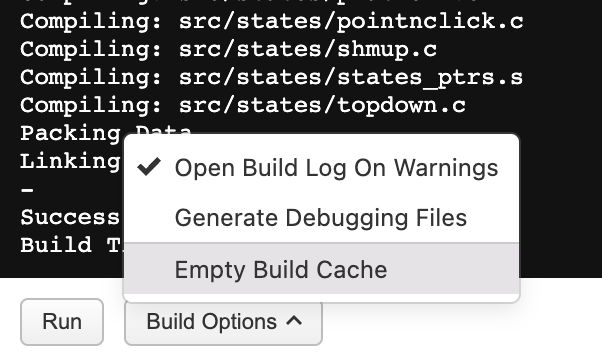
The other thing you could try is going into your temporary folder (which you can find in the application preferences)
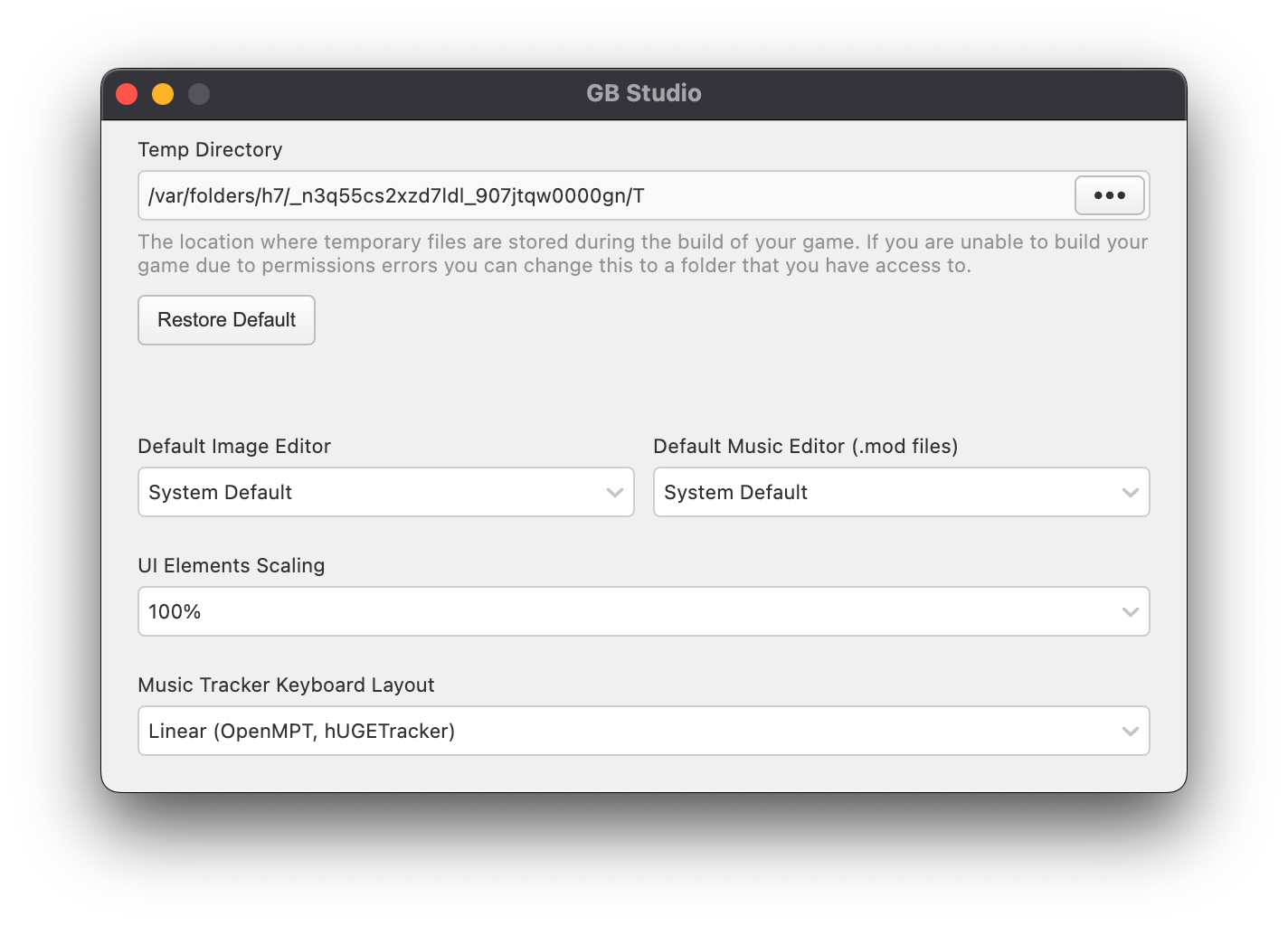
If you open that folder it will contain "_gbsbuild", "_gbstools", and "_gbscache". Try deleting all three of these folders, restarting GB Studio and trying to build again.

Please let me know if either of these methods fix the issue for you as it will help me track down what could have happened to prevent the problem for others in the future.

Hi Gerold55, I would definitely like to, I even bought a Raspberry Pi specifically for this. Unfortunately I’m being held up by something outside of my control at the moment. You can follow the progress here https://github.com/chrismaltby/gb-studio/issues/1406

Hi SuperOddone, that's very strange. Would you be happy sharing your project file with me? I could have a look what happened and see if I can fix the project so it opens again (and update the app to prevent the problem happening again). If you email it to my first name DOT my last name @ gmail.com (c***s.m****y@gmail.com) I'll see what I can do!

I'm the creator and main developer, and made the very first version by myself, the project is open source though so anyone can volunteer to improve it. There's been 55 contributors to the project so far! For example Pau who among other things wrote the entire music editor, and Toxa who was instrumental in the engine rewrite introducing GBVM that happened in v3.0.0.

If you ever want to help improve the application the code is all available at https://github.com/chrismaltby/gb-studio

Hi FamilyCastleCo1, the Ubuntu install instructions can be found here https://www.gbstudio.dev/docs/installation#ubuntu--debian-based-linux If you've managed to install, I think you'll just need to run `gb-studio` in a terminal to open the app

Thanks Levi, I've figured out what was wrong and fixed this in 4.0.2 released today :-) Thanks for raising this