Hello,
Instead of writing a "novel" here on itch.io, I’ve opened issue reports on GitHub for C64 Visual Assembler. It’s much simpler:
https://github.com/zstarczali/UltimateBasic
Cheer,
coderzxy54
Recent community posts
Regarding the analysis on GitHub, I was hoping for an interesting solution for the scrolling. Surely there are other examples of older games with smooth map scrolling out there. Are you still trying to find an optimization for map scrolling, or do you plan to give up on it at this stage (which would be a real shame for C64DevMachine)?
As for the partial dump (F2), it is not urgent or a blocker right now. If it requires coding time, take whatever time you need. And no, i haven't personally noticed any Macro or code loss in the dump.
Sincerely,
Great, finally, a nasty bug tracked down and fixed! ;). Thanks a lot!
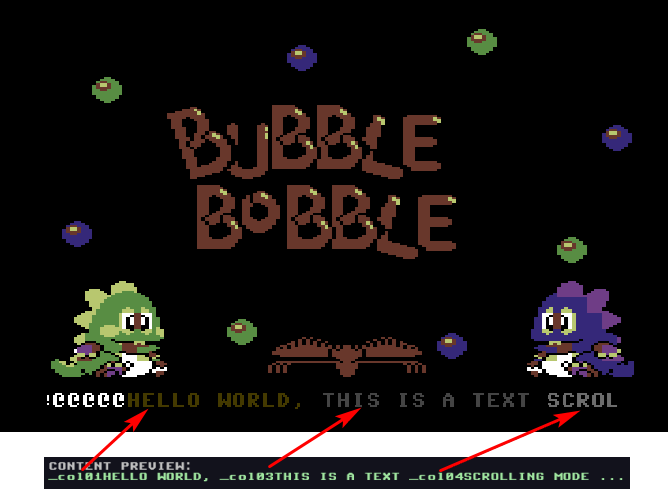
Just so you know, I also tested the text mode (HR/MC) for the Scrolling Text function. I used a "Bubble Bobble" background converted to TXT MC mode using Charpad (alphanumeric characters are included in the charset). I changed the text colors, but at this stage, the colors don't match the settings at all (see the screenshot below). I'm not using Irq or anything like that (just standard nodes).
I encourage you to run a test and see if you encounter the same issue with character color control.
Ah, that’s a real shame.
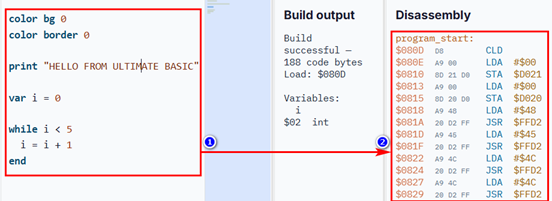
Is it possible to retrieve the ASM code from the right-hand panel at that stage (getting just a clean, standard ASM formatting with labels, but without the opcodes and line numbers)? Just so you know, it isn't possible to select, copy, or paste anything from the C64 Visual Assembler's right-hand panel.
Thanks.
I believe you already have the example in your archives; you previously made the file available for free download on itch.io (this was before version 1.00 of C64DevMachine) with the name CORE_BITMAP_SID_TEXTSCROLLER.json, including the Van Halen music ("Jump") :)
When you run it, you'll see those famous "@@@@@ ..." ;)
Sincerely,
Hello,
To be honest, I’m currently testing a few C64 compilers on itch.io. I downloaded C64 Visual Assembler and gave it a quick try to get a feel for it. You’ve added a new feature that looks really interesting and highlights the tool's capabilities: integration with the Ultimate Basic compiler.
There are a few points to check:
-In Ultimate Basic editor mode, when I click the "Build UltimateBasic Source" button, the compiler doesn't generate a PRG file in the source file's (.ub) current folder. The only workaround is to use "Build And Run" and then retrieve the temporary PRG file from the Windows %TEMP% folder.
-I’m also encountering an issue in the Ultimate Basic editor where the cursor isn't actually positioned where it should be (e.g., if I delete the letter 'T' in the default UB editor example, a different letter gets deleted... ???).
-Is it possible to add a feature to export the assembly code generated by the UB compiler—for instance, in KickAssembler format—rather than just showing a hex/mnemonic assembly dump in the right-hand panel?
If I may, here are a few suggestions that could add value to the UB compiler (standalone exe: https://github.com/zstarczali/UltimateBasic):
-Export generated ASM file (e.g., KickAssembler format) => --asm
-Export to CRT cartridge format (though that’s not so easy... so, optional...)
-Add extended collision handling features (bounding boxes or other methods rather than simple register checks like sprite_hit() ($D01E) or sprite_bg_hit() ($D01F))
-Map scrolling example (horizontal/vertical)
-Animated sprite example (frame speed control)
I hope these points help you improve the C64 Visual Assembler and Ultimate Basic software. You are doing a great job, in any case.
Hello,
I am currently testing C64DevMachine V1.0.8 with VICE, and the product looks interesting and user-friendly.
- However, i noticed during testing that the 'Scrolling Text' function doesn't work very well with Bitmap mode; it displays characters like "@@@@@ ...." at startup before showing the demo message (there is significant glitching and flickering on the background, even when adjusting the cycles). Is it also possible to adapt this function for TEXT mode (HR/MC)?
-There is also the map scrolling demo (https://drive.google.com/file/d/13tPgqtYfpMD9XT-zAPZwrvmoZIgh-EoR/view), which suffers from excessive flickering during scrolling. When moving the spaceship, the movement isn't smooth. Regarding scrolling management, here is an interesting link that might be useful for game scrolling (drwombat / Oscar64 Compiler):
https://github.com/drmortalwombat/plekthora
https://drmortalwombat.itch.io/plekthora
-When dumping a program (F2), only a partial source code Dump is generated. Is it possible to get a full dump of the program (assets, bitmap, SID, data, etc.)?
If you read this message and have the time, could you please take these points into consideration? Otherwise, you are doing a great job.
Okay, I understand the problem, but there might be a solution :
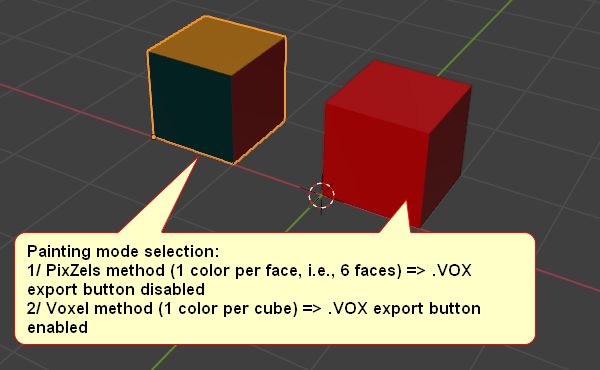
By asking users (via a dialog box) to select the painting mode for their model when creating the project, so:
Choice of painting mode:
1/ PixZels method (1 color per face, i.e., 6 faces) => .VOX Export or Slice Export button disabled
2/ Voxels method (1 color per cube) => .VOX Export or Slice Export button enabled 
It’s up to you to decide which is less complex to implement.
Sincerely,
Hello @pixel_Salvaje,
Sorry for all the requests below that you have to review, but I also wanted to bring up the topic of the MagicaVoxel (.VOX) exporter.
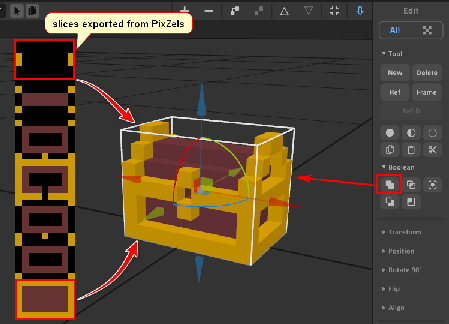
I think you can actually skip that and handle the export issue more simply. You just need to export as PNG slices. MagicaVoxel v0.99.7.2 supports importing image slices one by one. I’ve attached an example to give you an idea. Please take the time to consider my request, as I believe it would be much easier for you to program an image-slice exporter in PixZels rather than a .VOX format exporter.
A slice exporter would also allow for sprite stacking in 2D isometric games.
Thanks in advance.
Hello, congratulations on the development of Pixzels. When I import 6 images, one by one to build my model, saving the model doesn't work. However, when I import 6 views into a single image, saving works correctly. Please, could you look into this?
Also, could you add a new export format in a future version that supports the VOX format (MagicaVoxel V1 format, 126x126x126, for example)? Thank you.