

Installing Bepinex
Downloading the appropriate version of BepinEx Bepinex Unity IL2cpp 788
and unpacking Bepinex into game folder (near .exe)
Creating Project
Let's create a project - Open cmd in Windows Explorer
Execute command : dotnet new bep6plugin_unity_il2cpp -n MyFirstPlugin
Opening Project
I will use VS Code, You can use any soft
Setting .csproj
You need to add <GamePath>C:\Users\you\Desktop\1.1.3</GamePath>
and
<ItemGroup>
<Reference Include="Assembly-CSharp">
<HintPath>$(GamePath)\BepInEx\interop\Assembly-CSharp.dll</HintPath>
<Private>false</Private>
</Reference>
<Reference Include="Il2Cppmscorlib">
<HintPath>$(GamePath)\BepInEx\interop\Il2Cppmscorlib.dll</HintPath>
<Private>false</Private>
</Reference>
<Reference Include="UnityEngine.CoreModule">
<HintPath>$(GamePath)\BepInEx\interop\UnityEngine.CoreModule.dll</HintPath>
<Private>false</Private>
</Reference>
</ItemGroup>
and
Coding
Let's make a simple script (Plugin.cs)
At start you have: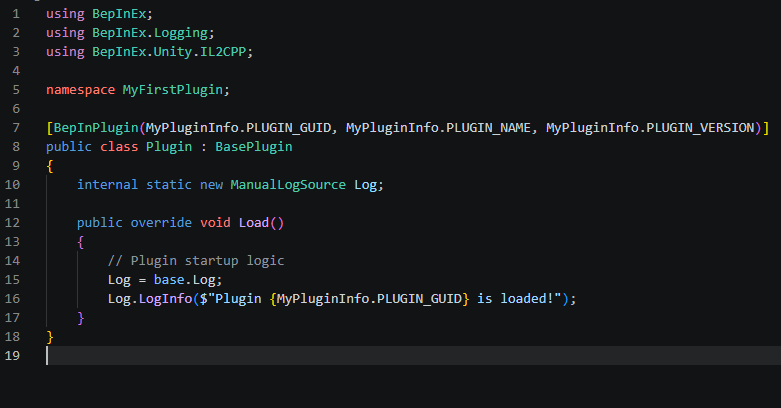
For a example i'll gonna show script that gave you GameMaster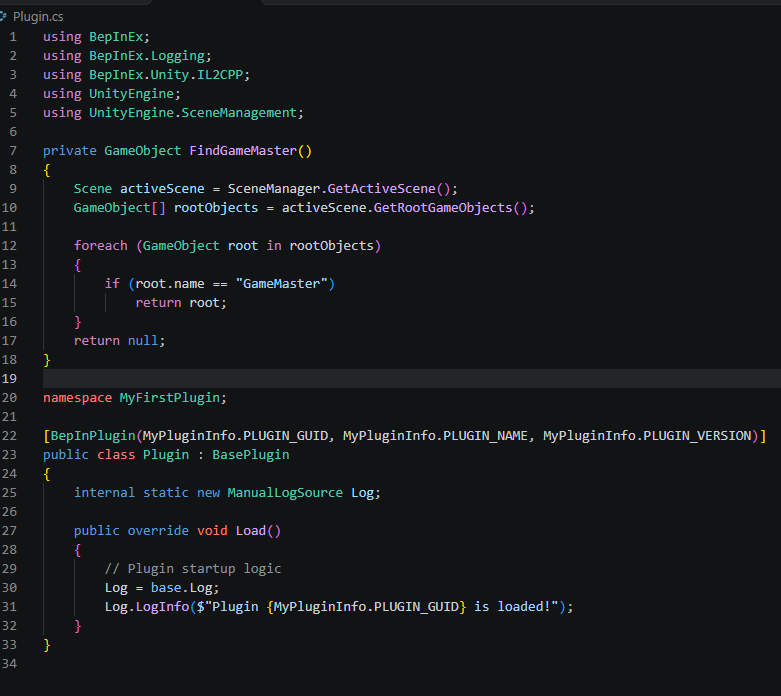
Building
Open Project Folder in cmd, and execute: dotnet build
After build -> find .dll in bin/Debug/net6.0/ (Project), and put it in BepInEx/plugins/YourModFolder (Game)
Done!