


On Sale: GamesAssetsToolsTabletopComics
Indie game storeFree gamesFun gamesHorror games
Game developmentAssetsComics
SalesBundles
Jobs
TagsGame Engines

SaKo

9
Posts
167
Followers
78
Following
A member registered Mar 26, 2015 · View creator page →

Creator of

Recent community posts

Thank you! Sorry about the crash... it should be fixed now, hopefully

yeah I just now realized this might be the issue, thanks for helping me pinpoint it! I had a feeling there would be issues with relying on the number wrapping (overflow)... I already used an alternate overflow-friendly way of comparing values elsewhere in the code because I found out that < and > don't wrap around (which makes sense, it's how most people would expect it to behave),  I should've done the same thing for the while statement (and other places where comparisons are used, I'm now noticing...)

I think I've fixed it, overflow looping seems to behave seamlessly now. I'll upload the updated version in a bit 

(1 edit)

Ah dang... I did encounter this error once but it was less than an hour before the deadline. I did a quick check of the memory usage after it happened but I didn't see it increasing, it was hovering at an amount nowhere near the limit. So I don't know what causes the crash.

I read that the jam allows for bug fixes after submitting, so I'll look into it later. (idk if the rules still matter after the jam is over)

wow this rules

oh wow we basically made the same game lol

That does seem to fix it, thank you!

(4 edits)

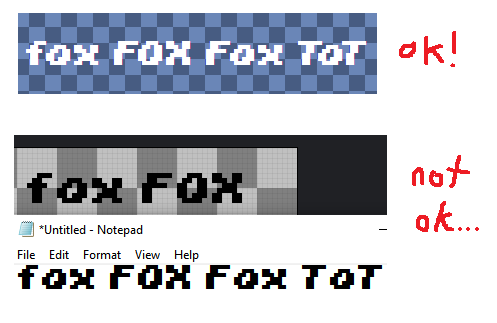
Sorry to bring up an old thread but I've been having the same issue. The kerning looks fine in the editor but when I use the exported .ttf file, the kerning doesn't seem to be applying in the windows font previewer or any of the applications I've tried so far (aseprite and notepad). I'm using the latest (I think) offline version of this program
(1 edit)

Whew made it in time