Indie game storeFree gamesFun gamesHorror games
Game developmentAssetsComics
SalesBundles
Jobs
TagsGame Engines

pflat

87
Posts
339
Followers
11
Following
A member registered Mar 21, 2020 · View creator page →

Creator of

Recent community posts

(1 edit)

I don't know if I've ever explained the animation data.

I have explained the export file format in the description of Version 0.7 - Export redone, but i didn't made a explicit connection with the animation data.

So here goes. Using the "walk_right" animation, you have: the animation has 8 frames and each row is one frame. Let's number them from 0 to 7.

----------------------------------------

{

    "id": "walk_right",

    "loop": true,

    "frames": [

        [128, 448, 64, 64, 32, 58, 75],

        [192, 448, 64, 64, 32, 58, 75],

        [256, 448, 64, 64, 32, 58, 75],

        [320, 448, 64, 64, 32, 58, 75],

        [384, 448, 64, 64, 32, 58, 75],

        [448, 448, 64, 64, 32, 58, 75],

        [512, 448, 64, 64, 32, 58, 75],

        [576, 448, 64, 64, 32, 58, 75]

    ]

}

----------------------------------------

Frame 0 is located in position (128, 448) - this is the top-left corner - in the spritesheet, with a size of 64x64. It's center is (32,58) relative to it's position (this means that rotations, scaling and sprite placement are relative to this position, not the top left corner). 75 is the frame time.

Now, if you read the description on Version 0.7 - Export redone, you know how to reference this frame. It is WLK_RI_0

Having said this I think you will not be able to add new animations to the CharGen, because the input system is hard-coded and not configurable in the .ini file.

You might be able to replace an existing one though.

Hope this made sense.

If it didn't, or you need more help, do you mind contacting me by mail? The mail is is my profile.

If you prefer to use the comments section, that's also fine. I'll provide all the help I can.
Glad you liked. Thanks for the kind words.

Remember that if you right click in a slot you can lock it from being randomized.

Hmmmm. Do you mind contacting  me  by mail? That way we won't fill the comments with more technical details.

The mail is is my profile.

I think i understand what you mean. Though I fear that if the tool works that way, than other users would need those animation for whatever reason. So I prefer to include everything.

Another problem is that some weapons allow for more the one type of attack (the first sword, for instance, allows three)

That being said, the generator uses the key 'SPACE' in much the same way. It only performs the attacks that the equipped weapon allows. What attacks are allowed is set in the weapon settings file.

This way the weapons settings are defined once and you don't need to change anything else.

Hope it made some sense and that it applies to your use case.

Glad you found it. However I'm concerned with the layout you describe. It should be 4 rows by 12 columns. In fact all animations are 4 rows (except die animation), for up, left, down and right.

For the fishing animations the rows work as I said above. As for the columns, the first 4 are the throw animation, the next 4 are used when  waiting for a fish to bite,  and the last 4 are for pulling the fish in.

If you don't have such  a spritesheet, then something is wrongly defined in the data files. Let me know so I can help there.

I just checked (in linux). You are right in that the animations for THR, CST, SLA, ISL and SHT don't include the fishing pole. I know that's a shame, but that is so because the original artists didn't draw the fishing pole in those animations. I gave it a try, but even though I "massaged" some assets myself, that's really not my field.

There are a couple more weapons that also don't include all animations, but they are good assets so I included them.

In regards to the fishing pole, you should have got a image suffixed with _fish.png. That's where you have the fishing animation frames.

Do you get that file ?

I hope this explains what you are experiencing. Tell me if it doesn't.

Of course you can only use the hairs.

As a matter of fact that permission is not mine to give. I could use those assets because the original authors gave their permission (as long as I credited them).  Now you also use the assets.

Hope your gamedev experience works well.

Good luck.

Hi, glad you liked it.

Regarding new animations, it can be done and requires little code changes.

But, like the requests for the running, jumping and sitting, I never did it because most of the clothing doesn't have those animation frames, so, by implementing  those animations, with most of the clothing, the characters would be naked when doing those actions.

I wish we had all the clothing (or most of it) with those cool animations available, but right now  we haven't.

I know this is not the answer you wanted, and I'm sorry for that.

They will not. Major reason is that I use one image for each part, in a sort of grayscale, over which is applied the primary, secondary and fixed color sets.

This is now how I've seen LPC assets being distributed (with an image for each color variation), so the assets need to be converted.

Can you tell me the url of the website, please? If time and licenses allow it, I'll be happy to have a go at it.

Thanks very much for the kind words.

In the ini file you can set  "export_individual_sheets"   to   "always".

This way you will get one image file for each animation.

Hope that's what you need.

They are different.

I think you can say that The Universal LPC Character Generator is the "official" generator, plus, it has more items, and animations. Ohh and facial expressions. Nice :)

In this generator (and because I did this as I tried to make a game) I tried to use items that had sprites for both the male and female regular bodies.

Also I take pride in the way the hair behaves when you put hats on top of it.

I never implemented all the extra animations, because most of the items didn't have those animations implemented (things might be different now).

Plus, mine has background music. I mean... that's the most important feature.

Well, have fun creating characters.

Nice.

Thanks for the heads up.

I'm sorry for the long response delay. Somehow, I missed the alert for this message. My bad.

As for your question, well, I'm not very knowledgeable in this legal stuff, but as I understand ("as I understand" IN RED AND BOLD)

1. The zlib license applied to the code is really not applicable, since I'm not releasing the app's source code yet. But since I had to pick a license, I chose the one that looked the least restrictive.

2. The licenses applied to the images generated by the app are individually defined for each asset. They will be GPL 3.0 and/or CC-BY-SA 3.0.

In practice, what this means is that you must credit the original authors of the images (the credits file created with each image gives all the information about the authors).

Also, if you publish any modification of the images, you must also credit the original authors.

Hope that answered your question.

I built new a new appimage and archive version of the application. Hope it works now.

Things are actually a little different.

The large flag means that the sprites of the character+weapon doesn't fit in the 64x64 size. In those cases the application fits the images in a 192x192 sprite.

This way the boomerang is a large weapon and the axe isn't.

This was me trying to not waste so much video memory. In the chargen I accomodate both sprites sizes by changing it's center position.

If this is not an option for you, you can try to change the parameter "export_large_sheets" to "always".

This will always export images sized like the boomerang ones, but at least it will be in a consistent size.

Hope this helped.

Unfortunatly no.

I toyed with the ideia when I made the pallete parameters some time ago, but it required such a long list of parameters that I thought it was unmanageable. I ended up scraping the idea.

If I think of some elegant way of doing it I'll sure implement it.

Please check my answer to the post

/post/12636571

However, if you want to completly replace the LPC assets by your own, some care must be taken (and because I have never tested it, it might just not work).

From the top of my head, the exporter code still has some 64 and 192 constants in it (so your assets should ideally 64x64 px).

Also the app assumes the LPC animations (idle, walk, slash, thrust, shoot, cast, hurt), so I fear that can be a big restriction to you.

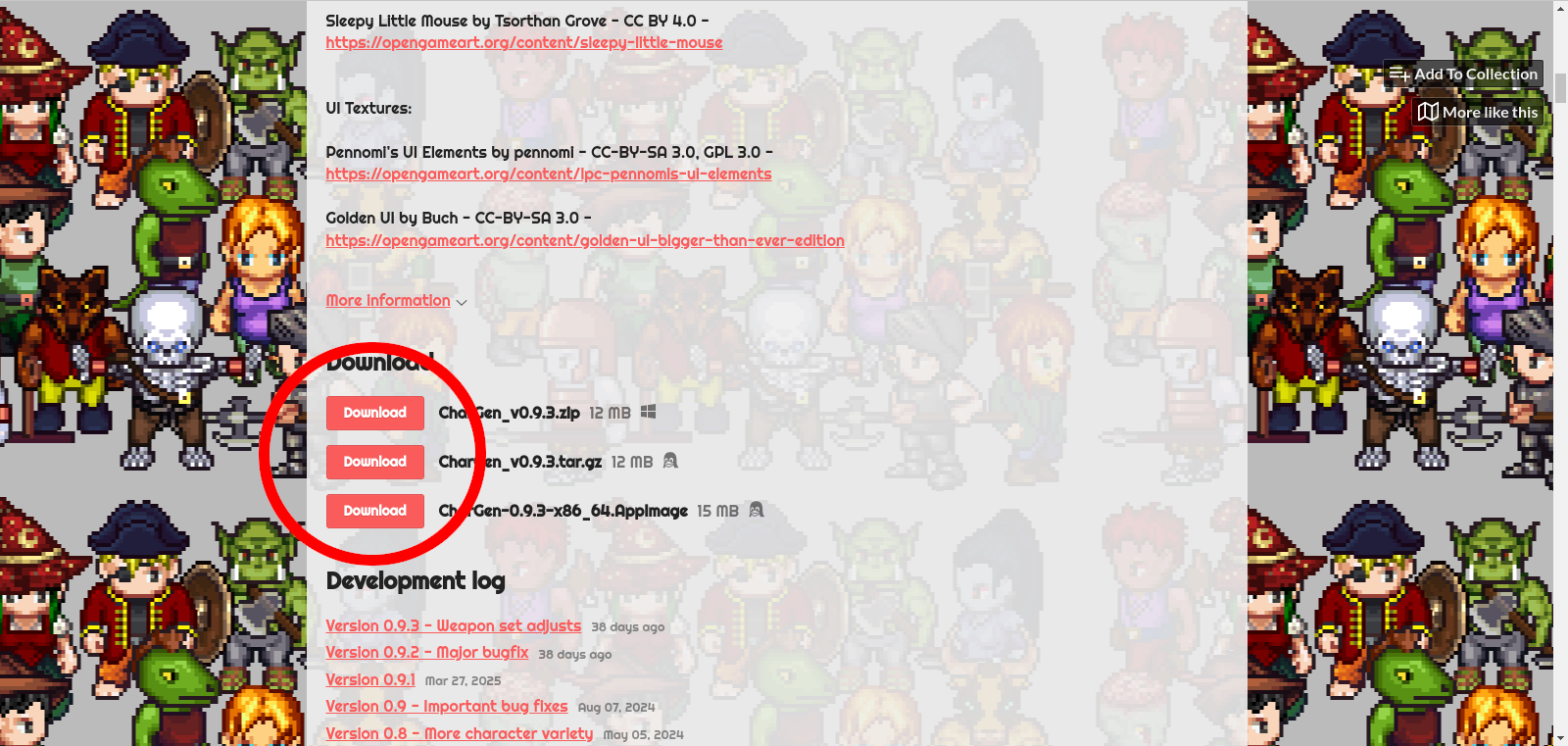
If I correctly understood your problem, you need to scroll down the page until you see the area I highlight in the screenshot bellow.


Btw, I had no ideia ChatGPT would recomend this app. :)

You are right. It was built on Arch.

I assumed the appimage would work on major distros. I'll try to get my hands on an old pc and install Debian..

Thanks for the info.

Hmmm....

It allows for custom spritesheets, BUT...

it expects each frame to be 64x64 or 192x192.

This means that you can only arrange each frame wherever you need it to be in the spritesheet (since the frame size is fized, this is kinda of semi-custamizable. That could be done, but it would no longer be a LPC Character Generator)

You can place several animations in the same spritesheet, and that's the closest thing you get regarding categories.

Regarding color, if you are trying to have, for instance, several walking animations with different hues in the same spritesheet,that's not supported.

If you need a character to colorize in game, maybe using the grayscale palette option will work for you.

Regarding the size you the spritesheets, I don't know yet. I've been trying to reduce it has much as I can, because I have a potatoe PC, but your question got me really curious. I guess I'll try to create a spritesheet that large, with many repeated frames and a very fast animation speed, to see how it goes (I don't hold much hope though).

Exactly. I also checked that asset pack and couldn't reach a conclusion.

if, while using the engine you come to an answer, share it here and I'll make an export layout for it.

Sorry, no.

The animations you get are the ones created by so many great artists that contributed to the LPC project.

It's way out of my reach to try to create new animations (that would mean updating most existing gear and clothing).

I don't know yet.

If you tell me the layout of the character spritesheets for "RPG Paper Maker", then probably the app can export with that layout.

I've checked the game engine site, but couldn't find and answer.

I haven't  made the repository public yet. This app has started has a by product of a game I was working on, and as such it's code is overcomplicated. I've wanted to clean it, for some time now.

In the meantime, if you open the pak file (it's just a zip) you can see how things are organized.

Look at the race files. They define what parts are used for each body.

Then look at the gear files. One of the fields of each gear definition is what body/head they can work with.

Hope this helps for now.

You're too kind. Thank you very much.

I've just published v0.9.3 that works correctly now.

Thanks for trying the app and extra thanks for reading the comments and trying to troubleshoot things yourself.

I've just check and you've done everything right. I on the other hand, have not (I'm not clearing the offhand slot).

Tomorrow I'll fix this this and push a new version. Sorry for the inconvenience.

The animations you see in the app use the following times:

idle     750ms/frame

cast / walk / thrust / slash / hurt     75 ms/frame

shoot   60ms / frame

I don't claim these times as the best possible, but they can give you a starting point to experiment.

Glad you liked it.

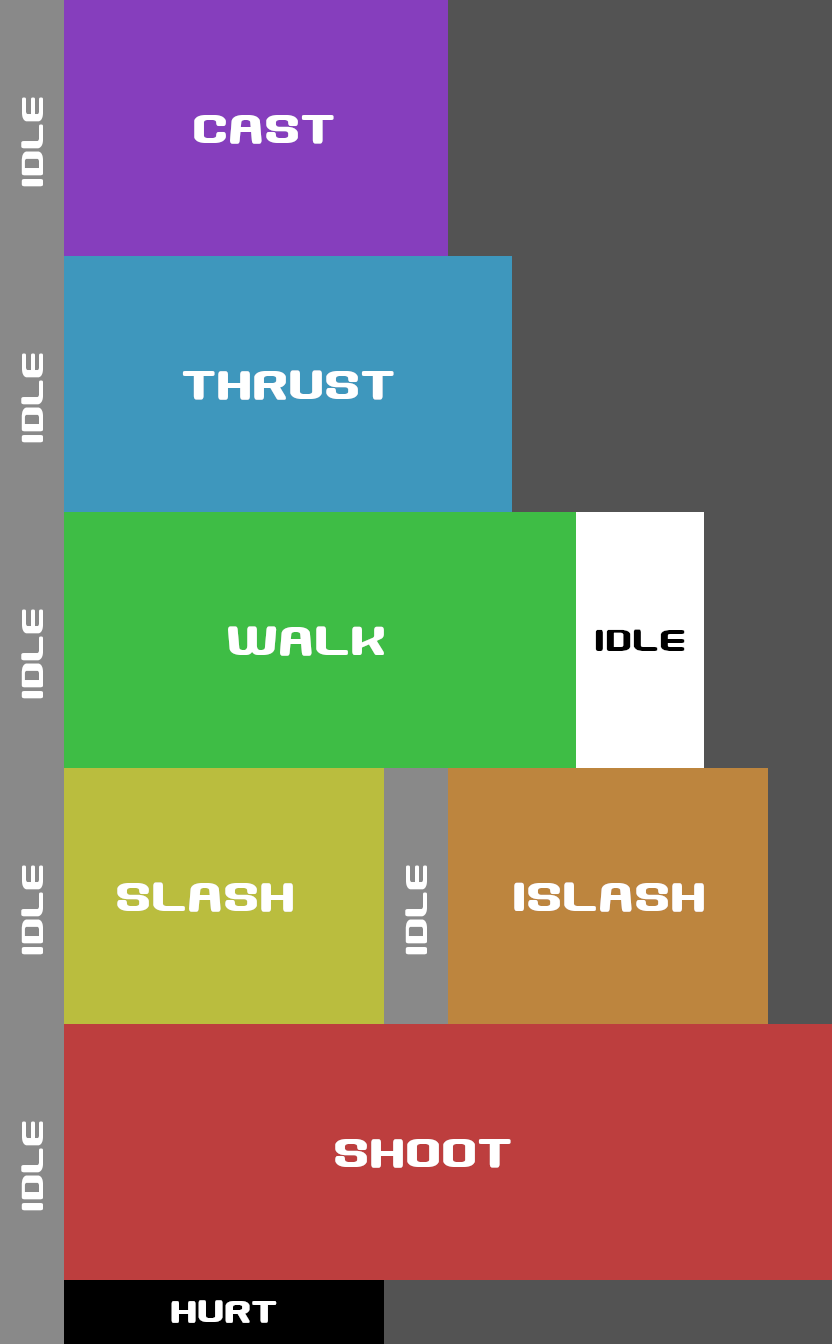
The idle animation are the 2 frames after the walk animation (10 and 11 columns).

If you don't want/need a idle animations, you can use columns 1 or 10 (they are repeated).

Best of luck in your projects.

I 've read the licenses descriptions several types, and that is also my understanding.

Heck, that was the reason I ended up choosing LPC assets.

That's for trying out the app.

Greetings.

That is possible and one of the easing things to mod in the editor.

First I suggest you read Devlog v0.2. It explains how the application loads it's resources.

With that knowledge, you can extract everything from "chargen.pak", and edit the file "data/character/race/human.race" to add the pieces you want. For instance, if you add the line

"tail": [ "none", "cattail" ],

to the "m1" configuration, then regular human males can have a cat tail.

After that there's no need to repack the assets in a new .pak file. Just place the "human.race" file in the folder "<base>/data/data/character/race" and the application will use the human race definition instead of the one inside the .pak file.

Note 1: To discover the id's of the pieces you want you need the open the json files in the "data/character/..." folders.

Note 2: Some pieces aren't configured to work on some bodies (because they don't fit well). If you still want to use them, you will also need to edit those pieces json files.

Have fun.

It is there.

Default universal lpc layout:


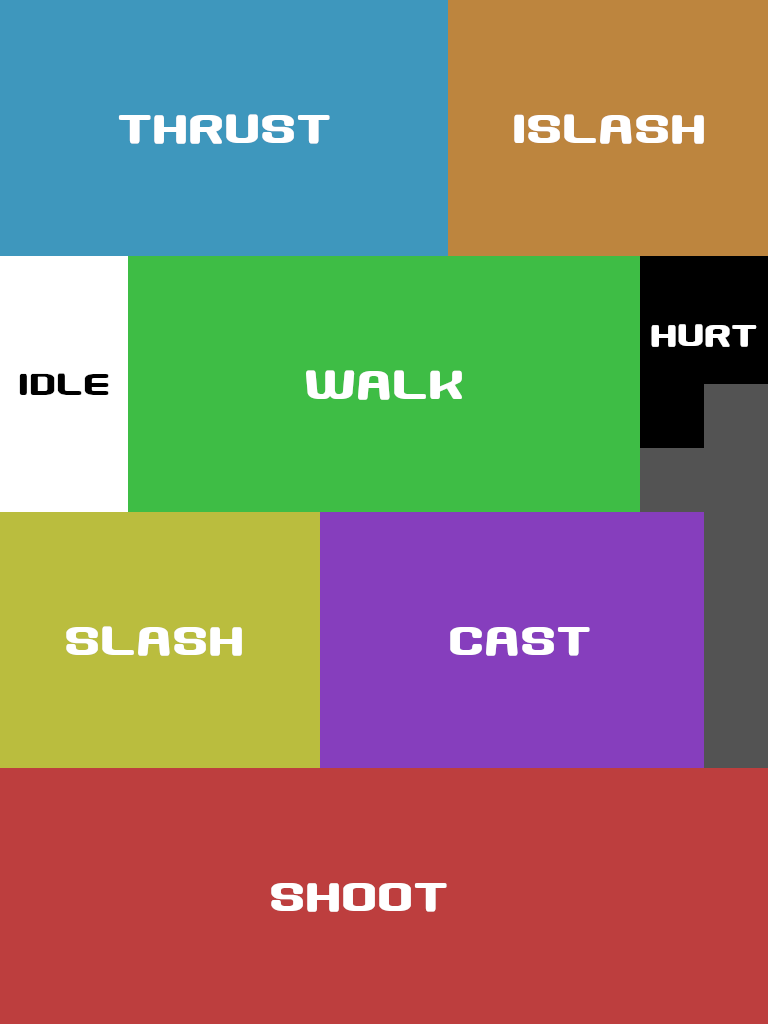
Default universal compact layout:


Have fun.

I'm not plannig on adding more animations to the app.

As I said before, there are running, climbing, jumping and sitting animations already made, but they have considerably very few clothes for those animations, and that made me take that decision.

Sure, running animations would be cooler, but to me, more clothing options was way more important.

While this is doable (I've been adding races from time to time), I acknowledge that it is not a straightforward process.

You should first refer to the version 0.2 devlog to see how the resources are loaded, and extract the existing ones.

Then you could try changing something first, like add some clothing or hair to a race that cannot wear that item.

Then you could try to create your own race.

It's a tedious and error prone process, and the generator will crash on startup several times, but it works.

Hmm... I should probably take same days to write a tutorial. 

Thank you for trying out the application.

The two extra frames after the walking animation are the animated idle tiles. I added then there because there was no such animation in the default LPC spritesheet.

You can get a better overview on the version version 0.3 devlog

Regarding the missing frame in the walking animation with weapons,  good catch there. I'll release a new update in the next few days.

Thanks for the alert.

The first suggestion is easy enough to implement, but I particularly like the second ideia. A grayscale palette sounds very cool indeed.

Gonna start fiddling with that....

Wow Platiname. I'm speechless.

Thanks for the amazing feedback, and thanks for answering this question (probably better than I would).

I had to give my attention to other matters for a couple of weeks and than this happens.

/bow

It can work with external resources, but textures would have to use the colors used in the packed textures, and you would need to create data files for the new items (it's not a straightforward process). Check v0.7 readme for more info.

If you only need the female orc pirate, i just made the eyepatch work with that head, so, in next version all assets needed will be present.

I went looking for LPC mermaids and didn't find any (doing it myself is beyond my pixel art skills).

As for exporting in a layout compatible with Bakin, maybe that's possible. I checked the bakin documentation, but did not find a reference spritesheet to use. It looked to me that each user is free to define their own layout. If that's the case you can try to define your export layout as explained in the v0.7 readme

Hope that helps

Thanks a lot for the kind words