No the links to MMO Engine and MMO engine 2 on this page with links to buy for $7.60 each. Why on this page with something completely different download links to websocket demos ? don't know what I'm buying.
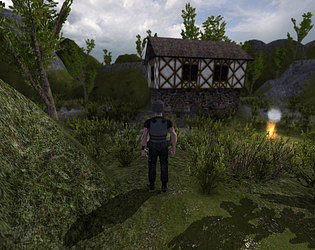
Yes, the terrain, trees and grass go well with the house models and look much better than the stock ones with coppercube. Also the wooden fence around one of the houses. These are good base assets to use along with the house models.
I watched your YT videos. Your Windows needs activating. Can I send you a private message in itch.io ? I can send you a legit Activation key as a gift if you tell me what version of Windows you are using.
Have you had any luck with the function smoothTerrain(mb, smoothFactor); located on the CTerrainSceneNode.cpp source file ?? I've noticed that the smooth factor is always set to 0 and not used in any of the of the Create Terrain or loadHeightMap calls.
I wonder how this would improve the terrains that normally look very jagged ?? I noticed that you added a ccbSetTerrainSmoothing(terrainnode,20); in your API but I could not get it working correctly and always produced strange texture artifacts.
How do we use the new Godrays and CueDepth? There does not appear to be any docs on any of the new functions. Sorry for all the questions. Ok, I found this out now.
Also, none of the ToneMapOn shaders are working, I get invalid for scene errors on all of them. Is this the correct calling methods:
I will see if I can fix it for you. Probably comparing the height of the water plane to the player to determine the splosh sound, this worksfine for sea level water but not for water planes above the players height.
Great work Robo! Appears to work much better now with sounds all around.
Although adding a water plane creates water sounds over terrain where the water don't cover it, if the terrain level is close to the water height.
You can't have water planes above the terrain level, for example a lake at the top of a hill as the full terrain will then have the water splosh sound.
Yes, I understand that but the demos projects for the Terrain sounds need updating to the newer API's as the behaviour scripts are still using the old API code.
I've fixed the problem! The ccbGetClosestNode had incorrect parameters set in the behavior_Terrain_walkSurface,js script. I commented out the line below and replaced it to make it work with the updated APIV2 function:
// get fall collision node
if (this.using_water && collPos.y < water_height) { collideNode = this.water_node; }
//else {collideNode = ccbGetClosestNode(pos.x, playerY, pos.z, collPos.x, collPos.y-0.5, collPos.z);}
else {collideNode = ccbGetClosestNode(collPos.y);}
I've fixed the problem! The ccbGetClosestNode had incorrect parameters set in the behavior_Terrain_walkSurface,js script. I commented out the line below and replaced it to make it work with the updated APIV2 function:
// get fall collision node
if (this.using_water && collPos.y < water_height) {
collideNode = this.water_node;
}
//else {collideNode = ccbGetClosestNode(pos.x, playerY, pos.z, collPos.x, collPos.y-0.5, collPos.z);}
else {collideNode = ccbGetClosestNode(collPos.y);}
I've got the Pro version and yes I added the Pro launcher to my custom binary options in coppercube. Have the parameters changed in ccbGetClosestNode as the message also points to invalid or missing parameter ? If you say you can run the demo without problems using the latest API then must be something I've not setup correctly. I get surface sounds for the terrain and plants but not for the objects platforms wood, metal etc.
The original demo executable works fine but when compiling a new binary with the latest API that's where I get the error messages.
This update appears to have fixed the alpha and blend issues with the particles and I can now use the ccbUpdateTerrain function. The FPS Camera bobbing and swaying also works now!
However, I still have an issue with grass disappearing when using the following functions:
Very interseting, I will try that as I thought the source code for the cloudscene was native Irrlicht code. I managed to compile it in VS2017, with a few updates, using the Irrlicht Engine SDK version 1.6.1. But not much success using it with the Coppercube SDK.
The cloudscene node demo looks great!! far superior than some of the DX11/12 engines out there (without naming any).
This would be something I'd like to see added to coppercube if it does ever get another update. A dynamic sky with a cloud layer node on top of a skybox.
Your TOD demo is quite amazing with the aurora and star clusters at night. Looks so much more better than the video shows when running in fullscreen with the anistrophic textures enabled.
I've added some helper functions for setting your post processing properties in javascript to my itch.io page. Feel free to include them in your API upgrade.
I was unable to get any of the following post processing properties to work:
"Brightness" float (0-1) "Contrast" float (0-1) "Saturation" float (0-1) "Vibrance" float (0-1) "Tint" color as vector3d(R,G,B) "Hue" float (0-1) "Vig" float (0-1) "VigRadius" float (0-1) "VigColor" color as vector3d(R,G,B)
Running an external ccb file would be for development and debugging use. As it allows me to run a single executable and launch any other ccb file and script via the command parameters. This means I don't have to constantly re-publish the execuatble for small changes or even load the IDE if I'm only working on the main javascript (re-publishing and then loading an embedded 500MB+ ccbfile takes far too long when making micro-changes to your scene).
Distributing the ccb file along with executable would be optional but if the execuatble is published through the editor then the embedded ccb file is automatically used as normal anyway.
The update is only a couple of extra code lines in win32player.cpp and CPlayer.cpp. Would also be possible to create your own ccb file packer without embedding into the executable so the runtime will be many times smaller.
Superb Robo! Thanks very much for taking the time to make the demo available. I will download all the updates later tonight and try them out. I will not be using them in any published game or app, only for personal use so don't worry about that. If I do happen to find any profitable use then I will make sure that you get the deserved credit. But I will make a donation anyway.
I'm in the process of adding some extra functions to my custom binary. I required the ability to run the custom binary and load any ccb file directly instead of the one linked into the executable.
I've updated the win32player custom binary to check for the executable parameter:
-ccbfile:myfile.ccb.
If the custom binary detects this param is set and the myfile.ccb exists, then the myfile.ccb is loaded from within the function:
CPlayer::createReadFileForDocumentLoading()
If the -ccbfile param is not set or the ccb file does not exist then the custom binary will look for and use by default a file named game.ccb instead of app.ccb (my personal preference but can revert back to app.ccb to avoid confusion)
If the custom binary is set within the publish settings for the Pro version then the embedded ccb file is always loaded as normal and the -ccbfile switch cannot be used. It will ony be possible to use the -ccbfile switch directly by calling the win32player.exe or whatever name you wish to name it (similar to how yours work for the Free edition).
I will be adding a few more updates so would be happy to collaborate. Or if possible you could add some of my updates to your API as I find your API updates to be the most useful.