Indie game storeFree gamesFun gamesHorror games
Game developmentAssetsComics
SalesBundles
Jobs
TagsGame Engines

Shirohane Studio

7
Posts
20
Followers
A member registered Oct 08, 2021 · View creator page →

Creator of

Recent community posts

If you can help me test the Steam Controller functionality, I can try implementing it into the plugin. If you are on Discord, please send me a DM so we can discuss this further.

(8 edits)

There is currently no plan to add native Stream Controller (2.0) input support to the "Controller" plugin. As I don't own a Stream Controller (2.0), there would be no way for me to add or test this.

It seems you might be able to run a converter such as "Streamless Controller" to convert your stream controller input to a Xbox or PlayStation controller

https://github.com/ddeverill/SteamlessController/releases

While Stream can convert controller input to a Xbox or PlayStation controller, this requires the Steam Overlay layer be added to vNyan. To do this you can add vNyan to your steam library as a "non-steam app". The issue with this is that the controller conversion only happens if the Steam Overlay (and vNyan) is in focus, but if you are playing a game, you will probably want the game you are playing to be in focus and vNyan to run in the background.

"Streamless Controller" seems to convert the steam controller running in Lizard mode to a Xbox or PlayStation controller, and should not require the Steam Overlay layer. If you try this, let me know if this solution works.

-----------------

If you are requesting for a Stream Controller prop (3d model) be added to the "Animator" plugin that is possible. Currently you can provide your own custom controller prop:

  1. Press the X button on the Animator prop menu to remove the  provided prop. 
  2. Using vNyan prop system to add your own controller and move it into position.
  3. Create a node graph to activate the prop if the animator is turned on. You can create a simple loop which checks if the animator is ON (1) or OFF (0). Check the xbox_animator_active  or ps_animator_active parameters.

If you have a Stream Controller (2.0) prop, I recommend configuring the PlayStation animation layer (as the layouts are more similar). As the Xbox and PlayStation animation layers are partially-standardized, you can convert your Xbox controller to vNyan parameters (using Shirohane's Controller Plugin) and still make use of the PlayStation animation layer. The plugin will automatically convert Xbox face buttons (X,Y,A and B) to PlayStation face buttons (Square, Triangle, Cross and Circle).

(1 edit)

From what you wrote, the lag could be causing the issue. If the app is connecting to vNyan correctly,  it could be timing out due to not receiving a response message in time, then the vNyan Receiver closes the client connection causing the disconnect.

I will need more information to try to diagnose the exact issue. What does the debug.log say?

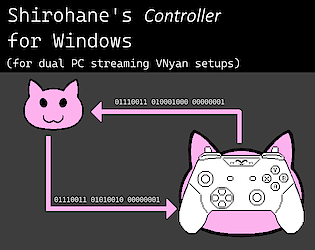
Can you also try running the "Shirohane's Controller for Windows" application  on the same machine as vNyan? Connect using the IP address displayed on the vNyan receiver tab (or the loop-back address - 127.0.0.1, port 9090) and check if the data being sent and received and the lag is not being caused by a firewall or network issue.

If you can, please join the Suvi's discord server http://suvidriel.com/, I can provide better support in the "Suvi's Apps > vnyan > [0.7] Shirohane's Controller (and Mouse) Plugin" thread, you can also post the debug.log file for me to take a look at.

Glad you like the change.

I spent a while trying to come up with something easier to use, but with enough options to support different avatars.

(2 edits)

Thanks for the feedback and support.

I am still hard at work with the next major (v0.6) plugin release which replaces the node graphs and props with a separate "Controller Animator" plugin and corresponding graphical interface. This will make the plugin even easier to install, customize and use. I can't wait to show off what I have been cooking up.

Additional controller styles are planned for future updates. Regarding PS4/5 controller support,  I will first have to investigate what can be done to get the touch-pad information into VNyan.

I am glad the plugin is working for you, even with the setup being a hassle.

I am currently in the process of planing the next update (v0.6), which will aim to simplify the setup and install procedure. I will take your feedback into account for the next version and aim to make the plugin even better.

(6 edits)

I am glad the plugin is working, a fightstick is a controller input I did not test. I was able to get the bumper and triggers working on my "Mad Catz Street Fighter V Arcade FightStick".

As the triggers are mapped to buttons on a fightstick instead of a trigger like in a controller, the plugin will return either 0 and 1 depending on if the button is being pressed.

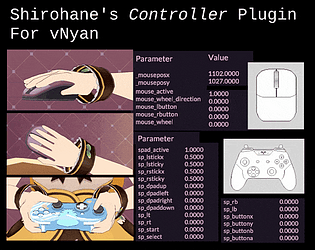
Could you check if the sp_lb, sp_rb and sp_lt, sp_rt parameters are appearing in your VNyan monitor?