Indie game storeFree gamesFun gamesHorror games
Game developmentAssetsComics
SalesBundles
Jobs
TagsGame Engines

taaspider

117
Posts
356
Followers
10
Following
A member registered Sep 14, 2020 · View creator page →

Creator of

Recent community posts

Hello!

The property mentioned in the error message is actually only used when setting up actions, which usually occurs within battle. Although it does expect there to be a target for the action, It is accessed when preparing and executing an action. So, in theory, starting battle with no enemies is not enough for the game to crash like this. It is more likely the SRPG gear plugin is reusing the Game_Action class for some other purpose.

I could add an exception handling to prevent the game from crashing at least. To do that, however, I'll need a print from the full error in the console. But I can't guarantee they will end up being fully compatible nonetheless, as there may be other changes from SRGP that may not sit well with TAA_EnemyLevels.
Regardless of code being written with the aid of AI should count or not as "AI generated", the current version for this plugin was built entirely "by hand", with no use of AI whatsoever.

However, I must point out that I recently started to toy around with using AI as a support tool for coding. So newer releases and updates may have some degree of AI usage involved. I would say the use I've been testing is pretty far from what I would call "AI generated", but if you're against any and all usage of it, you can safely rely on everything I released prior to september, 2026.

I am sort of a late adopter of AI tools for programming, mainly because I've been having little time to study and toy around with it, as I do not code for living for a long while now.

Hello!

Glad you've found out what was happening! Compatibility issues can be troublesome to figure out =/

Hello!

I found out that the issue occured because the animation spritesheet was not fully loaded before the plugin tried to use its images. That would mostly happen when you setup an animated cursor as your default (so it will try to load and render it at boot). I've added a few tweaks to identify this scenario, prevent the game from crashing, and reload cached data to update references before trying to render the cursor again.

Please update to version 1.1.6, and hopefully the issue will be resolved!

Hello!

I'll add to my backlog to troubleshoot this. If you could share how your cursors are set it may help me reproduce the issue more easily!

Hello!

Is this error occurring on the title scene?

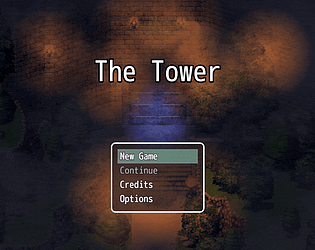
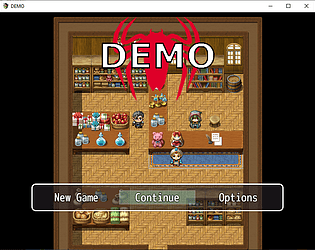
The only scene customized by this plugin is the title, which actually does not customize how the windows are created, it just repleaces the static background image with a map with moving events.

Although it is not the case with this one, there are other plugins from my library that do not use the window layer aggregator on scene objects, which may not be compatible with SuperTools due to that.

However, the "$dataWindows" object from the code snippet you shared is not an engine default object. I'm assuming it is created either by the SuperTools plugin, so the issue would need to be tackled on SuperTools, and not in TAA_MapTitleScreen (which at least is not even shown in the stack trace error).

I hope this is of some help.

Hello!

Hmmm... that should definetely not happen. I'll add to my backlog a note to include an exception handling to prevent the plugin to crash if there is no entries in either the plugin manager or the JSON file.

For now, the workaround is just what you described: just make sure there is at least one entry with an Enemy ID on the Plugin Manager settings, even if it is empty!

Hello!

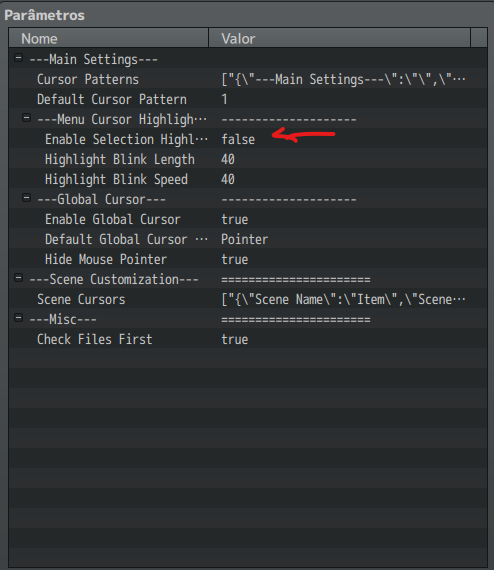
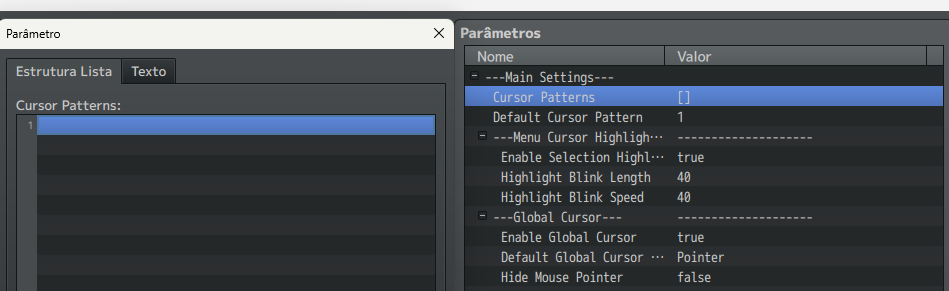
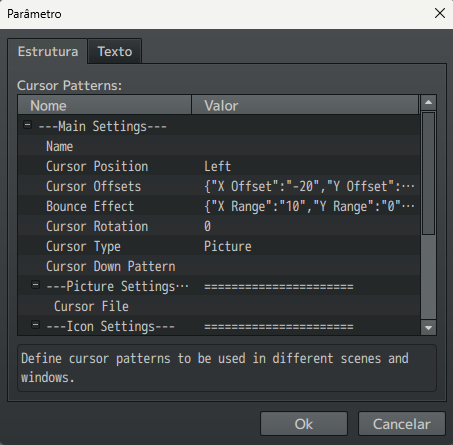
When you say "blank", do you mean like this image?


If so, that is completely normal before you setup any patterns. Just double click the empty line on the "Cursor Patterns" array and it will open another window like the one below, where you can create your pattern. 


Please be sure to read the help section to understand how patterns work and how they are activated!

Hey there!

Sorry for the delay in responding.

I've incorporated your fixes into version 1.4.1, which I just released. =)

Thank you for reporting not only the issue, but where to fix it in the code!

Hello!

I just released version 1.4.0 adding the option to change basically all skill properties that were not already included, with a few bug fixes as well.

Hope this helps with your project!

Hello there!

Thank you for the detailed steps to reproduce the issue, it really helped me track and fix this bug! 

I just released version 1.0.2 with a fix. The bug would cause any unit that died while being covered to not be properly cleaned up on substitution controls, what would cause them to keep being covered when revived, even with the state removed. I've added a failsafe to ensure this does not happen anymore.

Also, sorry for the delay in responding. Hope this can still be of help!

Hello!

The plugin won't allow you to transform one skill into another. However, at its current version it will allow you to change the skill's description, damage formula, hp/mp costs, tp gain, and set level specific effects and modifiers. If that would help with what you intend to do, I could consider improving level customization to allow you to change the skill's name, animation (and maybe some other skill's properties as well), to essentially make it become another skill without morphing it into another from the database.

Hey there!

Please read carefully the instructions in the plugin's help section. You can find it either by opening the file in any text editor, or through the RPG Maker's Plugin Manager interface after importing the plugin.

It contains a detailed explanation on how it works, and how to use it in your project!

Hi there!

I just uploaded a fix for it with version 1.1.5. Please try it out and let me know if it solves your issue! =]

I double checked here, and I see it is working as intended. I think the issue now is just a minor misunderstanding of how the plugin works.

The substitution state is not applied in the actor doing the substitution, it's applied in the one being covered. So if you setup the substitution state to be removed by restrictions, the substitution will be canceled if the actor being covered gets restricted, or has a restriction when you try to apply the substitution.

If I'm getting it right, I think what you intended to do was ensure that the actor doing the substitution cannot do so if he himself has a restriction. Correct?

Whenever the character doing the substitution cannot move, the substitution state in the covered actor is not removed, but the restriction will prevent the substitution to happen. If the substitution state lasts more turns than the "tank" restrictions, he will resume substitutions when the restrictions are lifted, until the state expires.

However, there is no clear battle message being displayed right now to let the player know the substitution did not occur due to a tanker restriction. I could add one and release a new version right away if you deem it necessary. If not, I'll let it rest in my backlog to be released in the future along other bug fixes or new features. =]

Hello!

I did find a bug that would cause the substitution to go on forever unless reapplied. I just released a fix with version 1.0.1... I was able to reproduce this behavior, and based on my tests I'm pretty sure it is fixed. But please let me know if the issue persists!

And I should say... thank you for the detailed error report! It was such a specific scenario, and your description really helped me quickly identify the issue!

Hello there!

Yes, I still support and (try) to do new stuff, it's just that I've been having little time to do so, so I more than often take some time to check comments and work things out! -.-'

Anyways... I think the quickest way I can help is to add a switch to enable/disable the dash pose as suggested. I've just released version 1.4.0 with this new feature. I've added a parameter for setting dash poses as a whole enabled or disable at game start, and a couple of plugin commands to allow you to toggle it for individual characters. I hope this is helpful!

Hello there!

I've looked into it, and I did find a bug causing this on MZ projects. It should be fixed on the just released version 1.1.4!

Hey there!

Oh my... good catch!

I've uploaded version 1.1.3 fixing that. Thanks for the heads up! =D

Hi there!

Are you sure you've set it up properly?
I just checked here, and it seems to be working as intended:


I was able to replicate the issue with my test project. It seams that if was trying to access data that was not yet loaded when the cursor was moving during game boot.

Just released version 1.1.2 with a fix to prevent the plugin from trying to access things before the required objects are ready!

Hello there!

There was indeed a bug that would cause the cursor to snap back to its starting position whenever the player was transfered to a new map, or changed to another scene. It was fixed in version 1.1.1 I just released!

Just one note... in my test project the cursor would always snap back to the screen center, not the top left corner. I am not sure why your project presented this alternate behavior, but assuming there is not any compatibility issues with another plugin, the fix added to 1.1.1 should do the trick!

Hello!

I've tried (with no success) to replicate the issue with the mouse pointer on my test project. However, I've just released version 1.1.0 adding a forced update to the "hide status", and the option to add a "mouse down" pattern for any cursor pattern. Just add a new pattern, and reference it on the new parameter for the main one.

Additionaly, you can also trigger the mouse pointer to be shown or hidden with plugin /script commands. For MV users, use the plugin command "MousePointer hide|show". As for MZ users, use the "Mouse Pointer State" command. On both engines you can also use the script commands $gameSystem.showMousePointer() and $gameSystem.hideMousePointer().

Hope this helps! =D

Hello there!

When you use the "Set Event Location" it will indeed override any currently set offset. However, you can work around that following it up with a "Set Movement Route" for the event reapplying the offset (just add a script move and enter "OFFSET: N.N; N.N" (without quotes, and replacing N.N with the actual offsets you need.

Hello there!

I did find a bug cause an erratic behaviour on the cursor when the choice window became active. Just uploaded a fix with version 1.0.4!

Hello!

I did indeed find a bug there. It was affecting all default letter based keys (x, z, q and w). It has been fixed on version 1.2.2, which I just released!

Hello!

Don't worry, it's no disturbance at all!

With you demo I could verify that there was indeed a bug in hiding. I hope to have fixed that with the version 1.3.7 I've just released.

Also, I may have jumped too quickly to a conclusion on my latest reply, so I feel it is important to correct myself as well. The spritesheet size you were using was actually correct, and there was no need to double it down like I recommended. The way I coded the 8 directions occupies a second character sheet, it does not extends the original one.

Lastly, a side note... your spritesheet for the idle pose is not vertically aligned with the walking and dashing frames, so it causes a weird displacement when the poses change. That is easily fixed making sure the frames are properly aligned between files! ;]

I hope with this fix we're out of the buggy woods, but do let me know if you find anything else not behaving properly!

(1 edit)

Edit: the explation I gave here turned out to not be fully correct. However, I've decided to keep the original post and just highlight this with this note, so anyone following this thread in the future can go through all the discussion and know I'll correct this info in a later reply! =]

Hello!

From your links, I think I understand what's happening.

The thing is, regardless of whether you are using the default 3 frame or a higher frame count, the plugin expects the spritesheets to be compliant to the spritesheet sizes commonly supported by the engine. That is, a spritesheet with 8 characters sheets, or a file with a single character (with the filename starting with $).

From the second image you linked I can see it may have 4 sheets with 8 directions and 8 frames each, one for walking, one for running, and two blank sheets. Because the engine expects the file to have 4 more sheets below, it will mess the calculations used to isolate each frame and behave erratically.

You need to either isolate each character sheet into a single file (with its name starting with $), or expand the image file adding 4 more blank character sheets below the ones you already have. 

I'm not sure if my explanation is helping or making it hard to understand, so here's an example using your file. I've edited it to highlight each character sheet, making it more visual, and also bluring the images to prevent it being copied without permission:


Hi there!

Oh my, that would be awesome! I will be thrilled to check what my plugins have been used to! =D

You can send it by email if you want: taaspider@gmail.com

Hello there!

Yes, of course. When you configure the idle pose you can set it using only frame indexes. If you do not specify a direction in the pose settings, it will maintain the current one when switching into it. I think that will render the effect you're looking for!

Hello!

I'm glad you figured out what was going on with the character turn! Indeed, when it switches back to the default/walk pose it will assume a frame from that pose. If the pose does not contain a "standing still" frame it will cause the "flashing" on the walking animation when the poses are switched. The easiest fix for this is to include an "idle" frame in the default walking animation (or at least one sufficiently close to it so as not to draw much attention).

As for the new issue, I would need more details on what you're trying to do, what is your setup, and what is the results you're getting that don't match what was intended. My demo project has an idle animation with 5 frames, which is working nicely, so if there is indeed another bug here I'll need more information to try and replicate it =/

Yeah, that is definetely occurring because there are no cursors properly configured. It's not even that there is no image set, is that there is no cursor pattern configured (which has the parameter to load the image within it).

I've added an exception handling on version 1.0.2, which I'm uploading right now. It will prevent the game from crashing if it is run with the plugin active without proper configurations. Even though the game will continue playing, if it happens you will still get error messages in the console to let you know something is not right, and you may not see any cursors at all on the screen.

That changes things... now I understood what you meant, and I could replicate it here.

I managed to track down what was causing it, and I did find a minor bug that would result in this behavior when switching between two poses. I'm uploading version 1.3.6 with a fix... please try it out and let me know if it solves it for you!

Hello!

If you know your way around JSON files, you can find a description of the file structure in the help section, and an example within my sample project (available here on itch). If not, you can change the "Datasource Type" parameter value to "Plugin Manager", and use the "Plugin Manager Data" to setup your enemy levels without the need to meddle around JSON files =]

Yes, that is possible.

My MV test project is in versino 1.6.2, so updating your engine may solve your issue with my plugin at least =/

Hello!

This is odd... the "isGlobalCursorEnabled" is a function within the plugin. This error indicates that something is not being properly loaded in your project.

Can you open the console when the error occurs (in Windows it would be F12) and send me here a print of the entire error, with the complete stack trace?

That will allow me to understand at which point it is being called and triggering the error. That would be my best clue to understand what is going on. The OS you use should not interfere in any way, but I confess I've never tested my plugins in a Linux environment =/

Are you sure you're talking about the Enemy Reinforcements plugin?

Because the thumbnail here has no actor's face portrait visible. oO

However, whichever thumbnail you are referencing, it must a default feature of either RPG Maker MV or MZ, as all images I capture from my plugins are taken from my test projects, with only my plugins enabled. I do have Yanfly's/Visustella's basic plugins loaded for testing purposes, but they are usually disabled when I finish testing and take prints.

Hello!

If you wish all books to be available from the start, you can go in the Menu List Window Config and set the "Hide Unread Books" to false. I recommend doing this at least when testing your project, to make sure all books are displayed as you intended.

With the "Hide Unread Books" set to true, all books will be hidden from the player unless you issue a plugin command to make it available. The plugin commands must contain the book keys you want to make available (or hide), not the title. If you are using an external JSON file, then the key is the object name for your book entry (which should not contain spaces). If you are using the Plugin Manager as source, the book key is the book title stripped from its blank spaces (more details in the help section). For example, if you book title is "This Is A Test Book", the key you should use in the plugin command is "ThisIsATestBook".

As for the font, the plugin uses the engine's text processing. So it should support using different fonts added to your project. Fonts are configured individually in each window parameter sets, so you would need to make sure all of them are set with the one you need. Although the "Font Face" parameter is a drop down list, you can type in a different value if you need to.

Although the plugin should be fine loading a custom font, it has no functions of its own to import that into your project. But I think you find many tutorials for that in the official forums.

I hope this was helpful!

Hello!

Hmmm... I think the plugin could be expanded to add more pose triggers (like pressing a button to attack, for example), but it would require a lot of coding and testing, which I unfortunately won't be able to commit to right now (even though I had some ideas not too different from this in my backlog).

However, I think you could probably achieve something like that with some clever work with Common Events. For instance, you could setup a common event to trigger the actor attack animation (configure as an automatic animation the plays itself and revert back to the previous pose), and attach this common event to the attack button. I have not tested this, but it may work. It wouldn't process the attack itself on the target though, as the plugin has no functions for that (nor is its purpose).

Sorry it took me so long to look into it... =|

I tested it out both in my MV and MZ debug projects, but I was unable to reproduce the behavior you describe. If I understood your issue correctly, what I did was setup an event with an idle and default poses configured, and then tested its behavior first with a random movement set, then with a custom fixed movement of just turning around and changing directions. In both cases it worked just fine, without the graphics "flashing".

However, I did experience similar issues early in development. Back then, it was due to the pose spritesheet not being loaded to memory yet. In theory, I solved that by adding a preloading system to my code. But I think it could still happen depending on how your pose spritesheets are created. For instance, if there are any blank spaces in your spritesheet, the "flashing" can just mean when the plugin switches between then it first lands in a blank sprite before changing it. For this example, you could solve this making sure there are no blank sprites in your character sheet.

I hope this is helpful... otherwise, I would need you to send me a sample project with the issue present so I could take a look =/