
Indie game storeFree gamesFun gamesHorror games
Game developmentAssetsComics
SalesBundles
Jobs
TagsGame Engines

TartanMonkey

14
Posts
4
Topics
7
Following
A member registered Dec 17, 2024

Recent community posts

Awsome, thankyou for getting back to me so fast!!

Hello :) , Great plugin as usual. Is it possible to tie the name  added to the hot bars in the Hud designer to a note tag on items to filter the list of items for the hot bar to only those with the same note take. For example if I created a hot bar with the name Tool and placed a <Tool> note tag in the items database the list that the hot bar shows up to be only the items with the <Tool> Note tag? I am trying to have more control on what is selected in a hot bar so I could have hot bar for "potions" another for "food" for example. 

that worked !! cant believe it was that simple and I missed it. !! Thankyou for all your help. You have been amazing as usual :D

I went through all my plugins one by one and found the issue only happens when the Hendrix post processing plugin is turned on. 

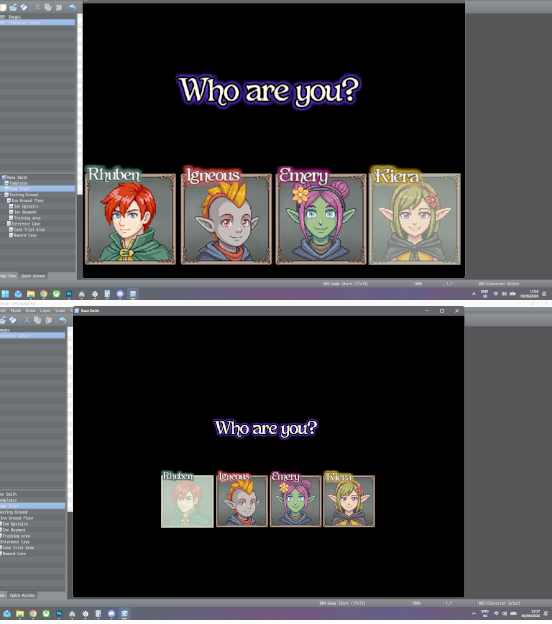
Hello, I seem to have an issue where the world camera plugin shrinks pictures. The top image the world camera is tuned off while it is switched on for the bottom picture. I am using the latest version of both plugins. The native setting in RPG maker MZ are increasing the screen size and UI to 1200 by 864. The world camera plugin is set to 1.8 zoom.   
I didn't know you had a discord! I am bout to go on holiday but I certainly will once I am bk. Thank you for all the support on your plugins !

Hello, I seem to have come across an issue where the pass ability data between maps isn't refreshing properly so if i transfer from one map that uses the parallax plugin to another and back the map no longer functions as pass abilities of everything is totally wrong. 

Awesome thankyou! I really appreciate the time and dedication you put into continually improving and developing these plugins !

As usual great plugin!!!  I have found that when I am using very large events like a tree where the image is something like 8 tiles tall the icon displays at the top of the image and not just above the actual event size. As the even is meant to be a tree players could chop down iv been trying to wrap my head around displaying the icon just above the first tile  of the actual event ( 1 tile) so the player can see the icon clearly floating on the trunk of the tree when they approach. I was wondering if there is a way to adjust the x/y  offsets for each icon on individual events to achieve this?  Thankyou for all your efforts with your plugins!

I know it has been years since this super helpful plugging was released but I'm just wondering if compatibility with the dot movement system was ever looked at?? I'd be more than willing to pay for a comission to make this happen as I am working on a little project with sang Hendrix action combat plugin that uses the dot movement plugging and finding trying to do stairs so inconvenient compared to this great pluggin.

It would be cool to have a carrying animation. kind of like the last frame of the pick up so the arms are in the air but then with the walking animation so that it looks like something is being carried over head.

Love this plugin! it has so much potential combined with all the others in the beginners bundle. I was wondering if its possible to have some particle effects only play on certain regions of a map or specific terrain tags. For example, having a splash effect for rain drops only appear on water tiles set by region or terrain tag?

Thankyou for replying to so fast! It's very much appreciated. I am loving your pluggins so far. 

Can the real time events builder allow an event to have more than one animation simultaneously. for example a say motion combined with a shine motion the the event has movement and shines at the same time?