

Updated the video link as Jamie remastered it and the old link was not working
A member registered Apr 05, 2016 · View creator page →
Creator of
Barbarian remake with a Masters of the Universe's makeover for pico-8
Fighting
Play in browser
The deadliest card game on Pico-8. Developed in 6 days for Random Game Jam 2020
Card Game
Play in browser
Recent community posts
I released a pico-8 port of klax, mainly based on the Atari Lynx version https://theroboz.itch.io/klax
Hope you'll enjoy it

Rolling your own editor
Disclaimer: this post opinions are based on a very cursory knowledge of the Lua language
After deciding on a mixture of tile-maps and shape-drawn background styles, I needed a tool to quickly and conveniently draw these shapes, because the hand-code experiment of Grayskull was too cumbersome. I just wasn’t sure if I had enough Lua/pico-8 experience to write one.
Seeing other’s editor examples though, the temptation was too strong and I am glad I tried. Writing picoDraw was a lot quicker than I thought, the process gave me a lot of additional good ideas to implement and, most of all, it was fun!
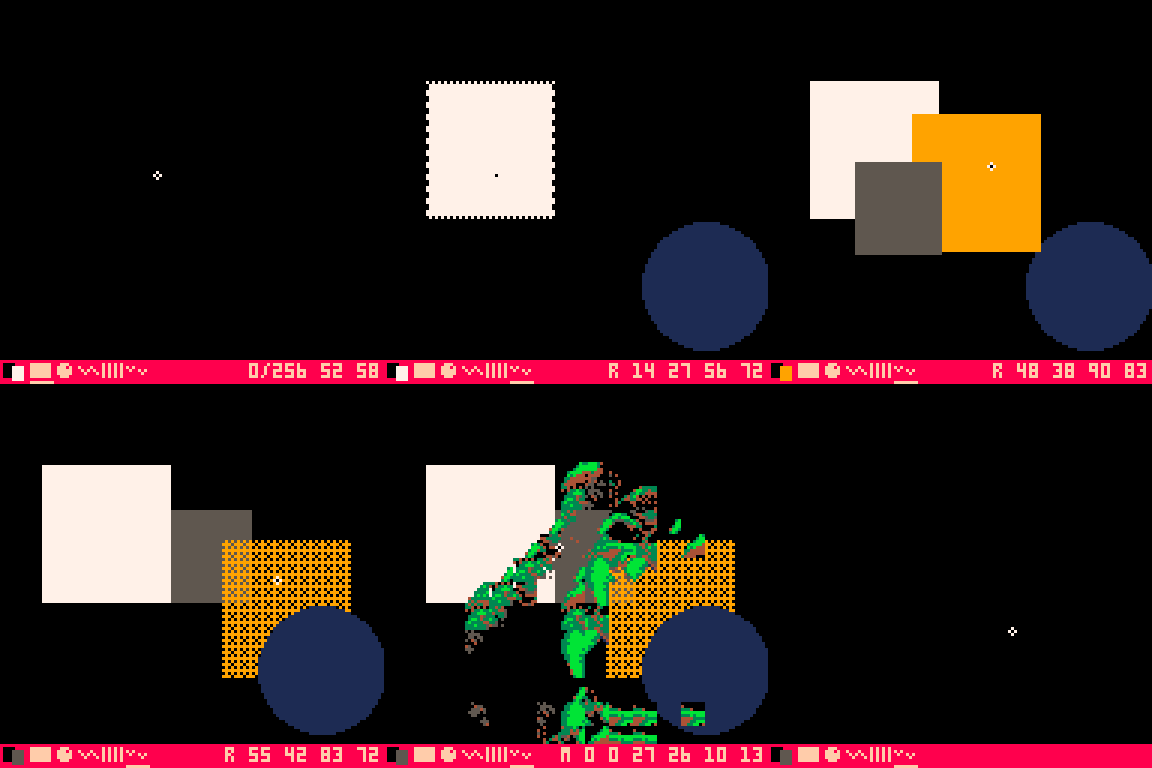
Since the drawing leverages a lot of existing pico-8 commands it was very easy to implement a working prototype, I will just highlight some details found interesting while programming and the unexpected solutions to some of my perceived difficulties:
1 – parsing and executing commands:
I am a big fan of Casey Muratori’s “write usage first” philosophy:
“you must always, always, ALWAYS start by writing some code as if you were a user trying to do the thing that the API is supposed to do”
https://caseymuratori.com/blog_0024
I worked backward from how I envisioned I was going to use picoDraw’s idealized output, a “stringified” series of command, since I already have code to extract symbol-separated data from a string for other game’s items
for simplicity I decided on using exactly pico-8 drawing function names and parameters.
cmd_list = “circ,16,16,8,1,rectfill,4,2,8,4,2,map,0,0,8,8,4,6,line,1,1,16,18,7,…”
First bit of luck was that even if gfx functions have different numbers of parameters, turns out the extra parameters are ignored, so for parsing simplicity I decided to store every function with the maximum numbers of params, 6, as in map(sx,sy,x,y,w,h):
cmd_list = “circ,16,16,8,1,0,0,rectfill,4,2,8,4,2,0,map,0,0,8,8,4,6,line,1,1,16,18,7,0…”
In this way I know each command is a series of 8 comma separated elements.
Now, how am I going to parse this into functions and parameters, in a simple way, so that I can just write something like:
draw_list(cmd_list)
I remembered seeing this pico-8 repl cart:
https://www.lexaloffle.com/bbs/?pid=71429 by user @thisismypassword
Which I thought might have some answers and turn out it did, it introduced me to the Lua _ENV variable, where turns out all function names are stored as key/value pairs, so my parsing code was incredibly simple, I just split the string into a commands table = {{“circ”,16,16,8,1,0,0},{“rectfill”,4,2,8,4,2,0}} which is also the way shapes are stored in memory and then
function draw_list(commands)
for i=1,#commands do
local cmd = commands[i]
_ENV[cmd[1]](cmd[2],cmd[3],cmd[4],cmd[5],cmd[6],cmd[7])
end
end
Right off the bat I had real-time drawing of the command list and easy parsing/ of the string output, with no special cases, no convoluted code and not a lot of token use, since this code has to run in the game too, but in game there’s a further optimization for tokens, if when I parse I store the command as the last item in the table, I can then do this:
function draw_list(commands)
for i=1,#commands do
local cmd = commands[i]
_ENV[cmd[7]](unpack(cmd))
end
end
*this code draws the complete left half of the background, map included, leveraging existing pico-8 functions. Then we just flip copy it like I explained in the previous post
As a neat side effects, it is easy to just traverse this list, drawing at each index increment, to have a nice step-by step recreation of your drawing, #putaflipinit style:

*replay of he-man’s portrait drawn by importing an image as a map (hidden here) and using it as an onionskin reference in picoDraw!
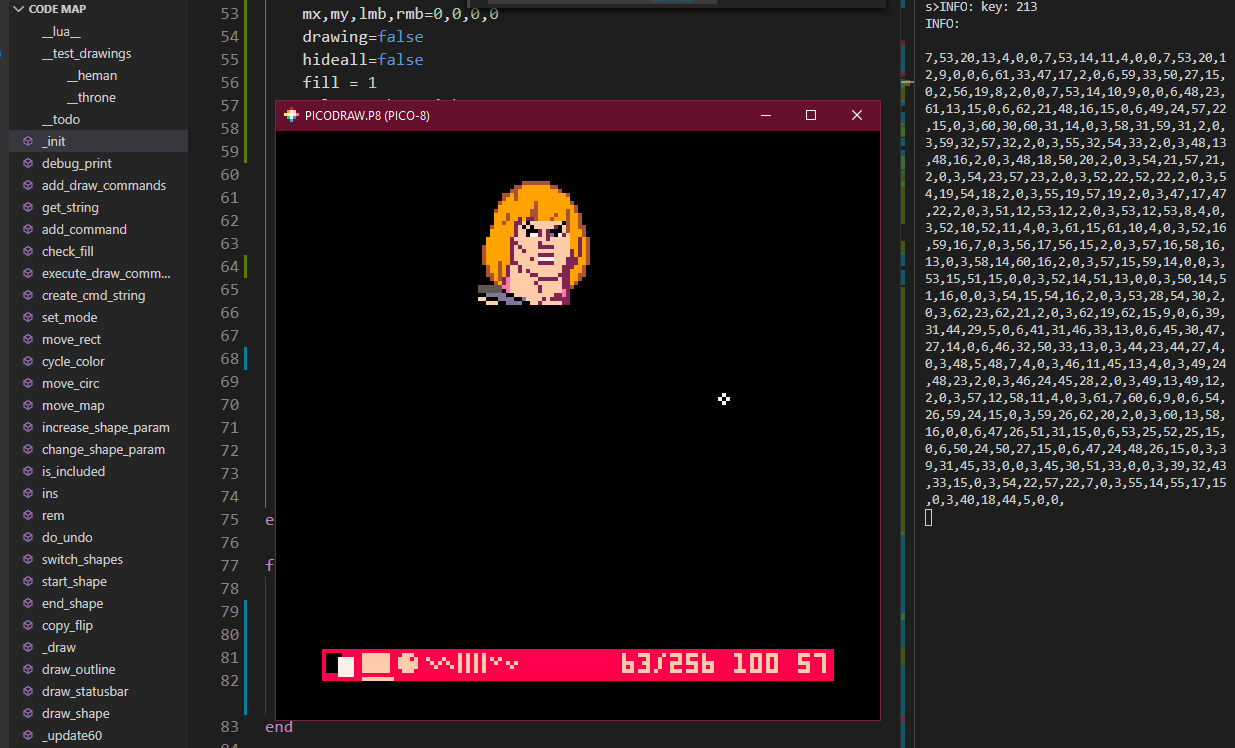
*and here is the command list “
2 – Undo function:
I was worried about implementing an undo function because I thought I was going to have to keep a stack of commands and command inverses (cmd pattern… aaaaargh!!!) or something, but looking at the console output suddenly I thought I could just save a table of cmd_string and just run an index through it, when I reach the desired undo, just parse the current string and purge all the subsequent one, in few minutes I had undo/redo working… now for sure it’s not the most elegant solution and in the long run could have bad side effects on memory but, for the current scope and usage it works pretty well and again, little code and tokens:
function do_undo(d)
cmd_string = undo[undo_index+d]
undo_index +=d
shapes={}
add_draw_commands(shapes,cmd_string) -–split string into a command table
end
3—load/save:
I knew I was going to depend on the clipboard to get the cmd_string in and out of picoDraw and while I was pasting any existing drawing in code and parsing it at init() time, @JohanPeitz showed his awesome 3d editor load/solution and gave me a code tip which made it really trivial to implement ctrl-v pasting at runtime, so now you can save and resume any drawing you want.
if k == 213 then
cmd_string,s=””,stat(4)
for i=1,#s do --sanitize pasted text
for c in all(allowed_chars) do
if (c == sub(s,i,i)) cmd_string..=sub(s,i,i) break
end
end
shapes={}
add_draw_commands(shapes,cmd_string)
else …
Look! It is almost exactly like the undo code!
All these conveniences are bonuses earned from settling on a simple data format following the usage first design (and pico-8/Lua awesomeness!)
4 – fill patterns
I was thinking of a complicated approach to this, storing a different fill command, or generating it when outputting the string but, since all commands except map still have a spare entry, I decided to just stick the eventual fillp there, so when it’s we don’t do anything and when there’s a value we apply it before drawing this shape and clear it afterward (or we can set a bool if we are in a fill or not and just clear once at first 0, this depends if we need more tokens or more speed)
cmd_list = “circ,16,16,8,1,0,0,rectfill,4,2,8,4,2,-512,map,0,0,8,8,4,6,line,1,1,16,18,7,0…” --rectfill now has a pattern applied
for i=1,#commands do
local cmd = commands[i]
if (cmd[6]!=0 and cmd[1] !=4) fillp(cmd[6] +.5) -- base pattern + transparency
_ENV[cmd[7]](unpack(cmd))
fillp()
end
5 – additional ideas:
Granted this tool is still unfinished and rough around the edges but, for a week worth of work, it was a pretty good investment for game assets creation and for personal learning. Now I am implementing some further refinements
Once oval() is available in pico-8, code will be further simplified because all the if else/ to manage circle exception will disappear, since I guess oval will use 4 params as rect and store color at the same parameter position and I won’t have to use giant circles any longer to get large, smooth curves
I think I can write a small triangle function that can fit into the existing data format, to avoid overusing rects for complex shapes, with a minimal token utilization, it should be easy to use in game too.
As you can see in the portrait examples, I switched to numbers as command, to compact output a bit, and I just do one lookup in a command table, now the execution is:
_ENV[cmd_string[cmd[7]]](unpack(cmd))
Still compact enough
I plan to encode cmd parameters length in this cmd index too, to allow variable length cmds, and save characters while not over-complicating the string splitting
My final goal is to normalize all coordinates and gradients so they can all be written as hex 00-ff allowing to store drawing data in map or sfx space, should the necessity arise
All this will be done after I progress a bit further with the game code. Now back to sprite work and game programming.
If there’s anything to learn from this post it is: Don’t be afraid to try and roll your own tools, sometimes it’s quicker than wrestling somebody else’s into doing your own bidding.
picoDraw current stats: 3500 tokens, 23100 chars