
This is such an amazing game, and I loved playing it on stream! I can't wait to play more of it when updates come out!
A member registered Sep 22, 2022 · View creator page →
Creator of
Recent community posts
 Huh... that's really weird. I looked there more than once and I still couldn't find it.
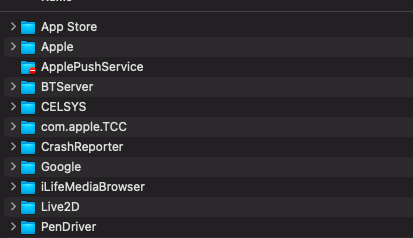
Alrighty! I found it! On my MacBook, I found it through desktop, Go, clicking Computer, then Macintosh, Library and then that shows all the folders.
Now I'm trying to find Godot. I think it's because I don't originally have godot on my laptop. And I transferred PNGTuber Plus to my applications folder.
Now... I think I'm stuck.
(Edit): Do I download godot on my computer to bypass this? Or is there another way to do it? Because... uh... I looked everywhere within those files and found nothing.
(Edited a day later): Here's what I see when I go into Application Support