its a bit jarring to have inertia/smoothing on the default camera and then raw input on the aiming camera
rolling while aiming will reorient your heading towards the direction you rolled in, i like it when you can roll while aiming and not throw off your aim
the bone guys are extreme sovl... gave me a boner
i actually liked the old resident evil camera and aiming a lot! but over the shoulder is probably easier to develop for and more functional
wish there was more satisfying feedback on shooting an enemy (i say this on every demo i just realized)
excited to see where this goes, keep up the good work!
You have very valid points on everything and I definitely will have them fixed by next demo day. I really want to nail the feedback juice; there is more of a reaction when you shoot enemies now, but it's not even close to where my standards are.
If I have enough development time in the future I may go back and revisit the resident evil camera style or maybe some kind of hybrid as an option.
I'm surprised no one has mentioned the jankiness in some of the animation transitions for the skeletons... I rushed them out so their behavior isn't fully realized yet and some of the transitions between animation states are pretty bad (I'm talking 360 degree leg flipping up and around). They will be even MORE sovl next demo day...!!
Hey Nylad! The new camera controls are working great, it feels good to move around and shoot. The new enemy also looks nice. I kept exploring the area and I think I went to some parts I wasn't supposed to go, you can climb some of the rubble and go to the other side of the arcade. Good work overall!! Thank you for the easter egg!!
Pretty early demo indeed, but I'm enjoying the presentation so far. As my first time playing, I was expecting the arcade machines to do something, maybe a simple minigame or even just a small animation for the character "playing the game" and maybe that leading to your tamabuki being happier or something. Is there a mood system for your tamabuki, like if the tamabuki is satisfied or happy, you deal more damage or something?
Overall looks good, but yeah, nothing much else. Also, I got stuck on the cave for a second and I had to dodge roll to unstuck myself from the geometry on the jagged wall.
I don't know if I'll make mini-games for the arcade machines, but I will definitely be putting in a playable claw machine in the future as part of a puzzle. I'm sure I can at least add some interaction for the arcade machines, but that'll be a future thing. For the time being they'll just be pretty to look at.
There isn't quite a *mood* system, but (and I don't expect anyone to know this as I don't have a tutorial yet in-game) you can make care mistakes by letting your pet starve or leaving them with their poop out for too long. This will in the future affect what your pet evolves into (too many care mistakes leads to getting a crappier evolution). The primary thing you'll get with higher evolution pets will be access to different unique abilities. Additionally, and I don't know if I'm sold on this yet or not, I might tie how fast you recover energy (which acts as ammo for your abilities) to the *fullness* of your pet.
Didn't realize you could get stuck in that cave. It's temporary though, but I'll keep this in mind when I build more organic geometry so I don't end up with players getting stuck in walls. Thank you.
And thanks for playing! I appreciate your thoughts and feedback.
noticeable improvements overall. the smaller tamagotchi screen is a good step, though i still think that the text isn't extremely clear to read and needs more contrast compared to the background i like the new camera. it's a shame that the atmospheric resident evil style camera ended up getting sacrificed in the process, but the smoothness of the new one is a worthy tradeoff. the game is much more playable now. the roll seems to have many frames of startup before beginning, which kinda makes it useless for dodging? it doesn't feel very satisfying to use either. for comparison, in many games dodge rolls are so fast that sometimes speedrunners use them instead of walking. i'm not saying you should buff it THAT much, but you should seriosly consider making it smoother and faster overall. not much else to do overall, i killed all the skeletons and that guy behind the corner
With the feedback on the text readability. I meant to do something about it for this Demo Day but it kind of slipped my mind. I hope by next Demo Day you'll be saying "Wow I can read it now!" I am taking your opinions on this, and others, to heart and will be trying some stuff in the future to improve readability.
I hear you on the dodge roll. I'll see what I can do to improve it (maybe cut the start-up, shorten the distance but improve the speed). And I definitely want to avoid the issue where dodge rolling is faster than moving. I think it looks goofy as hell and don't want that to be the way people speedrun my game lol.
Those skeletons were just trying to do their job... Can't believe you did them all in like that......
lol Everyone keeps going up the stairs. I thought I blocked them off unless you downloaded the first version I uploaded which lets you get up there. You're not supposed to be up there and those models and textures will be changed out eventually.
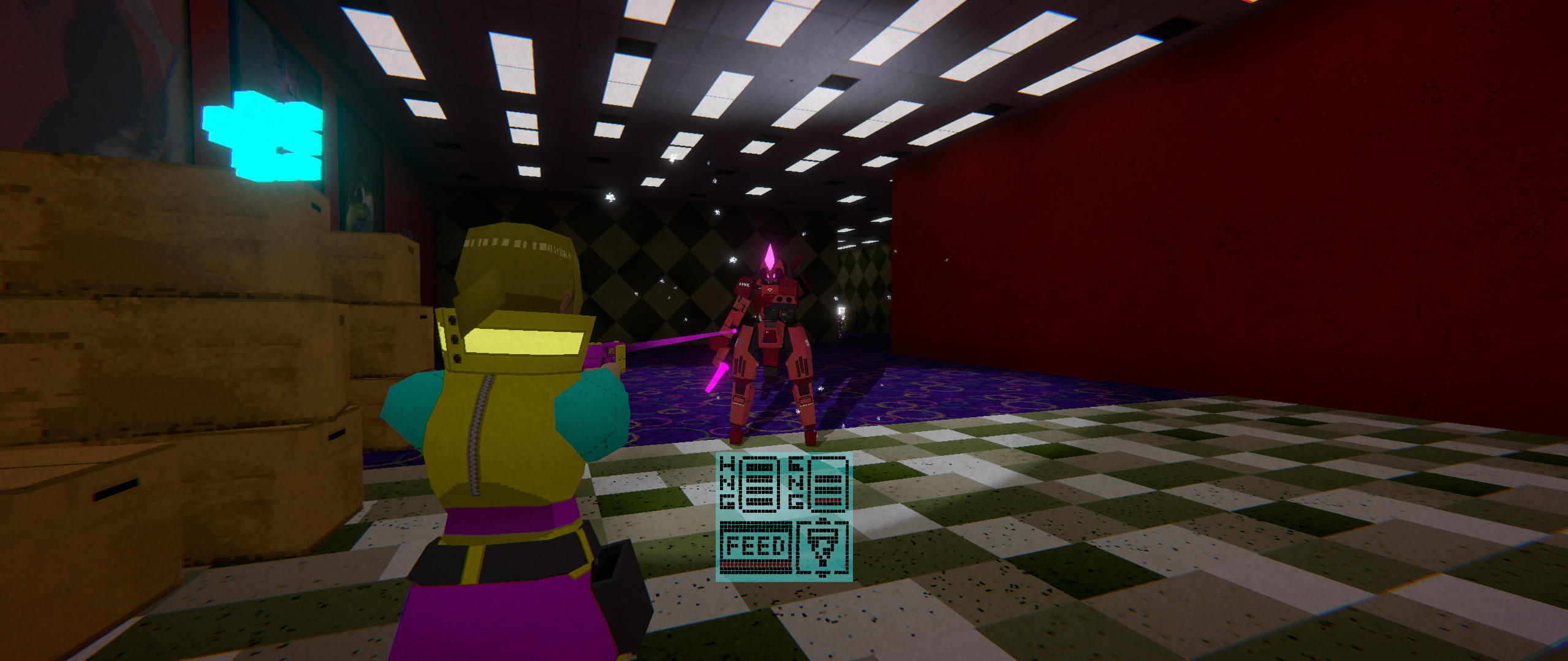
-Where's her flashlight coming from? Personally I would do a chest/shoulder mounted light over a flashlight.
-New hologram visuals of the pet are cool, makes it feel more cohesive this way.
-Camera is oddly choppy. It's frustrating, you hold one direction on the stick and it randomly starts moving or stays still for a moment before switching between the two.
-Oh the demo's already over. I was hoping the enemies would actually pose a threat this time.
I think the new direction is good, being up close makes it easier to bond with the tomagachi. Keep it up.
-Where's her flashlight coming from? Personally I would do a chest/shoulder mounted light over a flashlight.
This is something to think about. The flashlight is actually textured onto the gun beneath the end of it. This makes sense when you are aiming and the flashlight follows, but not so much when the character has their arms down at their sides with the gun in tow. Originally I was going to have them *mount* the gun to their jacket or a harness near their chest, but this is something I'll tackle later down the line.
-New hologram visuals of the pet are cool, makes it feel more cohesive this way.
Thank you!
-Camera is oddly choppy. It's frustrating, you hold one direction on the stick and it randomly starts moving or stays still for a moment before switching between the two.
I'm curious what you are referring to when you say "before switching between the two." Is the camera choppy, without aiming, while orbiting around the character? Is this choppiness when switching between aiming and not aiming? It's the first complaint I've heard of this, and I don't experience it on my end, so I'd like to figure it out or how to replicate it if possible. A video might help to further explain this if have time to post one.
-Oh the demo's already over. I was hoping the enemies would actually pose a threat this time.
Heheh. Sorry! The latest enemy is just a goofy one with some unique behavior. I have more in mind for them to be able to do, but I kind of rushed their behavior out into this Demo Day since I was behind on some things. They'll definitely be more threatening next Demo Day, but they'll still be pretty weak. I have some cool ideas for really strong/scary enemies, but I don't know if I'd throw them in this early in the game. Maybe it would be nice to make one I plan to use for later and just let them roam around in the Demo Day build for funsies.
>I think the new direction is good, being up close makes it easier to bond with the tomagachi. Keep it up.
It's nice to hear people enjoying the Tamagotchi aspect. I want them to become even more dynamic so people get attached to them and find them endearing :3
>I'm curious what you are referring to when you say "before switching between the two."
Very silly way to say that it would swap between super choppy and smooth every half second or so. To explain, I was using controller, and it happened the entire time I was playing. I played the game again, and the issue isn't there. I tried to recreate it by doing stuff with the window or mashing the controls, but nada. Sorry to say, but it seems like a freak Unity bug or somehow a windows bug(but I don't think my controller had any other issues that day).
No worries. I had no way of going down a rabbit hole for this without knowing how to recreate it.
I wonder if it's because I'm allowing keyboard inputs AND gamepad inputs at the same time. Like maybe if you had your mouse moving a little bit or something it might cause this. Not sure. I can at least try that in the future (and I need to have the game swap control types when it gets input from one or the other at some point anyways).
AAAAAAA at 3:30 I totally forgot about this issue where rolling while aiming immediately changes your camera direction to follow you. It looks awful and jarring. Thank you for remind me of this.
And thank you for trying the game and posting the video!
(I got a new GPU so I can run this now without crashing, idk if you fixed the framerate issue or not)
Don’t really know what this game is suppposed to be about, but it has a nice atmosphere. The instructions say "WS: Feed" but I cannot figure out for the life of me what WS is supposed to be. WebSockets? Also I never owned or operated a Tamagochi on my life so it’s a bit tough.
Anyways, will be coming back to this one just for the graphicx.
I actually didn't change anything related to the framerate. I did however add in occlusion culling (previously I wrongly assumed Unity was handling that automatically; the game ran fine for me but I have a really strong PC).
W & S (the keyboard buttons) will scroll through your list of food while aiming (if you picked any up; you can interact with the vending machine for infinite food). Using R you can reload/feed your pet when their hunger meter gets low. You can also do this through the gun's menu, but I added this in so people wouldn't have to go there all the time to feed their pet mid combat.
If you can elaborate on what's tough about operating/dealing with the pet I can take it to heart and perhaps make things a bit more intuitive next time.
I intend to make sprint a toggle eventually. (And of course add the option to make spring & crouch non toggles if the player wants that)
>If you can elaborate on what's tough about operating/dealing with the pet I can take it to heart and perhaps make things a bit more intuitive next time.
I just don’t understand anything about it. Lol. Like I said, I never dealt with Tamagochi in life. I also don’t get why you have a pet at all and how it’s related to the gun. I mean, it DOES seem cool.
You can see, I was in the feeding menu, I believe, a couple times, and I was spamming Enter, but that is the wrong button. So maybe Enter could also work, as it doesn’t seem to do anything else in that menu.
>You can also do this through the gun's menu, but I added this in so people wouldn't have to go there all the time to feed their pet mid combat.
Ok. Ok. I was honestly really confused about the "feed (while aiming)" thinking why the HELL would aiming and feeding be related? Isn’t aiming for shooting??
I’m not saying the average player is as stupid as I. And personally, I would have tried again and eventually figured out what to do, I only quit the game after dying because it seemed I had seen all there was to see. (I thought I wasn’t supposed to get up the stairs and had only found a cool glitch.)
But "not really getting the controls -> dying inexplicably -> immediately quitting" is the 90% pattern I have observed in demo players myself. I believe the way that games usually handle this is, they would give infinite amount of time for feeding the first time, and it would also unlock a door to move on. If you get what I mean.
>I just don’t understand anything about it. Lol. Like I said, I never dealt with Tamagochi in life. I also don’t get why you have a pet at all and how it’s related to the gun. I mean, it DOES seem cool.
You can see, I was in the feeding menu, I believe, a couple times, and I was spamming Enter, but that is the wrong button. So maybe Enter could also work, as it doesn’t seem to do anything else in that menu.
Gotcha'. I don't think I set up the Enter key to do anything yet, but I should set all my confirmation controls to use it in the future. And yeah, at some point I'll start adding in story to make it clear on how the Tamagotchi ties into the story (which it does, heavily). When I get to the point where things are more polished I'll start adding in some sort of tutorial as well so people who are not familiar with Tamagotchis will not be out of the loop.
>But "not really getting the controls -> dying inexplicably -> immediately quitting" is the 90% pattern I have observed in demo players myself. I believe the way that games usually handle this is, they would give infinite amount of time for feeding the first time, and it would also unlock a door to move on. If you get what I mean.
Understood. I'll keep this in mind when I build out this first level more and try to turn it into kind of a tutorial/learning area for the player.
The style of this game is amazing, and the soundscape is good, relaxing. Obviously there's not much content to be seen just yet so you should work on a real gameplay loop for next time. I think you're cooking up something good so don't beat yourself up over it. I like the logo for the game too, I know you put a lot of work into it (and into the rest of the game). Just keep going
Oh, forgot to mention but the UI in the ammo/health and the tab menu is kind of hard to look at for me. I know it's the style of the game but you might want to consider doing something about it? But still save it for when you have more content though if people aren't complaining
Thank you for your praise on the style and soundscape. I don't know if I can get a gameplay loop in by DD64, but it'll be something I'll aim for (and certainly reach by DD65 at least!).
I will look into the UI more to see what I can do. The main complaint I've heard is for the gun menu being hard to read. And I have an idea of how I can make that easier on the eyes by next Demo Day (I was actually going to do something about it for DD63 but it slipped my mind...)
If you can elaborate at all on *why* it's hard for you to look at I'd appreciate it. I think it's probably a contrast thing but not 100% sure. I've never had an issue with it myself, but others do.
Thanks again for your kind words and feedback! I really appreciate it!
It could be that that the fonts and graphics share the same blocky look so they all bleed together at a glance, so it doesn't really draw the eye/looks like visual noise until you need to look at it.
Works well enough on Linux except that I can’t see the laser pointer, it’s in black which definitely doesn’t match clips you’ve shown before.
The main menu is really confusing with the option highlight, you should only do highlights for either the mouse or the keyboard/controller and not both at the same time.
Controls okay except it didn’t actually pick up my controller and the mouselook feels like it has acceleration if you turn fast enough which then triggered a bunch of shader stutter so the first few seconds in game were really disorienting. You also can’t go “back” in the settings menu of the gun display, you have to just close it out with Tab. And the quit button also doesn’t work.
Art style is perfecto, you’ve got something really good cooking here. I think this will go far, your tamagotchi gimmick is a lot more interesting than a lot of ideas I’ve seen.
Interesting about the laser. I'll need to look into why that's not showing correctly. One of these days I'll install Linux on one of my PC's or try running the game on my Steam Deck to look for more bugs.
I'll definitely fix that highlighting issue with the menus. Thank you for letting me know.
Could you let me know what kind of controller you were using? In the future I'll add in a setting to turn acceleration on/off. I'm pretty new to gamedev so I'm not 100% sure what I can do for the shader stutter, but I assume there's a way to preload shaders beforehand. I will look into this.
I did a quick patch so that that settings menu in the gun menu is no longer accessible (the buttons there were just for show for now anyways). You CAN now quit from the pause menu.
Thank you for your kind words. I really appreciate that. I kind of rushed the lighting and look of the area in this demo day so I hope by DD64 I can really show off the full extent of what I'm going for with the artstyle (right now everything is *waaay* too dark an the only area I think looks decent is the arcade). I have some fun ideas planned for the Tamagotchi gimmick as well, but those might not show up till even later DD's.
Could you let me know what kind of controller you were using?
It’s a PS3 controller, but on my setup I think all controller input passes through Steam so if you could get it running on a Steam Deck it should just work with every controller.
I’m not 100% sure what I can do for the shader stutter, but I assume there’s a way to preload shaders beforehand.
On Unity I think there is an option for it somewhere, but it could also be caused the DirectX->Vulkan translation, in which case you either have to have Unity use Vulkan or OpenGL instead of DirectX (assuming that’s possible, I haven’t used Unity in like a decade) or just give up and make a dedicated Linux build.
I took some screenshots before I forgot to include, here’s the laser pointer problem I was talking about. You can just barely see it, it is there, and the tracer looks normal when you shoot, but I’m sure this isn’t intentional. EDIT: Now that I’m looking at it, you totally can’t see it, but in motion it is just barely visible.
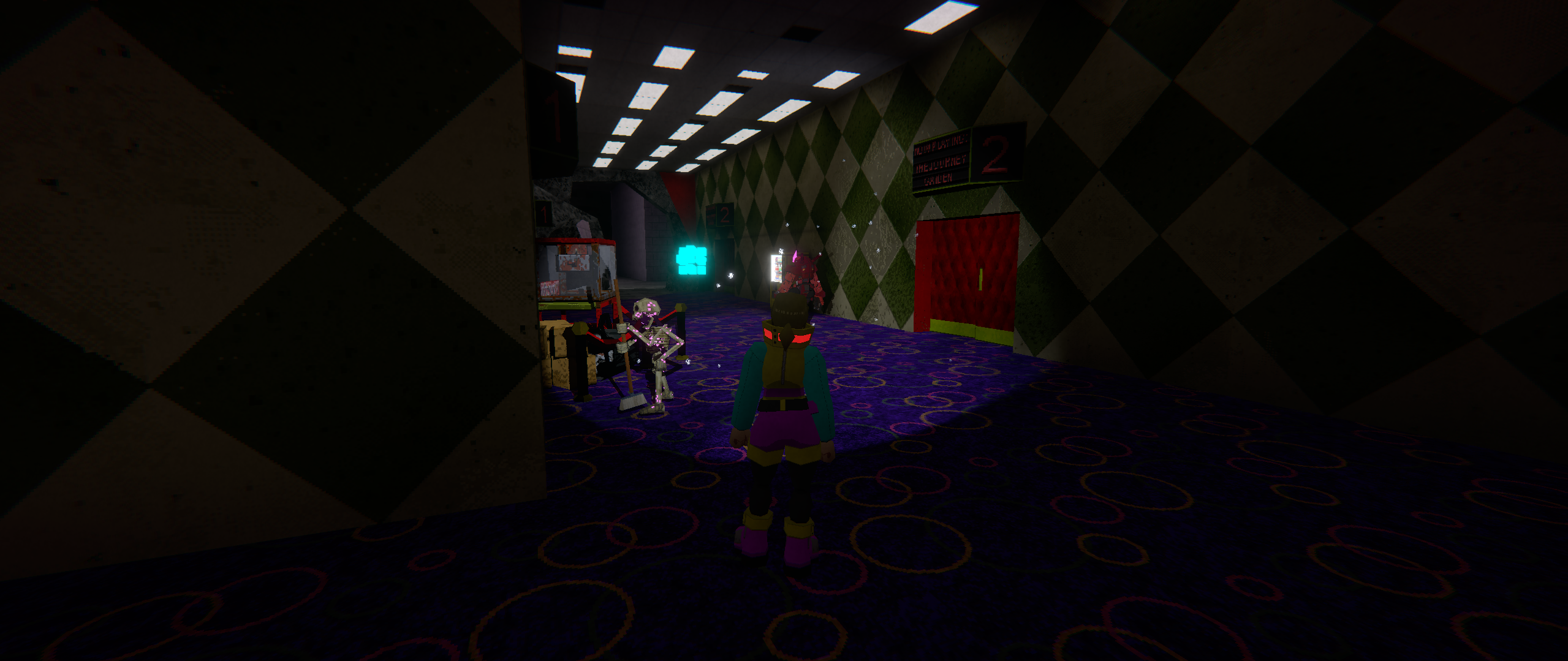
And this was just the start without the flashlight, I could barely see the instructions up on the wall until I turned it on.
Thanks for the tips on the shader preloading. I'll look further into that.
And for the screenshots as well I appreciate it. I'll try to figure out why the laser pointer isn't working on Linux. Hopefully I can replicate it on my Steam Deck.
Additionally, yeah, this demo area is WAAAAYYY too dark. I rushed it out when I was intending to have more time to play with the lighting in that area (some last minute bugs showed up among other things I felt were more important to work on). By next Demo Day everything should be a lot easier to see. Sorry about that.
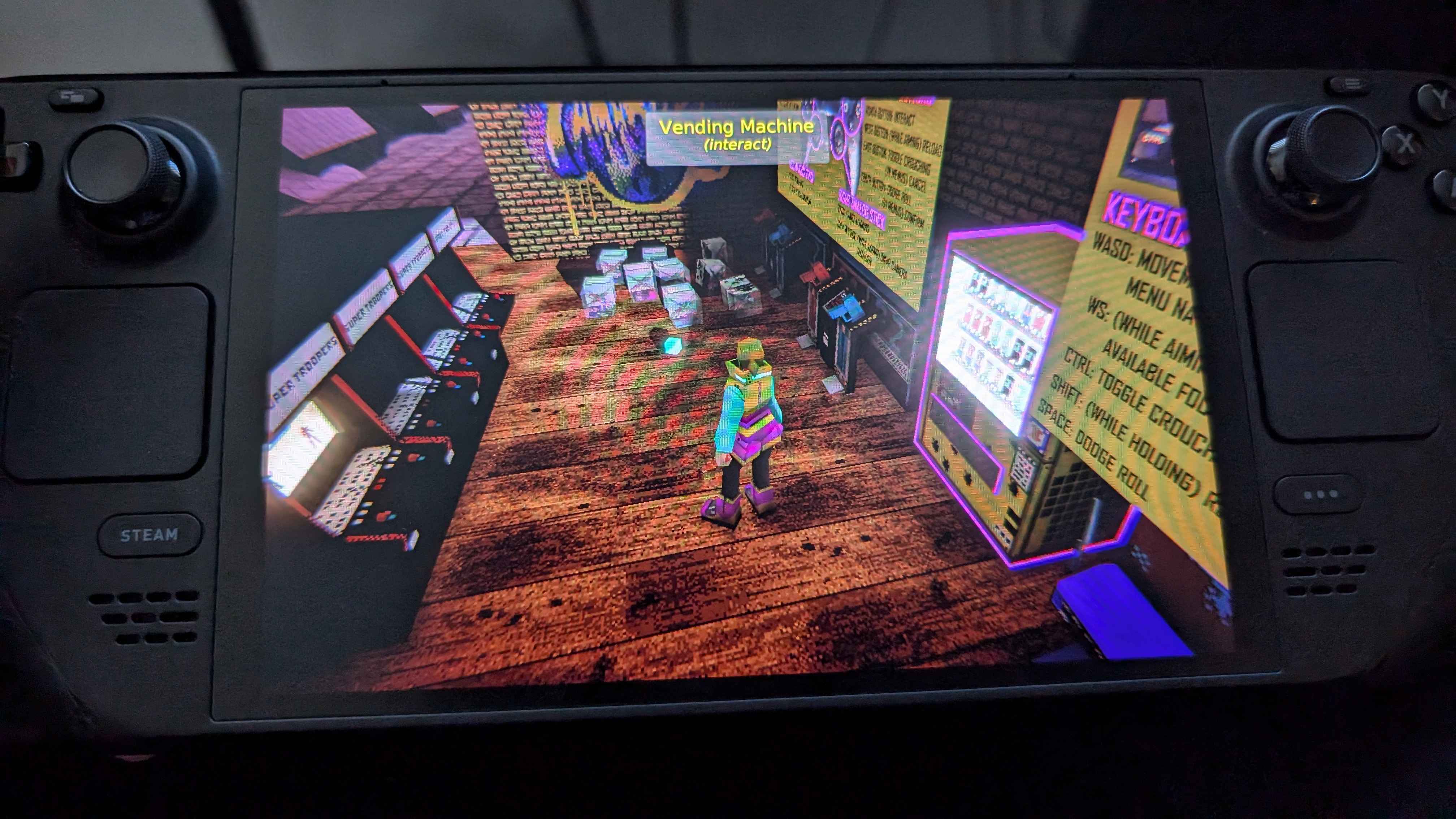
I did a dedicated Linux build to put the game on my Steam Deck today. Everything seems to work fine. Would like to hear back from you and other Linux users DD64 to see if everything is playing more nicely with you then.
Damn the game is a mood, the art style, the music, mix really well together, it provides a very specific melancholy feels for me.
There's not much right now so I'll feedback the things I see:
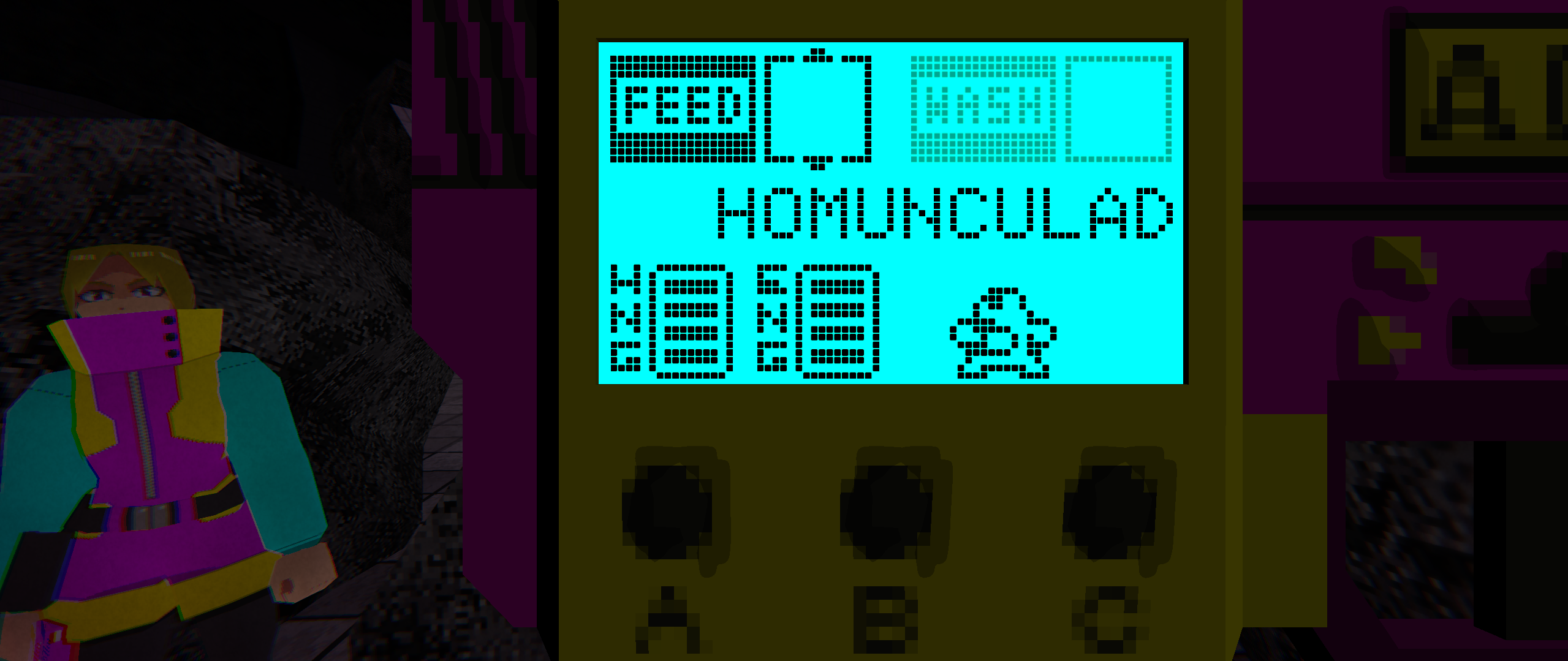
- The pet menu font can be hard to read.
- The skeleton throwing the broom can be abit too fast? As in, it feels kinda if the skeleton aim better then there's no way to dodge it, unless the intention is to face tank it.
In the last DD it was very slow and just unplayable for me, now it feels MUCH better. The stairs seems unwalkable at first. In order to go up I did some tricks like rolling or going up and left (or right) and finding the proper camera angle. Since ineptdev didn't say anything about the stairs I'm not sure if this is a known behavior or not, so I'm adding a video just in case.
The camera is too fast for me, it would be nice to add a slider to edit it.
I *imagine* a big part of it being slower was that I didn't use occlusion culling in DD62. I wrongly assumed Unity was already doing that in the background...
And yeah thanks for letting me know about the stairs. I shouldn't really have the area be accessible right now in any way. It's a nice background scenery prop but the model itself and geometry need to be updated. It was accessible before because the player had a higher step size for stepping up geometry. Every step is modeled and uses the mesh collider for the geometry (instead of just using a ramp which I'll likely do in the future) so when I lowered the player's max step height it made the stairs... well, not really climbable.
I did a quick little patch just now that blocked off the stairs and added in a camera speed slider among some other things.
Thank you for playing and giving me your feedback! It's much appreciated!
looks and feels extremely GOOD so far. my gun stopped working after i climbed the steep stairs and feel into the void and i wasn't able to select quit or quit game in either of the menus.
Thank you. Not sure why your gun stopped working (unless your pet got too hungry), but I needed to lock off those stairs. Thanks for letting me know.
I just did a small patch to block off the stairs and allow you to quit the game from the pause menu. The settings menu in the gun menu is not reachable anymore since no buttons there did anything anyways.
Thanks for playing and letting me know about these bugs!



Comments
i like the improvements you made thus far.
excited to see where this goes, keep up the good work!
Thank you friend.
You have very valid points on everything and I definitely will have them fixed by next demo day. I really want to nail the feedback juice; there is more of a reaction when you shoot enemies now, but it's not even close to where my standards are.
If I have enough development time in the future I may go back and revisit the resident evil camera style or maybe some kind of hybrid as an option.
I'm surprised no one has mentioned the jankiness in some of the animation transitions for the skeletons... I rushed them out so their behavior isn't fully realized yet and some of the transitions between animation states are pretty bad (I'm talking 360 degree leg flipping up and around). They will be even MORE sovl next demo day...!!
Hey Nylad! The new camera controls are working great, it feels good to move around and shoot. The new enemy also looks nice. I kept exploring the area and I think I went to some parts I wasn't supposed to go, you can climb some of the rubble and go to the other side of the arcade. Good work overall!! Thank you for the easter egg!!
Pretty early demo indeed, but I'm enjoying the presentation so far. As my first time playing, I was expecting the arcade machines to do something, maybe a simple minigame or even just a small animation for the character "playing the game" and maybe that leading to your tamabuki being happier or something. Is there a mood system for your tamabuki, like if the tamabuki is satisfied or happy, you deal more damage or something?
Overall looks good, but yeah, nothing much else. Also, I got stuck on the cave for a second and I had to dodge roll to unstuck myself from the geometry on the jagged wall.
I don't know if I'll make mini-games for the arcade machines, but I will definitely be putting in a playable claw machine in the future as part of a puzzle. I'm sure I can at least add some interaction for the arcade machines, but that'll be a future thing. For the time being they'll just be pretty to look at.
There isn't quite a *mood* system, but (and I don't expect anyone to know this as I don't have a tutorial yet in-game) you can make care mistakes by letting your pet starve or leaving them with their poop out for too long. This will in the future affect what your pet evolves into (too many care mistakes leads to getting a crappier evolution). The primary thing you'll get with higher evolution pets will be access to different unique abilities. Additionally, and I don't know if I'm sold on this yet or not, I might tie how fast you recover energy (which acts as ammo for your abilities) to the *fullness* of your pet.
Didn't realize you could get stuck in that cave. It's temporary though, but I'll keep this in mind when I build more organic geometry so I don't end up with players getting stuck in walls. Thank you.
And thanks for playing! I appreciate your thoughts and feedback.
noticeable improvements overall.
the smaller tamagotchi screen is a good step, though i still think that the text isn't extremely clear to read and needs more contrast compared to the background
i like the new camera. it's a shame that the atmospheric resident evil style camera ended up getting sacrificed in the process, but the smoothness of the new one is a worthy tradeoff. the game is much more playable now.
the roll seems to have many frames of startup before beginning, which kinda makes it useless for dodging? it doesn't feel very satisfying to use either. for comparison, in many games dodge rolls are so fast that sometimes speedrunners use them instead of walking. i'm not saying you should buff it THAT much, but you should seriosly consider making it smoother and faster overall.
not much else to do overall, i killed all the skeletons and that guy behind the corner
With the feedback on the text readability. I meant to do something about it for this Demo Day but it kind of slipped my mind. I hope by next Demo Day you'll be saying "Wow I can read it now!" I am taking your opinions on this, and others, to heart and will be trying some stuff in the future to improve readability.
I hear you on the dodge roll. I'll see what I can do to improve it (maybe cut the start-up, shorten the distance but improve the speed). And I definitely want to avoid the issue where dodge rolling is faster than moving. I think it looks goofy as hell and don't want that to be the way people speedrun my game lol.
Those skeletons were just trying to do their job... Can't believe you did them all in like that......
Pretty atmospheric, getting up the stairs was really odd. not sure if i knew where i was going.
lol Everyone keeps going up the stairs. I thought I blocked them off unless you downloaded the first version I uploaded which lets you get up there. You're not supposed to be up there and those models and textures will be changed out eventually.
Thank you for playing Space!
Playing on controller.
-Where's her flashlight coming from? Personally I would do a chest/shoulder mounted light over a flashlight.
-New hologram visuals of the pet are cool, makes it feel more cohesive this way.
-Camera is oddly choppy. It's frustrating, you hold one direction on the stick and it randomly starts moving or stays still for a moment before switching between the two.
-Oh the demo's already over. I was hoping the enemies would actually pose a threat this time.
I think the new direction is good, being up close makes it easier to bond with the tomagachi. Keep it up.
-Where's her flashlight coming from? Personally I would do a chest/shoulder mounted light over a flashlight.
This is something to think about. The flashlight is actually textured onto the gun beneath the end of it. This makes sense when you are aiming and the flashlight follows, but not so much when the character has their arms down at their sides with the gun in tow. Originally I was going to have them *mount* the gun to their jacket or a harness near their chest, but this is something I'll tackle later down the line.
-New hologram visuals of the pet are cool, makes it feel more cohesive this way.
Thank you!
-Camera is oddly choppy. It's frustrating, you hold one direction on the stick and it randomly starts moving or stays still for a moment before switching between the two.
I'm curious what you are referring to when you say "before switching between the two." Is the camera choppy, without aiming, while orbiting around the character? Is this choppiness when switching between aiming and not aiming? It's the first complaint I've heard of this, and I don't experience it on my end, so I'd like to figure it out or how to replicate it if possible. A video might help to further explain this if have time to post one.
-Oh the demo's already over. I was hoping the enemies would actually pose a threat this time.
Heheh. Sorry! The latest enemy is just a goofy one with some unique behavior. I have more in mind for them to be able to do, but I kind of rushed their behavior out into this Demo Day since I was behind on some things. They'll definitely be more threatening next Demo Day, but they'll still be pretty weak. I have some cool ideas for really strong/scary enemies, but I don't know if I'd throw them in this early in the game. Maybe it would be nice to make one I plan to use for later and just let them roam around in the Demo Day build for funsies.
>I think the new direction is good, being up close makes it easier to bond with the tomagachi. Keep it up.
It's nice to hear people enjoying the Tamagotchi aspect. I want them to become even more dynamic so people get attached to them and find them endearing :3
Thank you for playing!!
>I'm curious what you are referring to when you say "before switching between the two."
Very silly way to say that it would swap between super choppy and smooth every half second or so. To explain, I was using controller, and it happened the entire time I was playing. I played the game again, and the issue isn't there. I tried to recreate it by doing stuff with the window or mashing the controls, but nada. Sorry to say, but it seems like a freak Unity bug or somehow a windows bug(but I don't think my controller had any other issues that day).
Hope that didn't send you down a rabbit hole.
No worries. I had no way of going down a rabbit hole for this without knowing how to recreate it.
I wonder if it's because I'm allowing keyboard inputs AND gamepad inputs at the same time. Like maybe if you had your mouse moving a little bit or something it might cause this. Not sure. I can at least try that in the future (and I need to have the game swap control types when it gets input from one or the other at some point anyways).
Agumon
AAAAAAA at 3:30 I totally forgot about this issue where rolling while aiming immediately changes your camera direction to follow you. It looks awful and jarring. Thank you for remind me of this.
And thank you for trying the game and posting the video!
https://www.twitch.tv/videos/2504356343
(I got a new GPU so I can run this now without crashing, idk if you fixed the framerate issue or not)
Don’t really know what this game is suppposed to be about, but it has a nice atmosphere. The instructions say "WS: Feed" but I cannot figure out for the life of me what WS is supposed to be. WebSockets? Also I never owned or operated a Tamagochi on my life so it’s a bit tough.
Anyways, will be coming back to this one just for the graphicx.
Please make Sprint a toggle like Crouch.
I actually didn't change anything related to the framerate. I did however add in occlusion culling (previously I wrongly assumed Unity was handling that automatically; the game ran fine for me but I have a really strong PC).
W & S (the keyboard buttons) will scroll through your list of food while aiming (if you picked any up; you can interact with the vending machine for infinite food). Using R you can reload/feed your pet when their hunger meter gets low. You can also do this through the gun's menu, but I added this in so people wouldn't have to go there all the time to feed their pet mid combat.
If you can elaborate on what's tough about operating/dealing with the pet I can take it to heart and perhaps make things a bit more intuitive next time.
I intend to make sprint a toggle eventually. (And of course add the option to make spring & crouch non toggles if the player wants that)
Thank you for your kind words and feedback!
>If you can elaborate on what's tough about operating/dealing with the pet I can take it to heart and perhaps make things a bit more intuitive next time.
I just don’t understand anything about it. Lol. Like I said, I never dealt with Tamagochi in life. I also don’t get why you have a pet at all and how it’s related to the gun. I mean, it DOES seem cool.
You can see, I was in the feeding menu, I believe, a couple times, and I was spamming Enter, but that is the wrong button. So maybe Enter could also work, as it doesn’t seem to do anything else in that menu.
>You can also do this through the gun's menu, but I added this in so people wouldn't have to go there all the time to feed their pet mid combat.
Ok. Ok. I was honestly really confused about the "feed (while aiming)" thinking why the HELL would aiming and feeding be related? Isn’t aiming for shooting??
I’m not saying the average player is as stupid as I. And personally, I would have tried again and eventually figured out what to do, I only quit the game after dying because it seemed I had seen all there was to see. (I thought I wasn’t supposed to get up the stairs and had only found a cool glitch.)
But "not really getting the controls -> dying inexplicably -> immediately quitting" is the 90% pattern I have observed in demo players myself. I believe the way that games usually handle this is, they would give infinite amount of time for feeding the first time, and it would also unlock a door to move on. If you get what I mean.
>I just don’t understand anything about it. Lol. Like I said, I never dealt with Tamagochi in life. I also don’t get why you have a pet at all and how it’s related to the gun. I mean, it DOES seem cool.
You can see, I was in the feeding menu, I believe, a couple times, and I was spamming Enter, but that is the wrong button. So maybe Enter could also work, as it doesn’t seem to do anything else in that menu.
Gotcha'. I don't think I set up the Enter key to do anything yet, but I should set all my confirmation controls to use it in the future. And yeah, at some point I'll start adding in story to make it clear on how the Tamagotchi ties into the story (which it does, heavily). When I get to the point where things are more polished I'll start adding in some sort of tutorial as well so people who are not familiar with Tamagotchis will not be out of the loop.
>But "not really getting the controls -> dying inexplicably -> immediately quitting" is the 90% pattern I have observed in demo players myself. I believe the way that games usually handle this is, they would give infinite amount of time for feeding the first time, and it would also unlock a door to move on. If you get what I mean.
Understood. I'll keep this in mind when I build out this first level more and try to turn it into kind of a tutorial/learning area for the player.
The style of this game is amazing, and the soundscape is good, relaxing. Obviously there's not much content to be seen just yet so you should work on a real gameplay loop for next time. I think you're cooking up something good so don't beat yourself up over it. I like the logo for the game too, I know you put a lot of work into it (and into the rest of the game). Just keep going
Oh, forgot to mention but the UI in the ammo/health and the tab menu is kind of hard to look at for me. I know it's the style of the game but you might want to consider doing something about it? But still save it for when you have more content though if people aren't complaining
Thank you for your praise on the style and soundscape. I don't know if I can get a gameplay loop in by DD64, but it'll be something I'll aim for (and certainly reach by DD65 at least!).
I will look into the UI more to see what I can do. The main complaint I've heard is for the gun menu being hard to read. And I have an idea of how I can make that easier on the eyes by next Demo Day (I was actually going to do something about it for DD63 but it slipped my mind...)
If you can elaborate at all on *why* it's hard for you to look at I'd appreciate it. I think it's probably a contrast thing but not 100% sure. I've never had an issue with it myself, but others do.
Thanks again for your kind words and feedback! I really appreciate it!
It could be that that the fonts and graphics share the same blocky look so they all bleed together at a glance, so it doesn't really draw the eye/looks like visual noise until you need to look at it.
Hmmm. I'll consider this in the future for optimizing readability. Thank you.
Works well enough on Linux except that I can’t see the laser pointer, it’s in black which definitely doesn’t match clips you’ve shown before.
The main menu is really confusing with the option highlight, you should only do highlights for either the mouse or the keyboard/controller and not both at the same time.
Controls okay except it didn’t actually pick up my controller and the mouselook feels like it has acceleration if you turn fast enough which then triggered a bunch of shader stutter so the first few seconds in game were really disorienting. You also can’t go “back” in the settings menu of the gun display, you have to just close it out with Tab. And the quit button also doesn’t work.
Art style is perfecto, you’ve got something really good cooking here. I think this will go far, your tamagotchi gimmick is a lot more interesting than a lot of ideas I’ve seen.
Interesting about the laser. I'll need to look into why that's not showing correctly. One of these days I'll install Linux on one of my PC's or try running the game on my Steam Deck to look for more bugs.
I'll definitely fix that highlighting issue with the menus. Thank you for letting me know.
Could you let me know what kind of controller you were using? In the future I'll add in a setting to turn acceleration on/off. I'm pretty new to gamedev so I'm not 100% sure what I can do for the shader stutter, but I assume there's a way to preload shaders beforehand. I will look into this.
I did a quick patch so that that settings menu in the gun menu is no longer accessible (the buttons there were just for show for now anyways). You CAN now quit from the pause menu.
Thank you for your kind words. I really appreciate that. I kind of rushed the lighting and look of the area in this demo day so I hope by DD64 I can really show off the full extent of what I'm going for with the artstyle (right now everything is *waaay* too dark an the only area I think looks decent is the arcade). I have some fun ideas planned for the Tamagotchi gimmick as well, but those might not show up till even later DD's.
It’s a PS3 controller, but on my setup I think all controller input passes through Steam so if you could get it running on a Steam Deck it should just work with every controller.
On Unity I think there is an option for it somewhere, but it could also be caused the DirectX->Vulkan translation, in which case you either have to have Unity use Vulkan or OpenGL instead of DirectX (assuming that’s possible, I haven’t used Unity in like a decade) or just give up and make a dedicated Linux build.
np.
I took some screenshots before I forgot to include, here’s the laser pointer problem I was talking about. You can just barely see it, it is there, and the tracer looks normal when you shoot, but I’m sure this isn’t intentional. EDIT: Now that I’m looking at it, you totally can’t see it, but in motion it is just barely visible.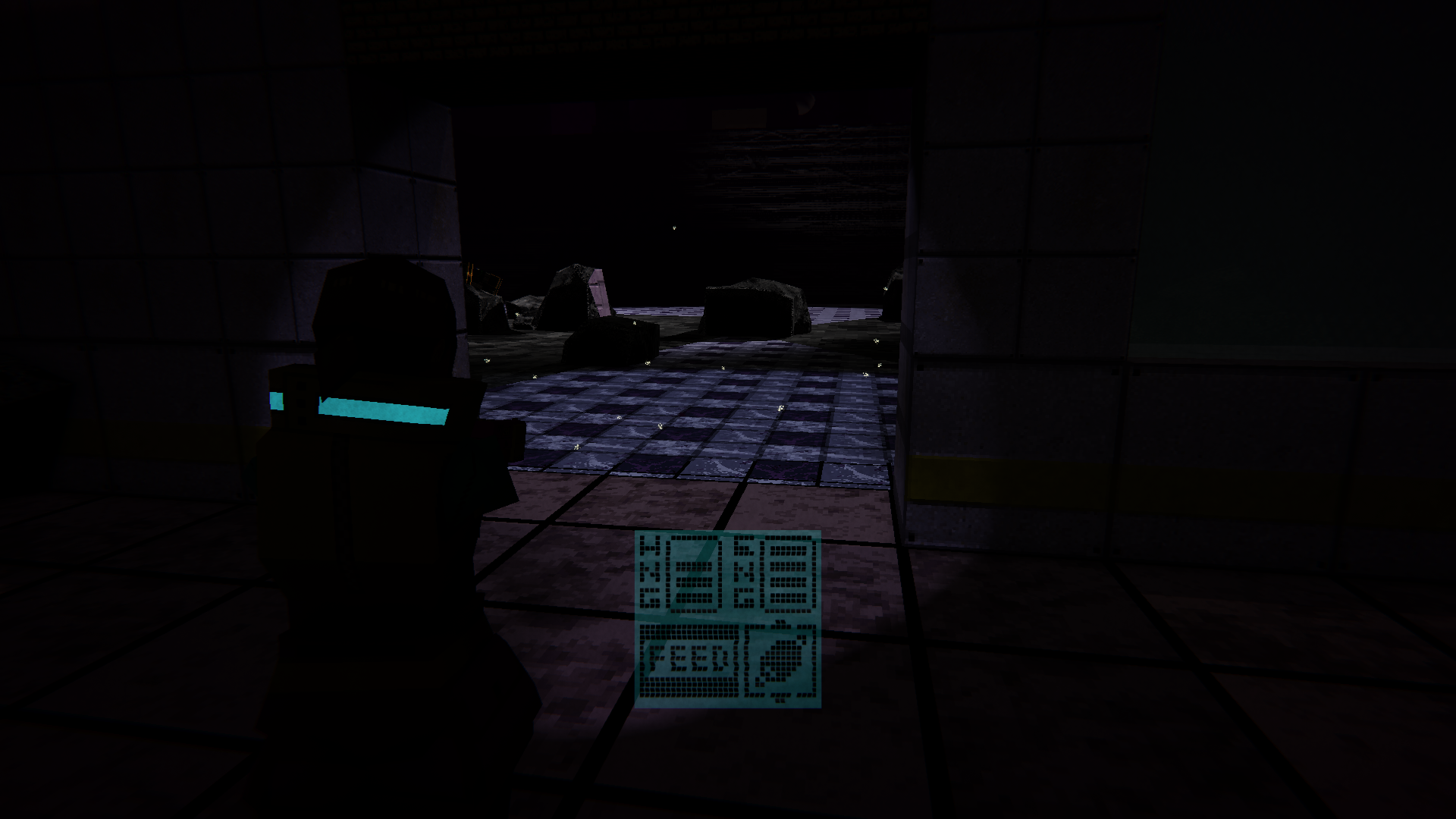
And this was just the start without the flashlight, I could barely see the instructions up on the wall until I turned it on.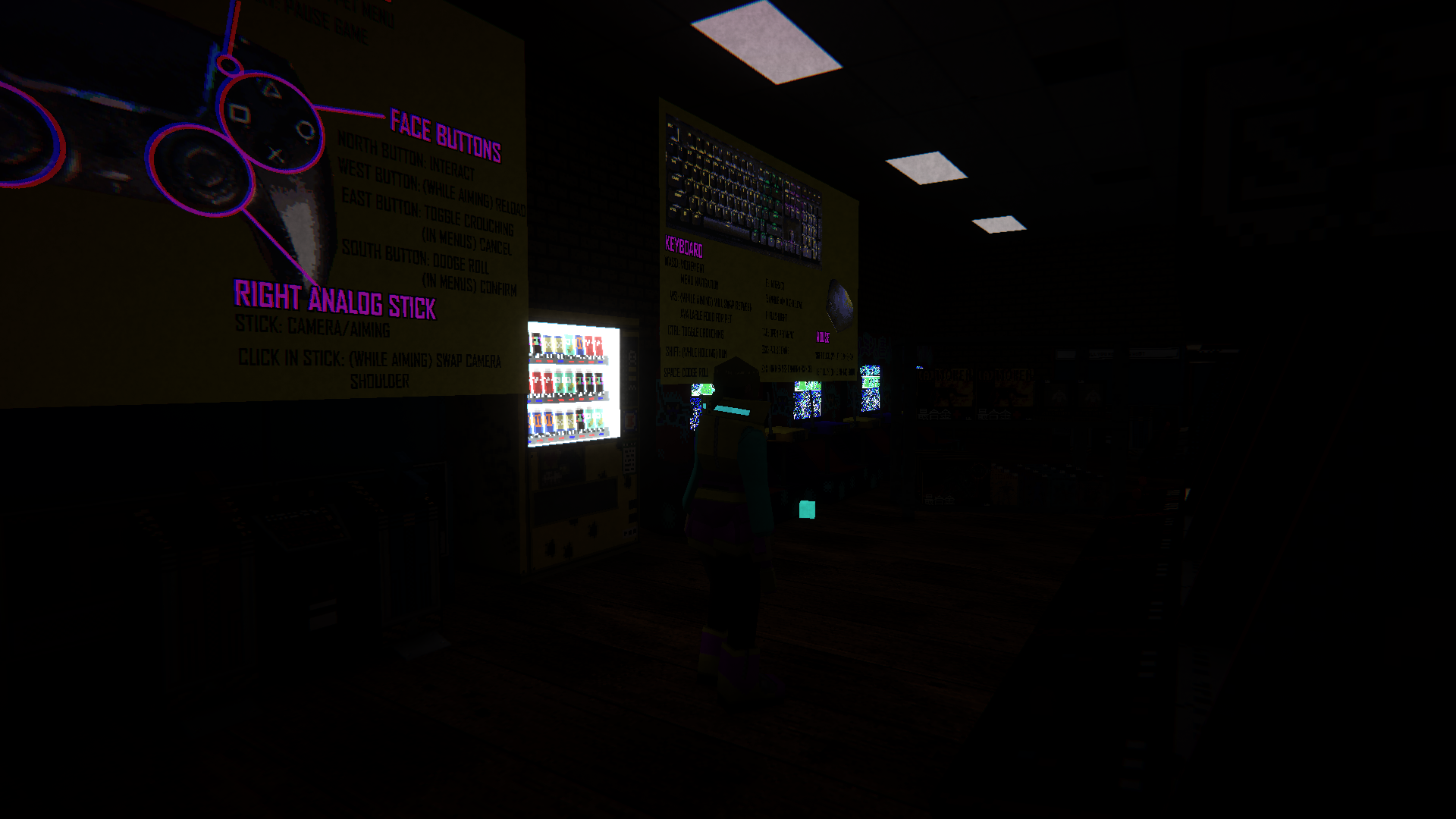
Thanks for the tips on the shader preloading. I'll look further into that.
And for the screenshots as well I appreciate it. I'll try to figure out why the laser pointer isn't working on Linux. Hopefully I can replicate it on my Steam Deck.
Additionally, yeah, this demo area is WAAAAYYY too dark. I rushed it out when I was intending to have more time to play with the lighting in that area (some last minute bugs showed up among other things I felt were more important to work on). By next Demo Day everything should be a lot easier to see. Sorry about that.
I did a dedicated Linux build to put the game on my Steam Deck today. Everything seems to work fine. Would like to hear back from you and other Linux users DD64 to see if everything is playing more nicely with you then.
Damn the game is a mood, the art style, the music, mix really well together, it provides a very specific melancholy feels for me.
There's not much right now so I'll feedback the things I see:
- The pet menu font can be hard to read.
- The skeleton throwing the broom can be abit too fast? As in, it feels kinda if the skeleton aim better then there's no way to dodge it, unless the intention is to face tank it.
In the last DD it was very slow and just unplayable for me, now it feels MUCH better. The stairs seems unwalkable at first. In order to go up I did some tricks like rolling or going up and left (or right) and finding the proper camera angle. Since ineptdev didn't say anything about the stairs I'm not sure if this is a known behavior or not, so I'm adding a video just in case.
The camera is too fast for me, it would be nice to add a slider to edit it.
I *imagine* a big part of it being slower was that I didn't use occlusion culling in DD62. I wrongly assumed Unity was already doing that in the background...
And yeah thanks for letting me know about the stairs. I shouldn't really have the area be accessible right now in any way. It's a nice background scenery prop but the model itself and geometry need to be updated. It was accessible before because the player had a higher step size for stepping up geometry. Every step is modeled and uses the mesh collider for the geometry (instead of just using a ramp which I'll likely do in the future) so when I lowered the player's max step height it made the stairs... well, not really climbable.
I did a quick little patch just now that blocked off the stairs and added in a camera speed slider among some other things.
Thank you for playing and giving me your feedback! It's much appreciated!
looks and feels extremely GOOD so far. my gun stopped working after i climbed the steep stairs and feel into the void and i wasn't able to select quit or quit game in either of the menus.
Thank you. Not sure why your gun stopped working (unless your pet got too hungry), but I needed to lock off those stairs. Thanks for letting me know.
I just did a small patch to block off the stairs and allow you to quit the game from the pause menu. The settings menu in the gun menu is not reachable anymore since no buttons there did anything anyways.
Thanks for playing and letting me know about these bugs!