

sorry for late responses, i unfortunately did not have time for it. back on track now. the fixes are uploaded.
Thank you for taking the time to update your mods!
I downloaded the full-bundle.zip and extracted its contents into E:\SteamLibrary\steamapps\common\Dorfromantik, and the game launches just fine. However, it seems like none of the mods are working/active? I am mostly interested in the only perfects and show perfects mods, but the additional camera controls aren't working either. Did I goof up the installation, or do I need to enable the mods somehow?
did you extract its contents as is, like so?
BepInEx/
doorstop_config.ini
Dorfromantik_Data/
Dorfromantik.exe
MonoBleedingEdge/
UnityCrashHandler64.exe
UnityPlayer.dll
unstripped_corlib
winhttp.dll
without sub-folder "full-bundle" (some extracting tools might create it by default). we do not need any sub-folders, so that as shown above folder "BepInEx" is at the same level as the "Dorfromantik.exe"
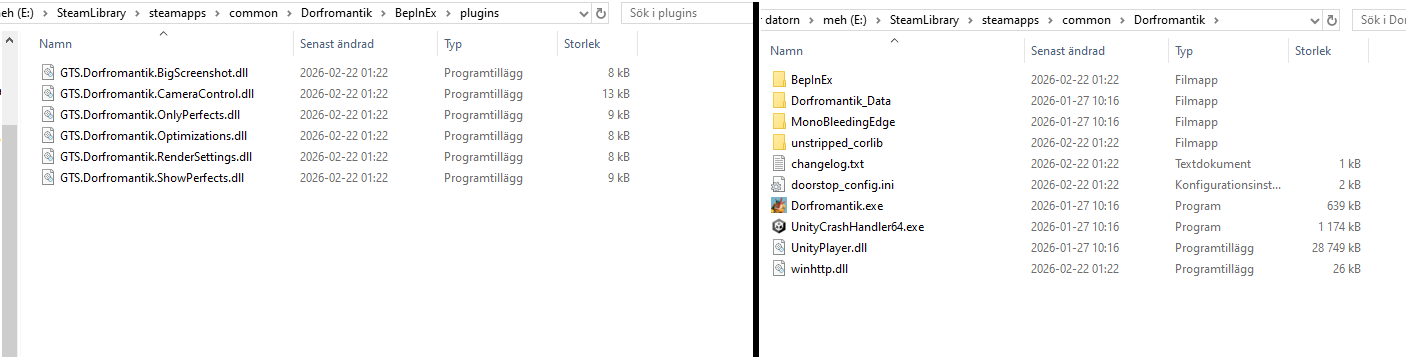
It works now. Amazing, thank you!!
As an additional suggestion, though compared to the mods you've already created I figure this might be a lot more complicated and maybe not supported by the game, it'd be a huge QoL if you could select an empty tile surrounded by 5 or 6 other tiles and "save" it, having the game notify you when a tile in the stack fits perfectly into that slot.
yeah, it would be one of the best improvements to this game ever. i've been having that idea for a long time. but on the other hand i fear it would ruin an effort part of the gameplay loop a bit and might suck the fun out of it. the core loop is "search-and-complete" the holes that the player left, and by automating the "search" part, we might no longer find satisfaction in "complete", because there will be no effort, no point in the reward. i've been thinking about it too much :)
but it is true that it is also not a trivial task, as we would need to design a small piece of UI.
still, maybe some day.