

Playing an animation with Auto-Pattern Switch
How to play an animation? You perhaps used the character sprites and by changing the direction sprites with route command, you made a very simple animation. (or not)
It works! Downside... very limited frames.
There's however another way, it allow more frames to be played.
First, let show a random sprites (with 8 directional pattern) on the screen, with the picture command.
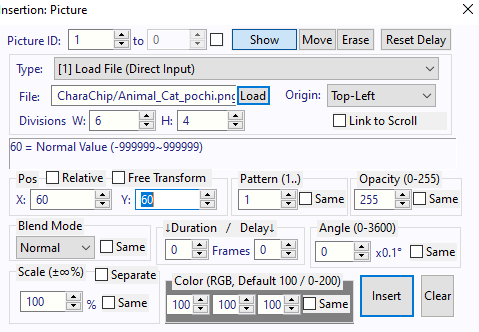
Make sure everything it exactly has showed above!
Now, when you test it, a cat or other sprites will appear in the upper corner.
Insert a condition (number) command, it can been any self variable.
In the condition branch, we put an effect command.
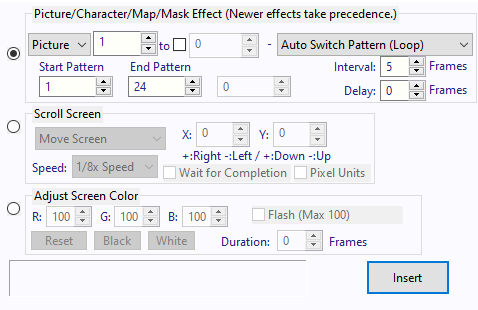
Once again, make sure everything is exactly as showed above.
Then add a set variable at the end, it should look like this;
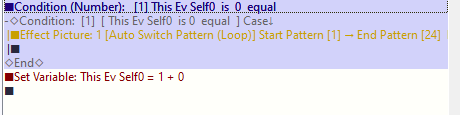
After this, when you test it. The sprites will be played.
But how?
Did you notice on the Picture command, when set the division as W:6 and H:4?
It essentially divided the sprites images in 6x4. Why? Because the Sprites sheet is 6x4!
And the Auto Switch Pattern allow to switch the "frame" of the sprites! Notice that it switch to left to right! (You can also change on the "Pattern (1..)" in the Picture command.)
If you know how to make a Sprites sheet, then you can play any animation you want! By to way, The Sample Game use it for attack and effects.
*The animation count is done by left to right, meaning the first sprite sheet on the upper-left corner is number 1!