On Sale: GamesAssetsToolsTabletopComics
Indie game storeFree gamesFun gamesHorror games
Game developmentAssetsComics
SalesBundles
Jobs
TagsGame Engines

CParam and Visustella keeps crashing?

A topic by Ellie Shadeflare created Jul 29, 2026 Views: 134 Replies: 2
Viewing posts 1 to 3
(2 edits)

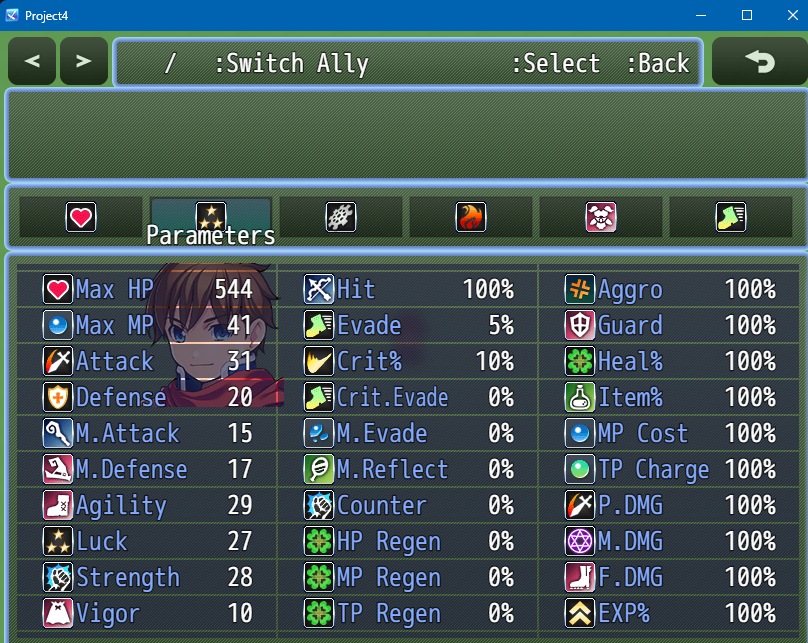
Attempting to use a solution seen from this thread: /t/6311133/solved-coreengine-custom-parameters-clash-with-identical-short-name, I was attempting to create a Strength stat that used the inbuilt VisuStella Custom Param status page functionality and your more controllable and notetag-able form; and attempting to see the stat in the Status page caused crashes. I added STR to the status page, and it works perfectly fine with the normal constants and formula, but attempting to use the fixes in the thread doesn't work, whether your param is known as "str" or as "vig"

For the record this is what I put in:

// Declare Constants
const paramId = Eli.CustomParameter.findCParamId("vig")
// Calculations
return this.cparam(paramId);

and the project itself, just in case:

https://drive.google.com/file/d/1E0Rh1-RNERZE7q0cvEuz3iNhkFte49Zl/view?usp=drive...

Worth noting that Reid has a class notetag to define his vig/str.
Developer

Hi there!

I got your sample project, but the crash is not happening at all. I did a lot of testing, including following the thread link you posted(which by the way is a different issue from yours), but I didn't manage to replicate the crash. And also did not manage to show my custom parameter on the status screen. but also, I didn't manage to change the status screen at all. Tried to remove LUK and AGI for example. Removed them from the plugin parameters, but when I opened the status menu, it was there again.

So I will ask for you to give me a sample project replicating the crash, In a way that I just open the status and the crash happens just like you said before. From there, I may have more luck finding the problem.

But as you know, Visustela is obfuscated. So that make everything harder and it also takes more time than usual. Give me the other projet when you can, and I will let you know what I have found out

Developer

Ops, no need! I just found out the issue and manage to fix it.

The thing is on Visustella Menu Core, you need to register the custom parameter you created from my plugin. But their abbreviation names cannot be the same. So if you created "vig" on my custom parameter plugin, on visustella engine you need to set the Abbreviation with any name you want. But not "vig".

For example: VisuVig

The JS Values, can still remain the same:

// Declare Constants 
const paramId = Eli.CustomParameter.findCParamId("vig") 
// Calculations 
return this.cparam(paramId);

Then, on the Element Status core, you go to the parameter Status Menu Settings > Displayed Parameters

There you you can decide on what column you want to display the custom parameter. But you will not use vig. You will use VisuVig.

Techically speaking, if Abbreviation and Short Name are the same, Visustella will overwrite the shortName from the battler, and it will not work. But if they are different, the Abbreviation will need to be used to reference the custom parameter. Therefore, on visustella menus, you do not use the custom parameter short name, but the Abbreviation name that has the JS values for the short name/custom parameter you want

Let me know if you manage to make it work!