

Ops, no need! I just found out the issue and manage to fix it.
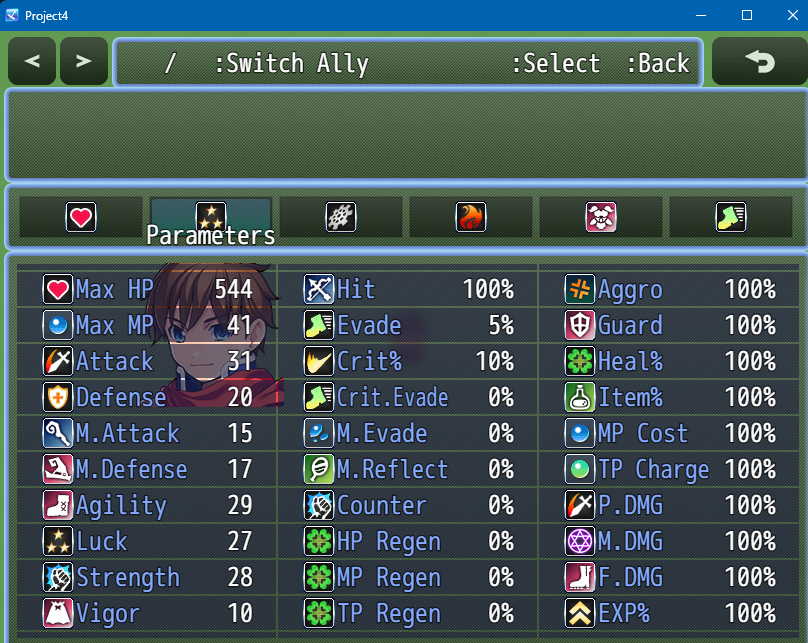
The thing is on Visustella Menu Core, you need to register the custom parameter you created from my plugin. But their abbreviation names cannot be the same. So if you created "vig" on my custom parameter plugin, on visustella engine you need to set the Abbreviation with any name you want. But not "vig".
For example: VisuVig
The JS Values, can still remain the same:
// Declare Constants
const paramId = Eli.CustomParameter.findCParamId("vig")
// Calculations
return this.cparam(paramId);
Then, on the Element Status core, you go to the parameter Status Menu Settings > Displayed Parameters
There you you can decide on what column you want to display the custom parameter. But you will not use vig. You will use VisuVig.
Techically speaking, if Abbreviation and Short Name are the same, Visustella will overwrite the shortName from the battler, and it will not work. But if they are different, the Abbreviation will need to be used to reference the custom parameter. Therefore, on visustella menus, you do not use the custom parameter short name, but the Abbreviation name that has the JS values for the short name/custom parameter you want
Let me know if you manage to make it work!