On Sale: GamesAssetsToolsTabletopComics
Indie game storeFree gamesFun gamesHorror games
Game developmentAssetsComics
SalesBundles
Jobs
TagsGame Engines
(17 edits)

Really neat app in concept but...

1. PLEASE add some automation for image uploading, say, a image is 50x48 then it should just add empty pixels around it to fit the 64x64 size it wants.

2. Also for some reason ALL fonts are ULTRA tiny? At least the custom small ones render super duper tiny.

3. I noticed drawing is super slow, maybe consider adding some chunk optimization of sorts perhaps? Since it is weird how laggy it is.

4. Is it intentional that the view snaps to the top and bottom but not to the sides? Maybe add a setting to also toggle this? It also seems to snap in a very specific view... which means the model FLIPS while you are trying to paint. It kinda felt weird too when it just SNAP JUMPSCARE. lol

5. Could it start on a new project instead of opening on the default model? because it can be a bit confusing to then want to upload images and it complaining about it, as in, its not intuitive that I had to go out of my way to click clear, then pick size, and THEN finally have my model.

6. Maybe the upload image buttons on the sides of the box should also render on the screen instead of being kinda hidden away when they don't fit the screen? It's a bit confusing also because I can barely read them to start with.

7. On the topic of lag, even the UI is laggy when you are selecting around a model?

8. Custom keybinds would be nice.

9. Can you make line mode always render the pixels it will draw? Since I noticed atm it only renders them if you move your mouse around.

10. Line mode currently doesn't go down steps if a mesh is curvy, which kinda makes line mode for that kind of editing be useless.

11.  Maybe add a symmetry mode too? So say, if I erase on one side, it should also erase on X, Y or Z too. So I can shape the model more nicely by just editing from one side.

12. Bucket tool doesn't really seem to fill as visually intended. As in, if there's a ton of black cubes, then it should paint them all as long as they are visually connected, but it doesn't do that, it just paints over the ones adjacent to it.

13. A bind for using a key and then using mouse wheel to increase and decrease brush size would be nice.

14. A smooth boxes mode? Basically say, I want to add a bump, but it looked wrong, so then I wanted to smooth out the connection between the bump top and the bottom, so a smooth tool would handle that by just click it a few times to smooth the surface.

15. Sizes beyond 128 would be nice, since I have vehicle sprites that are bigger than that. In general, odd sizes would be very welcome too.

My screen size is 1920x1080.

If you could look into these issues/suggestions I would appreciate it. Thanks in advance. c:
Really good point, Chillax.

I'll take some time to address these topics and answer all of these points—Your suggestions are really important. Some of them will take me a bit of time to implement, but I'm on track to improve this app and make it a professional tool. It's already very useful for me, but I see that it still needs a lot to improve.

When I spend too much time working on the same project, I get blind spots and it becomes hard to spot the bugs...

Thanks a lot for your feedback! 

I'll reply ASAP! :)

(1 edit)

I told you that requiring us to change all of our workflow with sprites to fit into 16,32,64 and 128 isn't very pratical..

Imagine if i had to rework and resize all sprites i make and clients send me just to fit those sizes?The first suggestion he said here totally will handle my issue with sprites size. 

Thanks! Wakawakamush :)

I haven't had many complaints about this before, but I'll definitely take it into consideration for the next update. Many thanks!

The current system relies on square images for simplicity because each pixel needs to align across the orthogonal views to generate a voxel. If the pixel positions don't match, the app can't determine where to place the geometry in 3D space.

Just to get a bit more context—what image dimensions do you usually work with?

I need to think through this carefully and do some testing. I imagine an extreme non-square aspect ratio (like 1:10) might cause issues. Similarly, if the side images have different dimensions from each other, it will be hard for the system to build the model accurately.
Do you also need to be able to use images with different dimensions for each side?

I'll test this out and let you know what I find!

Thanks again :)

To keep things simple, keep the predetermined sizes for the grid (users don't really care about this), but add an option to align the images uploaded? Then also do that filling in the space with empty pixels internal change I mentioned and the app should accept them just fine.

So, that way you keep everything the same (internally) and the user just has to tweak the images positions to have the right results when creating the mesh from multiple images?

(+1)

Working on it :) Thanks Chillax :)

Ok.

I don't have a fixed size of sprites i work with, but, the majority of them aren't in those sizes (16,32,64 and 128), they rely on needs of my clients.

'Do you also need to be able to use images with different dimensions for each side?' : yes, as majority of them don't have sides of same size, sadly.

(+1)

Good :) working on it.

(2 edits)

Appreciated! I mainly come from using Blender and Aseprite (and many other tools over the years), so you can imagine my muscle memory going HUH when things didn't felt quite right or I lacked certain tools. lol

Oh, I also wanted to mention one more thing and its how awkward it is to make more organic shapes on models, like for example I was trying to make a hoodie, like the back of the head shape, on my model but it was so hard to make a simple bumpy area that I just gave up (partially why I suggested a "smooth" tool but maybe an alternative now with context given might give you an idea).

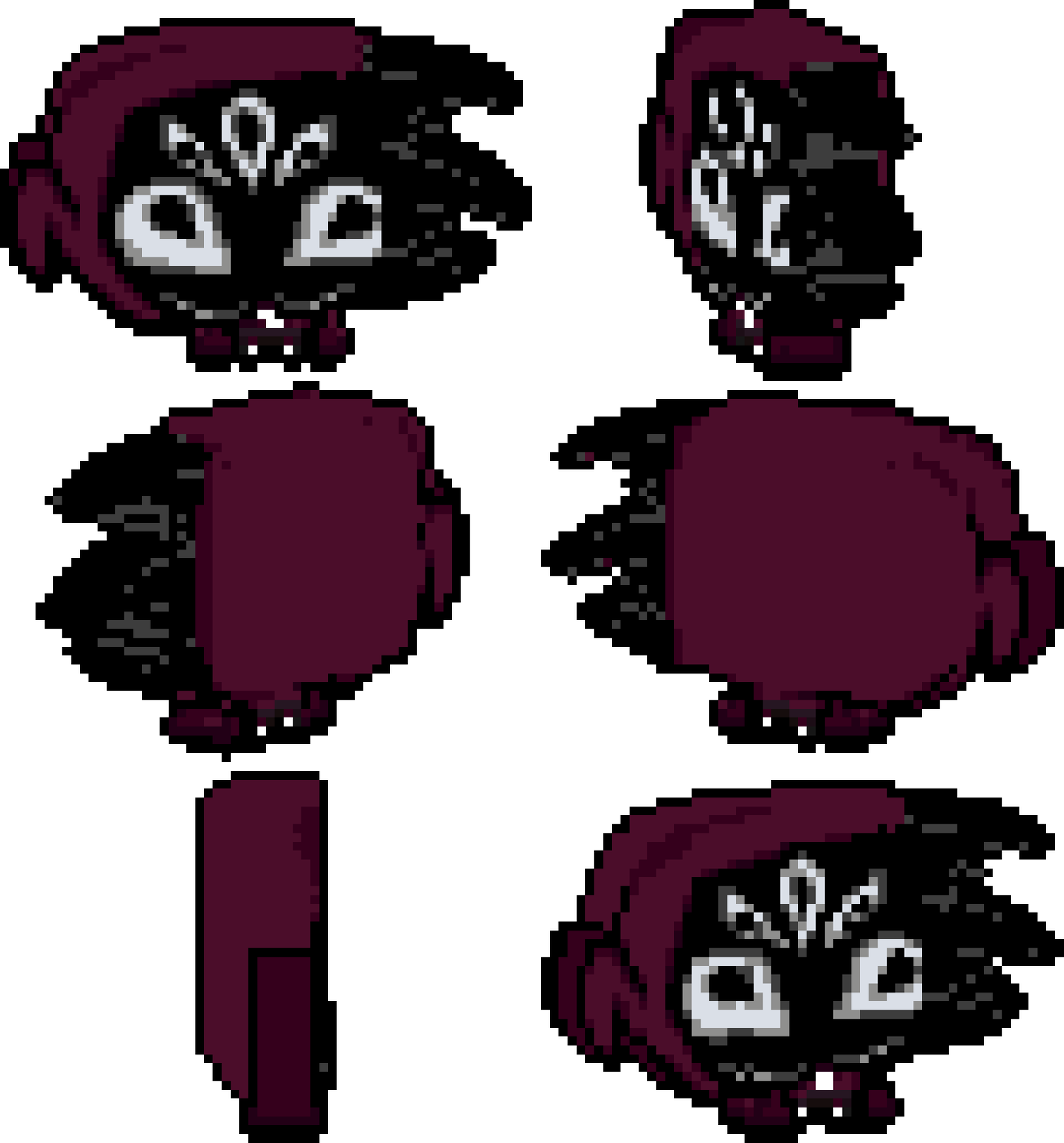
My little test render, bit flat, but again, hard to make round stuff. :)

Also I plan to use this tool for my game, so do excuse me if I sound ultra picky, haha, but sincerely, I do it out of  passion, this is a really neat tool and I'm getting the hang of it. I feel it's gonna make development time on my game a lot faster for designing vehicles (it was hard to find artists that could work on a very specific angle without often looking wrong, and the ones that did do it didn't like doing it, so the easier it is for my team, the better).

I will admit that when I first picked the tool due to all of the issues I almost gave up on it, but I am a very patient person, so I kept trying and the tool does shine when it works.


Also two more things, sorry, one is that I feel that the camera and the mouse don't feel... correct? often times you try to paint a pixel in 2d mode and it doesn't paint or it paints a wrong place? it has to do with projection.

Second thing is that, pressing the button to expand the window to full size... expands BEYOND the desktop bar? Like it fills the ENTIRE screen, which it should not -- it hides all my stuff if I hit it so I can't change apps by clicking on them, so I have to manually resize it instead. I'm on Windows 10 btw.

And again, sincerely, thank you for making this tool! I'm excited to see it improve overtime. :)

(+1)

Good Points Chillax..
It is on my roadmap to include a smooth tool... Especially in erase mode to avoid irregular chunks.
The pixel precision is an important issue that needs to be addressed. This app is very early in development and would not be easy to get to a professional level like Blender or Photoshop... My main concern is to create a tool very simple to work with, and all need to be very intuitive... I'm sorry that first encounter with Pixzels was hard... Need to investigate deeply...
My ultimate goal is to create the simplest tool to create pixelart 3d that feels as easy and natural as painting 2d pixelart.
Written down all the points and will keep working.. Many Thanks for your input :)
I would like to be able to see how people work with Pixzels and see where they get lost to understand the weak points.

Hi Chillax I try to adress all this topics:

1- Working on multi size upload mode

4-Snap view is possible to snap all sides (back, front, left, right top and bottom sides) and all the isometrics .. There is button called Lock view  that allow the user to not lock the views incase need to work on specific angles.

5- When I do implement different png sizes that popup telling the user that the png is not correct will not appear anymore. :)

9. "Can you make line mode always render the pixels it will draw? Since I noticed atm it only renders them if you move your mouse around.">>>> Sorry I do not understand this point. If u can explain further will help me out :)

13. "A bind for using a key and then using mouse wheel to increase and decrease brush size would be nice." There is a keyboard shortcut atm (numpad 1-0) to change pencil-eraser size... I might include a custom key to adjust that with the mouse wheel.

15- I notice that big sizes over 128 the app is slow and laggy... I tried several times to improve that but not much advance... I will dedicate a full day on it to improve and optimice the app to be able to create 512px size models.


The rest of the topics are on my list to do, hope I answer all your suggestions... Many thanks :)

Nice! Best of luck btw!

I tested Lock View, and it does no longer snap to inbetween angles like SW, NW, W, E, etc, but it does still snap to the top and bottom? which imo it shouldn't snap to any angle at all when disabled since one would assume it gives full free control when disabled but it doesn't.

Also I think should be named "Snap View" or "Snap to Isometric"? Using the word lock sounds like it restricts your view when in this context its more like a helper, not a "camera lock". Also maybe add a tooltip for  the right side buttons in general? It would help to make them a bit more clear.

About point 9, oki, so... Basically if you have your mouse on the model, click somewhere to draw point A, then move your mouse to another spot, point B, KEEP THE MOUSE STILL, and hold shift, it should show you the LINE it would make from point A to point B when you pressed shift.

Currently, line mode only shows you the line that would be drawn from point A to point B AFTER you move the mouse after you hold the line button, but if the mouse is completely still, it doesn't show you that line connection.


About 13, ohhh, I was unaware, but yeah, I am used to just be able to just "Ctrl + Mouse Wheel" to change pixel size, and thanks! it will be helpful. In general, the idea is to make it so the user doesn't have to mouse their mouse off where they are painting, since it can get a bit tedious to go back and forward over and over.

OH, in that note, could you make their tooltips also tell you their bind perhaps? That might also be an easy way to make things a bit nicer too, since you just hover over and see the bind it has.


Also I know this is just me being me, but if you do ever need an extra hand developing the tool, in the form of PRs,  suggestions of how to approach certain things, optimization tips (which I think you can tell I worry a lot about because it is also one of my favorite things to do when programming lol), or if you need help in general, I am willing to help as I myself develop apps, modding tools, games and tools for game development. If not, it's okey, but I figured to throw that out there. c:

(+1)

Hello Chillax :) Many thanks for your feedback :)

-working on the snap view and some of your points...
-Point 9.. You are totally right... good point thx I did not noticed that :)


-Currently I'm on a half vacation time... Want to connect via Discord? We can talk about ( efebe_ )

Heyo, of course and awesome to hear! :)

I sent you an invite btw.