Indie game storeFree gamesFun gamesHorror games
Game developmentAssetsComics
SalesBundles
Jobs
TagsGame Engines

The Contraption Bazaar Sticky

A topic by Internet Janitor created Feb 28, 2023 Views: 24,383 Replies: 197
Viewing posts 41 to 51 of 51 · Previous page · First page
(8 edits) (+3)

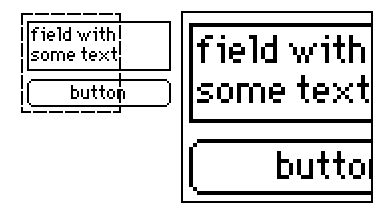
Another contraption! This one creates a pair of (configurable) canvases to magnify certain parts of your card. You can drag both of them around as you see fit.
Resize it to an area you'd like to use it on, then drag the small dashed square around to use the magnifying lens. This can help mobile users or people who are visually impaired see small components in your decks.

%%WGT0{"w":[{"name":"Magnifying Field","type":"contraption","size":[175,121],"pos":[95,37],"show":"transparent","def":"Magnifying Field","widgets":{"c":{"size":[175,121]},"z":{},"l":{},"zoom":{"size":[14,13],"pos":[158,-19]},"scale":{"size":[14,13],"pos":[138,-19]}}}],"d":{"Magnifying Field":{"name":"Magnifying Field","size":[162,106],"resizable":1,"margin":[0,0,0,0],"description":"Resizable contraption that displays large, zoomed in view within a square lens.","version":2,"script":"on set_scale x do scale.text:x end\non get_scale do scale.text end\non set_zoom x do zoom.text:x end\non get_zoom do zoom.text end\n\non view do\n card.show:\"transparent\"\n l.size:scale.text,scale.text\n l.clear[]\n l.pattern:23\n l.brush:0\n l.box[0,0 l.size]\n l.pattern:0\n z.scale:zoom.text\n z.size:(l.size-2)*zoom.text\n z.pos:3,3\n l.pos:(z.size[0]+6),3\n c.size:card.size\nend\n\non secure x do\n y:c\n x.pos:((y.pos+y.size-x.size)&y.pos|x.pos)-y.pos\nend","attributes":{"name":["scale","zoom"],"label":["scale","zoom"],"type":["number","number"]},"widgets":{"c":{"type":"canvas","size":[162,106],"pos":[0,0],"locked":1,"volatile":1,"show":"transparent","border":0,"scale":1},"z":{"type":"canvas","size":[96,96],"pos":[3,3],"volatile":1,"script":"on click pos do\n \nend\n\non drag pos do\n secure[me]\nend\n\non release pos do\n \nend","draggable":1,"scale":2},"l":{"type":"canvas","size":[50,50],"pos":[102,3],"locked":1,"volatile":1,"script":"on click pos do\n \nend\n\non drag pos do\n secure[me]\n z.clear[]\n z.paste[app.render[deck.card].copy[card.pos+me.pos+1 me.size-2]]\nend\n\non release pos do\n \nend","pattern":0,"show":"transparent","border":0,"draggable":1,"scale":1},"zoom":{"type":"field","size":[13,13],"pos":[146,-19],"locked":1,"show":"none","value":"2"},"scale":{"type":"field","size":[13,13],"pos":[128,-19],"locked":1,"show":"none","value":"50"}}}}}
Deleted 10 days ago
Deleted 10 days ago
Deleted 10 days ago
Deleted 10 days ago
(+2)

I'm really curious about this one! I think I'll need the tutorial card to really get my head around it, but I'm definitely interested in checking it out when that's ready.

Deleted 10 days ago
Deleted 10 days ago
Deleted 10 days ago
Deleted 10 days ago
Deleted 10 days ago
Deleted 10 days ago
Deleted 10 days ago
Deleted 10 days ago
Deleted 10 days ago
Deleted 10 days ago
Deleted 10 days ago
Deleted 10 days ago
Deleted 98 days ago
Deleted 10 days ago
(7 edits) (+4)

Here's some contraptions I had lying around, plus some new ones to celebrate the existence of the 1.66 Decker Gamepad interface. :3

1. Sticker

I noticed that ahmwma's deck, "Phinxel's Field Notes" had these amazingly cute stickers I wanted to use in one of my own decks, so I turned them into contraptions with attributes to change their sprites and constrain the dragging region within another widget.

%%WGT0{"w":[{"name":"Sticker","type":"contraption","size":[23,29],"pos":[240,128],"script":"on drag do\n if me.constrain\n   b:me.parent.widgets[me.constrain]\n   # 'constrain' script written Internet Janitor, from the 'rect' module.\n   me.pos:(b.pos+b.size-me.size)&b.pos|me.pos\n end\nend","show":"transparent","def":"Sticker","widgets":{"c":{"show":"transparent"},"is":{},"wc":{}}}],"d":{"Sticker":{"name":"Sticker","size":[23,29],"resizable":1,"margin":[1,1,1,1],"description":"Draggable, self-resizing  contraption that toggles between two images when pressed.\n\nCan be constrained if a widget name is provided under the 'constrain' attribute.\n\nInspired by stickers seen in 'Phinxel's Field Notes' created by ahmwma","version":2,"script":"# Code for making stickers draggable was repurposed from the 'follower' contraption found in path.deck.\n\non get_sprites do is.value end\non set_sprites x do is.value:x end\non get_constrain do wc.text end\non set_constrain x do wc.text:x end\n\non click pos do\n update_view[1]\nend\n\non drag pos do\n if !card.locked\n  card.pos:pointer.pos-c.size/2\n  c.pos:0,0\n  card.event[\"drag\"]\n end\nend\n\non release pos do\n update_view[]\n card.pos:card.pos+(0,1)\nend\n\non update_view x do\n if x then\n  i:last is.images\n else\n  i:first is.images\n end\n c.clear[]\n c.size:i.size\n c.paste[i]\n c.show:card.show\n card.size:c.size\nend\n\non view do\n update_view[]\nend","template":"on drag do\n if me.constrain\n   b:me.parent.widgets[me.constrain]\n   # 'constrain' script written Internet Janitor, from the 'rect' module.\n   me.pos:(b.pos+b.size-me.size)&b.pos|me.pos\n end\nend","attributes":{"name":["sprites","constrain"],"label":["sprites","constrain"],"type":["rich","string"]},"widgets":{"c":{"type":"canvas","size":[23,29],"pos":[0,0],"locked":1,"volatile":1,"border":0,"draggable":1,"scale":1},"is":{"type":"field","size":[18,18],"pos":[-2,-25],"locked":1,"show":"none","value":{"text":["","i","i"],"font":["","",""],"arg":["","%%IMG3ABcAHQZAgFAIKg6PyCSgyFQ6iSCX1PhEFl2prMtIfV5TKFRqywRVv2Hxdmp2stDhsUpF9kbBcdWK3k2+72Apenx9VlFSWXtSbEpXc497j4SGLiojlyOPIpsik1CVmJiPl5uTjqQhIqGhpWSnI5yrrISvm7KzrlGWt7KduaC8q75lwMGkhCx/xcHDba/MyELKu7zNR8+90UPT1KLaR8qVknRkLG5Mi4tM5k9/ZWXsVcnvIMlVSMn58UlB","%%IMG3ABcAGwZAgFAIKg6PyCSgyFQ6iSCX1PhEFl2prMtIfV5TKFRqywRVv2Hxdmp2stDhsUpF9kbBcdWK3k2+72Apenx9VlFSWXtSbEpXc497j4SGLiojlyOPIpsik1CVmJiPl5uTjqQhIqGhpWSnI5yrrISvm7KzrlGWt7KduaC8q75lwMGkhCx/xcHDba/MyEJ/ZUW9nlDUTJjNLEcsLeDg2XNk3U7h4kzlVUjpRebsSMnJSUE="]}},"wc":{"type":"field","size":[12,12],"pos":[21,-25],"locked":1,"show":"none","border":0,"style":"plain","align":"right"}}}}}


Note: I referenced the "follower" script from the path.deck module to make this contraption draggable, but I  could not reproduce the dragging behavior of the follower script without copy-pasting the exact canvas used. If you want to reproduce the steps to 'break' the follower contraption in a way that renders it undraggable, go to path.deck, specifically #followeranim, edit the follower contraption, then attempt to change the canvas script. At a glance, it doesn't look like the canvas has any scripts attached to it, so it will auto-fill with the default 'click' 'drag' 'release' functions, however, if you then save the canvas the contraption will not be draggable anymore. If you then go back and delete the entire script, it will still be permanently broken. I have found no way to fix this, other than copy-pasting the exact canvas used from path.deck.

2. Palette Storage

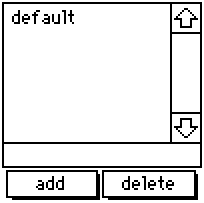
A resizable list to store and update color palettes, containing the default Decker palette when created. If you happen to change the colors in your deck manually or by importing a .hex file, you can give the new palette a name, add it to the list, then return to it any time using this contraption. If you click 'add' after specifying a name already listed, it will update that entry instead of making an entirely new one. By editing the contraption itself, you can specify more default palettes.

%%WGT0{"w":[{"name":"Palette Storage","type":"contraption","size":[100,100],"pos":[194,125],"def":"Palette Storage","widgets":{"s":{},"d":{},"t":{},"add":{},"delete":{}}}],"d":{"Palette Storage":{"name":"Palette Storage","size":[100,100],"resizable":1,"margin":[4,70,6,5],"description":"Adapted grid for storing and accessing color patterns sets.","version":1,"script":"on get_s do t.text end\non set_s x do \n t.text:x\n palz[x] \nend\n\np:32,33,34,35,36,37,38,39,40,41,42,43,44,45,46,47\n\non view do\n d.value:keys cols s.value\n w:add,delete,t,d\n w..show:card.show\nend\n\non palz x do\n if s.value[x]\n  each v k i in s.value[x]\n   patterns[p[i]]:v\n  end\n end\n card.event[\"change\"]\nend\n\non addz x do\n a:cols s.value\n a[x]:()\n each v in p\n  a[x]:a[x],patterns[v]\n end\n s.value:table a\n view[]\nend\n\non delz x do\n s.value:x drop s.value\n view[]\nend","attributes":{"name":["s"],"label":["selected"],"type":["string"]},"widgets":{"s":{"type":"grid","size":[100,22],"pos":[0,-31],"locked":1,"show":"none","value":{"default":[16777215,16776960,16737536,14417920,16711831,3539095,202,38911,43008,25856,6632960,9921846,12171705,8816262,4539717,0]}},"d":{"type":"grid","size":[100,71],"pos":[0,0],"locked":1,"volatile":1,"script":"on click row do\n v:me.rowvalue.value\n palz[v]\n t.text:v\nend","headers":0,"lines":1,"bycell":0},"t":{"type":"field","size":[100,13],"pos":[0,70],"volatile":1,"style":"plain"},"add":{"type":"button","size":[47,15],"pos":[2,84],"script":"on click do\n addz[t.text]\nend","font":"body","text":"add","style":"rect"},"delete":{"type":"button","size":[48,15],"pos":[50,84],"script":"on click do\n delz[t.text]\nend","font":"body","text":"delete","style":"rect"}}}}}

3. Gamepad Buttons

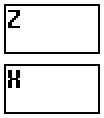
Scalable, vertical buttons that display the state of the action and cancel buttons introduced with the Decker 1.66 gamepad interface. They provide a visual interface for people without a keyboard or controller, and transmit the state of the buttons through boolean attributes 'action' and 'cancel'.  By observing the attributes of this widget instead of the global gamepad interface, mobile users or people on touch-screen exclusive devices are able to interact with elements in a deck as if they were using a keyboard.

%%WGT0{"w":[{"name":"Gamepad Buttons","type":"contraption","size":[48,55],"pos":[96,128],"def":"Gamepad Buttons","widgets":{"b1":{"size":[48,25]},"b2":{"size":[48,25],"pos":[0,30]},"handler":{},"action":{"size":[48,25]},"cancel":{"size":[48,25],"pos":[0,30]},"t1":{"size":[48,25]},"t2":{"size":[48,25],"pos":[0,30]},"locka":{"pos":[0,58]},"lockc":{"pos":[14,58]}}}],"d":{"Gamepad Buttons":{"name":"Gamepad Buttons","size":[48,104],"resizable":1,"margin":[2,2,2,2],"description":"Minimalistic, resizable buttons to add gamepad button functionality.","version":1,"script":"on get_action do action.brush end\non get_cancel do cancel.brush end","attributes":{"name":["action","cancel"],"label":["action","cancel"],"type":["bool","bool"]},"widgets":{"b1":{"type":"field","size":[48,48],"pos":[0,0],"locked":1,"pattern":12,"show":"invert"},"b2":{"type":"field","size":[48,48],"pos":[0,56],"locked":1,"pattern":9,"show":"invert"},"handler":{"type":"canvas","size":[8,8],"pos":[0,-8],"locked":1,"animated":1,"script":"t:(\"solid\",\"transparent\")\non view do\n if !locka.value\n  g1:gamepad.held[\"action\"]\n  action.brush:g1\n end\n if !lockc.value\n  g2:gamepad.held[\"cancel\"]\n  cancel.brush:g2\n end\n action.show:t[action.brush]\n cancel.show:t[cancel.brush]\nend","show":"none","scale":1},"action":{"type":"canvas","size":[48,48],"pos":[0,0],"locked":1,"script":"on click pos do\n locka.value:1\n me.brush:pointer.held\nend\n\non release pos do\n me.brush:pointer.held\n locka.value:0\nend","scale":1},"cancel":{"type":"canvas","size":[48,48],"pos":[0,56],"locked":1,"script":"on click pos do\n lockc.value:1\n me.brush:pointer.held\nend\n\non release pos do\n me.brush:pointer.held\n lockc.value:0\nend","scale":1},"t1":{"type":"field","size":[48,48],"pos":[0,0],"locked":1,"script":"on change val do\n \nend","font":"menu","show":"transparent","border":0,"style":"plain","value":"Z"},"t2":{"type":"field","size":[48,48],"pos":[0,56],"locked":1,"font":"menu","show":"transparent","border":0,"style":"plain","value":"X"},"locka":{"type":"slider","size":[8,8],"pos":[0,107],"locked":1,"show":"none","interval":[0,1]},"lockc":{"type":"slider","size":[8,8],"pos":[14,107],"locked":1,"show":"none","interval":[0,1]}}}}}

4. Gamepad Joystick

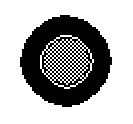
Similar to the previous contraption - except this one is meant to simulate a physical joystick. Exposes the attributes 'x' and 'y' for external scripts, observing both gamepad.dir and mouse inputs simultaneously.

%%WGT0{"w":[{"name":"Gamepad Joystick","type":"contraption","size":[100,100],"pos":[206,121],"def":"Gamepad Joystick","widgets":{"handler":{},"cir":{},"stick":{},"x":{},"y":{},"lock":{}}}],"d":{"Gamepad Joystick":{"name":"Gamepad Joystick","size":[100,100],"resizable":1,"margin":[0,0,0,0],"description":"Minimalistic, resizable joystick to add gamepad joystick functionality.","version":2,"script":"on get_x do x.value end\non get_y do y.value end\n\n# Circle drawing script provided on the Lil Playground\non view do\n card.show:\"transparent\"\n cir.clear[]\n cir.pattern:1\n c:cir.size/2           # center of canvas\n r:.7*c                    # radius of the pattern\n a:(pi/0.5*16)*range 16    # angle per wedge\n p:flip c+r*flip unit a    # points around a circle\n each x i in p\n  cir.line[x p[(count p)%1+i]]\n end\n cir.pattern:34\n cir.paste[cir.fill[0,0].copy[].map[(34,0) dict (0,1)]]\n stick.size:cir.size/2\n stick.paste[cir.copy[].scale[.5].outline[(35,32)].map[(1,35) dict (13,47)]]\n center[]\nend\n\non center do stick.pos:cir.pos+(stick.size/2) end\non stickz input do\n cntr:cir.pos+(stick.size/2)\n diff:(cir.size/2)-(stick.size/2)\n if input=\"gp\"\n  x.value:gamepad.dir[0]\n  y.value:gamepad.dir[1]\n  stick.pos:(cntr[0]+(diff[0]*x.value)),(cntr[1]+(diff[1]*y.value))\n else\n  x.value:(stick.pos[0]/diff[0])-1\n  y.value:(stick.pos[1]/diff[1])-1\n end\nend","attributes":{"name":["x","y"],"label":["x","y"],"type":["number","number"]},"widgets":{"handler":{"type":"canvas","size":[8,8],"pos":[0,-16],"locked":1,"animated":1,"script":"on view do\n if !lock.value\n  stickz[\"gp\"]\n end\nend","show":"none","scale":1},"cir":{"type":"canvas","size":[100,100],"pos":[0,0],"locked":1,"pattern":34,"show":"transparent","border":0,"image":"%%IMG3AGQAZAKEj6nL7Q+jnLTai7PevPsPhuJIluaJpurKtu4Lx/JM1/aN5/quBP4f4I2AxCJReDEql0AkhAmFOhnR6nKasGqNWMD2y0WCx0ce+fzToddpG/sdpMHh8jl7ZqfD8vMX3+7y18ciCKhSmJeCyIeymGjiyFgS+UhCaWh5OSiiiRnSufkJ+pY5esdpeiqaijbE2rr6SoYqexZbC3aLu6W7a9XrGwUcfEVLLGx8zOSqLJXcXFQKHfY83cZs3SSdHbedDcl97Q3dGK74fTjdQr7e7HccQ4y3W4dbY+/2qjYqBOqk2cVRlwOIBiIQZLBHqIQKZzGkUOUhhzISK1q8iDGjxo0cO3r8CDKkyJEkS0osAA==","scale":1},"stick":{"type":"canvas","size":[50,50],"pos":[25,25],"script":"on click pos do\n lock.value:1\nend\n\non drag pos do\n  mx:(cir.size+cir.pos)-me.size\n  if me.pos[0]<mn[0] me.pos:mn[0],me.pos[1]="" end\n="" if="" me.pos[1]<mn[1]="" me.pos:me.pos[0],mn[1]="" me.pos[0]="">mx[0] me.pos:mx[0],me.pos[1] end\n  if me.pos[1]>mx[1] me.pos:me.pos[0],mx[1] end\n  stickz[]\nend\n\non release pos do\n center[]\n lock.value:0\nend","show":"transparent","border":0,"image":"%%IMG3ADIAMgZAgHBILBqPyKRyyWw6n9CodEqtWq9YKmjL7WaZ3Jd4TOZ+j6BxY81uj0FnYrpNrzde2/P2Ze+zxXBYaXx+hXeBVXOGi3iJhIuMiFGKkJFSlJWWT5iZho1OnJ2ekkqhooWfS6anfalJq6x2rkiwsXSzaI+2o6q6u364RbW/a8FyvsR1xkPDxMtCzb/PANG709Wx09DIycWktNzd2tThzt+v5dbn6N1/6+zt40bYvFrpmfLg1vnwp3jvk8SI4tdkTyVAcY6pUQYIoKAwZBo6TNjFTMKLGDNq3Mixo5Ig","draggable":1,"scale":1},"x":{"type":"slider","size":[8,8],"pos":[25,-16],"locked":1,"show":"none","interval":[-1,1],"step":0.01},"y":{"type":"slider","size":[8,8],"pos":[39,-16],"locked":1,"show":"none","interval":[-1,1],"step":0.01},"lock":{"type":"slider","size":[8,8],"pos":[0,112],"locked":1,"script":"on change val do\n \nend","show":"none","interval":[0,1]}}}}}</mn[0]>
(+2)

These are all great! (And I'm extra happy about the sticker contraption. I love it.)

(+1)

Updated the Sticker contraption to use the same 'constrain' script as the one in the 'rect' module, which is a lot more succinct. ^^

Developer(+2)

When you update a contraption, be sure to increment the "version" property: if a user pastes a contraption snippet of a higher version than an existing definition in their deck, Decker will upgrade all the instances of that contraption in the deck.

(+1)

Sorry if the answer is obviously in the code and I just missed it, but for the Palette Storage, is there any way to switch the entire palette from one to another in Lil between cards? I keep having to replace each of the colors individually and I was wondering if this could be used for some kind of shortcut. I’m still not great at programming in Lil.

(1 edit) (+1)

Hiya! No worries - this was one of the first contraptions I made so it definitely could be made easier to operate. You can put a single Palette Storage contraption on any card and then add this to your deck script: (File > Properties > Script)

palette: cardName.widgets.paletteStorage

For the example above, I'm using 'cardName' and 'paletteStorage' as placeholder names for the card and contraption, respectively.

Then, in any other context (like the Listener, or a widget script) you can change the palette with the line: 

palette.s: "nameOnList"
(2 edits) (+4)

Standalone toolboxes for more Decker developments..!


LALC ( Look A Little Closer! 

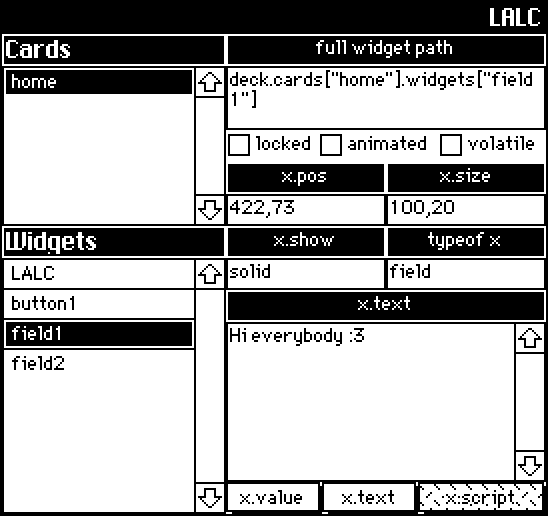
A read-only viewer that displays a list of every card in a deck, along with some general information about the widget interfaces that exist on any selected card.  Eventually I plan on having better support for canvases/grids.

%%WGT0{"w":[{"name":"LALC1","type":"contraption","size":[272,256],"pos":[114,44],"def":"LALC","widgets":{"tab4":{},"widgetz":{},"cardz":{},"c1":{},"w1":{},"t":{},"val":{},"path":{},"t2":{},"locked":{},"animated":{},"volatile":{},"p1":{},"s1":{},"pos":{},"size":{},"show":{},"sh1":{},"tab1":{},"tab2":{},"tab3":{},"to1":{},"to":{},"handler":{},"optype":{},"v1":{}}}],"d":{"LALC":{"name":"LALC","size":[272,256],"margin":[5,20,5,6],"description":"'Look A Little Closer!'\nA live, read-only viewer used to examine common attributes shared across all widgets.","version":1,"script":"on get_selected do path.text end\n\non view do\n card.show:\"transparent\"\n cardz.value:deck.cards\nend\n\non getwidgets x do\n widgetz.value:deck.cards[x].widgets\nend\n\non loadwidget do\n w:deck.cards[cardz.rowvalue.key].widgets[widgetz.rowvalue.key]\n if w.name \n  path.text:\"deck.cards[\\\"\",w.parent.name,\"\\\"]\",\".widgets\",\"[\\\"\",w.name,\"\\\"]\"\n  to.text:typeof w\n end\n if w.pos[0] pos.text:w.pos[0],\",\",w.pos[1] end\n if w.size[0] size.text:w.size[0],\",\",w.size[1] end\n show.text:w.show\n font.text:w.font\n locked.value:w.locked\n volatile.value:w.volatile\n animated.value:w.animated\n otxt:optype.text\n if to.text=\"canvas\" tab1.show:\"none\" tab2.show:\"none\" tab4.show:\"solid\" else\n tab1.show:\"solid\" tab2.show:\"solid\" tab4.show:\"none\" end\n if otxt=\"value\" val.value:w.value\n elseif otxt=\"text\" val.text:w.text\n elseif otxt=\"script\" val.text:w.script\n elseif otxt=\"encoded\" val.text:w.copy[].encoded end\nend\n","attributes":{"name":["selected"],"label":["selected"],"type":["string"]},"widgets":{"tab4":{"type":"button","size":[96,16],"pos":[112,240],"script":"on click do\n v1.text:me.text\n optype.text:\"encoded\"\nend","font":"body","pattern":0,"show":"none","text":"x.copy[].encoded","style":"rect"},"widgetz":{"type":"grid","size":[112,128],"pos":[0,128],"locked":1,"volatile":1,"script":"on click row do\n loadwidget[me.rowvalue.key]\nend","headers":0,"widths":[80,0]},"cardz":{"type":"grid","size":[112,80],"pos":[0,32],"locked":1,"volatile":1,"script":"on click row do\n\nend","headers":0,"bycell":0,"widths":[80,0]},"c1":{"type":"field","size":[112,16],"pos":[0,16],"locked":1,"font":"menu","show":"invert","border":1,"value":"Cards"},"w1":{"type":"field","size":[112,16],"pos":[0,112],"locked":1,"font":"menu","show":"invert","border":1,"value":"Widgets"},"t":{"type":"field","size":[272,16],"pos":[0,0],"locked":1,"script":"on change val do\n \nend","font":"menu","pattern":47,"show":"invert","border":0,"align":"right","value":"LALC"},"val":{"type":"field","size":[160,80],"pos":[112,160],"volatile":1,"script":"on change val do\n \nend","scrollbar":1},"path":{"type":"field","size":[160,32],"pos":[112,32],"volatile":1,"script":"on change val do\n \nend"},"t2":{"type":"field","size":[160,16],"pos":[112,16],"locked":1,"show":"invert","align":"center","value":"full widget path"},"locked":{"type":"button","size":[48,16],"pos":[112,64],"volatile":1,"font":"body","text":"locked","style":"check"},"animated":{"type":"button","size":[66,16],"pos":[158,64],"volatile":1,"font":"body","text":"animated","style":"check"},"volatile":{"type":"button","size":[54,16],"pos":[218,64],"volatile":1,"font":"body","text":"volatile","style":"check"},"p1":{"type":"field","size":[80,16],"pos":[112,80],"locked":1,"show":"invert","border":1,"align":"center","value":"x.pos"},"s1":{"type":"field","size":[80,16],"pos":[192,80],"locked":1,"show":"invert","border":1,"align":"center","value":"x.size"},"pos":{"type":"field","size":[80,16],"pos":[112,96],"volatile":1},"size":{"type":"field","size":[80,16],"pos":[192,96],"volatile":1},"show":{"type":"field","size":[80,16],"pos":[112,128],"volatile":1},"sh1":{"type":"field","size":[80,16],"pos":[112,112],"locked":1,"show":"invert","align":"center","value":"x.show"},"tab1":{"type":"button","size":[48,16],"pos":[112,240],"script":"on click do\n v1.text:me.text\n optype.text:\"value\"\nend","font":"body","pattern":0,"text":"x.value","style":"rect"},"tab2":{"type":"button","size":[48,16],"pos":[160,240],"script":"on click do\n v1.text:me.text\n optype.text:\"text\"\nend","font":"body","text":"x.text","style":"rect"},"tab3":{"type":"button","size":[64,16],"pos":[208,240],"script":"on click do\n v1.text:me.text\n optype.text:\"script\"\nend","font":"body","pattern":10,"text":"x.script","style":"rect"},"to1":{"type":"field","size":[80,16],"pos":[192,112],"locked":1,"show":"invert","align":"center","value":"typeof x"},"to":{"type":"field","size":[80,16],"pos":[192,128],"volatile":1},"handler":{"type":"field","size":[16,15],"pos":[-21,240],"locked":1,"animated":1,"volatile":1,"script":"on change val do\n \nend\n\non view do\n getwidgets[cardz.rowvalue.key]\n loadwidget[]\nend","show":"none"},"optype":{"type":"field","size":[32,32],"pos":[278,223],"locked":1,"volatile":1,"script":"on change val do\n \nend","show":"none"},"v1":{"type":"field","size":[160,16],"pos":[112,144],"locked":1,"show":"invert","align":"center","value":"x.value"}}}}}


QuickMod
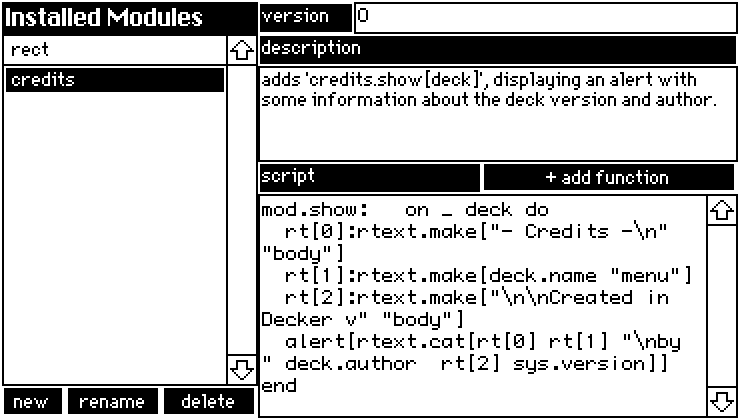
A GUI for creating simple modules and edit existing modules from within Decker - I've even provided a placeholder script for adding functions!

%%WGT0{"w":[{"name":"QuickMod","type":"contraption","size":[368,208],"pos":[69,71],"def":"QuickMod","widgets":{"mods":{},"m1":{},"v1":{},"new":{},"delete":{},"rename":{},"d1":{},"s1":{},"script":{},"description":{},"version":{},"name":{},"s2":{}}}],"d":{"QuickMod":{"name":"QuickMod","size":[368,208],"margin":[0,0,0,0],"description":"A combination viewer/editor for simple modules. \nEditing the 'data' interface must still be done externally.","version":2,"script":"on view do\n mods.value:deck.modules\n if !(count deck.modules) loadmod[] delete.locked:1 rename.locked:1\n else loadmod[mods.rowvalue.key] delete.locked:0 rename.locked:0 end\nend\n\non namecheck x do\n n:alert[\"name module\" \"string\" x]\n while deck.modules[n]\n  n:alert[\"name already in use\" \"string\"]\n end\n if !n n:\"module\" else n end\nend\n\non newmod do\n deck.add[\"module\" namecheck[]]\n loadmod[n]\nend\n\non loadmod x do\n mod:deck.modules[x]\n version.text:mod.version\n description.text:mod.description\n script.text:mod.script\n name.text:mod.name\nend\n\nmod:deck.modules[name.text]\n\non updatemod x y do\n mod[x]:y\nend\n\non renamemod do\n mod.name:namecheck[mod.name]\nend\n\non deletemod do\n if name.text\n  if alert[\"permanently delete '\",name.text,\"' module?\" \"bool\"]\n   deck.remove[mod]\n  end\n end\nend\n\non addfunction do\n r:alert[\"name function\" \"string\"]\n mod.script:mod.script,\"\\nmod.\",r,\":   on _ do \\n# script\\nend\"\nend","widgets":{"mods":{"type":"grid","size":[128,176],"pos":[0,16],"volatile":1,"script":"on click row do\n loadmod[me.rowvalue.key]\nend","headers":0,"widths":[100,0]},"m1":{"type":"field","size":[128,16],"pos":[0,0],"locked":1,"font":"menu","show":"invert","border":0,"value":"Installed Modules"},"v1":{"type":"field","size":[48,16],"pos":[128,0],"locked":1,"show":"invert","style":"plain","value":"version"},"new":{"type":"button","size":[32,16],"pos":[0,192],"script":"on click do\n newmod[]\nend","font":"body","show":"invert","text":"new","style":"rect"},"delete":{"type":"button","size":[48,16],"pos":[80,192],"script":"on click do\n deletemod[]\nend","font":"body","show":"invert","text":"delete","style":"rect"},"rename":{"type":"button","size":[48,16],"pos":[32,192],"script":"on click do\n renamemod[]\nend","font":"body","show":"invert","text":"rename","style":"rect"},"d1":{"type":"field","size":[240,16],"pos":[128,16],"locked":1,"show":"invert","style":"plain","value":"description"},"s1":{"type":"field","size":[112,16],"pos":[128,80],"locked":1,"show":"invert","style":"plain","value":"script"},"script":{"type":"field","size":[240,112],"pos":[128,96],"volatile":1,"script":"on change val do\n updatemod[me.name val]\nend","scrollbar":1,"style":"code"},"description":{"type":"field","size":[240,48],"pos":[128,32],"volatile":1,"script":"on change val do\n updatemod[me.name val]\nend","scrollbar":0},"version":{"type":"field","size":[192,16],"pos":[176,0],"volatile":1,"script":"on change val do\n updatemod[me.name val]\nend"},"name":{"type":"field","size":[16,8],"pos":[0,224],"locked":1,"show":"none","value":"credits"},"s2":{"type":"button","size":[128,16],"pos":[240,80],"script":"on click do\n addfunction[]\nend","font":"body","show":"invert","text":"+ add function","style":"rect"}}}}}
(+2)

This is so neat. 👀

(4 edits) (+6)

I would like to have some swoopy lines decorating my deck, but I do not have a graphics tablet to draw them with, and drawing large curves pixel-at-a-time can be tedious. Some graphics apps have a “curve” or “Bézier curve” tool, which is like a regular line-drawing tool except you get some extra “handles” you can move around to affect how the line bends. Decker doesn’t have a “curve” tool either, but it does have contraptions, so I made a Bézier contraption.

Edit: Version 2 changes how you set the pattern used to draw the curve, and adds the “step size” property to speed up rendering. Version 3 significantly speeds up rendering, so the “step size” is less necessary. Version 4 adds a little “pin” button in the top left to quickly hide the handles so you can see what the curve looks like without having to switch modes twice, lock and unlock.

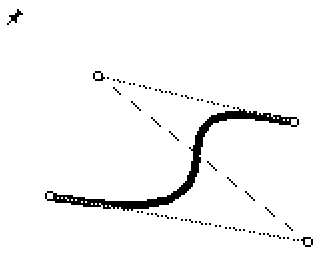
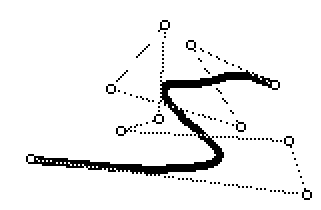
Normally, the contraption draws the curve, plus a little circle at each handle, and a dotted line connecting them so you can see which one is which. In interact mode, you can drag the handles around and see how they affect the shape of the curve.

Bezier curve with handles visible, and a little push-pin at the top left

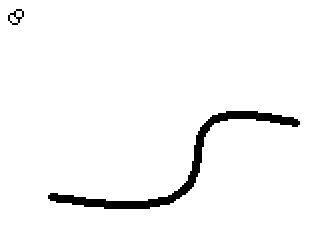
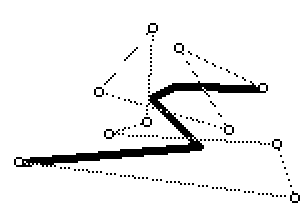
If you want to quickly see what the curve looks like without the handles, you can click the “pin” button in the top-left, then click it again to unpin:

Bezier curve with no handles visible, and the push-pin pushed in

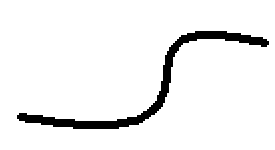
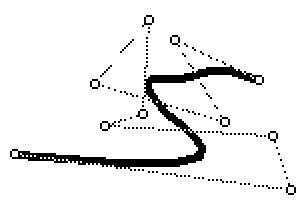
If you switch to Widget mode, lock the contraption, then switch back to Interact, the curve is drawn without the handles or the pin, and clicking won’t change the shape. You can just use this as a decoration directly, or go back into Widget mode and do Edit → Copy as Image to get something you can paste into your own artwork, or touch up with Decker’s tools.

Bezier curve unadorned

In Widget mode, you can use Widget → Pattern… to set the pattern used to draw the curve.

The properties are pretty simple: you can set the brush and set the handle coordinates specifically. You can have as many handles as you like, if you want a lot of control over the shape of the curve.

Contraption properties, listing “Brush”, “Coords” (coordinate pairs, one per line) and Step Size

If you do have a lot of handles (or make the contraption very large) it may take a while to calculate the exact position of the curve, which can make editing laggy. Here is a curve with 10 handles, and on my computer dragging one gets very laggy.

A very complicated Bézier curve

If I set the “Step size” property up to 50, the line gets very chunky, but dragging handles around becomes buttery smooth:

If I set the “Step size” back down to 10, it’s nearly as smooth as the original but still a lot less laggy:

The exact number you use depends on how fast your computer is, how big you make the contraption, how many handles you want, and what brush you use (smaller brushes make the chunkiness more visible). There’s also nothing stopping you from bumping the number up for editing, and then back down for display (or to use Copy as Image).

%%WGT0{"w":[{"name":"bezier1","type":"contraption","size":[189,137],"pos":[16,32],"show":"transparent","def":"bezier","widgets":{"canvas":{"size":[189,137]},"brush":{"size":[64,27],"pos":[205,0],"value":"2"},"coords":{"size":[96,137],"pos":[285,0],"value":{"x":[21,150,45,143],"y":[93,116,33,56]},"row":3},"sprites":{"size":[64,27],"pos":[205,55]},"stepsize":{"size":[64,28],"pos":[205,27]},"pinned":{"size":[64,28],"pos":[205,82]}}}],"d":{"bezier":{"name":"bezier","size":[80,80],"resizable":1,"margin":[0,0,0,0],"description":"Draws a Bezier curve. Use Widgets -> Pattern to set the colour, click the pin to hide the handles, lock the contraption to prevent editing.","version":4,"script":"on lerp t a b do a+(b-a)*0|1&t end\n\non bezier t ps do\n # Use lerping to combine adjacent pairs of positions\n # until there's only one left\n while 1 < count ps ps:lerp[t 1 drop ps -1 drop ps] end\n \n # Return the one that's left\n first ps\nend\n\non get_brush      do brush.data        end\non set_brush b    do brush.data:b      end\non get_stepsize   do stepsize.data     end\non set_stepsize s do stepsize.data:1|s end\n\non get_coords do\n (\"\\n\", \"%i,%i\") format coords.value.x join coords.value.y\nend\n\non set_coords t do\n coords.value:table \"xy\" dict flip \"%i,%i\" parse \"\\n\" split t\nend\n\non view do\n if !brush.data set_brush[0] end\n \n canvas.clear[]\n handles:coords.value.x join coords.value.y\n steps:ceil (max canvas.size)/stepsize.data\n canvas.pattern:card.pattern\n canvas.brush:brush.data\n canvas.line[0.5+each t in (range steps+1)/steps bezier[t handles] end]\n \n if ! card.locked\n  if pinned.value\n   # Draw the pinned sprite\n   canvas.paste[sprites.images[2] 0,0]\n  else\n   # Draw a dotted line connecting the handles in order\n   canvas.pattern:13\n   canvas.brush:0\n   canvas.line[handles]\n   \n   # Draw the handle sprite on top of each handle\n   sprite:sprites.images[0]\n   # Paste the handle sprite on top of each handle\n   each pos in handles canvas.paste[sprite pos-(floor sprite.size/2) 1] end\n   \n   # Draw the unpinned sprite\n   canvas.paste[sprites.images[1] 0,0]\n  end\n end\nend","attributes":{"name":["brush","coords","stepsize"],"label":["Brush","Coords","Step size"],"type":["number","code","number"]},"widgets":{"canvas":{"type":"canvas","size":[80,80],"pos":[0,0],"volatile":1,"script":"on click pos do\n if ! (pinned.value|card.locked)\n  best_row:-1\n  best_mag:me.size[0]*me.size[1] # an impossibly large number\n  \n  each handle i in coords.value.x join coords.value.y\n   handle_mag:mag (handle - pos)\n   if best_mag > handle_mag\n    best_row:i\n    best_mag:handle_mag\n   end\n  end\n  \n  coords.row:best_row\n end\nend\n\non drag pos do\n if ! (pinned.value|card.locked)\n  coords.rowvalue:\"xy\" dict pos\n  view[]\n end\nend\n\non release pos do\n if ! card.locked\n  # If the pointer was released in the top left 8x8 pixels...\n  if min pos < 8,8\n   pinned.value:!pinned.value\n   view[]\n  end\n end\nend","pattern":13,"show":"transparent","border":0,"scale":1},"brush":{"type":"field","size":[64,16],"pos":[96,0],"locked":1,"style":"code","value":"0"},"coords":{"type":"grid","size":[96,80],"pos":[176,0],"locked":1,"scrollbar":0,"lines":0,"format":"ii","value":{"x":[9,27,69],"y":[15,55,35]},"row":0},"sprites":{"type":"field","size":[64,16],"pos":[96,32],"locked":1,"value":{"text":["","i","i","i"],"font":["","","",""],"arg":["","%%IMG3AAUABQZAQGAoBBmHRhDyKCQGAQ==","%%IMG3AAgACAZAgBAACoCGwqKRCFIGjM9okygdOo/U5hKwxQKC","%%IMG3AAgACAZAgBAQKA6JoGSAWEyCmk8n9GkMOJ9Dq/JYXAqD"]}},"stepsize":{"type":"field","size":[64,16],"pos":[96,16],"locked":1,"style":"code","value":"2"},"pinned":{"type":"button","size":[64,16],"pos":[96,48],"locked":1,"text":"Pinned","style":"check","value":0}}}}}

Fun fact: Bézier curves are named for Pierre Bézier, the second person to discover them and use them to design more attractive vehicles at a French car manufacturer.

Developer(+2)

This looks handy!

If you referenced card.pattern from within the prototype, you could take advantage of the normal Widgets -> Pattern menu item/modal for changing line color.

(+2)

Ah, that’s really handy! Thanks for pointing it out!

(2 edits) (+4)

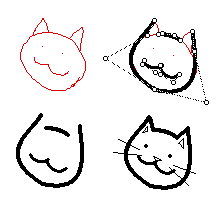
I love this!! Even though I do have an art tablet, sometimes I would rather do the work with my mouse instead. Have a Bézier kitty for your hard work:


For anyone else doing this, you can do a sweeping-select of every widget and lock them all or assign show:none/show:transparent all at once. From the listener, you can run the script 'deck.card.image:app.render[deck.card]' to flatten all visible widgets to the card background.

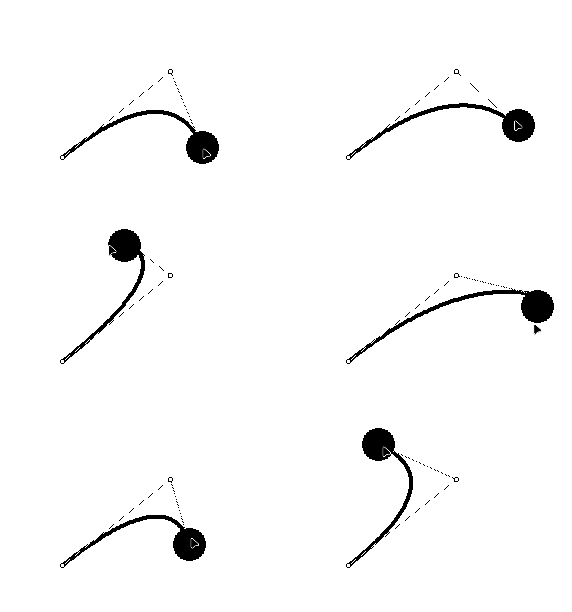
I immediately saw a future where this can be used to 'tether' other widgets or create wiring:

# this is a script attached to the black sphere, which is an animated, draggable canvas widget.
on view do
 p:"\n" split bezier.coords
 newpos:me.pos-bezier.pos-(floor me.size/2)
 p[2]:"," fuse newpos
 bezier.coords:"\n" fuse p
end

 (As a note: When using a larger contraption size / more handles on the Bézier curve,  the script profiler shoots up anywhere between 20%-70%, I didn't have any performance issues while using this on Decker native, but after adding 3 handles to a single curve, usage went up to 200%, and I wasn't able to edit it anymore. )

(+3)

Have a Bézier kitty for your hard work

Wow, thank you!

When using a larger contraption size / more handles on the Bézier curve, the script profiler shoots up anywhere between 20%-70%

Yeah, I was working on Native Decker, with only three or four handles total. Computing the curve position can be expensive (up to the square of the number of handles), and the original contraption I posted tried to do it for every pixel along the curve for maximum smoothness, so I’m not surprised it might be expensive.

(+3)

I’ve updated the contraption to version 3, which leans harder on Lil’s “conforming” to calculate the curve rendering. As a result, the ten-handle curve that was “very laggy” on my computer before (with the Script Profiler capping out at 100% CPU usage) is now smooth (capping out at 64% CPU) even at the default step-size of 2. The new version still has a step-size property, though, because somebody might want to draw an even bigger curve. :)

(+2)

I got sick of having to switch to Widget mode, lock the contraption, and switch back to see what the curve “really” looked like, then do the dance again to resume editing. Now there’s a little “pin” button in the top left to hide and disable the handles in Interact mode. Locking the contraption now hides the handles and the pin.

I also updated the rendering code to try rounding coordinates to the nearest pixel, which might make lines a bit smoother.

(+5)

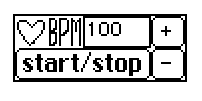
baby's first contraption. The Heartbeatizer.

will take a sound called "heartbeat", and play it continuously in the pattern of a hearbeat. It is very janky and goes regularly goes offbeat in bpms higher than 90 for some reason, but it exists and I made it!

%%WGT0{"w":[{"name":"heartbeatizer1","type":"contraption","size":[85,32],"pos":[243,155],"def":"heartbeatizer","widgets":{"timer":{"animated":1,"value":"22"},"start":{},"control":{"value":"1"},"bpm":{},"check1":{"value":"42"},"check2":{"value":"61"},"plus":{},"minus":{},"heart":{"show":"none"}}}],"d":{"heartbeatizer":{"name":"heartbeatizer","size":[85,32],"margin":[0,0,0,0],"description":"makes a heartbeat sound. bpm on the right side.","image":"%%IMG3AFUAIAKEj6nL7Q/jC9TQCsLRsnt2cRuWWaVZkd/ahaRrlqJGn+wNuSl81qiMCzp0RI7RVvMJl4iiDqVM2phU52V0zEhFVKb1daVlp92ltQmdbcrlYuLIRbK7RAX8vZ5XQ4s7OqbndWWnRaYWWNUwGHeI6PgIGSk5SVlpeYmZqbnJ2en5CRoqOkpaanqKmqq6ulAA","widgets":{"timer":{"type":"field","size":[34,16],"pos":[102,16],"script":"on view do\n   time1:floor 2520/bpm.data\n   time2:floor 3600/bpm.data\n      \n   if control.data=1\n      timer.data:timer.data+1\n      \n      if timer.data=time1\n         check1.data:me.data\n         play [\"heartbeat\"]\n      elseif me.data>time2\n         check2.data:me.data\n         me.data:0\n         play [\"heartbeat\"]\n      end\n   end\nend","value":"0"},"start":{"type":"button","size":[68,16],"pos":[0,16],"script":"on click do\n   if control.data>0\n      control.data:0\n      timer.data:0\n      timer.animated:0\n      heart.show:\"transparent\"\n   elseif control.data=0\n      control.data:1\n      timer.data:0\n      timer.animated:1\n      heart.show:\"none\"\n   end\nend","text":"start/stop"},"control":{"type":"field","size":[34,16],"pos":[102,0],"script":"on change val do\n \nend","value":"0"},"bpm":{"type":"field","size":[34,16],"pos":[34,0],"script":"on change val do\n \nend","value":"60"},"check1":{"type":"field","size":[34,16],"pos":[153,0],"value":"31"},"check2":{"type":"field","size":[34,16],"pos":[153,16],"value":"46"},"plus":{"type":"button","size":[17,16],"pos":[68,0],"script":"on click do\n   bpm.data:bpm.data+6\nend","text":"+"},"minus":{"type":"button","size":[17,16],"pos":[68,16],"script":"on click do\n   bpm.data:bpm.data-6\nend","text":"-"},"heart":{"type":"canvas","size":[17,16],"pos":[0,0],"locked":1,"show":"transparent","border":0,"image":"%%IMG3ABEAEAZAgHBILBqPyIAyUFwSA6AoiCmERqkAq5SpnQ67V+n1Ky5vn2Yxtpo+N9trdDkudyOz9jteqX/2/0NB","scale":1}}}}}
Developer(+4)

Gotta carry a bunch of stuff around in your pockets? Why not try the

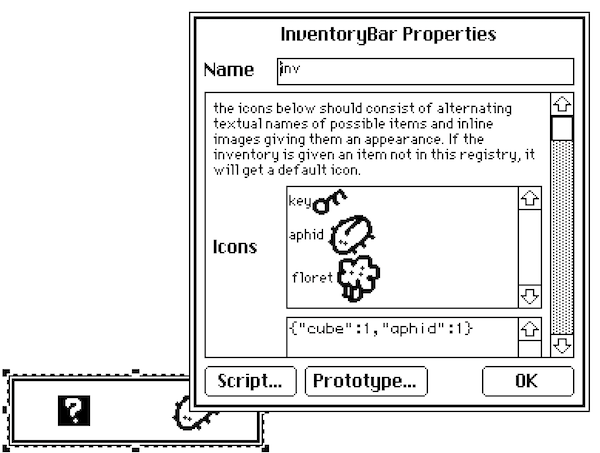
InventoryBar Contraption

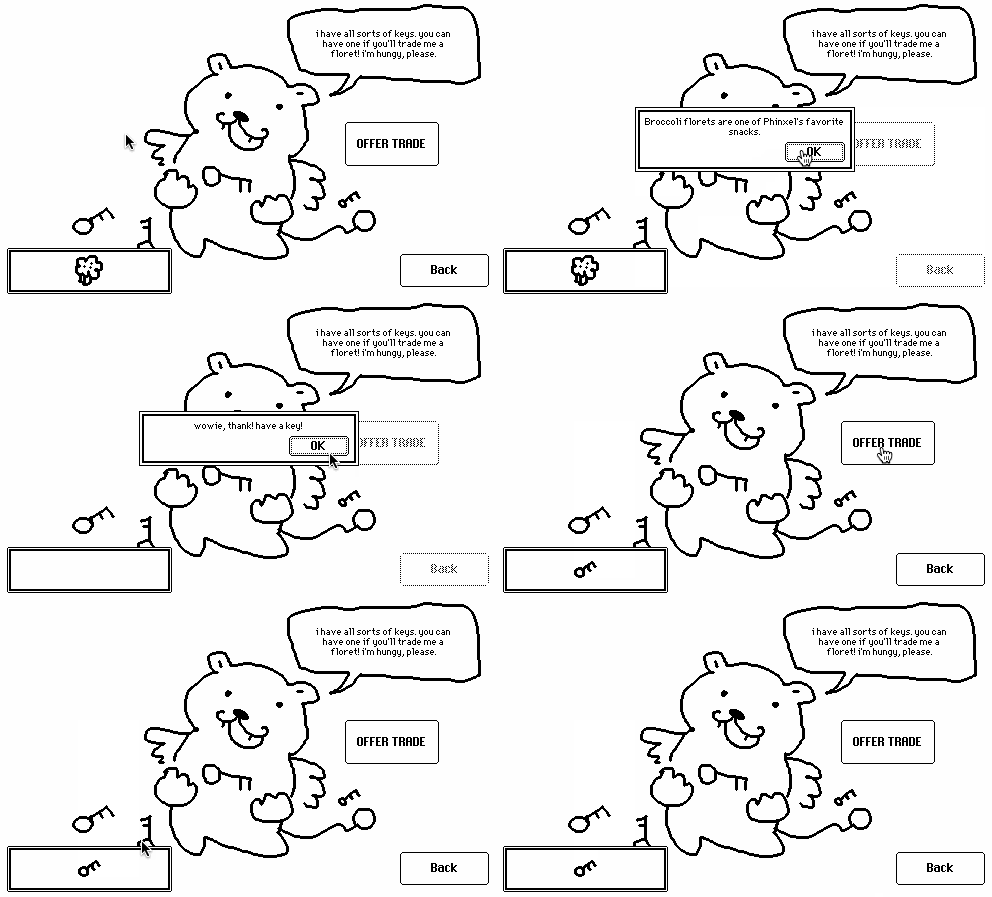
It's fair(l)y common for people making adventure games in Decker to want a way of showing some kind of inventory system on many cards. This contraption offers one possible approach which can be tweaked and customized:


The InventoryBar is a resizable rectangle that can contain zero or more horizontally-arranged icons. Every instance of this contraption in a deck must have the same name and dimensions in order to work as intended. It has several data attributes:

  • .icons is a rich-text table which associates textual names of inventory items with adjacent inline images. If you don't specify a name's icon, you'll get a default icon.
  • .items is a dictionary mapping the names of items to a boolean; if it's truthy, you have the item in the inventory.

Both of these attributes are shared across every instance of the contraption in your deck. They work by modifying values stored in the prototype, rather than in each instance. This provides the impression that every instance is displaying the same inventory. I've talked about this technique for having "singleton widgets" previously.

This contraption also exposes several functions, which are the main way you'll make it do things:

  • .animate[]: request that this contraption update itself visually; call this if you manually set .icons or .items in a script.
  • .give[name]: add the named item to the inventory.
  • .take[name]: remove the named item from the inventory.
  • .has[name]: returns a truthy value if the named item is currently in the inventory.

Here's an example of a script using these functions of an inventoryBar named "inv" for a simple "puzzle" interaction:

on click do
 if inv.has.floret
  inv.take.floret
  alert["wowie, thank! have a key!"]
  inv.give.key
  alert["(monch monch)"]
 else
  alert["come back when you have a floret, okay? i love you."]
 end
end


Note that this takes advantage of the fact that in Lil inv.has["floret"] is equivalent to inv.has.floret. Your life will be easier if your items use names that don't have spaces or punctuation marks in them!

If you click an item in the inventoryBar it will emit a "use" event that specifies the name of the item you clicked; The demo above has a deck-level script that describes items when they're clicked, but you could use this event to "activate" items, if you like!

on use name do
 descs:raze insert k v with
  "key"    "A weird, rusty little key."
  "aphid"  "A juicy aphid. Fairies love eating these."
  "floret" "Broccoli florets are one of Phinxel's favorite snacks."
 end
 alert["I have no idea what this is." unless descs[name]]
end

Here's the contraption itself:

%%WGT0{"w":[{"name":"inv","type":"contraption","size":[165,46],"pos":[14,288],"def":"inventoryBar","widgets":{"i":{"pos":[299,-25]},"h":{"size":[100,49],"pos":[299,3]},"c":{"size":[159,40]},"deficon":{"pos":[301,79]}}}],"d":{"inventoryBar":{"name":"inventoryBar","size":[17,17],"resizable":1,"margin":[5,5,5,5],"description":"A horizontal inventory bar which can gain and lose items over the course of a game. All instances share their state.","version":1,"script":"on get_icons   do card.def.widgets.i.value end\non set_icons x do card.def.widgets.i.value:x end\non get_items   do card.def.widgets.h.data end\non set_items x do card.def.widgets.h.data:x end\n\non click pos do\n i:get_items[]\n if count i\n  cw:floor c.size[0]/count i\n  ii:floor pos[0]/cw\n  card.event[\"use\" (keys i)[ii]]\n end\nend\n\non view do\n local ic:get_icons[]\n local ik:extract trim text where  \"\"=arg from ic\n local iv:extract arg       where !\"\"=arg from ic\n local m:ik dict iv\n local i:get_items[]\n local cw:floor c.size[0]/count i\n c.clear[]\n each name ix in keys i\n  local icon:deficon.copy[] unless m[name]\n  local pos:((cw*ix+.5)-.5*icon.size[0]),(.5*c.size[1]-icon.size[1])\n  c.paste[icon pos]\n end\nend\n\non get_innercanvas do c end\non view_all do\n view[]\n local i:c.copy[]\n local n:card.name # all instances must have the same name!\n deck.cards..widgets[n].innercanvas.paste[i]\nend\n\non get_animate do view_all end\non get_give    do on give  x do i:get_items[] i[x]:1 set_items[i] view_all[] end end\non get_take    do on takei x do i:get_items[] set_items[x drop i] view_all[] end end\non get_has     do on has   x do get_items[][x]                               end end","template":"on use name do\n \nend","image":"%%IMG3ABEAEQZAQGBILBqFoKRyyRyCjFCnlEkNPK1W6hKL1W6vT6+SGxaHp2ZyVqw2n7tp8NrbjkujRrB7LMRDAUE=","attributes":{"name":["icons_exp","icons","items"],"label":["the icons below should consist of alternating textual names of possible items and inline images giving them an appearance. If the inventory is given an item not in this registry, it will get a default icon.","Icons","Items"],"type":["note","rich","data"]},"widgets":{"i":{"type":"field","size":[100,20],"pos":[151,-25],"show":"none","value":{"text":["key","i","\naphid ","i","\n floret ","i"],"font":["","","","","",""],"arg":["","%%IMG0ABcAEQAAYAAA8AAD+AAHuAAfHAA/Hg9/DD/3AH/ngPHjwODhgODgAODgAPDgAH/gAD/AAA8AAA==","","%%IMG3AB8AGgZAgHBILAoDyKRxyQQkn89mE0pVSo/VgDN7rYK+ULCVGf6CymItOWlOB9ppo/YJp8PP4y27vr/j1Vh9aX5teXp8SIRmhoJ/im5EjY6PjIl3b5RQQ5KPblGHnYhqSIGYZ6GfkXZspqJrlqeNVFOwi6KpcrW3gbSthbiAS3a/hld6WbjGx7PFyrObykE=","","%%IMG3ABwAHwZAgHBIJAaOyEBxyRQmn00nFPCsMqtVkHaLXGKf23C3iAyDkmbt2Hg0l9PnKbXtrqut8wBcTI9D0Xtqe11ggoFuX3d6XIGJjFx9iICHi4qKb4d8X5FplZdJeY2ccpOemJpsWZadR2RYl6xKrpucfldtm5K3emC0TWWYm1HAfV/DxJVrUVKqtsupgKDPXsbT1HjW163ZQQ=="]}},"h":{"type":"field","size":[100,20],"pos":[151,3],"show":"none","value":"{}"},"c":{"type":"canvas","size":[11,11],"pos":[3,3],"locked":1,"show":"transparent","scale":1},"deficon":{"type":"canvas","size":[21,20],"pos":[153,50],"locked":1,"show":"none","border":0,"image":"%%IMG3ABUAFAbAgHBILBqPyOQQxGyClEunExqQSqFNYla5FXaTzyiTKv5yr+Sqmbpmj9NauJw9977n4bqeGgQ=","scale":1}}}}}

There are innumerable possible alterations and additional features intentionally left out of this contraption; go ahead and make your own variations!

  • Configurable background images (you can just edit the prototype and its margins to do this!)
  • Item counts (you'd need to come up with a way to display the counts, and probably make many other tweaks!)
  • Animated items (more complicated .icons and view[] implementations)
  • Drag-and-drop stuff with items (this can get really complicated! beware!)
  • etc!

Go nuts.

(3 edits) (+3)

Let's chat about

chatWindow

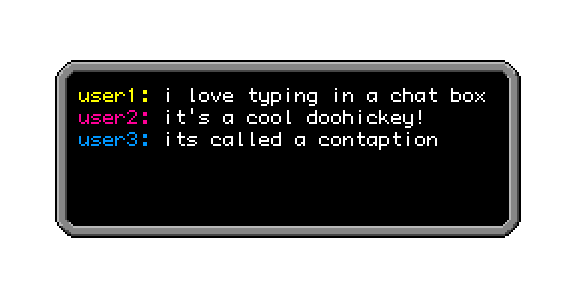
This is a contraption that I made for a thing I did recently. It's a resizable window intended for chat logs, with white monospaced text on a black background.


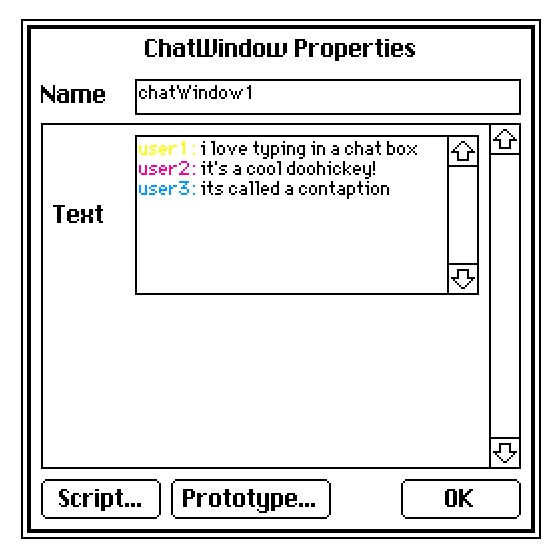
The text shows up in black when you edit it, but if you change the color of the text it will be reflected in the window.


You can change the border if you like by just redrawing it on the prototype, but if you change the size of the border you might have to change the margins and/or resize the text field.

It doesn't have a scroll bar so... try to make the text fit in the box.

Inspired by Internet Janitor's macWindow and Faffotron's modification.

%%WGT0{"w":[{"name":"chatWindow2","type":"contraption","size":[48,48],"pos":[206,219],"def":"chatWindow","widgets":{"field":{}}}],"d":{"chatWindow":{"name":"chatWindow","size":[48,48],"resizable":1,"margin":[16,16,16,16],"description":"Industrial-looking chat window.","version":1,"script":"on get_field do field end\non get_value do field.value end\non set_value x do field.value: x end","image":"%%IMG3ADAAMAZAgHAoDBiPyKRyiSQ6nUaWdEqtWq9U4xMqbXm/4LB4DJYGtsUuec0Wm7cBVntO97LOxHjYxe/7/4CBfGF3Q3FyXy5Mi4xHLmWKaWCKjZVMj4lnepmWnUqIXpSglJ6lR6NRnKamqJstpKuera2xspy0tZazqrmVu6G9nb+vwbq3vMVMw7DJS8vNjM/QysfA087VxNef2czbrqLI39Lfp93lSOTo6uXs4+foqda47fDx7tv41/rT/ND+zQAmG6atXiYArlrceXcQoRo7+SZFKoLpC5aLGKfswWOoYp2PYiZCGQSyJB+OTwKQLEnnJBpDKgXJnOlHy8s839AEAQ==","attributes":{"name":["value"],"label":["Text"],"type":["rich"]},"widgets":{"field":{"type":"field","size":[28,28],"pos":[10,10],"locked":1,"font":"mono","pattern":0,"show":"transparent"}}}}}
(8 edits) (+5)

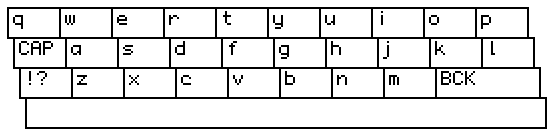
Some alternative input options! Both are resizable, and you can configure a sound to play when they are interacted with. :3


All keys are configurable, but there's currently no way to type text anywhere but the very end of the field.

On-screen Keyboard

%%WGT0{"w":[{"name":"Screen Keyboard","type":"contraption","size":[272,64],"pos":[143,47],"script":"# define the text field widget that events should be sent to:\ntf:outz\n\non click x do\n if ((me.alt)&(x=\"B\"))|((!me.alt)&(x=\"<\")) \n  tf.value:rtext.span[tf.value 0,rtext.len[tf.value]-1]\n elseif ((me.alt)&(x=\"S\"))|((!me.alt)&(x=\"?\")) me.alt:!me.alt\n elseif (!me.alt)&(x=\"^\") me.caps:!me.caps\n else tf.value:rtext.cat[tf.value x] end\nend","def":"Screen Keyboard","widgets":{"c":{"size":[272,64],"image":"%%IMG3ARAAQAKMj6nL7Q+jnLTai7NmoPsPBOBIkmKJmun6nezqvmgsq/V847m9g/T46wV3w1zxFjumlDLmK9kLRX3TFqzqcbK0V6w0G+UuvV+sWGfuhg7EjujddhuE7jVdPjfW90j+uQzYh3eHcKfj8ncCl+gXl8cIRhgpiBjHp1cGWYl5OFmjKKVZiPln5Ul5+tTIGfi5inrZ1LWJCkdaBToFJRmr+pUn2Cub6Zi6pTYabMuZ7NoaLGfZPGwHKey7VqrIZlnyY41LVgokTs6qW+6VG6Zm3I6unp422A0/Pz9+7X7OHu9/H+5fQID2vMkbiLCgwn4EGSZ0yOOhIYn1IFqcuBDjRVMNNXqs+JFfSGgZQbbYgDKlypUsW7p8ieHdRpEmadokORPnSGdouGXDEyQfx4fg7Nx0JnRXsYLjlKxbBtVcx4rgmqZLehWh1TGBKtGaNA1b2GNApQFT5hNpWp7PfK2DtrXTSTZjny7t95VaW7J53e5Ds3dWYK76ZFLpCuaIXWZnkf41+FjuYBt9yRbmupZtXMheE2OOxk9TZKmTOY8+XLnd1reac2Z65LnnMrWNqY1VzfD258sRV58eWhsb5KlH9ZYMXROua+Ouhf4mTLG42OCWA1IXflzn0OxsuTPf+T159+XYSXsvDx69+PDSq593b548/PTz16tvb9h+/eeA3+fHD51/Acr3n3ZZwIRgggouyGCDFhQ4Hn0QsmdghRHqR8Z+lyRx3XYEDijhbh/2h5dP3KQmUG9gaXghgCTyMuJw1sUWCm/cKeWhOQncZU1mftmImo98GUWKkILVQcNsGeYIXHwRlSaVksOgKJloQJoC2y1S8nWiD86xiCOUYbYGoyFbDnllJFSadqaISrZ50JO52QOnZGZCiRp/v+gJSp2U0WjLly82yaSOulVpVocyrmakm8X4aSgwXaZpoaCWxhmjnCEO6uKSmhZqIYUthnofqSyK6imYmG4qo4CcmjphqamqmmKmTmIIIq6vjjorhJfWyuqnnQoLa6690kpcsbuiKiuzpzZ7LLHZOEhttdZei60Ey0bLbbfefguut0UIGm655p6Lbq/jpstuu+6+q+628M5Lb73trmtvvvruey6+/P4LcMCrUipwwQb/6+/BCi9scMIMPwyxvQ5HTHHF6E5sccYaR4vxxh5/TBy5II+8ccckn4yysNmuzHLLLrOUcswyz0xzzTbfjLMXBQA="},"caps":{"value":0},"alt":{},"storage":{"size":[9,8]},"altkeys":{"size":[113,8]},"cnoise":{"size":[89,8],"pos":[18,-16]},"clickhold":{"size":[114,9],"pos":[158,-16]},"current":{"size":[9,8],"pos":[141,-15]}}}],"d":{"Screen Keyboard":{"name":"Screen Keyboard","size":[241,64],"resizable":1,"margin":[0,0,0,0],"description":"Resizable on-screen keyboard that can be used as an alternative to the default.\n\nMust be populated with script for full functionality.","version":1,"script":"on view do renderz[] end\n\non get_caps do caps.value end\non set_caps x do caps.value:x renderz[] end\non get_alt do alt.value end\non set_alt x do alt.value:x renderz[] end\non get_cnoise do cnoise.text end\non set_cnoise x do cnoise.text:x end\n\non renderz do\n c.clear[]\n c.size:card.size\n if get_alt[]\n  keyb:\"W\" split altkeys.text\n elseif get_caps[]\n  keyb:\"QWERTYUIOP\",\"^ASDFGHJKL\",\"?ZXCVBNM<\",\" \"\n else\n  keyb:\"qwertyuiop\",\"^asdfghjkl\",\"?zxcvbnm<\",\" \"\n end\n kwh:10,4\n cellsize:floor ((c.size[0]/kwh[0])-1),(c.size[1]/kwh[1])-1\n input:()\n each r ri in keyb\n  each ch chi in \"\" split r\n   if !get_alt[]\n    if ch=\"?\" ch:\"!?\"\n    elseif ch=\"^\" ch:\"CAP\"\n    elseif ch=\"<\" ch:\"BCK\" end\n   else\n    if ch=\"S\" ch:\"ABC\"\n    elseif ch=\"B\" ch:\"BCK\" end\n   end\n   xy:((chi*cellsize[0])+3*ri),(ri*cellsize[1])\n   if (ch=\"BCK\")&!get_alt[] cellsize[0]:cellsize[0]*2 end\n   if (ch=\" \") cellsize[0]:c.size[0]-10 end\n   c.box[xy cellsize+1]\n   xy[0]:xy[0]+3\n   input[r[chi]].pos:(xy)\n   input[r[chi]].size:(cellsize)\n   c.text[ch xy]\n  end\n end\n storage.value:table input\nend\n\non inside p r cellsize do\n min(p>r)&(p<r+cellsize)\nend\n\non clickz pos do\n input:cols storage.value \n each v k in input\n vpos:v[0].pos\n vsize:v[0].size\n  if inside[pos vpos vsize]\n   vpos[0]:vpos[0]-2\n   vpos[1]:vpos[1]+1\n   c.invert[vpos vsize-1]\n   play[get_cnoise[]]\n   current.text:k\n   card.event[\"click\" k]\n  end  \n end\nend\n\non startholdz do clickhold.animated:1 end\n\non endholdz do\n clickhold.animated:0\n clickhold.value:0\nend","template":"# define the text field widget that events should be sent to:\ntf:placeholder\n\non click x do\n if ((me.alt)&(x=\"B\"))|((!me.alt)&(x=\"<\")) \n  tf.value:rtext.span[tf.value 0,rtext.len[tf.value]-1]\n elseif ((me.alt)&(x=\"S\"))|((!me.alt)&(x=\"?\")) me.alt:!me.alt\n elseif (!me.alt)&(x=\"^\") me.caps:!me.caps\n else tf.value:rtext.cat[tf.value x] end\nend","attributes":{"name":["caps","alt","cnote","cnoise"],"label":["caps lock enabled","alt characters enabled","(optional) noise to play[] when clicked",""],"type":["bool","bool","note","string"]},"widgets":{"c":{"type":"canvas","size":[241,64],"pos":[0,2],"locked":1,"script":"on click pos do startholdz[] clickz[pos] end\n\non release do endholdz[] renderz[] end","font":"mono","border":0,"image":"%%IMG3APEAQAKMj6nL7Q+jnLTaizPYvIcOhuInliFppgCqlmx7wuYrc3S94rHupeiBI/1qQgRxYzyukjChTTmUsW4+myGIBCpdyKe0C26GsbmxaqpzmqvldgtNjorb1BFb/g7Xd/uZfus2h3f29+UFdZhHB8iXSLhoyCSoZbj2mNMHohbIZnnneEc5xwUpiInIs5mZuNoD+jjYyQn7Stqq+elpt8QbyVMW61crrGs7vFO8G2yc2imquKwsSZvsWo17vLt068ZNd4WaJntNTvo7yyh+jl756419vvdu7b7OPlq/Pp99mR8/ru6fPnv7ymnzh7DZQGIJAzYkIzDiw3QQJxpEZhGfQokbMyri6BBjx5EhS1YkedIkxZVZMrh8CTOmzJk0ay4AmDInS40q26Hc+THjD3DbWsIpuuUZLKWhmJpzyuwePH5eojX6CWaI1kOqwt3q6kuhVWxj6ZVTw22TzqzwPsgBa0osVbZy60o1e7dqXlfz5JlJsA0O4EpQlc0FVvgqUWjTAH7NYnctsLaz4AY9WyiuurJ6MZeCtrdzz8ldtl4NbZka6ot0V39W/Zh02NFDu95I7WwxY92qISYme7h2nOBGY5vz2A8rT8mXRzdnnnyq8udAo0PHWR27T9oEuy8EeZ3hdOvZxUt3Tn57+OPjtS8vz/78+oPtzc8Xid49dfWH6ee3D59/98kXIH6S2YRgggouyGCDhRUUmoAFEshfhe9ZaM+F3XjAG1+NCcOZHh2CSFxgw3kWImJEaZFiehtmhp9xbp3oWoq4gajWUr1oNmNprAE4xm3ipYVXb14d6UuPpigJmo89QGggK1EG6ZA3ORIWYREjMrPlabEl8UKXQpnVR4tU0uhbljDChiSPgTCZ4T0QXjkKnGy2Y+WaudRYommnROjiUcloKSZfJSKF52a/GYpin5Sw2J97c3oH3oRFWhophXHuB6imnH7qIqj6hUrqpvFdimGpQGoo6qqtnmoqp5N+h9yotrqqKqyxSkpprbjeqiuruUq466qzVpoqsMQKq+yUxS7rYLTSTkvttL8+i2222m7Lba+edgtuuOKOW2wdUJKLbrrqgmvuuu6+C6+67cZLb732xjrvvfruy6925/YLcMDZ5itwwQbLe+3BCi8cJ8EMPwzxpg5HTHHFLP1rccYCT6xxxx1z7HHIFJtbbckmn4zyAyKvzHLLLr8Mc8wVFwA=","scale":1},"caps":{"type":"button","size":[8,8],"pos":[-15,56],"locked":1,"show":"none","style":"check","value":1},"alt":{"type":"button","size":[8,8],"pos":[-15,41],"locked":1,"show":"none","style":"check","value":0},"storage":{"type":"grid","size":[8,8],"pos":[0,-16],"locked":1,"volatile":1,"show":"none"},"altkeys":{"type":"field","size":[100,8],"pos":[-1,69],"locked":1,"show":"none","value":"+=/_<>[]`~W-@#$%^&*()WS'\":;!?,.BW "},"cnoise":{"type":"field","size":[79,8],"pos":[16,-16],"locked":1,"show":"none"},"clickhold":{"type":"slider","size":[101,9],"pos":[140,-16],"locked":1,"volatile":1,"script":"on view do\n me.value:me.value+1 \n if me.value=me.interval[1] card.event[\"click\" current.text] end\nend","show":"none","interval":[0,30]},"current":{"type":"field","size":[8,8],"pos":[125,-15],"locked":1,"volatile":1,"show":"none"}}}}}

Has .noetc attribute to enable/disable drawing the pound sign and asterisk.

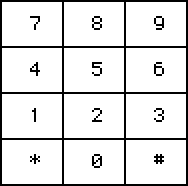
On-screen Numpad

%%WGT0{"w":[{"name":"Screen Numpad","type":"contraption","size":[94,93],"pos":[336,143],"script":"# define the text field widget that events should be sent to:\ntf:outz\n\non click x do tf.value:rtext.cat[tf.value x] end","def":"Screen Numpad","widgets":{"c":{"size":[94,93],"image":"%%IMG3AF4AXQKMj6nL7Q8jArTaizMNuvvKfSJmjCZ4nmEqlmz7wrHnztpqk/mN76h/6QFrwE3RIvQRi8ldM7fsJD5PUlRnOrSqN2r2J/0aadwMtzwGnMVqKhopG2m9cjAvhX6v1tm59J1Gw8aH51YYt1UG6Pd3ZMfkuAGoEtkWeeVUOdmn2Xm5WXepCYoI+enpSGooypoq8QobK/uKeqRKVmvqmjs0yqvk22obnPrrdBsmzLSp2MdopoKJNCn9mBxaivvVLPcM3V0tKcZ9eE1n2QgeDkp4fsac3RX4HffOQp4Yz6OILF98qqwXwH8EbfWjN2xgwoLLjEEhtjBiw4DAPs26iDEjBIc2DlrhOMNjEJFwKB4DGYMkCJXzBO4y+VChLolDqGHLdw6ntm43BbUMMmgVG5/l/FHa2dNoUiychC5l+hToPaf6pEa16o5qTnNkvGF1ww/lC5ZqyJqFODNtTbFTZbqkqeQszI5yGa6dG3KUxr18M7ItOtFuxZeCM7kdDPck3pRo36qN+/co4avW/uDzErYOh3ZEOVtetygcOjrrKGWGsXlrmNREwYIGrDSd59Vb2O5RDXnxyst3C8ec/NgwcMfEc/vu2BhxcCh1EzOPPDSwc+QW+1q//qAA"},"storage":{"size":[10,8]},"noetc":{"size":[10,8],"pos":[19,-16],"value":1},"cnoise":{"size":[94,8],"pos":[1,99]},"clickhold":{"size":[113,9],"pos":[18,-32]},"current":{"size":[10,8]},"chenable":{"pos":[137,-31]}}}],"d":{"Screen Numpad":{"name":"Screen Numpad","size":[79,80],"resizable":1,"margin":[0,0,0,0],"description":"Resizable on-screen numpad with optional asterisk and pound signs.\n\nMust be populated with script for full functionality.","version":1,"script":"on view do renderz[] end\n\non get_noetc do noetc.value end\non set_noetc x do noetc.value:x renderz[] end\non get_cnoise do cnoise.text end\non set_cnoise x do cnoise.text:x end\non set_chenable x do chenable.value:x end\non get_chenable do chenable.value end\n\ncellsize:floor (c.size[0]/3),(c.size[1]/4)\non renderz do\n c.clear[]\n c.size:card.size\n cellsize:floor (c.size[0]/3),(c.size[1]/4)\n nump:\"789\",\"456\",\"123\",\"*0#\"\n if !noetc.value nump[3]:\" 0 \" end\n input:()\n each r ri in nump\n  each ch chi in \"\" split r\n   xy:((chi*cellsize[0])),(ri*cellsize[1])\n   c.box[xy cellsize+1]\n   xy[0]:xy[0]+3\n   input[r[chi]].pos:(xy)\n   input[r[chi]].size:(cellsize)\n   c.text[r[chi] xy+(cellsize/2)-(c.textsize[r[chi]]/2)]\n  end\n end\n storage.value:table input\nend\n\non inside p r cellsize do\n min(p>r)&(p<r+cellsize)\nend\n\non clickz pos do\n input:cols storage.value \n each v k in input\n vpos:v[0].pos\n vsize:v[0].size\n  if (inside[pos vpos vsize])&!k=\" \"\n   vpos[0]:vpos[0]-2\n   vpos[1]:vpos[1]+1\n   c.invert[vpos vsize-1]\n   play[get_cnoise[]]\n   current.text:k\n   card.event[\"click\" k]\n  end  \n end\nend\n\non startholdz do clickhold.animated:1 end\n\non endholdz do\n clickhold.animated:0\n clickhold.value:0\nend","template":"# define the text field widget that events should be sent to:\ntf:placeholder\n\non click x do  tf.value:rtext.cat[tf.value x] end","attributes":{"name":["noetc","cnote","cnoise","chenable"],"label":["draw asterisk and pound sign?","(optional) noise to play[] when clicked","","enable click hold function."],"type":["bool","note","string","bool"]},"widgets":{"c":{"type":"canvas","size":[79,80],"pos":[0,0],"locked":1,"script":"on click pos do startholdz[] clickz[pos] end\n\non release do endholdz[] renderz[] end","font":"mono","border":0,"image":"%%IMG3AE8AUAKMj6nL7Q8NmLTaWwPeHOgOUlIYfmRnntuori2XvlksT3R9y2wt8lb+2q0QrpIwQzrAgJgc09ZrlqKXI6p4hUpBJucTiUVZtVnP8MT8dsPL8bhahlF/LS863pYbge+6D/zn8ZUUSPbXpzI4VYh4x1goCKnIJTmJx2O5JLnJGOH5CRqawBmYefaIWmq6VVpJeuiaCtuZqCemxHqrmcS3eAnHNajRG/ymhtukZkhXm4tlV+zm58wKTchWjQ1sltxMnUxcvNsq69N4Ta76ah6bPqtejtn+Tm++ul2PKbrP33/umw/HPWbu7K2TRysejnnsFOpQlIZXOF2ngv0i6MSXNUq20BH0OMORtpHcjIzjSPIjPoAhQapMWdLWxovLwEnbc7JhQX0HFybc6RMeUB0MEQ4NMhBQwIc9iXbyBzWqg6ZBigZdipTqNKFYtx5KOkfnV60ijFl1Wibjz65abnIV62IYTDRga1b5oPatUZlzeZG1YXYt3L0GHVYVTDixwL8uFxv2WvgoZJ6PvR0qAA==","scale":1},"storage":{"type":"grid","size":[8,8],"pos":[0,-16],"locked":1,"volatile":1,"show":"none"},"noetc":{"type":"button","size":[8,8],"pos":[16,-16],"locked":1,"show":"none","style":"check"},"cnoise":{"type":"field","size":[79,8],"pos":[1,86],"locked":1,"show":"none"},"clickhold":{"type":"slider","size":[101,9],"pos":[15,-32],"locked":1,"volatile":1,"script":"on view do\n me.value:me.value+1 \n if (me.value=me.interval[1])&(get_chenable[]) card.event[\"click\" current.text]\n end\nend","show":"none","interval":[0,30]},"current":{"type":"field","size":[8,8],"pos":[0,-31],"locked":1,"volatile":1,"show":"none"},"chenable":{"type":"button","size":[8,8],"pos":[122,-31],"locked":1,"show":"none","style":"check"}}}}}
(5 edits) (+2)

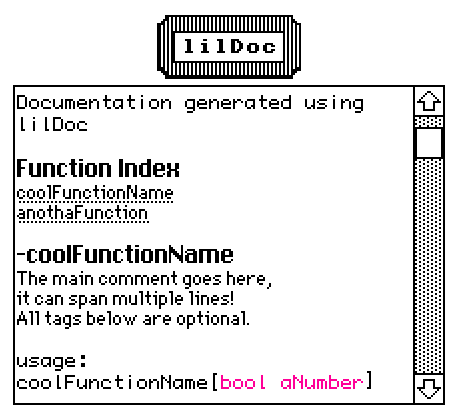
lilDoc

 A mini, Decker-fied documentation utility inspired by YUI/JSDoc. Add comments to your scripts, and this contraption will be able to generate documentation for their functions automatically. You can create multiple widgets and/or download the formatting guide by clicking on the 'lilDoc' button.

%%WGT0{"w":[{"name":"lilDocFactory","type":"contraption","size":[72,32],"pos":[211,52],"script":"###\n# Displays the 'alert' modal with information about lilDoc and a list of options.\n#\n# @function menuz\n# @return {Dictionary} menu_option A dictionary containing functions.\n##\n\n###\n# Find every formatted comment within a script, then generate documentation.\n#\n# @function gendocz\n# @param {String} x The script to search.\n# @param {String} y The name of the interface that contains the script.\n##\n\n###\n# Create, format and populate a field widget with generated documentation.\n#\n# @function genwidgetz\n# @param {Dictionary} x A dictionary generated with gendocz[]\n# @param {String} y The name provided to gendocz[], used as the title for the documentation.\n##","show":"transparent","def":"lilDocFactory","widgets":{"main1":{},"main2":{},"main_alert":{},"format_guide":{},"fieldscript_template":{}}}],"d":{"lilDocFactory":{"name":"lilDocFactory","size":[72,32],"margin":[5,5,5,6],"description":"Generates documentation for any script available within a deck, using specially formatted comments. ","version":2,"script":"on view do card.show:\"transparent\" end\n\n# Assigning all the different menu options to a dictionary...\nmenu.ds:on x do gendocz[deck.script deck.name] end\nmenu.cs:on x do gendocz[deck.card.script deck.card.name] end\nmenu.sw:on x do\n w:alert[\"Select Widget\" \"choose\" deck.card.widgets]\n gendocz[w.script w.name]\nend\nmenu.sm:on x do\n w:alert[\"Select Module\" \"choose\" deck.modules]\n gendocz[w.script w.name]\nend\nmenu.fg:on x do write[format_guide.text] end\n\non menuz do\n d:(\"Use Deck Script\",\"Use Card Script\",\"Select Widget\",\"Select Module\",\"Download Formatting Guide\",\"Exit\") dict (\"ds\",\"cs\",\"sw\",\"sm\",\"fg\",\"ex\")\n r:alert[main_alert.value \"choose\" d]\n menu[r][]\nend\n\non gendocz x y do\n s:\"\\n\" split x\n i:0\n w:0\n r:() dict ()\n each v k in s\n  if v[2]=\"#\" w:1\n  elseif v[1]=\"#\"\n   r[i].comments:1 drop r[i].comments\n   i:i+1\n   w:0\n  elseif (v[0]=\"#\")&(w)\n   e:\" \" split v\n   if (e[1] like \"@*\")\n    r[i].tags[\" \" fuse (e[1],e[2],e[3])]:\" \" fuse 3 drop e\n   elseif e[2]\n    r[i].comments:r[i].comments,\" \" fuse 1 drop e\n   end\n  end\n end\n genwidgetz[r y]\nend\n\n# Outputs a field widget containing generated documentation.\non genwidgetz x y do\nshow[x]\n r:deck.card.add[\"field\" \"\" fuse y,\"_doc\"]\n r.size:(card.size[0]*3),(card.size[1]*5)\n r.pos:(card.pos[0]-(r.size[0]/2)-(card.size[0]/2)),((card.pos[1]+card.size[1])+3)\n on rtm x y do rtext.make[x y] end\n r.value:rtext.cat[rtm[y \"menu\"],rtm[\"\\nDocumentation generated using lilDoc\\n\\n\" \"mono\"],rtm[\"Function Index\\n\" \"menu\"]]\n r.locked:1\n r.scrollbar:1\n r.script:fieldscript_template.text\n \n on appendr x do r.value:rtext.cat[r.value x] end\n on nline do appendr[\"\\n\"] end\n \n indx:()\n each entry in x\n  each v k in entry.tags\n   if k like \"@function*\"\n   n:\" \" split k\n   indx:indx,n[1]\n   r.value:rtext.cat[r.value rtext.make[n[1] \"body\" n[1]] \"\\n\"]\n   end\n  end\n end\n nline[]\n \n each entry i in x\n  r.value:rtext.cat[r.value \"-\" rtext.make[indx[i] \"menu\"] \"\\n\"]\n  each v k in entry.comments\n   r.value:rtext.cat[r.value v \"\\n\"]\n  end\n  nline[]\n  r.value:rtext.cat[r.value rtext.make[\"\" fuse \"usage:\\n\",indx[i],\"[\" \"mono\"]]\n  pinx:()\n  each v k in entry.tags\n   if k like \"@param*\"\n    pn:\" \" split v\n    pinx:pinx,pn[0]\n   end\n  end\n  appendr[rtext.make[(\" \" fuse pinx) \"mono\" \"\" colors.magenta]]\n  appendr[\"]\\n\\n\"]\n  each v k in entry.tags\n   pn:(\" \" split k),(\" \" split v)\n   if !(pn[0]=\"@function\")\n    fc:(\"@param\",\"@return\") dict (colors.magenta,colors.orange)\n    if pn[0]=\"@return\" appendr[rtext.make[\"returns:\\n\" \"mono\"]] end\n    r.value:rtext.cat[r.value rtext.make[pn[2] \"mono\" \"\" fc[pn[0]]] \" - \" 1 drop -1 drop pn[1] \"\\n\"]\n    appendr[\" \" fuse 4 drop pn]\n    appendr[\"\\n\\n\"]\n   end\n  end\n end\nend","template":"###\n# Displays the 'alert' modal with information about lilDoc and a list of options.\n#\n# @function menuz\n# @return {Dictionary} menu_option A dictionary containing functions.\n##\n\n###\n# Find every formatted comment within a script, then generate documentation.\n#\n# @function gendocz\n# @param {String} x The script to search.\n# @param {String} y The name of the interface that contains the script.\n##\n\n###\n# Create, format and populate a field widget with generated documentation.\n#\n# @function genwidgetz\n# @param {Dictionary} x A dictionary generated with gendocz[]\n# @param {String} y The name provided to gendocz[], used as the title for the documentation.\n##","image":"%%IMG3AEgAIAUgIAJBaZ5oqq5sy44wOc10bd94ru94EIslnnBIFJZiwaJyWTySksyotGeaWq81KHbL1HK/Qy94nBOTzzQz+qxej9vuLzy+ndOv9vs0r4/y+0t/gE0Bg2+FhnKIiXWLjHiOj3uRkn6UlYFVmJkom4ROmp47JkiXolk+Py6rrK2tP0CusrOuMCE=","attributes":{"name":[],"label":[],"type":[]},"widgets":{"main1":{"type":"canvas","size":[56,16],"pos":[8,8],"locked":1,"script":"on click pos do\n \nend\n\non drag pos do\n \nend\n\non release pos do\n \nend","border":1,"image":"%%IMG3ADgAEAKEj6nL7Q+jnLTai3HYiqMdfGDWeJAJcCh5rGOCeiYYtu+zprXI64ZcA552tg5R6EvmHLnmMTQLSn/EBU0Uu12xzyXrCw6Lx+Sy+YwoAA==","scale":1},"main2":{"type":"button","size":[56,16],"pos":[8,8],"script":"on click do menuz[] end","style":"invisible"},"main_alert":{"type":"field","size":[56,16],"pos":[0,-16],"locked":1,"script":"on change val do\n \nend","show":"none","value":{"text":["","lilDoc\n","Generates documentation for any script available within a deck, using specially formatted comments. "],"font":["","menu","mono"],"arg":["","",""]}},"format_guide":{"type":"field","size":[16,16],"pos":[56,-16],"locked":1,"show":"none","style":"plain","value":"Formatting Guide for lilDoc\n~\nSince lilDoc is based on YUIDoc,  it follows similar formatting conventions. \n\nEach comment block starts with a triple octothorp (###) and ends with a double (##)\n\nThe description that will appear when the documentation is generated should be written underneath the (###) header, followed by a single (#) to close it off.\n\nAfter the description, you can add @ tags, which will appear in the documentation with special formatting. As of now, lilDoc recognizes three tags, which should be included in this order:\n@function\nusage: # @function functionName\n\n@param\nusage: @param {paramtype} paramName Description of param variable\nCan include multiple @param tags.\n\n@return\nusage: @return {paramtype} returnName Description of return variable\n\nComment example:\n###\n# The main comment goes here,\n# it can span multiple lines!\n# All tags other than @function are optional.\n#\n# @function coolFunctionName\n# @param {Boolean} bool 0 or 1\n# @param {Number} aNumber Any integer\n# @return {Boolean} isTrue Returns 1 on success\n##\n\nExample params:\n# @param {Boolean} \n# @param {Number} \n# @param {String} \n# @param {List} \n# @param {Dictionary} \n# @param {Table} "},"fieldscript_template":{"type":"field","size":[72,24],"pos":[0,32],"locked":1,"show":"none","value":"on link x do\n me.scrollto[first (rtext.find[me.value (\"\" fuse \"-\",x) 1])]\nend"}}}}}
(+2)

That’s really cool!

I have a suggestion, though: put the format guide into the prototype’s “Template Script”, so that it gets automatically populated when you paste the widget, and you tell the contraption to document itself to read the docs and see the results of formatting.

(+3)

Put out an edit when I woke up today - now there's a template script included with information about the prototype functions. It's also possible to select modules now when importing scripts. At the same time, I discovered a bug where duplicate parameter types would only display the most recent, so I fixed that too! Thank you for your feedback. ^^

Deleted 10 days ago
Deleted 11 days ago
Deleted 10 days ago
Viewing posts 41 to 51 of 51 · Previous page · First page