

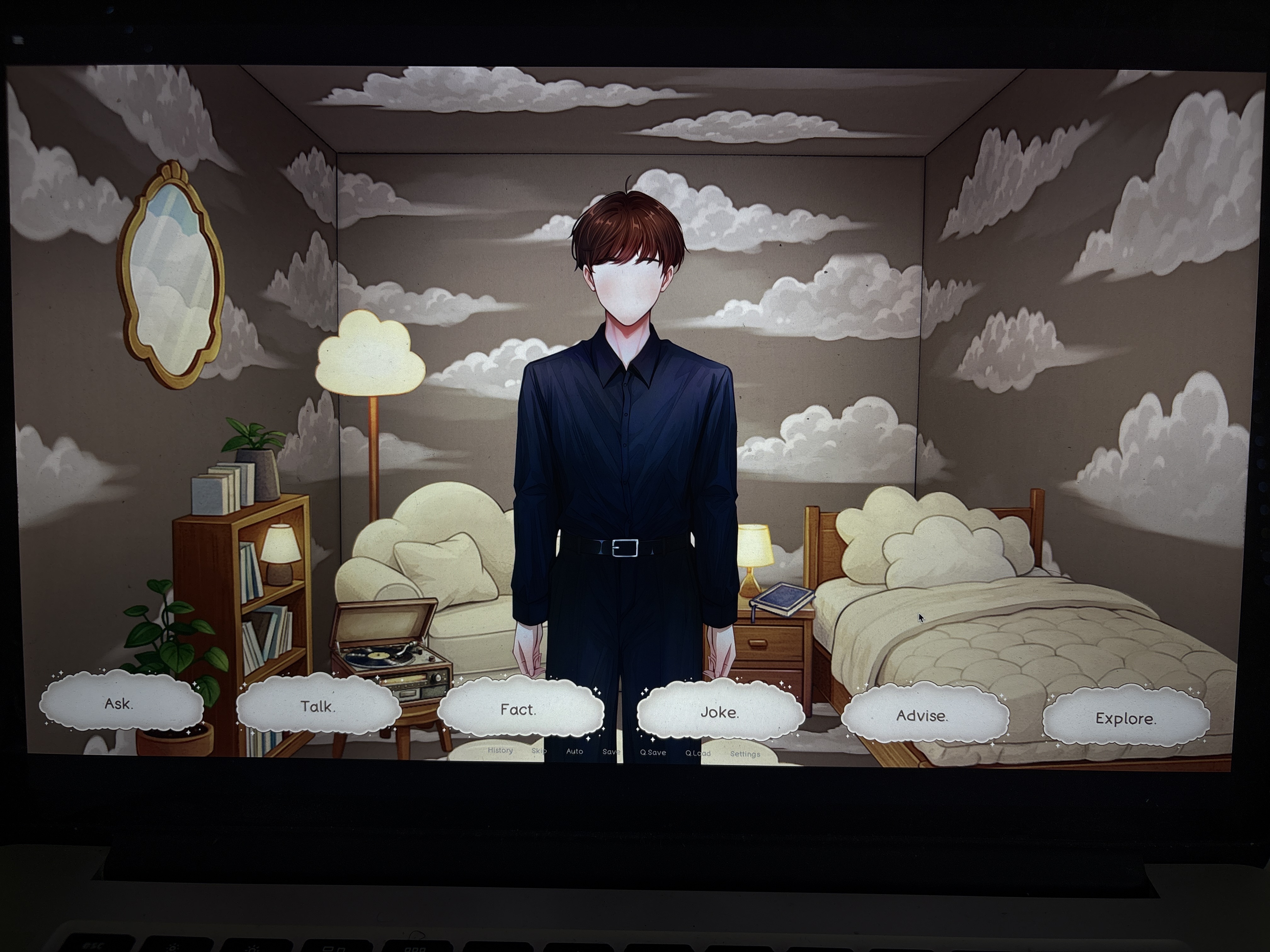
 Hi! No worries, thank you for the response. Yes, those buttons completely disappeared. I'll include an image in this comment if I can, so you can see what I mean. The interaction buttons like got bigger? Or went lower- one of those- and I can't find the arrows anymore. I tried A and D and the left and right arrow keys but neither worked.
Thank you for the image!
Alright, I do not believe this is actually an issue with the UI.
The buttons automatically adjust themselves depending on which interactions have been fully completed.
Once an interaction is finished, its corresponding option disappears, and if there is no longer any need for additional space on the left side, the navigation buttons will disappear as well.
I’m assuming that you already completed the quiz interaction. If you did not, please let me know, because normally Myrddin shouldn’t ask you to do the quiz if you have already completed it.
This is something you have already tried, but I will mention it just to be safe:
Selecting the “Talk” option should provide a hint regarding what to do next.
Try asking Myrddin for a joke. If he doesn’t currently want to tell one, try some of the other available interactions first and return to it afterward, until he feels like telling a joke.
Please let me know whether that allows you to continue, and if not, what sort of response you are getting!
Ok, so when I press talk, he says, "Want a joke before anything else?"
And then when I press joke, he says, "As much as I'd love to bombard you with my whole repertoire, we have to pace ourselves."
Then I went for fact, and he says, "Believe me, I could go on for hours, but we should save some for later."
I went through all the advice, so there aren't even any more advice options.
And I've clicked through all the furniture in Explore. The only book option left is The Boy, the Youth and The Present, but of course he doesn't want to talk about that. There are no more questions to ask him except for the exploration and ambience questions. And he alternates between the joke and the quiz when I ask him to talk. Or he'll also mention an interesting fact he has to tell me. I already completed the quiz, so I'm not sure what else he wants from me.
I think I misunderstood quizzes. I didn't get any options; he just asked a question to see if I remembered what he said about the hadal zone. So I'll retract my statement and say I haven't done any quizzes yet. But in that case, I should be able to see the quiz option. Thank you so much for all your help so far. If we can't get this resolved, no worries; the game has been awesome so far ^-^
Nope, I will get this resolved, because now I have a much better indication of what might be going wrong!
Of course, as long as I am not completely burning through your patience, haha. Apologies again!
Frankly, I still do not know exactly how it happened, but for some reason, something seems to have not been properly recognized during your playthrough.
Do you remember seeing this at some point after Myrddin brought the furniture into the background? He should enter a sort of thinking idle pose where you can click on him.
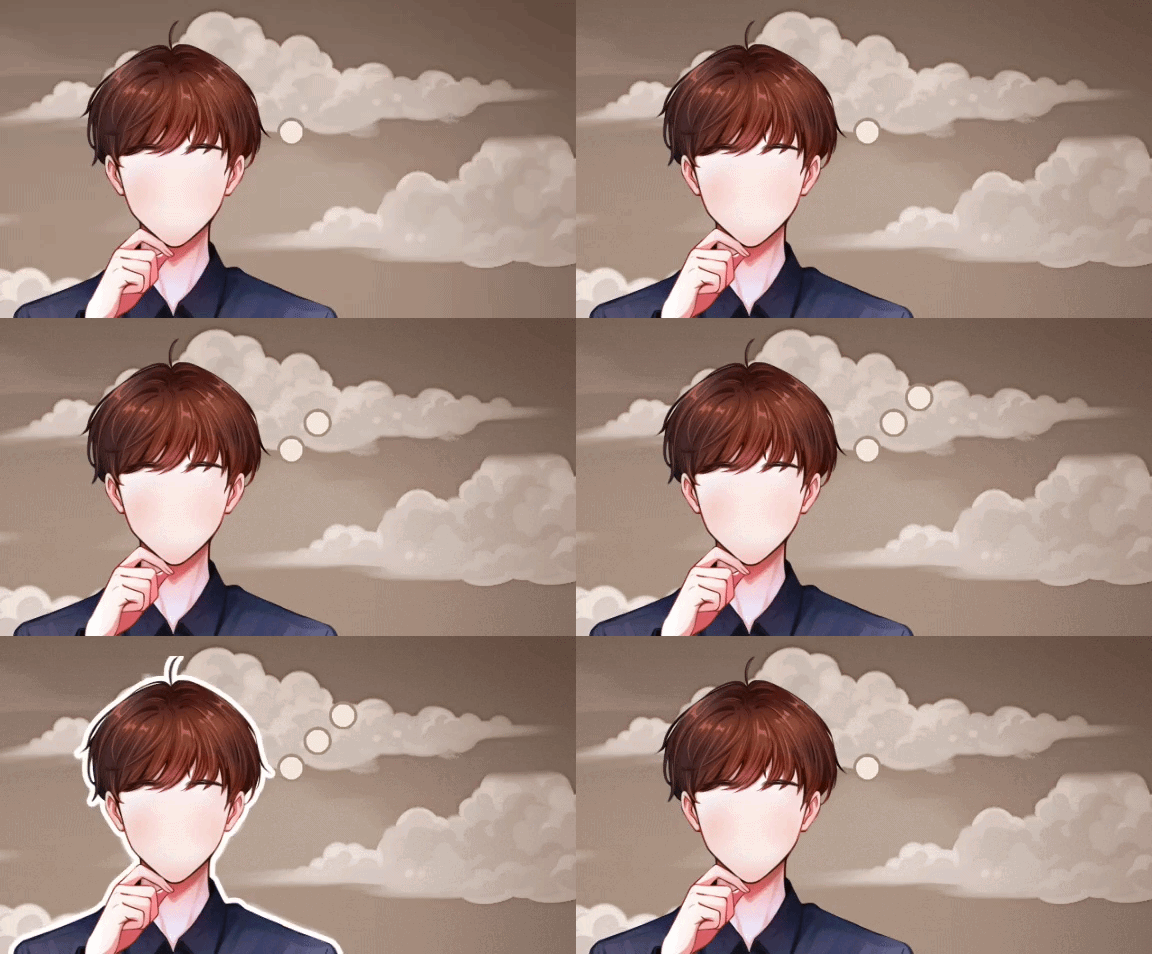
Did that ever appear for you?
Hmm… then that appears to be the issue.
Myrddin should enter that thinking state after you have spoken to him at least once and either heard one of his jokes or fully explored six pieces of furniture.
Based on what you have described, you have completed more than enough for those conditions to have been met, which makes this particularly strange.
I believe I may have found a workaround for the issue, however.
Could you tell me which version of the game you are playing?
Are you playing through the browser, or using the downloadable version?
If you are using the downloadable version, please let me know whether you are on Windows, Linux, or macOS.
That might fix it! You can check whether there happens to be a suitable save in the autosave section.
Though, being on the browser actually makes the following solution a little easier:
Please reload the itch.io page so that the (hopefully) fixed version is properly loaded.
Once you are back in the game, simply reload the save you were using.
Then, choose any interaction and click through the dialogue as usual.
Once you return to the main interaction screen, check whether Myrddin is now in his thinking pose. If he is, simply click on him, and everything should continue from there as intended.
If he still does not enter the thinking pose, please let me know!