Indie game storeFree gamesFun gamesHorror games
Game developmentAssetsComics
SalesBundles
Jobs
TagsGame Engines
(+2)

Hello, back again.

I am going to try and dip my toes into the scary scary world of fancy puppets, so I might be coming back here a few times. For the time being though, I was wondering how I can refer to widgets inside of a contraption since I'm admittedly having a little trouble. My intention is paste the art on a canvas from outside of a contraption to a canvas inside of a contraption. 
(+2)

One of the strengths of a contraption is that code running outside the contraption doesn’t know about what’s happening inside it. That means when you’re creating a contraption prototype you don’t have to keep in mind all the other thing going on in a deck, and when you’re working on the deck you don’t have to keep in mind the contents of every contraption. However, that does mean you need to take care when getting data into or out of a contraption.

In short, a script outside the contraption can’t refer to widgets inside it… at least, without permission.

Code outside the contraption can poke at all the attributes listed in the Contraption interface in the Decker documentation, but the contraption can add extra attributes of its own. If your prototype’s script has a handler like this:

on get_gimmefive do
 5
end

…then code outside the contraption can do somecontraption.gimmefive and get 5 as the result. In the same way, if your prototype script has a handler like:

on set_taketen val do
 if val = 10
  alert["Thanks!"]
 else
  alert["Not what I asked for."]
 end
end

…then code outside the contraption can do somecontraption.taketen:"hello" and it will produce an alert.

If your prototype has a get_foo handler with no set_foo, it’ll be read-only; if your prototype has a set_foo with no get_foo, it’ll be write only; if your prototype has both then it behaves like any other variable.

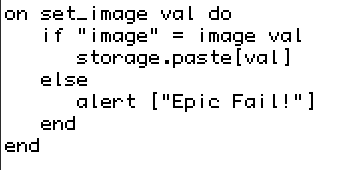
In your case, you probably want your prototype to have a handler like set_image that takes an image and stores it on an internal canvas somewhere (or perhaps a rich text field). Then in the deck outside instead of writing something like this:

# This doesn't work
somecontraption.widgets.storage.paste[mycanvas.copy[]]

…instead you can write something like this:

# This *can* be made to work
somecontraption.image:mycanvas.copy[]

…and inside the prototype:

on set_image val do
 if "image" = typeof val
  storage.paste[val]
 else
  show["Tried to store" val "but I need an image"]
 end
end

(the show[] just gives you a clue about what might have gone wrong if things don’t work as expected)

(+2)

I was able to get the first 2 examples working, but I'm having trouble with the last one.

(I'm assuming typeof is supposed to be a placeholder thing since I couldnt get it working, although admittedly I'm not positive on that since I'm still new to all this syntax stuff.)


As of right now, the box1 contraption is non-responsive as I haven't been able to get it to alert.
(+3)

"typeof" is a unary operator in Lil which tells you the name of the type of any value:

typeof "foof"      # "string"
typeof 123.4       # "number"
typeof (11,22,33)  # "list
(+1)

Beastmode, thank you for the clarification.

I admittedly am still having some trouble with the last example. I've copied and pasted the code at this point and renamed all of the assets to their placeholder names to miminize accidentally breaking something, but the contraption is still currently completely non-responsive to both the if and else statement, but was working initially with the previous examples.

(+2)

Copy this text to the clipboard, then in Decker you should be able to Edit → Paste Card:

%%CRD0{"c":{"name":"home","widgets":{"highlighter1":{"type":"contraption","size":[128,128],"pos":[224,112],"def":"highlighter","widgets":{"storage":{"image":"%%IMG3AEAAQAKEj6kW7Q/dmrTOiDO0vOsPdqICBlc5il+6plTmLnCMYPRr0/mNb7HPs+w8wCCnKEQak4+jcsmUVJ7QaKN3rf6ap6x2K01Qv07vYVwzjcxlNjeqChPD6LN8em/b2dg43wpQx/AGyCJBiPfXZ3iFuOintnaY1xU5Z3kpOKhYCeb4eOlJ2SnJiTUqg5pqWqkq5kqCWcoaS1Zoq6WJOyu7y6Pr29YbLEq8BGy8+pmcScusDPsciyytkTiso9q0vOksfB3oGvFbty0+1Gy6Ud4CPQ7eLVyCch2pOU8PlxYdjq+rxK3eO0Z/qNniZjAXwoTHAvbjp9DhQ29QBn4zZlEetooS3W0kx3BGFXSiIJ4yKbDjHpJG5rViOdIfPowyrbkoAA=="}}},"sendnum":{"type":"button","size":[96,16],"pos":[112,112],"script":"on click do\n highlighter1.highlighted:5\nend","text":"Send Number"},"happy":{"type":"button","size":[96,16],"pos":[112,144],"script":"on click do\nhighlighter1.highlighted:image[\"%%IMG3AEAAQAKEj6kW7Q/dmrTOiDO0vOsPdqICBlc5il+6plTmLnCMYPRr0/mNb7HPs+w8wCCnKEQak4+jcsmUVJ7QaKN3rf6ap6x2K01Qv07vYVwzjcxlNjeqChPD6LN8em/b2dg43wpQx/AGyCJBiPfXZ3iFuOintnaY1xU5Z3kpOKhYCeb4eOlJ2SnJiTUqg5pqWqkq5kqCWcoaS1Zoq6WJOyu7y6Pr29YbLEq8BGy8+pmcScusDPsciyytkTiso9q0vOksfB3oGvFbty0+1Gy6Ud4CPQ7eLVyCch2pOU8PlxYdjq+rxK3eO0Z/qNniZjAXwoTHAvbjp9DhQ29QBn4zZlEetooS3W0kx3BGFXSiIJ4yKbDjHpJG5rViOdIfPowyrbkoAA==\"]\nend","text":"Send Happy"},"sad":{"type":"button","size":[96,16],"pos":[112,176],"script":"on click do\nhighlighter1.highlighted:image[\"%%IMG3AEAAQAKEj6kW7Q/dmrTOiDO0vOsPdqICBlc5il+6plTmLnCMYPRr0/mNb7HPs+w8wCCnKEQak4+jcsmUVJ7QaKN3rf6ap6x2K01Qv07vYVwzjcxlNjeqChPD6LN8em/b2dg43wpQx/AGyCJBiPfXZ3iFuOintnaY1xU5Z3kpOKhYCeb4eOlJ2SnJiTUqg5pqWqkq5kqCWcoaS1Zoq6WJOyu7y6Pr29YbLAqlYfzJO/MboVOSnEn7+twsKr1XnTYUPbwKvQl8LNwdm51o8g1+jZ0eOEkLPA3b1N5+Tu7+bhrvTf72zc/bKXatkHFC9CTgiYHyBBLL9ychvlyoFFYZY+4hwXsTyWTs1/FiOHtLPnIMeUPhNpEWlxkkeQrWuHVW4rWgGAKkSZbUnj3smTNFAQ==\"]\nend","text":"Send Sad"}}},"d":{"highlighter":{"name":"highlighter","size":[128,128],"margin":[0,0,0,0],"description":"Draws attention to an image","script":"on get_highlighted do storage.copy[] end\non set_highlighted val do\n show[\"called set_image with\" val]\n if \"image\" = typeof val\n  storage.clear[]\n  storage.paste[val]\n else\n  alert[\"%J is not an image\" format val]\n end\nend","image":"%%IMG3AIAAgAUgII5kaZ5oqq5s675wLM90bd94DnCcfvK+oNDEAw6LvaHyl3whmypj6ymULkVIWJa1JUq7OvCSOhWjzLss2Yc+Fl3rVHxEbdvm3pudhGdaS097NXuCK32Ab2V/fIGLOYFniYOScpRRloiQSpqZjpl+UJGenaGkmGx9gnhdmoedXJybaKqxao09qVCFjV6lNKunpk23kLOSu7FpwTJzhVh1xFvGX8t0rbyPYs7P0drTRsjdlNWGYNvWxNbovtxJ4eKM5JfH8r1x0sv4o+3RppPQ+0R5A5cvkblQ3UAFhJUuBrZ17SoRpGblocI74tjNG+iu4MRhllxFZJaxnkKEBunF6/hRI0OXAkvqKQWQJcg3+mBu1GmvJE+SQHKurPmz569vC2f4HIpz259zQJMehcfUokRdJo9eWXcrpsiVXLeKrbqv4cubRcfO/MrPJCuoJNWOVHTurdSpaeXGi8rvClu9qJrCrQcXMMaWDr8WNow3GV07ixlHNfsY2F3J/5aevZcVc2aZlWt6Vkuvq5OMoz07htMvteu1q1/LPv13tu2eeW9L9plbt17evX2T5i1ceMLOxZMrx3F5+evIzhnXjhs9DPSN1Q9fx55dqVXW5ZB3b017VOzuJ6e3xaS+ekJloTmLNw78vDLy7X3XN72z6/bn+9mHG2XorXdcfvfxVyBT4H0moHsPBhahcwqK9d2C621FHoYDjrEhh8K4QSCIRgVRIYnziNgcihquyOKLMMaYnYsymjhfjdbdOCONiemY3Imy8EgfkCoGp9+IWrwXFopElhcgkz4KUx+JCHq1H4gX2ogah0i2+J9rSlpYpW5hBvnlbGVKGOWRgo2ZHo52TRjemsUd1CRrdP5IU5en4Zikm37+E6gsg0onJ2xCsnlofIvqyedkaR7ZX5aQfqhoTEPlWMyZYpaWIFZGMoEbLI0Fh1qjzCkGlaVz9kOpmeREuCWjZLxaZFkParYZJ6zeGsydn+ICbLDs2AJoq7m8ymubMCGZU54DmtHrp0vSEtQpcSbq1VwG/iofWhqJZg8pVdgJKpGWnYupY9JCm+Ar3XrriLlWpltiqhyFFds3YIES7LgA4zsvuG1VIhAiVxUM78La6VSrrf6WpzDCFzn4mIE9NldRYVVCzA1XyP2XX6Me15uWyIuNPCZREiPaGFCwQYRnqH29bChFRaGsI6oxq9Nyw0ADBqi27x52M9HZuCu00tphyGk2XDJdKHdTy4V01VjTEAI=","widgets":{"storage":{"type":"canvas","size":[64,64],"pos":[32,32],"locked":1,"border":0,"scale":1}}}}}

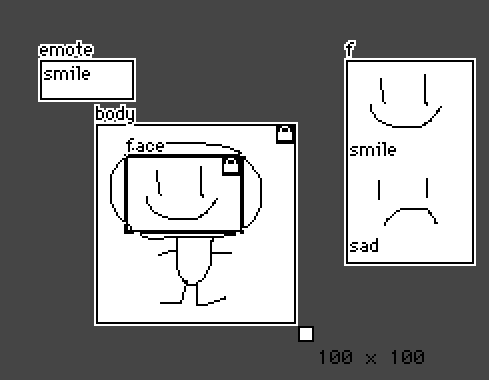
There’s a contraption with an embedded canvas, that draws a border around the image on the canvas to highlight it. The contraption has a .highlighted attribute which allows the canvas image to be set or retrieved. There’s also three buttons, one which sets the .highlighted attribute to a number (which should be rejected) and two which set it to an image (to demonstrate the image is actually being changed).

It’s basically the same as my last example, but I had to change the attribute name from .image to .highlighted. It turns out that contraptions already have a .image property (which refers to the background image of the contraption, like card.image refers to the background image of a card), so you can’t override that with your own set_image{} handler. I wrote my original example based on my experience of attributes in general, but I hadn’t actually tested it as written, sorry.

(+3)

You're all good. Thank you so much for the help! I was finally able to get it working! I'd share a photo of the final results of my testing but the placeholder artwork i am using is just one of those graffiti penises and Im to sleepy to make something more respectable right now.

(+2)

Hey goons.

I've messed with fancy puppets a couple times, though I haven't published anything using them. Would you like me to throw together an example and an explanation so you have another thing to look at? 

I've been storing all my modular pieces inside the contraption itself (images stored in internal fields and copied over to internal canvases when needed) and using them to build various expressions for puppeteer.

(+2)

Oh absolutely! I treat your Phnixel guide like a bible. I'd shout you out in my work but I'd feel like I'd be tracking mud on your kitchen floors by associating you with my work.

Also, you're absolutely right about storing all of the modular pieces internally, I was just planning on having a puppet with very minor customization using an outside canvas.

(2 edits) (+2)

Sorry for the delay, I realized that my existing fancy puppets have a friend's art in them so I made a new one with Phinxel.

Contraption code block is at the bottom of the post.

+ I'll try to explain here about what it's doing, and the different ways it's set up to work for each part.


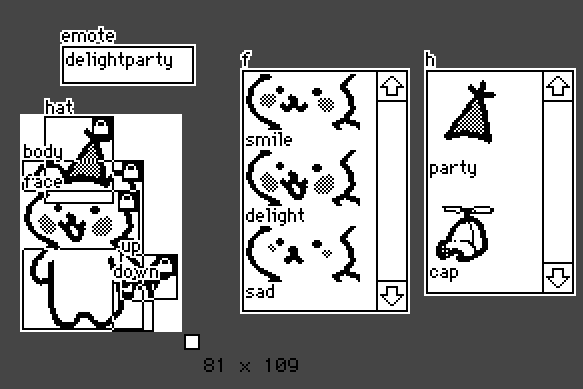
There's a series of canvases in the visible area and some fields for data storage. 

The Fields:
emote = holds the name of the current emote (used by puppeteer)
f,  h = holds all of the images of a specific part (face, hat) and a label for that part on the line above or below the image.

In this example I put the string of text on the line below the image, but I'm pretty sure it works the other way too...  (Just be consistent about it.)

The Canvases, and what they need to do:
body = Always visible, never changes.
face = Always visible, image can change.
hat = Only visible if the emote calls for it, image can change.
up, down = Multiple canvases for one feature (the tail) and the images do not change but only one of these canvases should be visible at a time.

And now let's look at the code. We got some basics:

on set_emote x do emote.text:x end
on get_animate do view end

And then we get into the emotes:

on view do
     faceData:insert
      emote          faceImage     tail       hat  
     with
      "smile"        "smile"       up         nil
      "smileparty"   "smile"       up         "party"
      "smilecap"     "smile"       up         "cap"
      "delight"      "delight"     up         nil
      "delightparty" "delight"     up         "party"
      "delightcap"   "delight"     up         "cap"    
      "sad"          "sad"         down       nil
      "sadparty"     "sad"         down       "party"
      "sadcap"       "sad"         down       "cap"
     end

The instructions for which combination of canvases + images apply to which named emote all live in a big table.

Quotes around a word mean we're referring to a string of text in one of the fields. When there's no quotes it's either the name of a widget (the canvases: up, down) or specifically nothing (nil).

These next lines let us refer to the images in the hat/face storage fields by their labels (the strings of text) on the neighboring lines:

 faceImages:("" drop "\n" split f.text) dict f.images
 hats:("" drop "\n" split h.text) dict h.images

And this sets up 'e' to only look at the information in the row for the current named emote:

 e:(faceData.emote dict rows faceData)[emote.text]

The face is simple, because there's only one canvas and it's always visible:

 face.paste[faceImages[e.faceImage]]

For the hat we also need to check to see if there's supposed to be a hat in the current emote (whether there's a label in the hat column or just nil). So we toggle the visibility based on the contents of the hat column, then paste the relevant image.

 hat.toggle["transparent" e.hat]
 hat.paste[hats[e.hat]]

And finally the tail. For this one we hide the tails in the column and then only show the one that's named for the current emote: 

 (distinct faceData.tail)..show:"none"
 e.tail.show:"transparent"
end                   # ending the "on view do" from earlier


Hopefully one of these examples of ways to handle a modular part in a fancy puppet is helpful to you, or to some future forum reader.

(And I'm honored that Phinxel's book has been useful to you! I'm not bothered at all by the association. Keep making your art, Goons.)

%%WGT0{"w":[{"name":"fancyphinxel1","type":"contraption","size":[81,109],"pos":[235,103],"def":"fancyphinxel","widgets":{"down":{},"up":{},"body":{},"face":{},"f":{"value":{"text":["smile\n","i","\ndelight\n","i","\nsad\n","i","\n"],"font":["","","","","","",""],"arg":["","%%IMG3ADkAHAZAgHAICBiNxKRyyWwWkczj0UmtJqdRacDKpWKX0q64+VWWx2jhmbhOi8NgKHnrztLNcvu92h7Cr3lxgXN9amuFfntef3Z4ew2QkVGLio2Jj5GZjpVpf2WZmoCIAKANlk+YpYKcQ6WQgpdErqZql3eVs7CxraCxWoaKuY5sg5K2Wr+yrqeoVsnJSarMo7vATaG6xKx1XYzV3GPe2tvgzKvk5cCDm+vpyOKi1G9aIO+U8s5HIPv70ITtnYzwG1gPnb10qAjyCxAE","","%%IMG3ADkAHAZAgHAICBiNxKRyyWwWkczj0UmtJqdRacDKpWKX0q64+VWWx2jhmbhOi8NgKHnrztLNcvu92h7Cr3lxgXN9amuFfntef3Z4ilaPgJGObIMADQ2Ek2N/Z5ifeptJoIKJe5+kgqJCqJilhqetmX6md5Gys5KVd7izU1qwo7ivwUO9T1rJscPEyMbMwMh5va7NZczStbzUzcWsrbu208eOkdeppulE2OGafFhr4N3lq8po0U7J+fiQypbh/7JxSQbC3j5GdaSBWLiQX6iEkhhKLFhPH0RTExkGCAI=","","%%IMG3ADkAHAZAgHAICBiNxKRyyWwWkczj0UmtJqdRacDKpWKX0q64+VWWx2jhmbhOi8NgKHnrztLNcvu92h7Cr3lxgXN9amt9DQ2GXVpeg22JiYKEVmWIkXiFjF+FkpmDS5h2fqB8mkKRnpmke5ulRKmKk6xvWq2hqqu0XLanlXm+hlB/bpaveGy3Y4fHdb+gwc6CysLU0pROjdeOvrbb097Z2t+2IL3c0aZGIOzs44TNtQHt9ObW1enq9e0BQQ==",""]}},"h":{},"hat":{},"emote":{}}}],"d":{"fancyphinxel":{"name":"fancyphinxel","size":[81,109],"margin":[0,0,0,0],"description":"A little demo of a modular fancy puppet.","script":"on set_emote x do emote.text:x end\n\non get_animate do view end\n\non view do\n faceData:insert\n  emote          faceImage     tail       hat  \n with\n  \"smile\"        \"smile\"       up         nil\n  \"smileparty\"   \"smile\"       up         \"party\"\n  \"smilecap\"     \"smile\"       up         \"cap\"\n  \"delight\"      \"delight\"     up         nil\n  \"delightparty\" \"delight\"     up         \"party\"\n  \"delightcap\"   \"delight\"     up         \"cap\"\n  \"sad\"          \"sad\"         down       nil\n  \"sadparty\"     \"sad\"         down       \"party\"\n  \"sadcap\"       \"sad\"         down       \"cap\"\nend\n\n faceImages:(\"\" drop \"\\n\" split f.text) dict f.images\n hats:(\"\" drop \"\\n\" split h.text) dict h.images\n \n e:(faceData.emote dict rows faceData)[emote.text]\n\n face.paste[faceImages[e.faceImage]]\n hat.toggle[\"transparent\" e.hat]\n hat.paste[hats[e.hat]]\n (distinct faceData.tail)..show:\"none\"\n e.tail.show:\"transparent\"\nend","widgets":{"down":{"type":"canvas","size":[19,24],"pos":[47,84],"locked":1,"show":"none","border":0,"image":"%%IMG3ABMAGAZAQABALBqPxIASySwqh83mM8p8TqlOqxar3VK7VqzRK04uy1koWnhGX5Fvszodlh/By3oaxAeBx0p9fWRygnxxe4KIgAGKbXBPh49VXWWERUE=","scale":1},"up":{"type":"canvas","size":[27,21],"pos":[51,71],"locked":1,"show":"transparent","border":0,"image":"%%IMG3ABsAFQZAgHBILBIDSKRxuUw6A8wo4AlySo1OkLaavA6zW23XO0WGt2Nv8ixWktfs9BWMdpPLa+v9+7TvhX1/R36CfFCFg4eIeIR7gVGKhk9qfY+UlY1zk4hB","scale":1},"body":{"type":"canvas","size":[59,83],"pos":[2,24],"locked":1,"show":"transparent","border":0,"image":"%%IMG3ADsAUwZAgHBIDBiPAaJyyWw6nwCkNAmtWqHT6XXLFR5B4DDo2C0/v2Ix2VxcW9HpsJudfRvj6Xk3a8Te8Wp9UXx6gwGBgk1wgGCEhEOLcolMkXGOl0iAhZB/mlKMkp+eVJSdmqCjppaTbYeor56om4ausLa3s7S3u6+5tLW8wY2sS1PCwr6/wMe2yZnMwc6q0M3ESpXUvb7Y2bLWnMvdsEhO3OKg5KXh59qk19Ps7cXw8d6s5vWMevj5ePv0/UbNWxfQHzF+BUMNTCjvHUGGw9y1gmjwmyGKiCQOfJgvmZdnBaVcMdbxURWS4ozVOSkqG8iIHn+d45auHEqX9LY94xgtUs2FIXfmQtjNpDqMY0QqInps3U+HPKFhe/rR6cychXwC7Pnwqdaou8zNqcS0Gkc3ZLdyRZcoLdiwANFOK2tWX9u5atcKBJcnLy+a977cTKlKaass9eBoUTe4qNFyfBMv5kIXl2HKfrmyqVpSI+a3mulkDm2msmXPI0f/tcgS9GrUdlzDhd26X8ylsk9vviiZdu14t23ybLyKdequiNn6Pm43efHlx51Omho8drh/pqjuVjb5cPft3i9D1Q4eHHnz0JUEAQ==","scale":1},"face":{"type":"canvas","size":[57,28],"pos":[2,39],"locked":1,"show":"transparent","border":0,"image":"%%IMG3ADkAHAZAgHAICBiNxKRyyWwWkczj0UmtJqdRacDKpWKX0q64+VWWx2jhmbhOi8NgKHnrztLNcvu92h7Cr3lxgXN9amuFfntef3Z4ilaPgJGObIMADQ2Ek2N/Z5ifeptJoIKJe5+kgqJCqJilhqetmX6md5Gys5KVd7izU1qwo7ivwUO9T1rJscPEyMbMwMh5va7NZczStbzUzcWsrbu208eOkdeppulE2OGafFhr4N3lq8po0U7J+fiQypbh/7JxSQbC3j5GdaSBWLiQX6iEkhhKLFhPH0RTExkGCAI=","scale":1},"f":{"type":"field","size":[83,121],"pos":[111,-22],"scrollbar":1,"value":{"text":["","i","\nsmile\n","i","\ndelight\n","i","\nsad"],"font":["","","","","","",""],"arg":["","%%IMG3ADkAHAZAgHAICBiNxKRyyWwWkczj0UmtJqdRacDKpWKX0q64+VWWx2jhmbhOi8NgKHnrztLNcvu92h7Cr3lxgXN9amuFfntef3Z4ew2QkVGLio2Jj5GZjpVpf2WZmoCIAKANlk+YpYKcQ6WQgpdErqZql3eVs7CxraCxWoaKuY5sg5K2Wr+yrqeoVsnJSarMo7vATaG6xKx1XYzV3GPe2tvgzKvk5cCDm+vpyOKi1G9aIO+U8s5HIPv70ITtnYzwG1gPnb10qAjyCxAE","","%%IMG3ADkAHAZAgHAICBiNxKRyyWwWkczj0UmtJqdRacDKpWKX0q64+VWWx2jhmbhOi8NgKHnrztLNcvu92h7Cr3lxgXN9amuFfntef3Z4ilaPgJGObIMADQ2Ek2N/Z5ifeptJoIKJe5+kgqJCqJilhqetmX6md5Gys5KVd7izU1qwo7ivwUO9T1rJscPEyMbMwMh5va7NZczStbzUzcWsrbu208eOkdeppulE2OGafFhr4N3lq8po0U7J+fiQypbh/7JxSQbC3j5GdaSBWLiQX6iEkhhKLFhPH0RTExkGCAI=","","%%IMG3ADkAHAZAgHAICBiNxKRyyWwWkczj0UmtJqdRacDKpWKX0q64+VWWx2jhmbhOi8NgKHnrztLNcvu92h7Cr3lxgXN9amt9DQ2GXVpeg22JiYKEVmWIkXiFjF+FkpmDS5h2fqB8mkKRnpmke5ulRKmKk6xvWq2hqqu0XLanlXm+hlB/bpaveGy3Y4fHdb+gwc6CysLU0pROjdeOvrbb097Z2t+2IL3c0aZGIOzs44TNtQHt9ObW1enq9e0BQQ==",""]}},"h":{"type":"field","size":[74,112],"pos":[203,-22],"scrollbar":1,"value":{"text":["","i","\nparty\n","i","\ncap"],"font":["","","","",""],"arg":["","%%IMG3ACEAKgQQyEmrvTjrzbv/VQB+QTli4lSmJ7WqZuu+KytL9XuHeb4DPd8tqJP1frBAo7hbNZaxZun5ZLacVOsIm42euFSoDQTujj1l83caDms3abeXE5efM/X2+5K3d/p+dGxthGKCSlV1e0lEOWp4jZGGKEEzkRqLljVIPHOcQJ+hoqOkpaalEQ==","","%%IMG3ACEAKgZAgHBILBqPyKRyyWw6n9CodEqtWq/YrHbL7XqHgbB4bByTkwGQeg0yh9nsMNKtpqfh7YBTDnD79VJiXmZaf4BVhnxTZm11goFvcY6Ke5GSk1BieI2YT5qbd3mHS5+ga49MpXihqEqqq6eUaJamsaNFdpNvoaJzY5u2cbJgr6C8rcQBEcvAwrZHYcvSosB3Z7jR0nRwbr7K2tu2w8nfj6qEruh9iZW3hlndTEE=",""]}},"hat":{"type":"canvas","size":[33,42],"pos":[13,2],"locked":1,"show":"transparent","border":0,"image":"%%IMG3ACEAKgQQyEmrvTjrzbv/VQB+QTli4lSmJ7WqZuu+KytL9XuHeb4DPd8tqJP1frBAo7hbNZaxZun5ZLacVOsIm42euFSoDQTujj1l83caDms3abeXE5efM/X2+5K3d/p+dGxthGKCSlV1e0lEOWp4jZGGKEEzkRqLljVIPHOcQJ+hoqOkpaalEQ==","scale":1},"emote":{"type":"field","size":[66,19],"pos":[21,-34],"value":"delightparty"}}}}}
(+2)


IT'S ALIVE!

I'm going to have to dissect this code later to wrap my head fully around it. Thank you so much for the tutorial, I'll definitely be utilizing this in the future.