

hey just a question is there a video that i can have to break the files down im very confused
i’ll make a video for you today, if i can, cuz i don’t have much available time rn.
what part are you confused about ?
as a reminder, here are the installation instructions :
Install the easy way
-
Download the easy install ZIP from this page.
-
Open the Drag’N Wash game folder. From Steam you can right-click the game → Manage → Browse local files.
-
Extract the contents of the ZIP directly into the game folder, beside DragNWash.exe. The package already contains BepInEx 6 + UnityVRMod + WalkNWash VR Companion in their proper locations. In the end, you should have in the same folder both DragNWash.exe and the BepInEx folder (and BepInEx should contain a few folders including config and plugins )
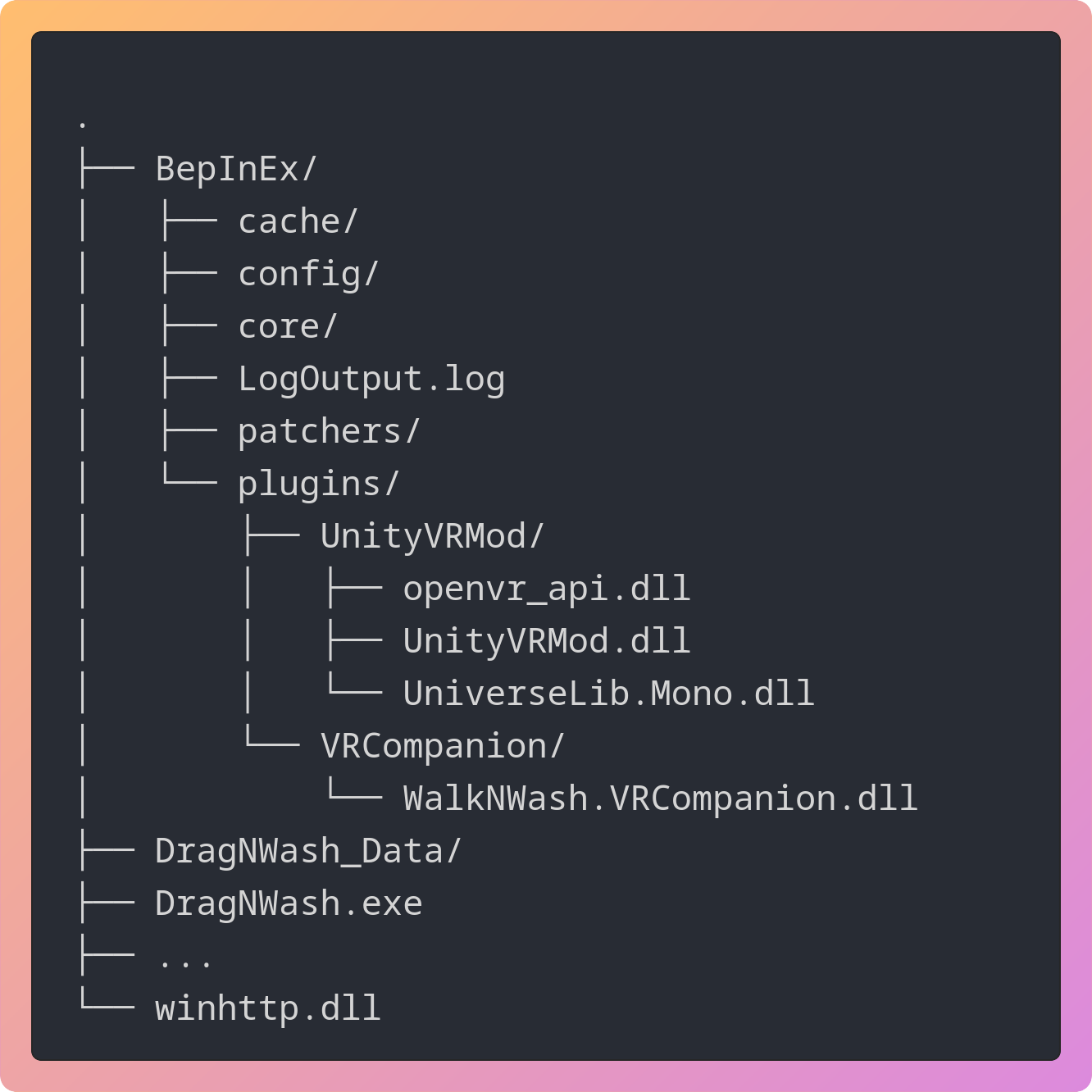
-
DO THIS OR IT WILL LOOK VERY LAGGY/SHAKY ! Open the game’s Steam properties and put this in Launch Options:
%command% -force-d3d11