sorry I didn’t see your comment earlier, here ya go : discord.gg/nbfPtCaX (its a friend invite link) (do DM me first cuz idk who you are on discord XD)
randomcat4
Creator of
Recent community posts
Hi ! This mod is in good faith and I’ve been sleeping an average of 5 to 6hrs per night for the last week to improve it. Involvement of AI in code doesn’t automatically mean it is badly made; and the mod is properly tagged as ai-assisted on here.
I am sorry you’re experiencing crashes; have you properly added the arguments I described to the launch params on steam (or whereever you launch teh game from) ? As a reminder it should be like %command% -force-d3d11 -force-gfx-direct. Literally 99% of people that reported crashes were not having them anymore after having properly set it up.
If you wish for help with setting up my mod properly, or if you wish to proceed in getting a refund, i’ll glady contact you on discord, telegram or whereever you want to talk !
heya !! Did you add the -force-gfx-direct parameter to your steam launch command ? If not, this may solve your creashes ! Else we’re in unknown territory and yeah i’d be up for chatting on discord !
Btw, the 0.9.0 beta version may be more stable (and may also not require that param), we’ll talk about it if needed :3
heya ! Could you tell me what launch parameters you are currently using ? I have observed that behaviour on some setups, and the fix is adding -force-gfx-direct (after the -force-d3d11 parameter) to the launch command. Let me know if that helps !
If you’re lost, we could move over to discord, just lmk !!
Hi ! I used https://www.deepl.com/en/translator to understand your message.
There is a mod on github that adds translation, and I do believe it has chinese !
a simple search pointed me towards https://github.com/TomXV/dragnwash-localization/tree/main
Okie, no, the uninstall should be easy, just remove every file you got from the zip from your game folder and you’re as good as new !
Sorry to hear about the issues tho, I’ll be looking to cutting off the dependency to UnityVRMod because I think that may be the source of a few issues (I am not experiencing the hitching at all, nor the frame pacing issues on a mid-end laptop)
Thanks for trying it out and for the support, I’ll be posting a comment here when I think your issues may be solved :3
May you try following the install guide ? it may help you :3 https://youtu.be/kuSj8uUfsJg
Hi ! This mod runs over PCVR, so you’ll need a computer. Installation would be the same as for steam ! Replace “open steam → library → right click → open game folder” with “just go where you downloaded the game”, and to launch it use the cmd script that’s included in the easy install zip !
Lmk if you need further assistance :3
Hi ! it is rather easy, provided you follow the installation instructions i left in the decription of the item in here. Here’s what it says. You’re welcome to ask if you don’t understand something, do tell me what specifically. Thankies
Install the easy way
-
Download the easy install ZIP from this page.
-
Open the Drag’N Wash game folder. From Steam you can right-click the game → Manage → Browse local files.
-
Extract the contents of the ZIP directly into the game folder, beside DragNWash.exe. The package already contains BepInEx 6 + UnityVRMod + WalkNWash VR Companion in their proper locations. In the end, you should have in the same folder both DragNWash.exe and the BepInEx folder (and BepInEx should contain a few folders including config and plugins )
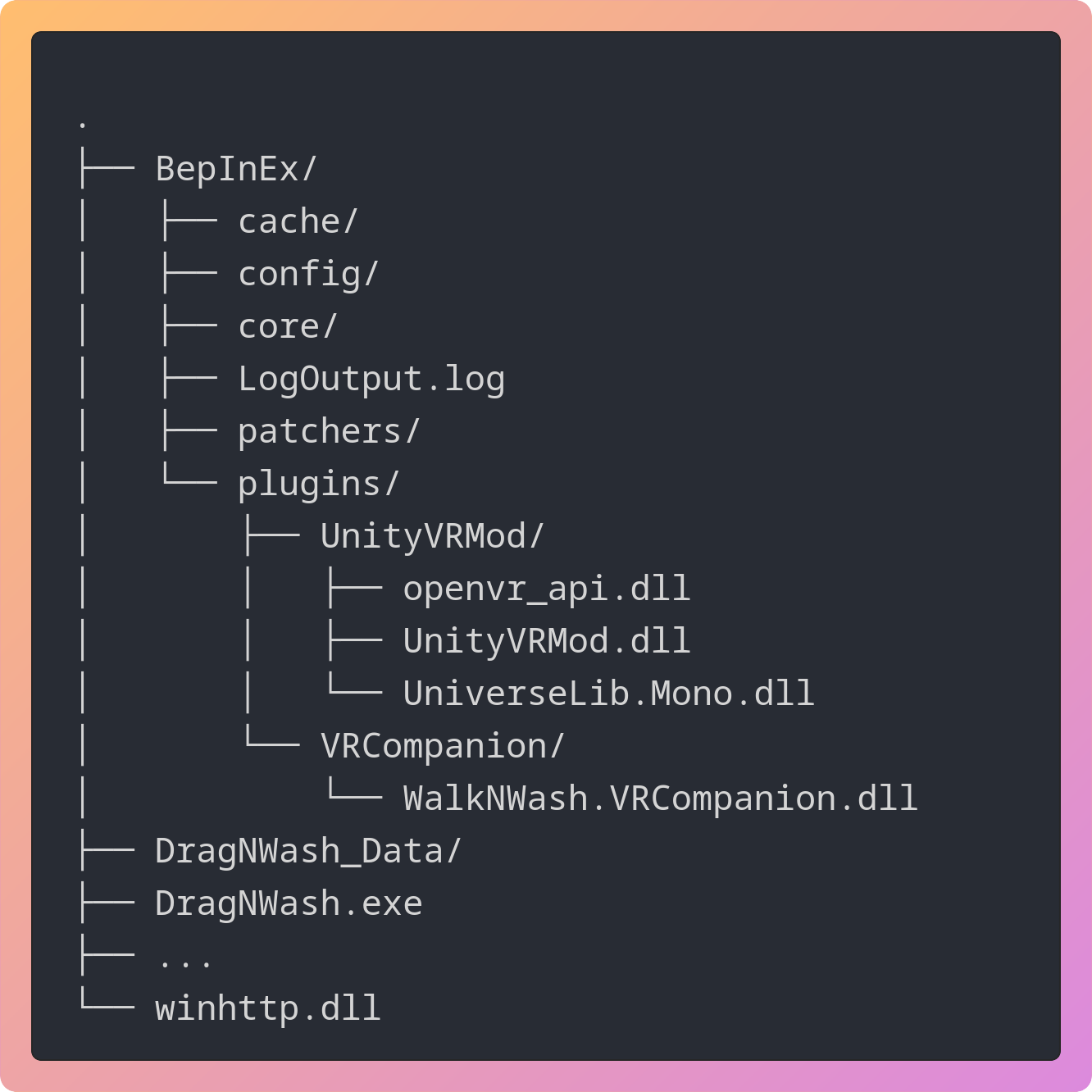
Not sure everything landed where it should ? The ZIP also includes Check-VR-Install.cmd. It should be beside DragNWash.exe after you’ve installed the ZIP, and run it. It should flag misplaced or duplicated companion DLLs or other config errors. Currently it will report itself missing just ignore it ‘:)’
- DO THIS OR IT WILL LOOK VERY LAGGY/SHAKY ! Open the game’s Steam properties and put this in Launch Options:
%command% -force-d3d11
