

Hi ! it is rather easy, provided you follow the installation instructions i left in the decription of the item in here. Here’s what it says. You’re welcome to ask if you don’t understand something, do tell me what specifically. Thankies
Install the easy way
-
Download the easy install ZIP from this page.
-
Open the Drag’N Wash game folder. From Steam you can right-click the game → Manage → Browse local files.
-
Extract the contents of the ZIP directly into the game folder, beside DragNWash.exe. The package already contains BepInEx 6 + UnityVRMod + WalkNWash VR Companion in their proper locations. In the end, you should have in the same folder both DragNWash.exe and the BepInEx folder (and BepInEx should contain a few folders including config and plugins )
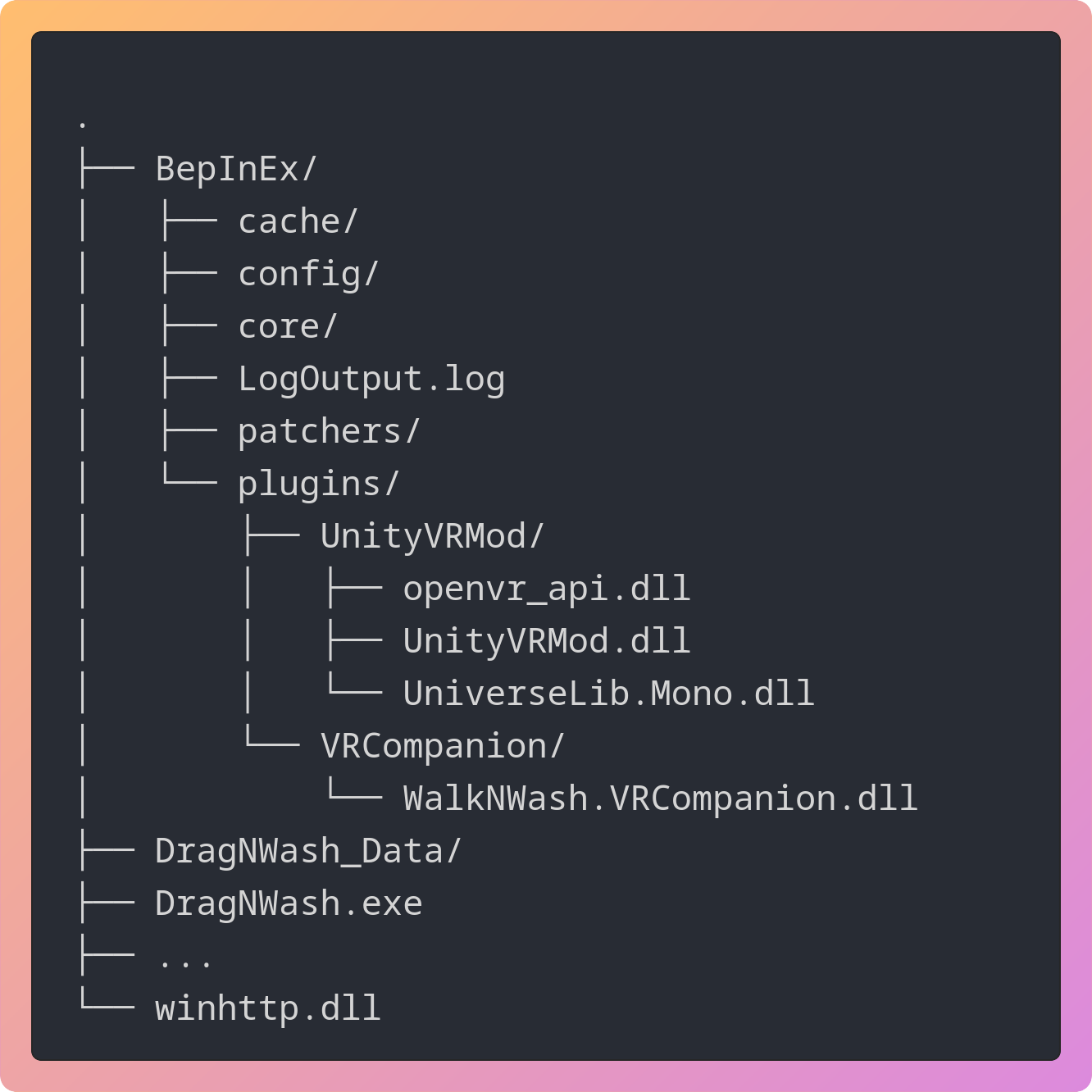
Not sure everything landed where it should ? The ZIP also includes Check-VR-Install.cmd. It should be beside DragNWash.exe after you’ve installed the ZIP, and run it. It should flag misplaced or duplicated companion DLLs or other config errors. Currently it will report itself missing just ignore it ‘:)’
- DO THIS OR IT WILL LOOK VERY LAGGY/SHAKY ! Open the game’s Steam properties and put this in Launch Options:
%command% -force-d3d11