
On Sale: GamesAssetsToolsTabletopComics
Indie game storeFree gamesFun gamesHorror games
Game developmentAssetsComics
SalesBundles
Jobs
TagsGame Engines
(1 edit)

You can define commands that change the style of dialog boxes mid-stream, including sound effects.

You'll need to define the handler for these commands either at the card level (if they're only used in one scene), or at the deck level (if they're used in multiple scenes). If you're also using Puppeteer, your custom command handler needs to ultimately defer to pt.command[] as its default case.

Does that make sense? I can furnish a more complete example if the one in the docs isn't clear enough on its own.
(+1)

I might need the example.  I tried to recreate the custom command stuff in the Dialogizer example, but I haven't been able to get it to work.

(+1)

Let's say you have a scene with two characters, Alpha and Beta, which takes place on one card. I'll further assume that you're using both Dialogizer and Puppeteer together.

Alpha's speech should use a sound clip named "alphaVoice" and Beta's speech should randomly choose between sound clips named "betaVoice1" and "betaVoice2". We'll define two commands for use in our prose for dd.say[]: "!alpha" will switch to Alpha's voice, and "!beta" will switch to Beta's voice. To make the difference even more stark, I'll also give Alpha's text boxes a light color scheme and Beta's text boxes a dark color scheme. Voices are chosen with the "tsound" style setting, which also requires us to set a "speed" for animating in text. "fcolor" and "bcolor" are used to change the text box color schemes.

On the card script, we'll include an event handler for command[] events that looks like this:

on command x do
 if x~"alpha"
  o.speed:3
  o.tsound:"alphaVoice"
  o.fcolor:colors.black
  o.bcolor:colors.white
  dd.style[o]
 elseif x~"beta"
  o.speed:3
  o.tsound:("betaVoice1","betaVoice2")
  o.fcolor:colors.white
  o.bcolor:colors.black
  dd.style[o]
 else
  pt.command[deck x]
 end
end

Notice how there are blocks of code when the argument to command[] is "alpha" or "beta", and when it is neither it will fall through to calling pt.command[] to allow puppeteer !-commands to work normally. If you wanted to reuse these style-changing commands across your project, you could "lift" this definition up to the deck-level script.

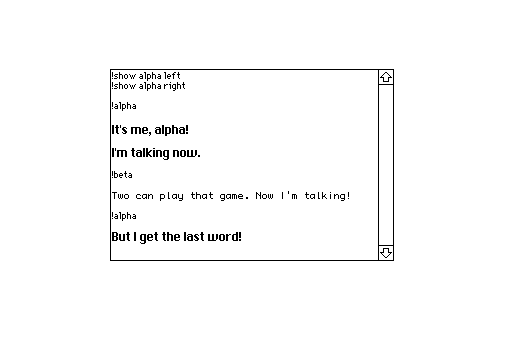
Your prose for the scene might be stored in a field named "scene" and look something like


To play the cutscene, you'd then have a script triggered by, for example, a button:

on click do
 dd.open[deck]
 dd.say[scene.value]
 dd.close[]
 pt.clear[]
end

Is that more clear?

(+2)

Yes! Was able to get it working! I got really bad sleep last night so I somehow forgot about adding dd.style 😭. Although I'm glad I asked because I also kinda completely misplaced the pt.command[deck x] part as well. Thank you!