

The sprite and background editors are missing. I opened two issues on GitHub.
40 days ago (+2)
Try reloading? They're both there when I open the tool. Based on the issues you opened, you just need to open up the sprite, background, and title cards on those tabs to get to the tools you're talking about.
39 days ago(+1)
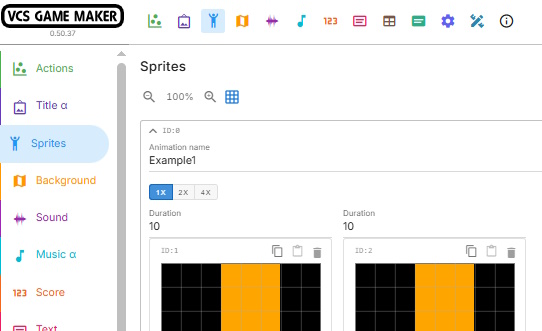
Sometimes I'm just stupid. I clicked the arrow in the top-left corner and the editor appeared. But the red Player0 icon is missing. Or is this just another one of my blunders?
39 days ago (+2)
Sprites are now pooled and not specific to any Player sprite. You can use the blocks to set them the same way as worked previously, but now all sprites are under the "Sprites" tab instead of Player 0 and Player 1.
This was done to reduce duplicated animations between Player sprites, reduce player-specific blocks - now there's a dropdown to set Player number in unified blocks that work with all Player sprites - and because kernels other than the Standard Kernel support more than 2 Player sprites, so having 2 different tabs for the Player sprites was a blocker to supporting kernels with more than 2 Player sprites, as work on Standard Kernel support is nearing completion.