
Indie game storeFree gamesFun gamesHorror games
Game developmentAssetsComics
SalesBundles
Jobs
TagsGame Engines

Lemon Lane (free browser, ages 8–12): does the morning screen teach cost vs. price clearly enough?

A topic by nathans-game-shed created 2 days ago Views: 74 Replies: 5
Viewing posts 1 to 5

Hi! Lemon Lane is a 7-day lemonade stand game I made to teach kids the basics of running a tiny business: https://nathans-game-shed.itch.io/lemon-lane 
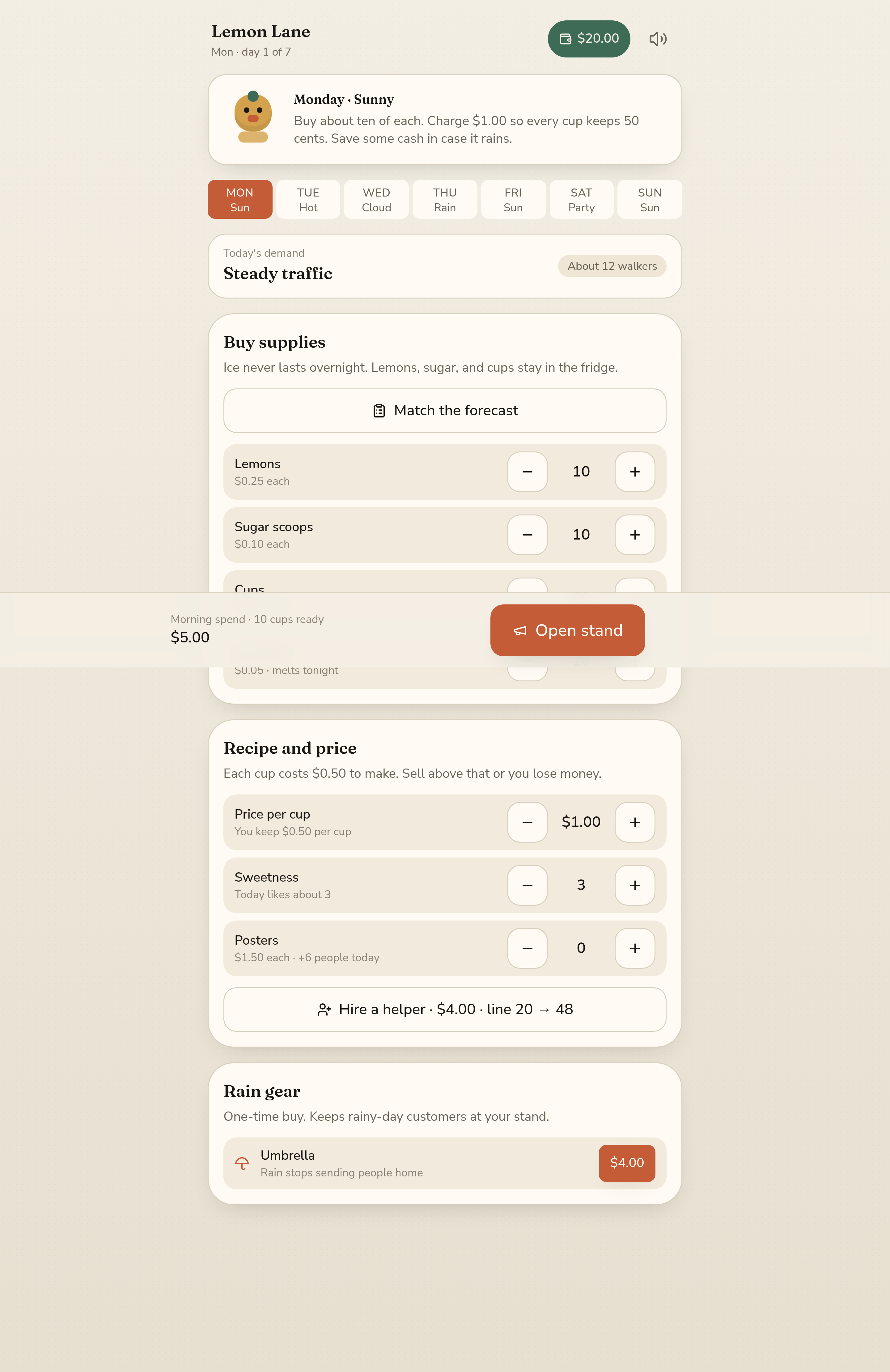

Each morning screen shows the forecast, what supplies cost, and a line like "Each cup costs $0.50 to make. Sell above that or you lose money." At the end of the week there's a report card that explains revenue vs. profit.

Two things I'd really like feedback on:

1. If you played Day 1 without reading anything else, did you understand why your price has to be higher than the cost per cup? Or did you just press "Match the forecast" and open?

2. Is the end-of-week report card worth getting to? Too long, too short, or too preachy for an 8–12 year old?

It runs in the browser with no account or download, and a week takes about 15 minutes. Even "I quit on day 2 because…" helps. Thanks!

This game, and I am being nice, sucks. It is unplayable. I have been on Itch a while and have played very few games this bad.

Thanks for trying it, and sorry. You hit a broken upload around noon (styles didn't load and the day wouldn't start). It's fixed now. If you're up for a second look, I'd love to know what still feels off.

Hi! I played a full week on desktop Chrome. I started in the itch embed, then opened the game on its own page because of the first point below.

In the itch embed I couldn't reach the price at all. The day screen is taller than the embed (the embed is 860px high, the day screen about 1480px) and scrolling is off in the embed, so "Recipe and price" sits under the Open stand bar. Even in fullscreen I couldn't scroll. Ticking "Enable scrollbars" in the embed options, or making the day screen shorter, should fix it. Maybe it's also part of what the first commenter ran into.

1. Honestly, I did exactly what you were worried about: I pressed "Match the forecast" every day and opened. I got 3 stars on Pricing without ever choosing a price myself. The line "Each cup costs $0.50 to make. Sell above that or you lose money." is very clear when you see it, but nothing made me stop and look at it. Maybe Match the forecast could fill the supplies only, and leave the price to the kid?

2. The report card is short and friendly, not preachy at all. "Posters and helpers are bets" is a great line for that age. One thing confused me on day 1: my wallet went from $20 to $18, but the screen said "The till is heavier" and "+$1.15 profit". The supplies-on-hand line explains it, but I think a kid will see the wallet go down next to the word profit and get lost. Maybe slow that moment down on day 1?

Clean art, and the little mascot is cute. Good luck with it!

Thank you, this is exactly the kind of feedback I was hoping for.


The embed: you nailed it. I've turned on scrollbars for the itch embed, so "Recipe and price" should be reachable now. That very likely explains what the first commenter hit too.


1. Match the forecast: yes, that's the hole. Filling the supplies but leaving the price to the kid is a much better split, so I'll change it that way.

2. Day 1 wallet vs profit: good point. Seeing the wallet drop next to "+$1.15 profit" is confusing at that age. I'll slow that moment down on day 1 and show where the money went (supplies still on hand).


Really glad the report card didn't feel preachy. Thanks again for playing a full week.

PingLife, the itch build is updated now (refresh if the page was open). "Match the forecast" fills the supplies only and leaves the price to the player, with a one-time nudge to pick one. On day 1 a "Why did my wallet go down?" box explains the drop using that day's real numbers. And Buy supplies now sits next to Recipe and price, so the whole morning screen fits much better in the embed. Thanks again for the detailed playtest.