
On Sale: GamesAssetsToolsTabletopComics
Indie game storeFree gamesFun gamesHorror games
Game developmentAssetsComics
SalesBundles
Jobs
TagsGame Engines

TOY MENDER devlog: a cozy sim where you wash, fix and hand back people's childhood toys

A topic by Somehow Shipped created 6 days ago Views: 628 Replies: 9
Viewing posts 1 to 7

Devlog #1: two new toys, and why each toy gets its own repair

Hi! I'm Alex, a solo dev. Toy Mender started as a jam game: a small workshop where neighbours bring you the toys they loved as kids. You scrub off the mud with a brush, foam and a rinse gun, fix what's broken, and hand it back. People played it more than I expected and left really useful feedback, so I'm starting this thread to show what changes and why.

The rule I set myself: every toy gets one hands-on repair you can't do on any other toy. The garden truck has a stuck wheel. Theo's die-cast hot rod has a bent axle and dull chrome, and you test it on a loop track. This week two more toys came in.

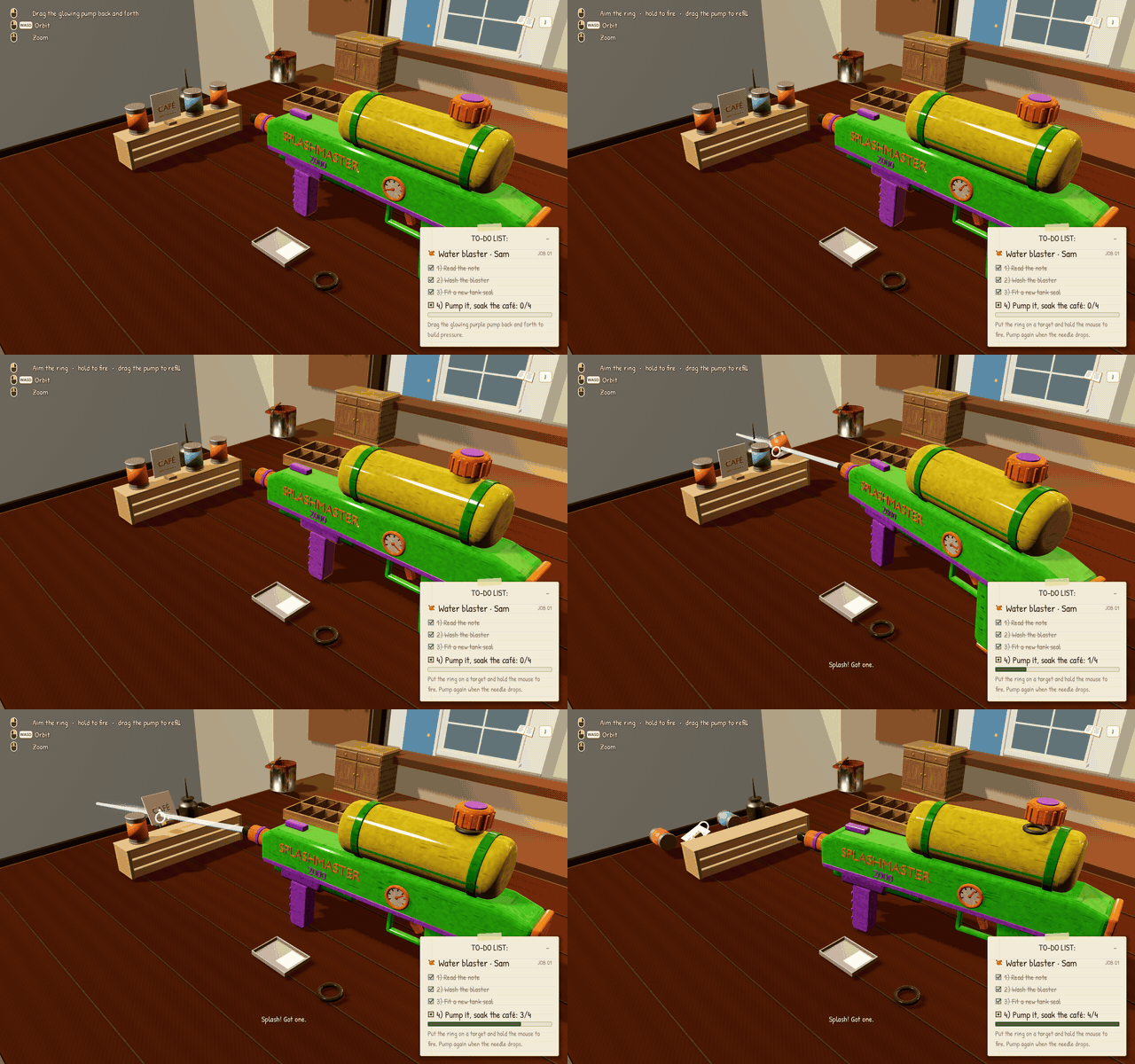
Sam's Splashmaster 2000. Sam runs the bakery and wants to win the summer-fair water fight against the café owner. After the wash you unscrew the tank cap, pull out the cracked rubber seal and fit a new one, then pump it up and soak the café's tin cans. A tester tried to fire by clicking on the blaster itself, so now the stream always leaves the nozzle straight ahead and swings smoothly toward your pointer.
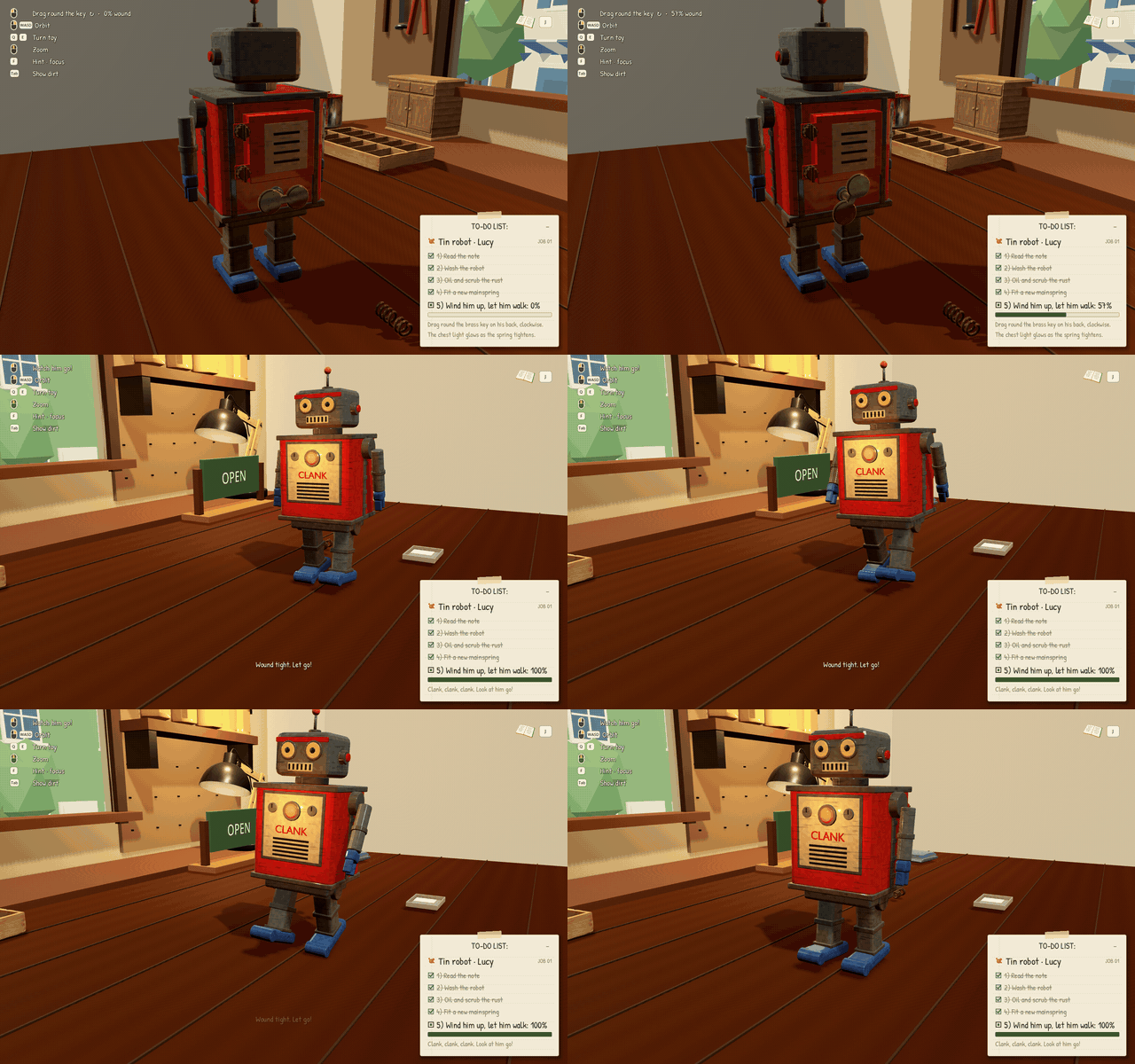
Professor Clank. Lucy wants her 1950s tin robot walking again for her art-school show. He's covered in orange rust: you oil the seams first, then scrub, and the flakes drop onto the bench. Then you open his back plate, swap the snapped mainspring and wind the key. His chest light glows brighter as the spring tightens.
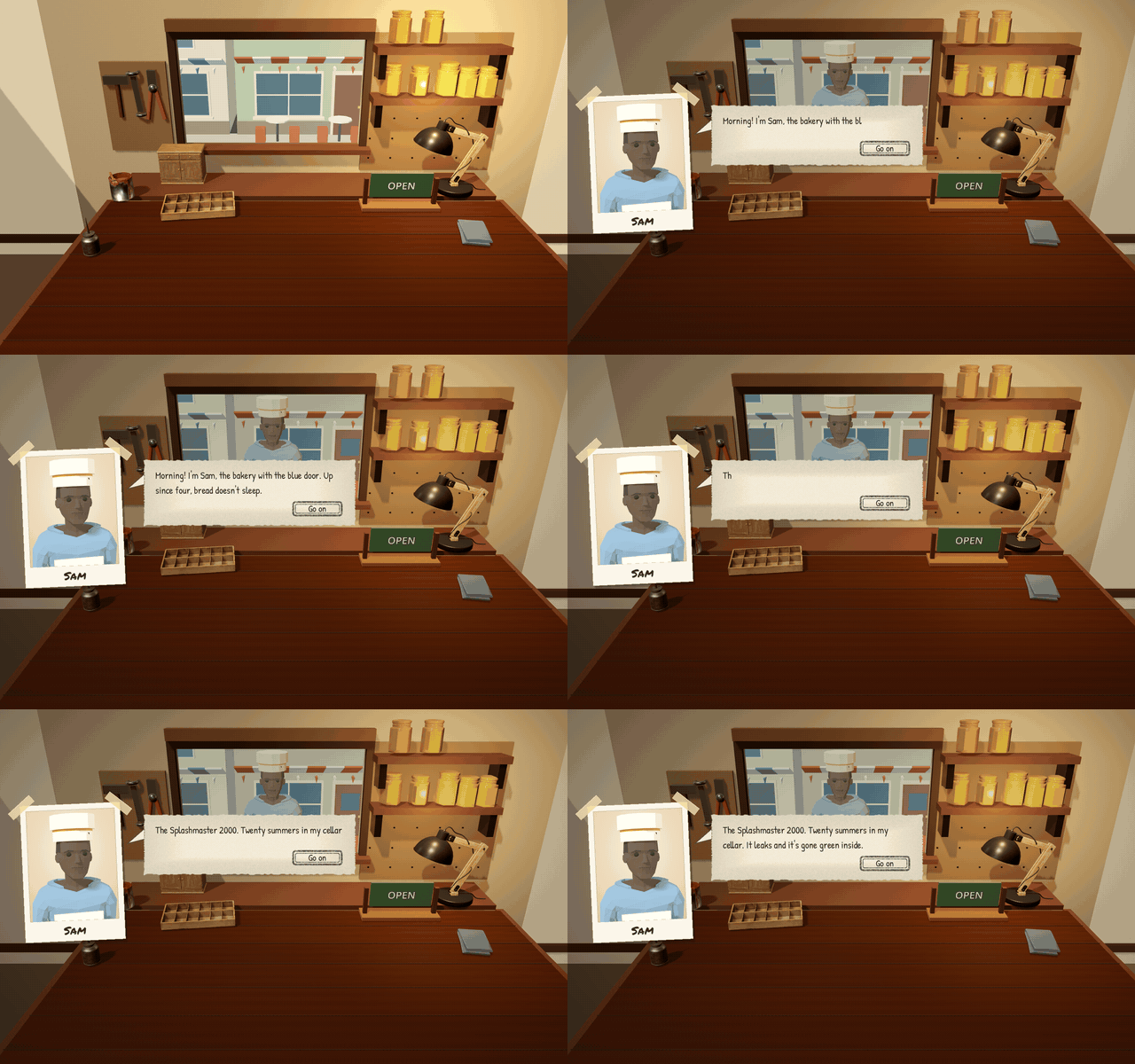
New faces. The customers at the window are now low-poly people (built on Quaternius's free CC0 characters), in front of a little 3D street with Sam's bakery, the café and the summer-fair bunting.
Also in this update: the shop, album and receipt got the same paper-notebook look as the to-do list, the mud now looks like dried, cracked earth, the light in the workshop is softer and warmer, and whatever you need to grab next glows until you find it.

What's next: more toys. I'm thinking about a music box, a teddy bear that needs stitching, or a spinning top. Which would you most like to fix?

Play Toy Mender free in your browser (or on Windows, Mac and Linux): https://n3at18.itch.io/toy-mender

Full 1.1.0 notes: Update 1.1.0

Goblin votes for the teddy bear. Pulling a split seam together stitch by stitch could give it a very different rhythm from replacing the robot's spring. A gentle squeeze afterwards could be the little test that the repair holds.

It would be lovely to keep a worn patch or a crooked old stitch visible when you hand it back. That gives the owner something familiar to recognise in the repaired toy.

thank you for the feedback! teddy bear goes next :) 

Devlog #2: the teddy is in, a water ring toss, and a much faster start

Thanks to everyone who voted. The teddy bear won, so Misha arrived first: you pull a split seam together stitch by stitch, dry him with a warm dryer, and give him a gentle squeeze to check the repair holds.

Splash Hoops. Owen's little water ring toss handheld is now the first job for new players. You scrub the grime off, descale the cloudy window, drain and refill the water, and free the jammed rings. Then it goes on your shelf and you can play it any time (press H).

1.4.1, out today: getting to the bench faster. I added anonymous play stats and found that half the new players never pressed Play. In the browser, the title screen took close to a minute to become clickable. It now shows a loading bar right away and is ready in about 8 seconds, and the download is 40% smaller. Each toy is now prepared while its customer is talking to you, so cleaning no longer stutters. The title screen also got one big Play button.

What's next: a toy with a tiny game inside it. Ideas welcome!

Play free in your browser or on Windows, Mac and Linux: https://n3at18.itch.io/toy-mender
Full 1.4.1 notes: https://n3at18.itch.io/toy-mender/devlog/1741823/update-141-faster-loading-smoother-web-play

Devlog #3: a toy with a game inside

Last time I said the next toy would have a tiny game inside it. Here it is: Brick Pocket, a chunky grey 90s handheld that Dev dug out of his parents' attic.

The repair is all hands-on. Unscrew the battery door, drag the leaked batteries into the scrap tin, swab the green crust off the contacts, then prise off the cracked screen cover and press in a new one. Fresh batteries go in, the switch clicks, and the little LCD flickers to life. To prove it works, you clear Dev's test rows.

Then it lives on your shelf as a real falling-blocks game. Every row you clear packs a pixel toy into the box, and Dev tips you the first time you pass each score milestone.

One thing I learned from playtesting: my first version had a battery door you could only open by clicking a small spot in the middle, and it took about ten clicks to work out. Now everything is grab and drag, and the hint always matches what will actually happen.

Play free in your browser or on Windows, Mac and Linux: https://n3at18.itch.io/toy-mender
Full 1.5.0 notes: https://n3at18.itch.io/toy-mender/devlog/1742125/toy-mender-150-brick-pocket-a-handheld-with-a-game-inside

Devlog #4: where players got stuck, and a much faster browser version

After Brick Pocket went out I looked at the numbers, and they surprised me. Most people cleared the workbench just fine, opened the shop, met Owen at the window… and then two out of three left before taking his Splash Hoops.

When I played it as a first-time visitor in the browser, the reason was obvious: while Owen talked, the game was busy getting his toy ready behind the scenes, so the conversation froze for a second or two at a time and clicks seemed to do nothing. Click through quickly and he vanished, leaving an empty bench and "Unpacking the box…" for almost twenty seconds. Not a great first customer.

What changed in 1.5.1 and 1.5.2:

  • Owen's toy is now prepared behind the loading bar after Play, so his visit is smooth.
  • The browser version runs on a slightly customised copy of the Godot engine that only prepares the graphics the game actually draws. That's about a third of the work, and loading after Play went from roughly 30 seconds to 18 on a first visit.
  • No more frozen conversations with later customers either.
  • The glowing CLOSED sign now opens the shop when you click it (it used to just blink at you).
  • Clicking the speech bubble skips to the end of the line, and Go on is a proper green button.

Full notes: Toy Mender 1.5.2. If you tried it before and bounced off Owen, I'd love to know if it feels better now.

Devlog #5: getting to the bench faster

Good news first: after last update's fix, every player who met Owen took his Splash Hoops. Before, only one in three did.

The next thing the numbers showed was the start itself. In the browser, pressing Play kicked off a long loading bar (18 seconds or more on a first visit) while the game got Owen's toy ready, and some people gave up right there.

In 1.5.3 the toy is prepared while you're still on the title screen, so Play takes you to the workshop in about 10 seconds. If the toy isn't quite ready when you open the shop, Owen waits at the window with a short progress bar instead.

I also added a few anonymous stats about loading and the title screen, so I can see exactly where the start still feels slow. Next up: making the title screen itself smoother while it loads.

Notes: Toy Mender 1.5.3

Reading your devlogs back to back, the Owen fix stood out: two out of three players leaving before Splash Hoops, then every player who met him taking it after the freeze was gone. Watching a first-time visitor's session like that is the kind of thing most of us skip. One free tip for the game page: since the browser version still needs a loading bar, put a 3-second looping GIF at the very top of the page of the mud washing off a toy, brush and foam, ending on the clean reveal. That's your most satisfying moment, and it shows people what they're waiting for before they hit Play.

Thanks so much for reading the devlogs back to back. Watching first-time sessions has taught me more than any amount of playtesting on my own. Owen was a perfect example: I’d never have spotted that freeze myself.

Love the GIF idea. The mud-to-clean reveal really is the moment the whole game is built around, and showing it while people wait for the browser build to load makes total sense. I’ll put a short looping one at the top of the page this week. Thanks for the tip!

The Owen loading issue is such a useful example: the conversation looked unresponsive even though the toy was still loading. Preparing it earlier and showing progress at the window sounds like a much clearer handoff. The idea of each toy having its own repair is lovely, too.