

A top-down sprite often has transparent space around the character. Using the whole cell as its collision shape can make it hit walls while the visible character is still some distance away. A useful setup is to put the body origin at the feet, then offset the visual child.
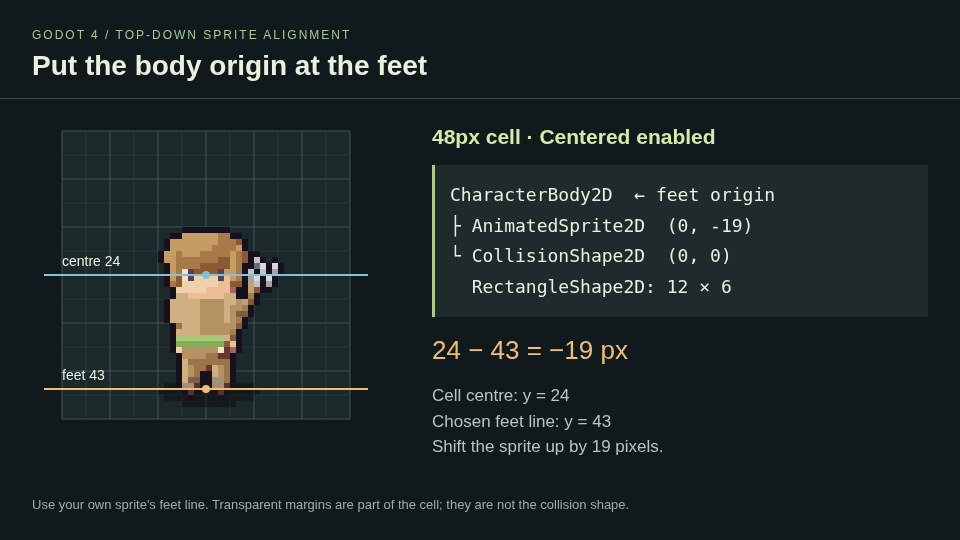
In this example the cell is 48×48, its centre is y = 24, and the chosen feet line is y = 43. With Centered enabled, the sprite's local Position Y is 24 - 43 = -19. The body and feet collider can stay at (0, 0).
- Use a
CharacterBody2Das the moving root. Add aCollisionShape2Dwith a small rectangle around the feet; this example uses 12×6 at local(0, 0). Tune that size for your art and game. - Add an
AnimatedSprite2Dchild. Keep Centered enabled and set its Position to(0, -19)for this particular sheet. Keep the same cell size and chosen feet line across animations. - Use Floating motion mode for top-down movement. It treats collisions as walls rather than introducing floor/ceiling behaviour.
For example, merge these settings into your controller's existing _ready(); sprite is the AnimatedSprite2D child:
@onready var sprite: AnimatedSprite2D = $AnimatedSprite2D

func _ready() -> void:
    motion_mode = CharacterBody2D.MOTION_MODE_FLOATING
    sprite.centered = true
    sprite.position = Vector2(0, -19)
    sprite.texture_filter = CanvasItem.TEXTURE_FILTER_NEAREST
Your movement still belongs on the body: set velocity and call move_and_slide(). Input.get_vector() is useful for keeping diagonal speed consistent. The sprite is just the visual child, so it follows the body's movement while keeping its offset.
Checked in a fresh Godot 4.7.2 project with a free 48px villager: four walk/idle facings, equal diagonal/cardinal speed, feet offset, and collision against a static wall. The diagram is a cell-alignment illustration, not a screenshot of Godot's collision debugger.
The -19 is specific to this sheet, not a universal RPG setting. Use your own frame size, chosen feet point and collider dimensions. For a centred cell, the vertical offset is cell_height / 2 - feet_y.
References: CharacterBody2D motion modes and Input.get_vector.