
Indie game storeFree gamesFun gamesHorror games
Game developmentAssetsComics
SalesBundles
Jobs
TagsGame Engines

Hi!

What a FAB update! 😊

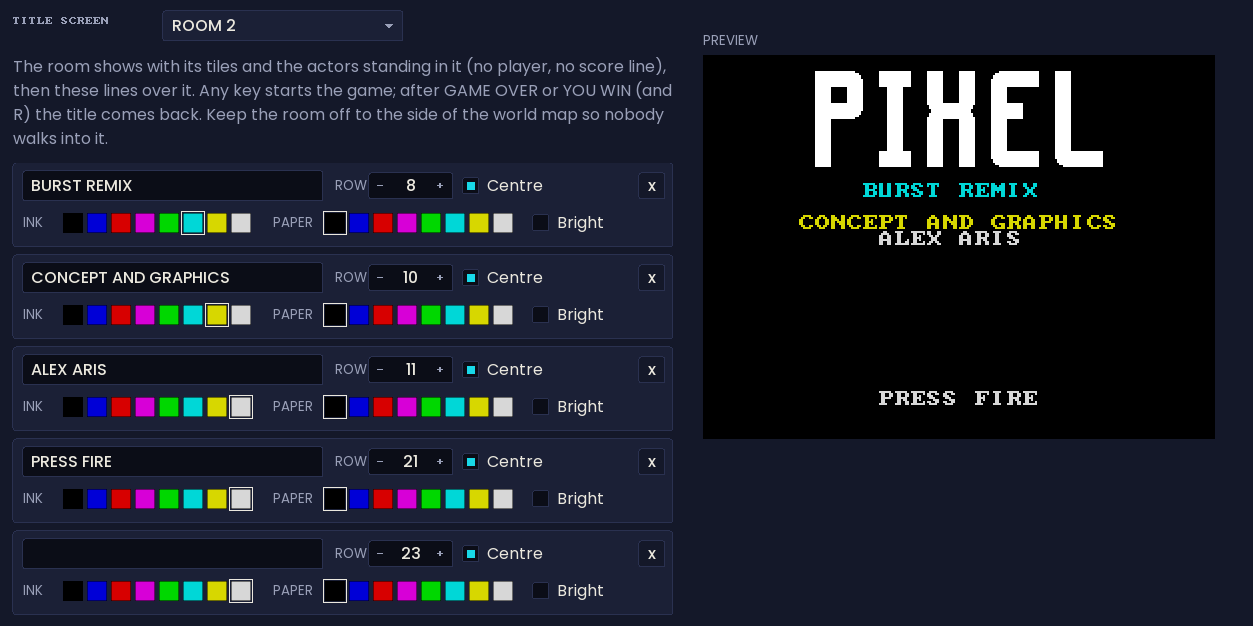
I've designed a basic title screen and will adjust it a bit more until it looks okay.
I am trying to work out the rule logic at the moment for when the player collects 8 gems and then the exit will appear. Once the actor touches the exit, they should be able to go to another room. I think a message should be displayed to say something like 'level completed' and then go to the next room.
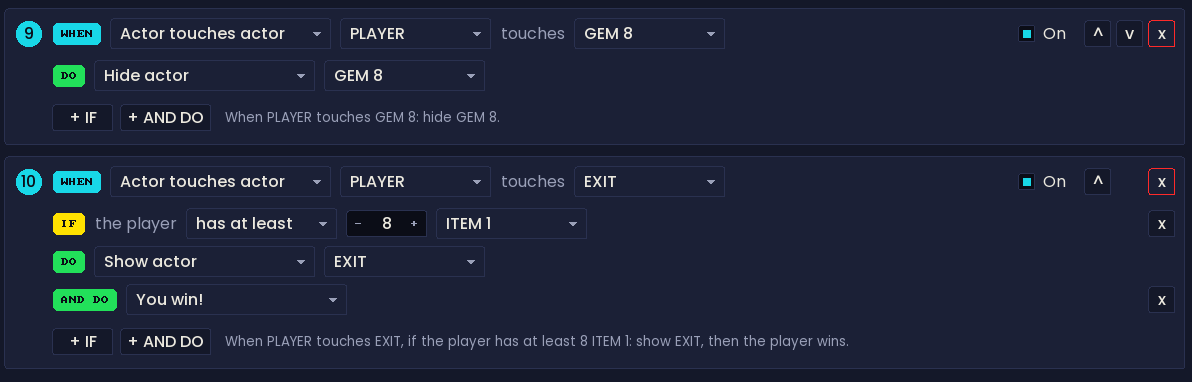
I'm not sure if the current rules will allow for this, and maybe a couple more might be needed.

Will there be an option in the future for the ability to design your own font?

Many thanks! 😊
Hi! Thanks so much, and the title screen looks great already.

On the rules, you're very close, and everything you need is already there.
Two things are tripping it up:

 1. A hidden actor can't be touched, so "When PLAYER touches EXIT… show EXIT" never gets the chance to fire. The exit needs to appear when the 8th gem is picked up instead.

2. Hiding GEM 8 doesn't put anything in the bag, so "has at least 8" never comes true...
The easiest fix is to make the gem an item (Items tab, kind "Thing"), not an actor, and place 8 of them in the room. 

The player picks them up by walking into them, and you don't need a rule for each gem. That's how GEM RUN does it, so it's worth opening it to look at its rules. Then three rules do the whole job: 

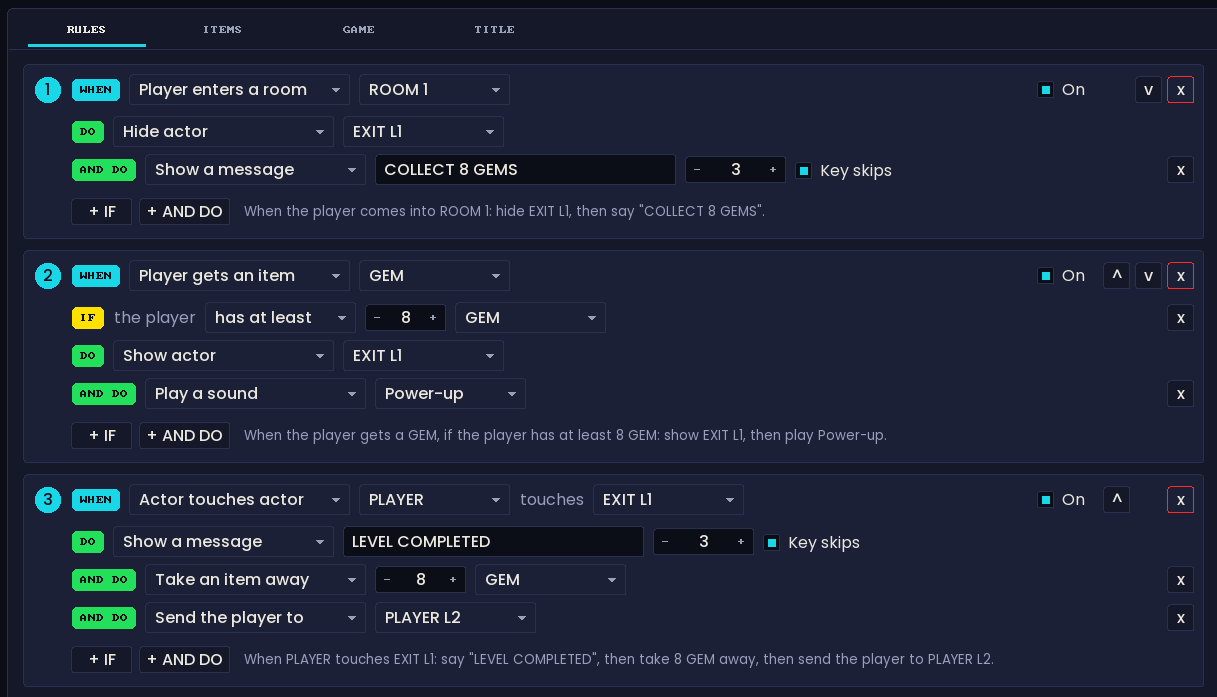
 • WHEN Player enters a room → ROOM X · DO Hide actor → EXIT · AND DO Show a message → "FIND 8 GEMS" 

• WHEN Player gets an item → GEM · IF the player has at least 8 GEM · DO Show actor → EXIT · AND DO Play a sound 

• WHEN Actor touches actor → PLAYER touches EXIT · DO Show a message → "LEVEL COMPLETED" · AND DO Take an item away → 8 GEM · AND DO Send the player to → ARRIVAL 2 For that last step, put a "Still" actor (e.g. ARRIVAL 2) in the next room where the player should start. "Send the player to" drops the player at that actor's spot. 

Taking the gems away means the next level starts the count from zero. On the very last level, use "You win!" instead of "Send the player to". 

--

 Designing your own font is a great idea. 

The game already has its own built-in font, so it's something I'm looking at. 

Thanks again!

Hi!

I've done more testing, with some unusual results. The hidden actor, Exit, doesn't appear again when all 8 gems are collected. 

The collect 8 gems message appears very quickly and then disappears. I recorded my experience to show what else has happened as well. I ended up turning the exit actor on, so I could show the next level in the video.

Many thanks for your help so far.

Cheers, Alex. 😊👍

Hi MightyAxle, thanks for the video. 

It made both problems easy to find. 

  Why the exit doesn't work in room 2 : Right now, rules work on the exact actors they name, not on every room. 

All three of your rules mention EXIT L1, so in room 2 nothing knows about EXIT L2. 

When you get the 8th gem there, the rule shows EXIT L1, back in room 1, and touching EXIT L2 does nothing. 

 For now, each room needs its own rules for its own exit. 

For your game: 

 • In your first rule, add AND DO Hide actor EXIT L2, so both exits start hidden. 

• In the "gets an item GEM" rule, add AND DO Show actor EXIT L2. 

• In the "touches EXIT L1" rule, add AND DO Hide actor EXIT L2 before "Send the player to". Otherwise room 2's exit would already be open when you arrive, because your level 1 gems opened it. 

• Add a new rule: WHEN PLAYER touches EXIT L2, then whatever ends level 2. 

 I'm going to make this easier: rules you can mark to apply across all rooms, so one set of rules runs every level. I'll post again when it's in. 

The spike glitch: there are two players ARRIVAL L2 has its Behaviour set to Player, so room 2 has two player actors that both move with the keys. You land exactly on ARRIVAL L2, so they move together and look like one. When the spikes take a life, only the real player goes back to its start, and the copy carries on by itself. That's the player jumping between positions. 

Set ARRIVAL L2's Behaviour to Still and it becomes just a marker. PRISM shouldn't have let you make a second player, so I'll fix that as well. The message that vanishes Untick Key skips on the "COLLECT 8 GEMS" message. With it ticked, any key you press clears the message, and you're pressing keys all the time while you move. 


 Thanks again for testing so thoroughly, it really helps.

Hi MightyAxle,

I managed to fold this into some other updates I was working on this week. To be honest, I redesigned it a few times, but settled on this: an exit can now point to any room, and to an arrival point in that room where the player comes in. You can use the new exits, or keep using rules like yours. Both work.

For your game: give each level's exit the Exit behaviour and set where it leads, and level 2 will work just like level 1. Or name both exits EXIT, and one set of rules ("any EXIT", "this room's EXIT") covers every level. There's also a new lesson, "5 Levels", on the Home page that walks through it.

I hope this makes it a bit more streamlined and useful!

See the latest devlog: https://polytricity.itch.io/prism/devlog/1796956/prism-122-levels-screen-rooms-y...

Many thanks!
- Robert