On Sale: GamesAssetsToolsTabletopComics
Indie game storeFree gamesFun gamesHorror games
Game developmentAssetsComics
SalesBundles
Jobs
TagsGame Engines

Final Fantasy Blackmoon Prophecy Series

A remake of the 2011 fan game, recreated from the ground up in RPG Maker MV. · By uprc

Overworld Map is upside down in JoiPlay.

A topic by nanashi89 created 7 days ago Views: 124 Replies: 7
Viewing posts 1 to 4

Tried playing this in Joiplay. When I got to the Overworld, the map flipped upside down, and refuses to display properly.

What do I do?

Developer

This is a known issue with how that specific mobile emulator interprets the Mode 7 plugin. Since I’m only versed in how to run this on PC, I’d suggest trying an alternative mobile emulator. I do not know of any, because it’s outside of my wheelhouse, but I know that others have had luck with using alternatives.

MaldiVes works fine. Only problem is slow encounter loading, but all emulator have that problem 

(1 edit)

Close mode7 in plugin and it's clear only problem on joiplay is slow transition encounter but if you don't mind it's ok to play 

How to close Mode 7 Plugin?

1. Open your game folder and navigate to: www/js/plugins.js (or js/plugins.js depending on your game version).

2. Open plugins.js using a text editor (e.g., QuickEdit, MT Manager, or ZArchiver).

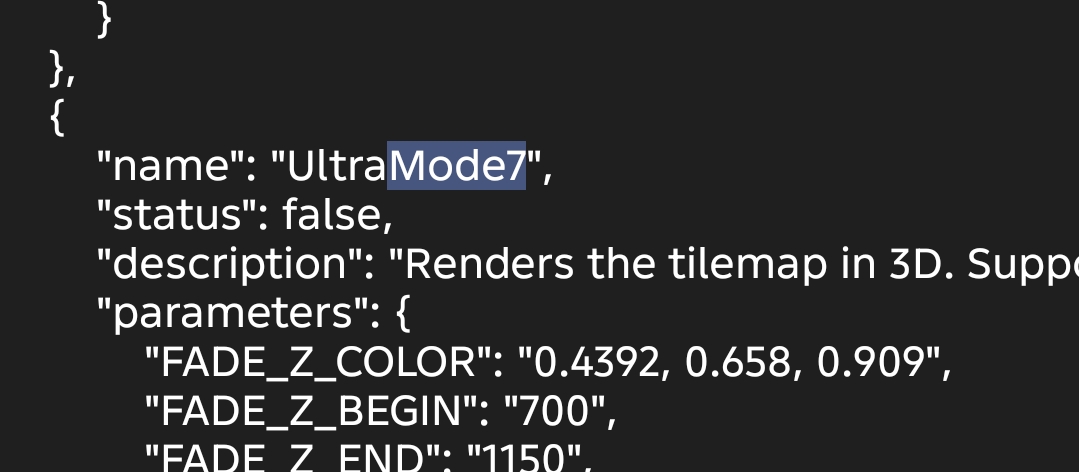
3. Search for Mode7 (usually listed as "name":"UltraMode7").

4. In that same line, change "status":true to "status":false (make sure not to delete any commas or quotation marks).

5. Save the file and launch the game via JoiPlay. The world map will now render in standard 2D

That fixed it. Now how to make the game display fit the whole screen?

Honestly, I'm not sure either, haha. I don't think there's a way to stretch it to full screen in JoiPlay. I just play it with the default screen size after disabling Mode 7, and it works great for me!