
On Sale: GamesAssetsToolsTabletopComics
Indie game storeFree gamesFun gamesHorror games
Game developmentAssetsComics
SalesBundles
Jobs
TagsGame Engines

227

16
Posts
1
Followers
A member registered Sep 19, 2015 · View creator page →

Creator of

Recent community posts

This is really cool! Is there a way of exporting the frames or video output at 4K? The resolution options seem to max out at 1920x1080, and I think this would be really useful for Youtube-type stuff.

Oooh, it works perfectly, and the new features seem amazing. Thanks for the quick fix!

Yeah, sure thing: https://drive.google.com/file/d/1-bPipzv9ZanfPDiEZjZEvtGsQNI6ikpA/view?usp=shari...

Works great! The FBX export, at least. Exporting it as a GLB or GLTF contorts the model, but that could be user error or the software I use to add bones to things, and I can change an FBX into a GLB easily enough anyway.

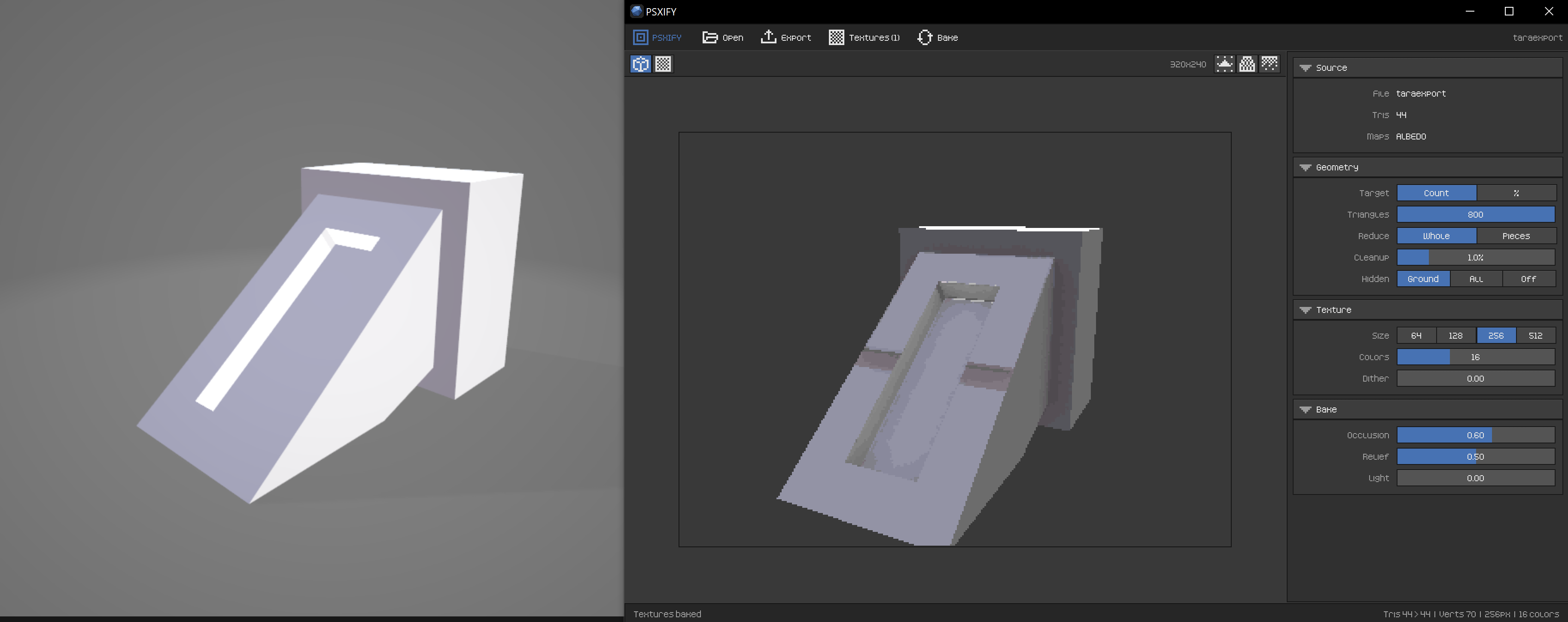
Do you know why this model has a weird seam when imported? I think it has something to do with the way PSXify is packing the textures, because when I add actual textures to the model and then import it, the wrong textures show up around that seam area in the middle of the slope. No combination of settings in PSXify changes it, and I'm racking my brain trying to figure out why it's doing this and how to avoid it. It's pretty rare (maybe some consequence of importing models that are already low-poly?) and only something I've seen on this one model, but I'd like to be able to use the dithering and palette quantization features on low-poly models, too, if at all possible.

Works great on Windows, and the new update for choosing where the vertices go is really cool. Here's hoping the "(yet)" means that it'll eventually be possible to import rigged models with animations and have those survive the process, though it's not too much trouble to run models through this first and then do all that stuff afterward.

Here's a little test playing around with particle bouncing to simulate a kind of splash effect when a 3D object blocks the flow: 

And this is a gif experimenting with turning PlasmaGen's output into pixel art, which seems incredibly promising:

Bought this on a whim because the particle systems I have are awkward or aimed more at pixel art, and I'm very impressed with it. Everything's laid out intuitively, with enough options to create all sorts of things. Love when a program is easy to pick up and make something fun in.

Only thing I wish was that you could import your own sprites as particles like how you can import meshes as emitters (which adds so much flexibility and is much appreciated!). Even without that, though, this is definitely going to be my go-to for particle effects.

Looks cool, but the link to the full node list goes to a 404 page. And is there a video showing off how everything works? Gifs are great but a little too short and low-res to get a sense for the workflow.

That video you posted won me over big time. Been looking for something like this for quickly banging out low-poly stuff, and I'm already zooming around and figuring things out. Seems like a really great tool; I look forward to learning its ins and outs.

Oooh, new features? Honestly, the only thing that feels missing to me is some kind of a batch convert option, because the style reference and color simplify options could make this the best possible tool for converting a series of video frames.

I've tried a ton of software for this sort of thing over the past few months, including stuff only found on obscure Japanese-only stores, and I can already tell from my testing that this is one of the top tools out there for converting images to pixel art. The palette quantization in particular does an incredible job.

All right, sent. Hopefully it helps! Thanks for your time.

This seems like an incredible tool, but it crashes like crazy on me. I can start to get something going, but then it'll crash as soon as I've got a few nodes up when I'm moving them around or changing settings. There's also a warning that comes up when I start the program:

"Errors in loading assets in project

Subgraph '(chosen project name)/stdlib/samples' not importable in catalog.

The node Random Bool Stream#592 of type boolean lists & streams/random bool stream has been replaced by a do-nothing node.

['factory not found for boolean lists & streams/random bool stream']

Subgraph '(chosen project name)/stdlib/wood texture ramp' not importable in catalog.

The node Random Bool Stream#732 of type boolean lists & streams/random bool stream has been replaced by a do-nothing node.

['factory not found for boolean lists & streams/random bool stream']

Subgraph '(chosen project name)/stdlib/wood_texture' not importable in catalog.

The node Random Bool Stream#732 of type boolean lists & streams/random bool stream has been replaced by a do-nothing node.

['factory not found for boolean lists & streams/random bool stream']"

I don't know if that's connected to the crashing since I haven't been using the node types listed, but I've downloaded it multiple times to see if that fixes anything and always get the same errors and crash-prone behavior, which is a shame since this is otherwise right up my alley.

Installing it to C:\TileGraphX worked perfectly; it must be a weird permissions thing. Whatever the case, I'm glad to be able to use this now. Thanks so much for the help!

Same problem, I'm afraid, even after force-uninstalling the older version with Wise Program Uninstaller! It gives me an error about not being able to stop TileGraphX, almost like the installer is complaining about itself being open. It did that before, too, but it'd only give me that particular error when I'd install it for all users and not just the current one. I'm headed to bed now, but I'll try again in the morning and record it in case that helps you figure out what's going on.

I'm really looking forward to playing with this!

Hey, this seems amazing in the browser, but the Windows install doesn't work. It goes through the install, says it can't locate the program, and then the only file in the install location is the uninstallation file. And even that file doesn't work to remove the program, giving me an "installer integrity check has failed" error. Is there a fix for this?