Indie game storeFree gamesFun gamesHorror games
Game developmentAssetsComics
SalesBundles
Jobs
TagsGame Engines

Astropelican Games

24
Posts
1
Topics
2
Followers
90
Following
A member registered Dec 05, 2020 · View creator page →

Creator of

Recent community posts

Really happy to have some of your art in my own game, Konbini Shift!

I’ve been using the portrait assets in my own character portrait generator for the customers, and your work has been a big inspiration as I’ve been putting together this little pixel-art puzzle game about working the night shift at a Japanese convenience store.

If you’d like to check out the demo, I’d really appreciate a Steam wishlist!

Konbini Shift on Steam

(2 edits)

delighted to share that I have some of your art in my own game, Konbini Shift. Your work has been a big inspiration as I’ve been putting together this little pixel-art puzzle game about working the night shift at a Japanese convenience store.

if you’d like to check out the demo, I’d really appreciate a Steam wishlist!
Konbini Shift on Steam

I’ve been playing Mai-Chan’s Sweet Buns and it’s been a big inspiration for me as I’ve been making my own little game, Konbini Shift, a pixel-art puzzle / matching game about working the night shift at a Japanese convenience store.

If you enjoy Sweet Buns, I’d love it if you gave Konbini Shift a look and considered adding it to your Steam wishlist! 🍙🍘

Demo is out for Windows, with Mac and mobile coming soon.

Konbini Shift on Steam

doesn’t seem to work with aseprite 1.3.18.2? the resize modal doesn’t pop-in after going into file -> scripts -> easy resize.

(1 edit)

you need to showcase a list of names for the sprites in your asset packs please. it’s very risky for people to make a $40 investment on a pack they do not know the contents of, especially for something as particular as cooking game, where the ingredients and individual food items need to be known.

Since the individual PNGs are just numbered, I wrote a Python script that extracts the 32×32 cells from the spritesheet and names the files according to the HTML table that references those cells.

However, it appears that the rolling pin is missing from the HTML as well. Because of that, the script will end up assigning the wrong filenames to the wrong images.

Would it be possible for you to provide the individual PNGs with the proper names for what each image represents? That would avoid any ambiguity and ensure everything is named correctly.

(1 edit)

btw, the html does not refer to the red coffee maker in the spritesheet on row 7, which sits between the Choco mold and Stand mixer. can you plz ensure the html is current and updated? I wonder what else is missing from the spritesheet. :/

image.png

it would be helpful to know, considering the price point, what is actually in these zips? can you list the pngs by name, or where can I find that here?

ok

would be nice to have a descriptive name for each of the icon files. ;)

haha cute game! : )

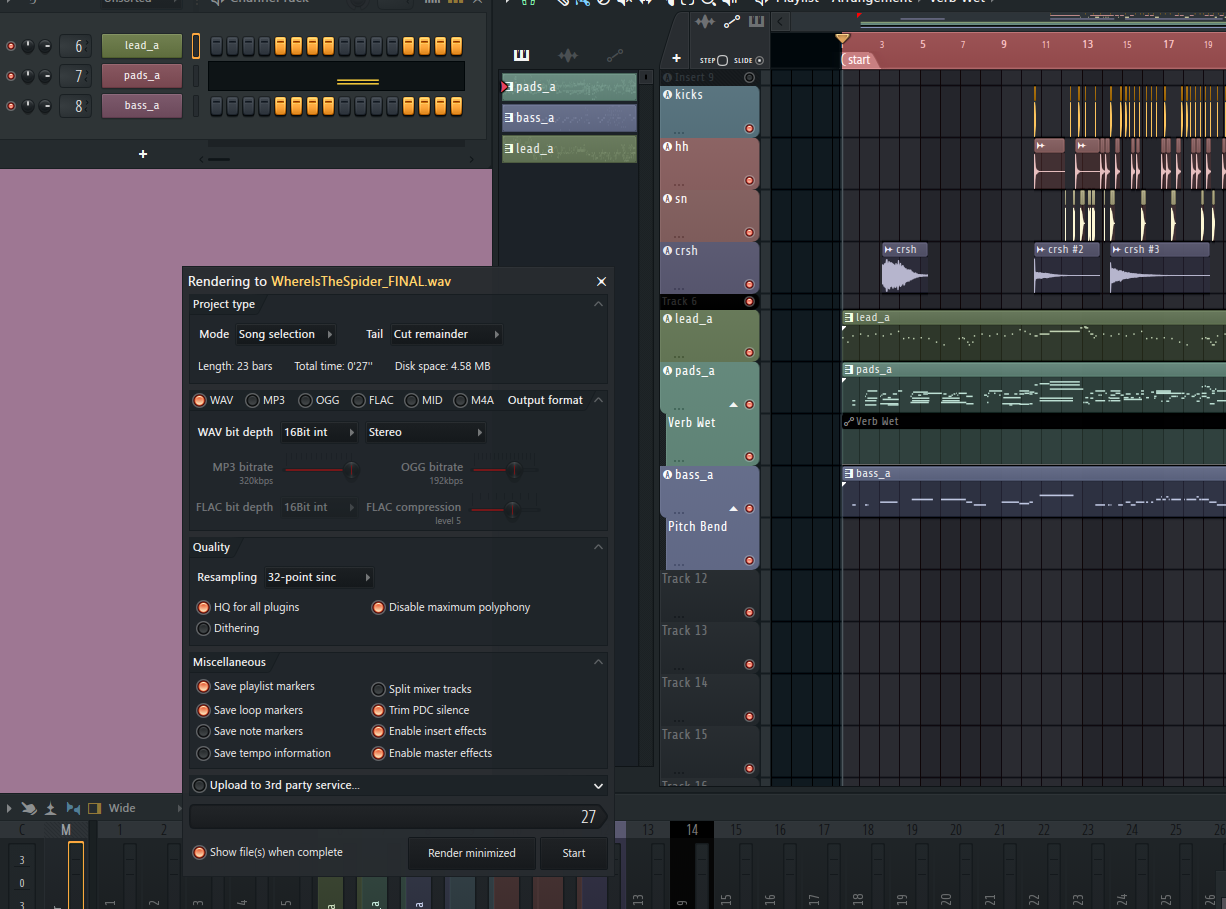
Audio milestone: the stage track is now fully complete in FL Studio, and I implemented it with a classic NES-style intro+loop structure.

I exported the intro as a one-shot segment first, then exported the main body as a dedicated loop section (as shown in the screenshot), and wired both up with a Love2D queueing system so playback rolls from intro into the loop with a seamless handoff and stable repeat behavior.

image.png

thanks for playing! yes hug all the kitties :) 🦁

(1 edit)

Devlog: Onboarding & Dialog Polish Update

A focused quality-of-life pass centered on onboarding clarity, visual communication, and smoother moment-to-moment UX. No changes to gameplay or core mechanics were made.

Highlights

  • macOS and web builds now available!
  • Web build has shader support disabled due to lag, so the richer experience is on desktop builds.
  • Added first-time room entry messaging, so each room can introduce its mechanics the first time you step in.
  • Main puzzle room intro now uses shorter, clearer guidance.
  • Key room intro now includes trap warning text with visual sprite support.
  • Added reusable inline sprite tokens inside dialog text (ex: mirror/receiver icons embedded directly in a sentence).
  • Improved inline icon reveal behavior so sprites appear smoothly during typewriter text without pop-in/reflow. This was very tricky to get right.
  • Ensured tutorial prompts are enabled by default on first run.
  • Stability pass completed across builds; web and desktop outputs are currently in a good state.

Why This Update

This pass was about making guidance easier to read, quicker to understand, and more visually intuitive without overloading players with text.

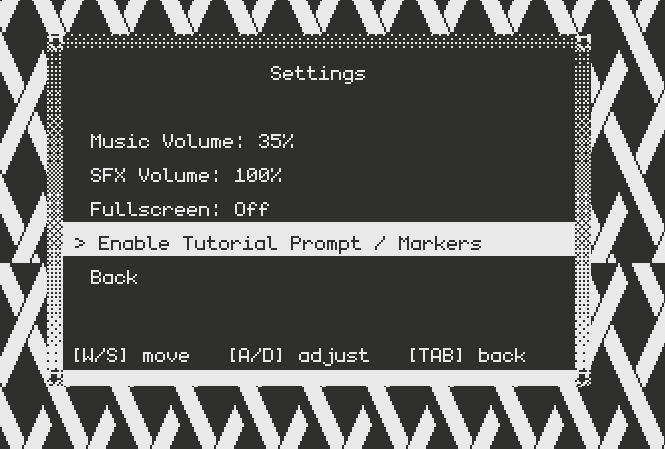
note: enable/disable tutorial messaging in settings.

heya! in case you’re still interested, I’ve uploaded a macOS version for the game. :)

thank you for helping me bring my game to life with your cat animations! Where Is The Spider?

thanks for the feedback. definitely needs some fine tuning. thanks again for playing. :)

indeed, there is a sign on one of the walls which explains a bit more. I was going to make a smaller tutorial level but ran out of time lol.

the wall sign also explains that if you just let kitty fall asleep after being idle for 5 seconds, the mirrors reset to their original positions, but yea, a tutorial level that explains everything would be better.

thanks for playing!

thanks for playing and for the feedback!

thank you!

hi! can you make a sliding animation?