Indie game storeFree gamesFun gamesHorror games
Game developmentAssetsComics
SalesBundles
Jobs
TagsGame Engines

Celianna

509
Posts
15
Topics
5,363
Followers
A member registered Feb 24, 2017 · View creator page →

Creator of

Recent community posts

Tailor Tales will not support a Mac version, I'm sorry. There's a sort-of version here on Itch.io but it is not supported as it tends to crash when you try to create your character (due to permissions with changing files on a Mac computer).

I will try my best to get a Mac version working as well this time around!

It's a consumable item, yes. You'll have to craft more, but the base materials are pretty easy to get.

I did not want to create a permanent item that acts as a tool, because there are only three permanent tools in the game. Though I might change my mind on this!

Don't worry, crafting already happens from your storage! It's a quality of life indeed :)

No sorry. The save files have a flag set when you start the game, to know which platform you're playing on. Steam, itch, Patreon even. They don't work if you transfer them over, because each version of the game works differently (Steam has achievements, that's why you got that OrangeGreenworks error; it's trying to show a Steam achievement, which it cannot do). There's also some content in one version, and not in the other. It's better to start a new game because of that.


As for your progress; I recommend going the Patreon route. Yes, you get a new game version, and yes, you start a new game again. However, you get cheatcodes that lets you unlock routes without having to play through them again. You'd want the Plus tier version.

If you want to stick with this version, then no, you can't save your progress at this point because each save file is already tainted. You can hold down the left mouse button to speed through the chapters, or press W on your keyboard for an even faster fast-forward, just to get you back to where you left off.

Can you try a new game (delete old save file)? Transferring save files is risky. Let me know if you still get the same error or not.

Thank you for following, I appreciate it a lot! I post monthly updates on my Patreon, sometimes free users can read them, too. Though I always wonder how many people read my dev notes 🤣

I'm having a ton of fun! Wish I could work on this 24/7 but I still have regular Tailor Tales to work on, too haha.

Good luck! Godot has been quite fun, but it really is a full engine where you need to create everything yourself. Just now, I made a small script so you can select a number... something so simple haha. But nothing exists in Godot, every method needs to be created. I wouldn't recommend it for beginners because of that.

Hmm I can't seem to find the issue, I have updated the game to version 7.1.1 which works on my end. Please make sure to redownload the game, and that you're running version 7.1.1, and start a new game as well.

Hi, where are you playing this from, Itch or Steam, or perhaps Patreon?

The error appears to be running a function that I recently added, but it almost looks like you're running an older version of the game.

The DLC is only available on Steam, not on Itch. So yes, you can go ahead and purchase directly from Steam. Both Steam and Itch will be updated, but only Steam receives the DLC.

I updated the game to fix an issue a previous user had, but it turns out they weren't even playing this version, so I introduced a bug for regular users 😅 My mistake. I've updated the game, it should now start as usual. Please update the game through the Itch app, or re-download it.

Hm this requires some more personal testing, can you join the Discord and post in the tech support channel there? Mostly, I am in need of your save file so I can see why it wouldn't show up for you.

You can find your save file here:

1. Oen your game, undress your character so she's not wearing any clothes (hair doesn't matter). Save the game.

2. Open your Itch App and find Tailor Tales. Click the cogwheel, then click manage. Then click 'open folder in explorer' and browse to this location: Tailor Tales > www > save.

3. There is a file in there called file1.rpgsave and that is your main file.

4. Drag & drop the save file into the tech support channel.

Interesting! I should look at some videos of Tomodachi Life to see how they did the layering system. It's been quite a challenge getting it to work for a 2D sprite, but I think I've got a working version so far.

That's what I'm working on right now! So much customization, so many layers you can mix and match. And you can change body type as well, there's a female and male body type for you to pick. The clothes will look different on each body type. You can pick the colour for any of the clothes (and its details!), and also change your own hair or eyes etc.


It's a dress-up game as well after all, gotta have customization.

The important client you need should be at the top of the list, with an exclamation mark. That's the one you need to finish.

Can you join the Discord to get further help? I'd very much like to find out what's wrong then if you're playing the Steam version and bought the DLC, but it's not unlocking for you. Link to the Discord here, just say you need help in the tech channel.

If you bought DLC on Steam, you must play the Steam version, not the Itch version. The Itch and Steam version are two completely different games and save files. The Itch version doesn't recognize any DLC.

The game has a save file, it saves after each time you finish playing a chapter, and when you press save. But you have to make sure you're not playing the game from the zip file directly. You need to unzip the file first!

(1 edit)

Unable to load addon script from path: 'res://addons/poly-rig/main.gd'. This might be due to a code error in that script.

Disabling the addon at 'res://addons/poly-rig/plugin.cfg' to prevent further errors.

Can't seem to get the plugin to load. Console says:

  ERROR: res://addons/poly-rig/main.gd:2 - Parse Error: Class "PolyRigPlugin" hides a global script class.

Would appreciate any help! My project is on 4.6.

Happy to see such a long time fan! Hope you continue to enjoy this game, and the next installment of Tailor Tales Cottina as well.

I know why this error occurs (it thinks you're playing the Steam version), but I don't know why you're getting this error. I tried a clean new game on the Itch version right now, and it does not show up for me (because it correctly identifies I'm playing on Itch, not Steam). I double checked; the error that causes this is turned off for the Itch version.

Please start a new game on the Itch version, do not try to transfer save files from one platform to another. If that does not work, reinstall the game and start a new game.

Did you transfer your Steam save to the Itch one? Or did you start a new game on the Itch version?

What's the error you're getting? Screenshot if possible?

Yes, everything is still Windows only.

Eeyok's route is not in the original line-up at the introduction (only the 6 main guys are). But once you select a random guy, go to the main menu, click on the cogwheel icon, and then click Character, you should see Eeyok listed there :) you can then click on him, and click on 'start new route'  to begin his route.

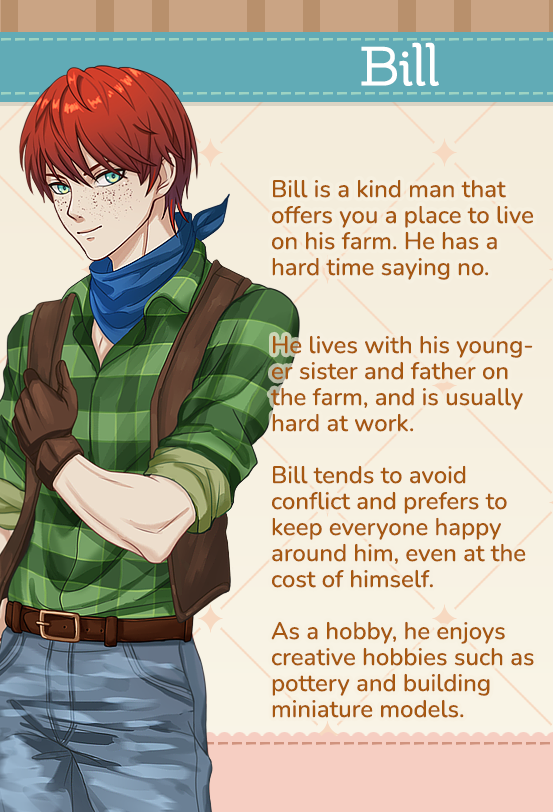
Billius was based on Bill (earlier version for Tailor Tales). Bill is again a character in Cottina :)

I'm sorry, Mac isn't officially supported because of this. It doesn't work when it's a third party app, and Mac is basically blocking it from running. Some people can run it, hence why I still upload a Mac version, but it seems you're one of the unluckier ones.

You can disagree with it, but be civilized in the comments.

The only one to reply on the Discord would be me! I'm sorry you had encountered that situation, but I always help out people who have issues with the game. And I will work with them until it's fixed. This requires asking questions to determine where the 'bug' is, including things such as asking when a pop-up appeared or not (very important!). But I always, ALWAYS, work until the issue is resolved. I don't delete messages either (with the exception of spam and or spoilers from the Patreon).

I hope you'll give the game another shot, it's been plenty updated!

Sadly, Moonstone remix is cancelled :(

It was a combination of things, but there was a power surge which fried all hard drives and a lot of progress was lost. I decided it was better to cancel the project and start a new one where I'm the one coding things now.

His DLC will release in April most likely, so it won't release at the same time as his free route. This is because the Patreon is still my main source of income, so I'd rather people get the Plus version of Eeyok on there, than Steam :)

Depends on what you want to achieve! Passwords are mostly to unlock things, which are also usually Patreon/DLC only. They don't do anything in the free version.

Where did you read Steam is not getting updated? Steam is the only one with the Plus DLC; Itch doesn't even have any DLC,

Tailor Tales is still getting updated, through Steam and through Itch. Eeyok will be released next year on both platforms, but only Steam will get his Plus DLC.

An android version is something we've been tinkering with, but I can't tell you an ETA. Porting Tailor Tales to mobile required an entire new engine, and Tailor Tales is actually... quite big.

Eeyok's route will be free to play, but his Plus DLC you must purchase like the rest.

He will possibly be released at the end of the year on Steam, it all depends!

Eeyok's route was finished last month :) currently working on the next route; Zex! Zex already has 1 playable chapter, and 4 chapters have been written. Like I mentioned in this post, I post monthly updated on Patreon, and only on other platforms sparsely. So don't worry, development is still very much active!

If you want, you can play Eeyok's entire route already! Early Bird tier has access to his full route on Patreon.

If that is the case, there's not much there I can do to bugfix. It sounds like your computer doesn't have the minimum requirements to run the game, mainly you need at least 6 GB of RAM. You should also play on Windows, the Mac version doesn't work.