
Indie game storeFree gamesFun gamesHorror games
Game developmentAssetsComics
SalesBundles
Jobs
TagsGame Engines

ChaddyBones

35
Posts
1
Followers
3
Following
A member registered Sep 01, 2025

Recent community posts

Playthrough of 1.0.0 uploaded with bugs list and timestamps.

Pretty small list overall!

https://drive.google.com/drive/folders/1fbHS4eyMDrMpPXpjdBLMi52GaWSdeeHe?usp=sha...

Thanks!

(1 edit)

Thanks. Know where to download it? Can it also convert to a standard romset to work on MAME?

(1 edit)

Would love to see a release for MAME and BakBit.

(1 edit)

Would love to see this too for all your NeoGeo releases. More options for more people to play and test with.

(2 edits)

Stage 3 Barricade: You are correct, this does happen exactly the same in the arcade version. I guess the repeated sound is suppose to be the sound of all the knights armor as they walk maybe? Sounded kind of awkward to me, but I guess that's how its suppose to be. My appologies.

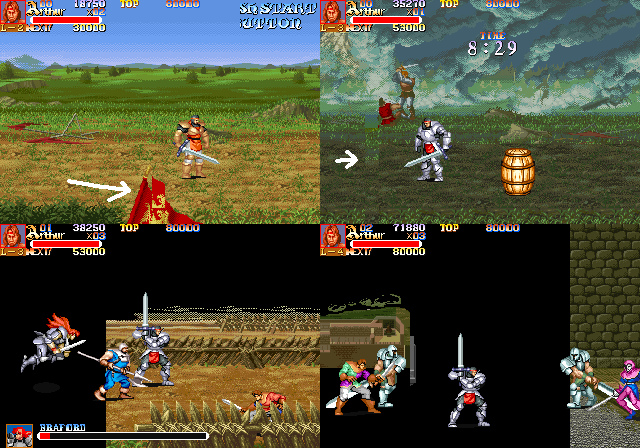
Stage 2: What I'm trying to show in my video I uploaded is the graphics that are glitching across two men fighting in the background. You can see on two separate occasions that few rows of graphics glitch out in that spot if you watch it again. Gameplay up to that point seems normal and I don't believe has any effect on the glitch. Also, in the background behind the two men fighting, the background should have animation playing for the soldiers and horses. The sound effect that's lopping is to simulate the battlefield of soldiers, but it appears to be on a constant repeated loop before it has a chance to finish.

In this video, you can see the background animation throughout this section of the stage. And the looping sound effect to go along with it plays out entirely followed by a brief pause, before it begins to loop again. Hope this helps clarify.

I'm currently doing all my testing on MAME 0.289 at the moment. I have an MVS 4-Slot cabinet running stock US Bios, and a consolized MVS running UniBios 4.0, but I don't currently have access to any flash cart. Looking to buy a BackBit in the near future, and from then I will do all testing on original hardware.

Glad I'm able to help! Just tested using 0.2.1.

- Stage 2 floor bug is still present. Using a continue is not the cause as it happens even when I haven't used one. Also the background animation of the soldiers riding horses and the sound doesn't seem to load in properly, and the sound effects to go with it don't loop properly.

- Stage 3 barricade seems to happen everytime. Just hitting it normally.

Hope these videos help!

(3 edits)

That fixed a majority of the graphical glitches! Noticed the title screen logo still has some glitches after inserting a coin. All the rest I mentioned before seem to be corrected now! I did see some graphical glitches in Stage 2 with the red flag in the foreground and a section of floor before the boss. Backgrounds also seem to disappear after using a continue. They do load back in once you start scrolling the screen again. 

I only played up to the beginning of start of Stage 4 so far but a couple other things I noticed:

- "Press Start Button" graphics for player 2 often glitches.

- The screen transition after the first section of Stage 1 loads too quickly, cutting off Arthur's speech before he can finish his speech when he says "Excalibur Ho!". Not sure if this affects other characters too.

- When smashing the barricade at the beginning of stage 3 to enter that castle, the sound effect of the barricade breaking plays on a repeated loop until it transitions into the next section of the stage.

- Of course slowdown is an issue when multiple enemies are on screen at one.

Regardless, the port is shaping out nicely so far. Looking forward to future improvements and I'll report any other issues I run into when I have more time to test.
(2 edits)

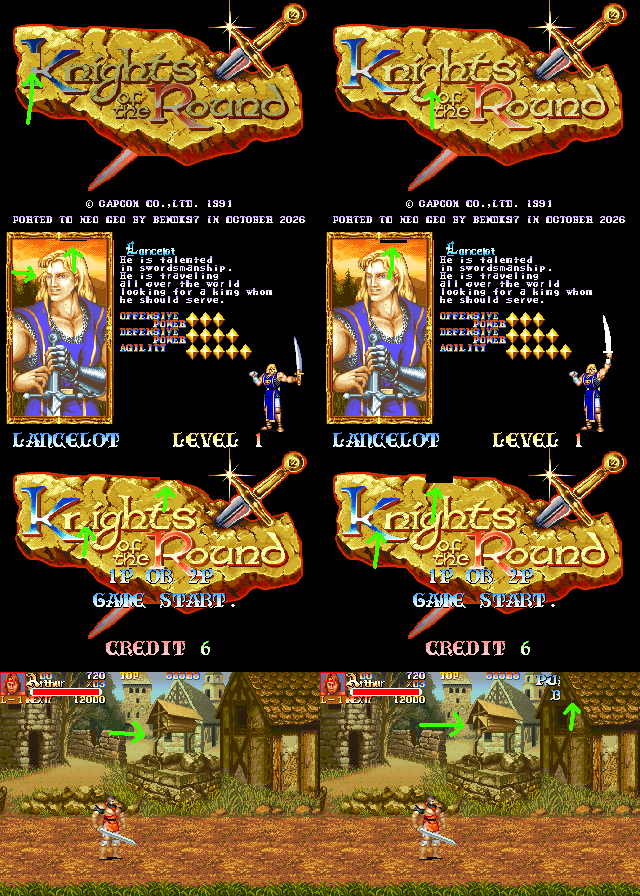
Sprite flicker during the Sword cutscene is now fixed, although background scrolling is choppy (it was in previous releases as well but forgot to mention). Still present on title screen, attract mode demo, and backgrounds during gameplay. Maybe sprite flickering isn't the proper way to describe it. More like graphical glitches, but they happen really fast and flicker. I can't capture video which is unfortunate, as it would show the graphical glitching more clearly, but here are a few frames I was able to snap that catches some of the glitches. They happen very fast and are constant. Could be some kind of sprite tile loading issue? Maybe credit counter on screen would be nice too if it will fit in bottom center of screen? 
Your fast! Tested and working!

Looking great! 

Small recommendation. Is it possible to have the credits counter show at the bottom of the screen during gameplay? I know it disappears in the original Arcade release as well during gameplay, but it would be a neat feature since most NeoGeo games always show the credits at all times.

Keep up the great work, looking forward to future updates!

(1 edit)

Happy to see proper MVS softdip support coming! It helps the ports feel more natural and feature complete like original MVS games.

As for graphical issues, its mostly sprite flicker. During the opening cutscense with the sword in the stone, title screen, and on the backgrounds during gameplay. Playing Beta 0.1.3 using Mame 0.289. Nothing major, but still very present.

Awesome!

Would love to see proper MVS softdip settings added in a future release! Great work so far! Always happy to have new games to play on my NeoGeo MVS!

(1 edit)

Nice work! Only tested briefly in MAME but seems to be running well overall aside from some graphical issues. Would love to see proper MVS softdip settings support in the NeoGeo service menu in a future release for those of us that are playing on an MVS cabinet and want the true NeoGeo arcade experience. Great start so far. Will try to test more in the future.

This absolutely needs some aquarium sounds! I would totally leave this running on my actual Genesis as background noise while chilling out in the game room.