
Indie game storeFree gamesFun gamesHorror games
Game developmentAssetsComics
SalesBundles
Jobs
TagsGame Engines

Cynthia Tools

19
Posts
3
Topics
71
Followers
15
Following
A member registered Nov 23, 2020 · View creator page →

Creator of

Recent community posts

Hi noname1848,

That’s wonderful to hear! 😁

We’re really glad that v1.0.23 is working well for you so far, especially alongside your 50+ plugins. Plugin compatibility and performance are two of our biggest priorities, so your feedback is very encouraging!

Hi noname1848,

Great news! 😁

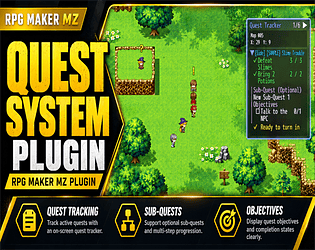
We’re happy to announce that CT Quest System v1.0.23 has officially been released!

Thank you again for your valuable feedback. We’ve implemented all three of your suggestions across our recent updates!

✅ 1. Show / Hide Quest Tracker

We’ve added Show, Hide, and Toggle Tracker Plugin Commands, allowing developers to control tracker visibility during cutscenes, introductions, and gameplay.

Visibility preferences also persist across map transfers and save/load.

✅ 2. Quest Tracker Map Click-Through

We’ve improved the tracker’s mouse interaction handling so noninteractive areas no longer unnecessarily block map clicks.

We’ve also removed the behaviour where clicking a quest title automatically opens the Quest Journal, preventing accidental menu interruptions.

✅ 3. Automatically Hide Empty Tracker

The tracker now automatically disappears when no active quests are being tracked and reappears when appropriate.

This feature is enabled by default and can be configured through Plugin Manager.

🎨 Additional Improvements in v1.0.23

We’ve also introduced customizable NPC ! and ? quest marker colours, a new Plugin Command for switching the tracker between the left and right sides, and a dynamic keyboard shortcut hint beside the Quest Tracker title.

These improvements were implemented while preserving existing quest data and save compatibility.

📦 CT Quest System v1.0.23 is available now:

https://cynthiatool.itch.io/rpg-maker-mz-plugin-ct-quest-system

We sincerely appreciate the time you’ve spent testing our plugin, especially your performance testing on maps containing over 100 events.

Your feedback has directly contributed to making CT Quest System better for everyone.

If you have the opportunity to try v1.0.23, we’d love to hear how it performs in your project!

Thank you once again for supporting Cynthia Tools and helping us improve our products! ❤️

— Cynthia Tools

Hi noname1848,

Thank you again for your detailed feedback and for taking the time to test CT Quest System on a map with over 100 events!

We’re glad to hear that the plugin is performing well so far. Performance and stability are important priorities for us.

Both of your observations are excellent points, and we agree that these areas could be improved.

  1. Show / Hide Quest Tracker

We agree! Developers should be able to control tracker visibility through simple plugin commands, especially during cutscenes, introductions, and other scripted events.

We’re planning to introduce Show, Hide, and Toggle Tracker commands, with visibility preserved across map transfers.

  1. Quest Tracker Blocking Map Clicks

This is an important usability issue. We’ll investigate the current input handling and work on allowing map interactions behind noninteractive tracker areas while preserving the tracker’s own functionality.

Both improvements have been approved and will be implemented in our upcoming CT Quest System v1.0.22 update.

We really appreciate the time you’ve spent testing the plugin and sharing constructive suggestions.

We will start working on patch v1.0.22 by today.

Feedback like yours helps us make CT Quest System more reliable and developer-friendly.

Thank you for supporting Cynthia Tools! ❤️

— Cynthia Tools

Hi noname1848,

Great news! 😁

We’ve identified and fixed the crash involving RPG Maker MZ’s Erase Event command.

The issue was caused by how CT Quest System handled erased or inactive events when checking for NPC quest markers.

We’ve released CT Quest System v1.0.21, which includes:

  • Fixed the crash triggered by the Erase Event command.
  • Improved event-page validation and handling.
  • Fixed quest markers not properly disappearing when events are erased.
  • Improved overall event handling and stability.

✅ Version 1.0.21 is now available for download!

Please download the latest version and let us know if everything works correctly on your end.

A special thank-you for taking the time to report this issue and providing such clear steps to reproduce it. Your feedback genuinely helped us improve the plugin for everyone!

We really appreciate your support! ❤️

— Cynthia Tools

Hi noname1848,

Thank you for reporting this issue and providing clear steps to reproduce it.

We take bug reports seriously, especially those that could affect game stability.

We’ll investigate the interaction between the CT Quest System and RPG Maker MZ’s Erase Event command using the steps you’ve provided.

If we can reproduce the issue, we’ll work on a fix and release an update as soon as possible.

We appreciate you bringing this to our attention and helping us improve the plugin.

— Cynthia Tools

(2 edits)

hi i have make a tutorial video, you can watch it at the youtube link below:

https://youtu.be/mYbVQLJUWhQ

(1 edit)

Hello! Thank you for your interest! 😊

Yes, I can make a tutorial video showing how to set up and use the plugin. I’ll work on one and add it to the plugin page.

Regarding VisuStella, the plugin should generally work alongside VisuStella plugins, but compatibility may depend on which specific VisuStella plugin(s) you are using, especially if they also modify enemy stats, levels, or battle calculations.

Could you let me know which VisuStella plugins you are currently using? I can check them for you.

If necessary, you can also send me a small test project/project copy with the relevant plugins installed, and I’ll be happy to test the compatibility on my side before you purchase. 😊

You can email it to cynthiatools86@gmail.com

Thank you!

(1 edit)

Hi! I haven’t tested the Elemental Reaction System together with Sang Hendrix’s Action Combat plugin yet, so I can’t confirm full compatibility at the moment.

If the Action Combat plugin still processes damage/effects through RPG Maker MZ’s normal battle/action functions, there’s a decent chance it may work, but ABS/action-combat plugins often change quite a lot under the hood.

My honest answer is high chance is it won’t work with sang hendrix action combat plugin

Thanks for the information. I checked the Farming System plugin and it does not contain or use a property named _rngSeed, so the error may be coming from another plugin or a plugin compatibility/order issue.

Could you please press F8 when the error appears, open the Console tab, and send me a screenshot of the full red error stack, including the plugin filenames and line numbers?

Please also let me know which other plugins are enabled and whether more than one version of CT Farming System is present in Plugin Manager.

Hi , if i may ask are you using mz or mv ? And if can do send me a screen shot or email me your project in a zip file to this email cynthiatools86@gmail.com so that i can check it out for you, thx

hi sorry for the late reply, first of really sorry for the trouble and inconvenience for the missing demo project.

I just checked and indeed the demo project file are not included in the zip file,

i have just uploaded the new zip file that contain the demo project.

really appreciate for reaching out and telling on this matter and thank you for purchasing from Cynthia Tools

The first full version of the Realmrise: Endless Clicker Combat Page is now built.

This is one of the core pages of the game, where players fight through rifts, earn Realm Essence, manage progress, and watch their Realm Maidens contribute to the journey.

In this update, the Combat Page now includes:

enemy encounter panel with attack interaction enemy HP and Realmkeeper HP display current Realmkeeper power snapshot combat log panel Realm Maiden roster display role-based maiden cards upgrade buttons and maiden detail access top bar progression display sidebar navigation for the main game systems

The goal for this page is to make the player’s core progression feel clear, readable, and satisfying — click, fight, upgrade, grow stronger, and continue pushing deeper through the realms.

Realmrise is still in active development, so visuals, balance, UI spacing, and combat systems may continue to improve over time.

More development updates will be shared as the game grows.

Thank you for following Realmrise: Endless Clicker and supporting Cynthia Tools.

love the art style, and interesting concept

Realmrise: Endless Clicker is now in development.

We at Cynthia Tools are currently working on a new dark fantasy idle RPG project focused on realm progression, maiden bonds, combat, upgrades, and long-term progression systems.

Realmrise combines idle/clicker gameplay with fantasy RPG elements, character collection, ascension systems, realm growth, and immersive dark fantasy visuals.

The project is still in active development, but we’re excited to finally begin sharing its progress publicly.

More updates, screenshots, feature previews, and development logs will be posted here over time.

Thank you for supporting Cynthia Tools and following the journey of Realmrise.

Planned Features: • Idle & incremental RPG progression • Realm Maiden roster system • Bond and support mechanics • Combat & rift progression • Realm upgrades & ascension • Inventory, crafting, missions & achievements • Dark fantasy inspired UI & artwork

Realmrise is coming soon.

Thank you again for the extra testing and explanation! This is really useful. 🙏

That makes sense — since it depends on your full SDJB_Base setup, I’ll add a note in the help file that in MV the plugin can still be useful through the console log, and that the popup behavior may depend on the user’s setup.

I’ll still keep NotetagGuardian officially listed as an MZ plugin for now, since MZ is the version I can properly test and support, but your MV testing is very helpful for anyone who wants to try it there.

Good catch on the < / > edge cases too. Since the plugin checks for malformed angle-bracket style notetags, cases like <=, =>, or custom tag formats can create false positives. I’ll look into adding an ignore/whitelist option so users can allow valid custom syntax from their own plugins.

For something like <something!> as a closing/custom tag, I think it’s safer not to assume it is valid by default unless the user defines it as allowed syntax, because different plugins may use different notetag formats.

Really appreciate you testing this so deeply — this is exactly the kind of edge case feedback that helps improve the tool. 😄

Thank you so much for testing it in MV and sharing the info! Really appreciate it. 🙏

NotetagGuardian was originally made for RPG Maker MZ only, mainly because I don’t currently have MV, so I don’t have a proper way to test and support it there. 😂

But this is very useful to know — especially that it seems to work on your end with SDJB_Base, and also the note about the popup window being too large / text getting cut off on the 3rd line.

For now, I’ll still list it as an MZ plugin officially, but your testing helps a lot for MV users who may want to try it carefully on their own setup.

Thanks again for taking the time to test and report this!

Simple and fun , love it lol 

ok i'm back on my pc, below are my honest feedback after playing your game.

-it will be awesome if you could for a brief moment at the beginning of the gameplay to let player know what are the keyboard and controls.

-if you could add some dialog to all the things it would improve the game experience, like adding dialog to the well, scarecrow and the pokemon creature like in the opening house area.

-might need to edit abit on the pokemon sometimes it will trap and block player charac from entering or exiting the farm.

-in battle scene the player move selection menu are overlaping/ covering the monster in the battlefield, love the ai auto battle features btw

-battle scene back ground art, doesn't really match with the player, enemy sv battler art, you might want to consider making a more matching art

-Music and art are good it's really polish i can see you put alot of effort and time to develop to this level of quality, keep up the good work (thumb's up),

-you really should considering giving the game a custom mouse cursor, you have good art on character, map, ui, but the mouse cursor are the only thing doesn't have good art

-when entering the castle main entrance, player are not walking smoothly into the castle town area, it's like player are teleporting into it, (i think this is a bug)

-all character design , sprite and art are good, but they are lacking one important thing, they are no shadow beneath all of the character, it make's it look weird, because all of your art have good lighting and shadowing on the character.

i apologize if any of my words hurt or harm you in any way, i'm just giving my honest feedback and what i think would improve your game.

Genre: Clicker Game

Download Link: https://zymmylim.itch.io/food-poppers

Story: A bunch of food aliens trying to invade planet Cresfthium and you will be playing as head chef to stop the alien from succeeding.

Game Feature:

-Rebirth System.

-Funny 2d Character Design

-Hiring and lvling up your allies hero

-Clicking till your hand pain.

- (not an indle game) A total of 205 Stage to beat.

Game Engine: RPGMAKER MZ

Words from developer: This is my first time making a game, I'm a solo developer who work as cleaner in the day and game developer at night, i hope you guys will enjoy the game i made, thank you.

Game Screenshot: