Indie game storeFree gamesFun gamesHorror games
Game developmentAssetsComics
SalesBundles
Jobs
TagsGame Engines

Loiags

3
Posts
1
Topics
A member registered 8 days ago

Recent community posts

Thank you very much for your detailed help and for providing the example screenshot.

I found the cause of the problem. The display scaling on my 4K monitor was set to the default 150%, and I also realized that I had not enabled Manga Mode. I apologize for overlooking such an important setting and for the confusion this caused.

After changing the display scaling and enabling Manga Mode, the translations are now correctly overlaid on top of the original text inside the speech bubbles, exactly as I expected. Everything is working perfectly now!

I really appreciate you taking the time to explain the settings and possible causes in such detail. Your example screenshot made it especially easy for me to understand what the correct result should look like.

Thank you again for your patience and excellent support!
Hi,

I tried the settings you recommended, but unfortunately the problem is still the same.

I used:

  • Lens Mode
  • Manga Mode: Enabled
  • Vertical Text: Disabled
  • OCR Language: English
  • Target Language: Japanese
  • Select Area: Only the comic page/panels

I reproduced the issue using the Diagnostic Build as well.

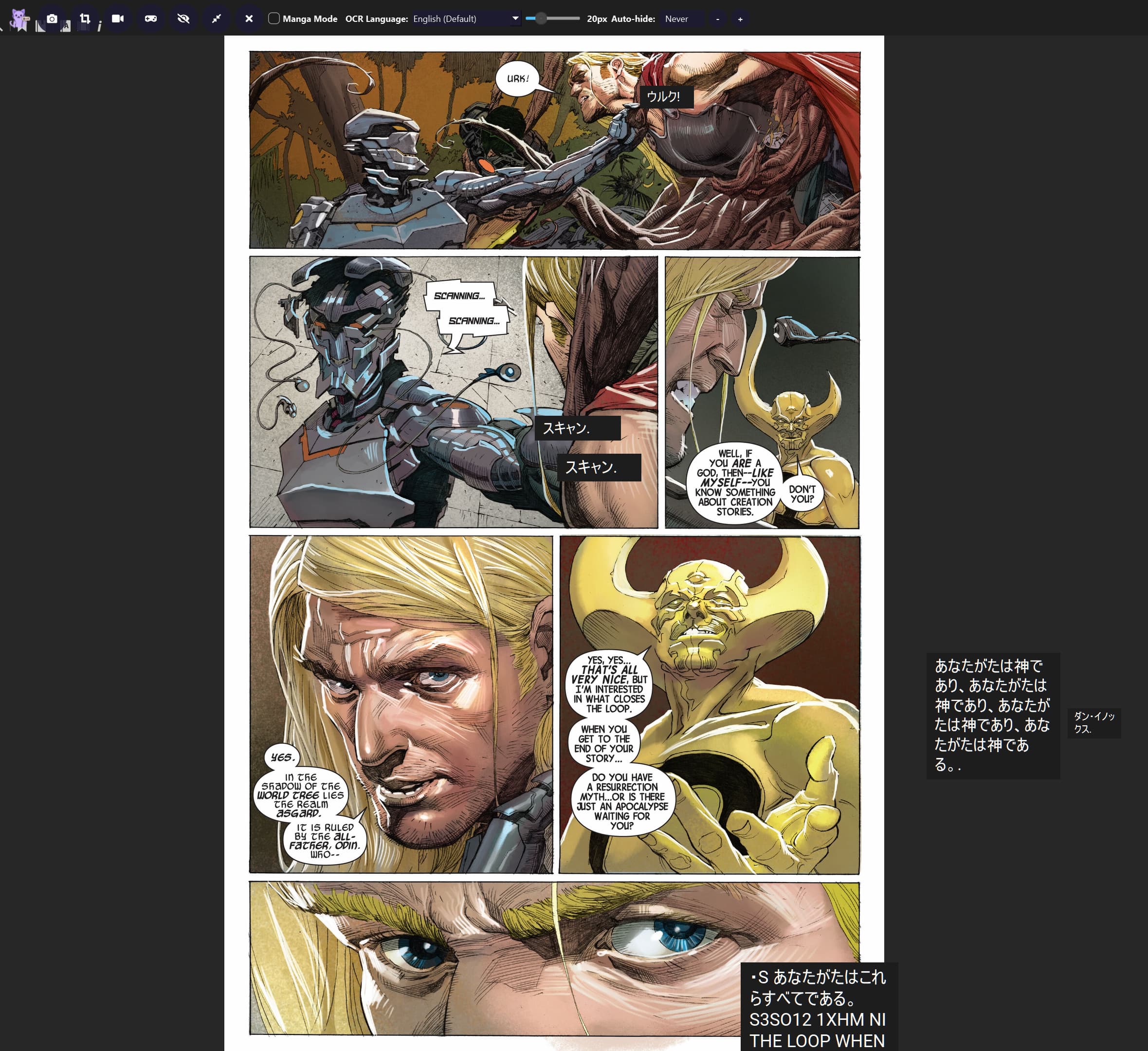
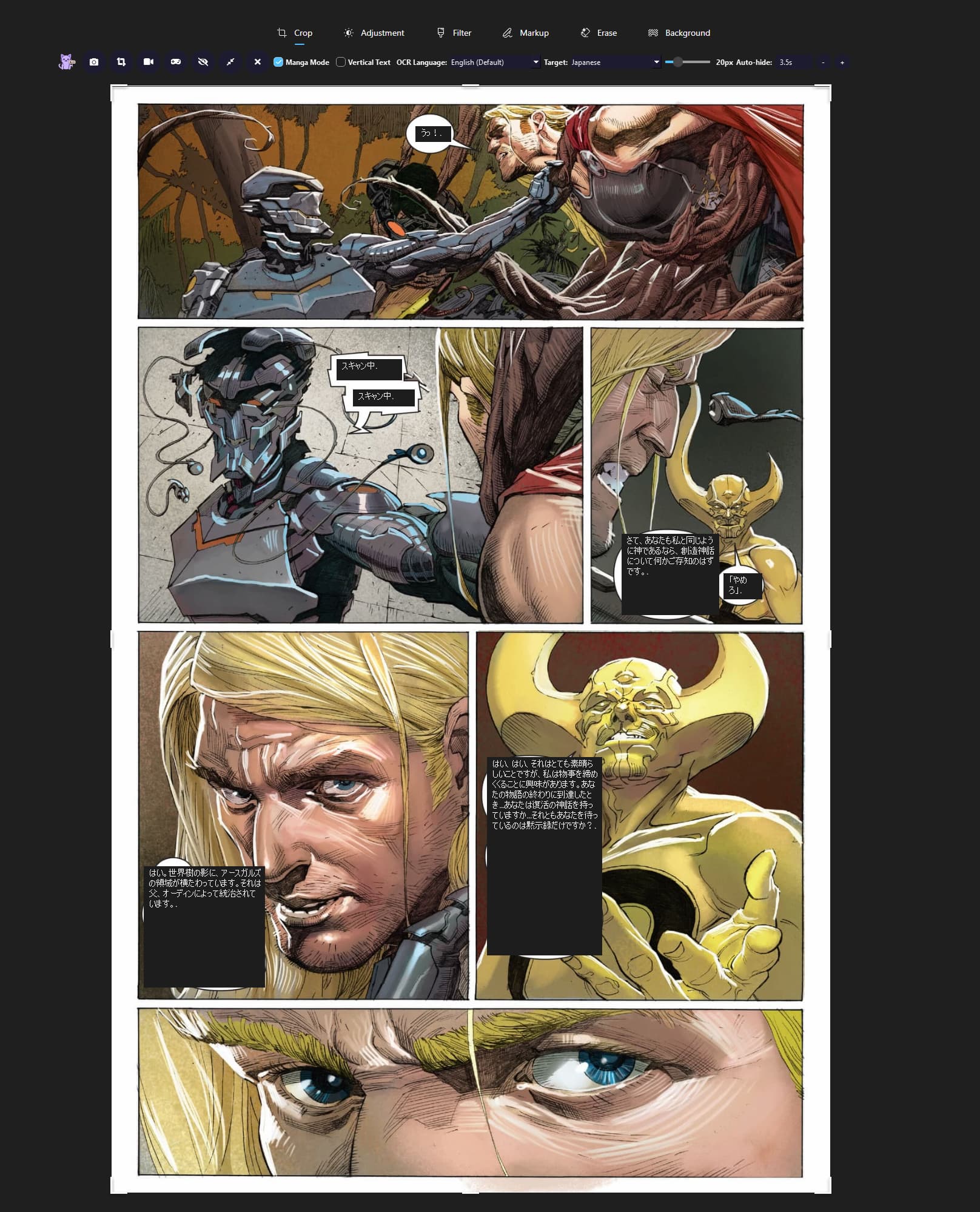
The Japanese translation boxes are still positioned away from the original English text. What I expected was for the Japanese translation to be placed directly over the original English text, as shown in the example images.

I have attached:

  • Original Comic Page
  • Incorrect Translation Overlay Position
  • Diagnostic Build console logs

I did not change the OCR language while reproducing the issue; it remained set to English.

Could you please investigate this as a possible overlay positioning/layout issue?

Thank you.

Diagnostic Build console logs

[Thaluna] Starting... HOME=C:\Users\ciosm

[Thaluna] Paddle models: C:\Users\ciosm\AppData\Local\Thaluna\.paddleocr

[CUDA_DLL_DEBUG] add_dll_directory: C:\soft\thaluna-real-time-translator-thaluna-preview-3.0-diagnostic\_internal\paddle\libs

[CUDA_DLL_DEBUG] add_dll_directory: C:\soft\thaluna-real-time-translator-thaluna-preview-3.0-diagnostic\_internal\nvidia\cudnn\bin

[CUDA_DLL_DEBUG] add_dll_directory: C:\soft\thaluna-real-time-translator-thaluna-preview-3.0-diagnostic\_internal\nvidia\cuda_runtime\bin

[CUDA_DLL_DEBUG] add_dll_directory: C:\soft\thaluna-real-time-translator-thaluna-preview-3.0-diagnostic\_internal\nvidia\cuda_nvrtc\bin

[CUDA_DLL_DEBUG] add_dll_directory: C:\soft\thaluna-real-time-translator-thaluna-preview-3.0-diagnostic\_internal\nvidia\cublas\bin

[CUDA_DLL_DEBUG] add_dll_directory: C:\soft\thaluna-real-time-translator-thaluna-preview-3.0-diagnostic\_internal\nvidia\cufft\bin

[CUDA_DLL_DEBUG] add_dll_directory: C:\soft\thaluna-real-time-translator-thaluna-preview-3.0-diagnostic\_internal\nvidia\cusparse\bin

[CUDA_DLL_DEBUG] PATH prepended dirs=7

[TORCH_DLL_DEBUG] deferred torch dirs=1

[Thaluna] Models OK.

main.py:2588: DeprecationWarning: Enum value 'Qt::ApplicationAttribute.AA_EnableHighDpiScaling' is marked as deprecated, please check the documentation for more information.

main.py:2589: DeprecationWarning: Enum value 'Qt::ApplicationAttribute.AA_UseHighDpiPixmaps' is marked as deprecated, please check the documentation for more information.

[Thaluna] Starting... HOME=C:\Users\ciosm

[Thaluna] Paddle models: C:\Users\ciosm\AppData\Local\Thaluna\.paddleocr

[CUDA_DLL_DEBUG] add_dll_directory: C:\soft\thaluna-real-time-translator-thaluna-preview-3.0-diagnostic\_internal\paddle\libs

[CUDA_DLL_DEBUG] add_dll_directory: C:\soft\thaluna-real-time-translator-thaluna-preview-3.0-diagnostic\_internal\nvidia\cudnn\bin

[CUDA_DLL_DEBUG] add_dll_directory: C:\soft\thaluna-real-time-translator-thaluna-preview-3.0-diagnostic\_internal\nvidia\cuda_runtime\bin

[CUDA_DLL_DEBUG] add_dll_directory: C:\soft\thaluna-real-time-translator-thaluna-preview-3.0-diagnostic\_internal\nvidia\cuda_nvrtc\bin

[CUDA_DLL_DEBUG] add_dll_directory: C:\soft\thaluna-real-time-translator-thaluna-preview-3.0-diagnostic\_internal\nvidia\cublas\bin

[CUDA_DLL_DEBUG] add_dll_directory: C:\soft\thaluna-real-time-translator-thaluna-preview-3.0-diagnostic\_internal\nvidia\cufft\bin

[CUDA_DLL_DEBUG] add_dll_directory: C:\soft\thaluna-real-time-translator-thaluna-preview-3.0-diagnostic\_internal\nvidia\cusparse\bin

[TORCH_DLL_DEBUG] deferred torch dirs=1

qt.multimedia.ffmpeg: Using Qt multimedia with FFmpeg version 7.1.1 LGPL version 2.1 or later

[UI_DEBUG][translation_window.update_language_buttons] idx=8 engine=? model=English -> Japanese target='English' target_code='en' button='EN → JA' ocr_button='Japanese'

[STARTUP] Lazy OCR/model loading enabled; worker starts paused.

[LANG_RUNTIME][translation_window.apply_styles] idx=8 engine=? model='English -> Japanese' target_name='English' target_code='ja' font='Roboto' rtl=False

OCR language changed to: en

[UI_DEBUG][translation_window.update_language_buttons] idx=8 engine=? model=English -> Japanese target='English' target_code='en' button='EN → JA' ocr_button='English (Default)'

[DEBUG] Worker capture_active=False

[LENS_DEBUG][enter] main_idx=8 main_engine=None main_model=English -> Japanese worker_idx=8 worker_engine=? worker_model=English -> Japanese tw_idx=8 tw_engine=? tw_model=English -> Japanese ui_lang_button='EN → JA' main_ocr_device=auto worker_ocr_device=auto

[LENS_DEBUG][enter] target_visible=False (local model layout)

[LENS_DEBUG][snapshot_reader] lang=en persistent=False ocr_device_setting=auto use_gpu=True worker_idx=8 worker_engine=? worker_model=English -> Japanese

INFO: Could not find files for the given pattern(s).

paddle\utils\cpp_extension\extension_utils.py:711: UserWarning: No ccache found. Please be aware that recompiling all source files may be required. You can download and install ccache from: https://github.com/ccache/ccache/blob/master/doc/INSTALL.md

C:\soft\thaluna-real-time-translator-thaluna-preview-3.0-diagnostic\_internal\paddleocr\ppocr\postprocess\rec_postprocess.py:1229: SyntaxWarning: invalid escape sequence '\W'

  noletter = "[\W_^\d]"

C:\soft\thaluna-real-time-translator-thaluna-preview-3.0-diagnostic\_internal\paddleocr\ppocr\postprocess\rec_postprocess.py:1455: SyntaxWarning: invalid escape sequence '\W'

  noletter = "[\W_^\d]"

[2026/08/25 00:14:59] ppocr WARNING: The first GPU is used for inference by default, GPU ID: 0

[2026/08/25 00:15:01] ppocr WARNING: The first GPU is used for inference by default, GPU ID: 0

[2026/08/25 00:15:03] ppocr WARNING: The first GPU is used for inference by default, GPU ID: 0

[TORCH_DLL_DEBUG] preload: C:\soft\thaluna-real-time-translator-thaluna-preview-3.0-diagnostic\_internal\torch\lib\libiomp5md.dll

[TORCH_DLL_DEBUG] add_dll_directory: C:\soft\thaluna-real-time-translator-thaluna-preview-3.0-diagnostic\_internal\torch\lib

[TORCH_DLL_DEBUG] PATH prepended dirs=1

[LANG_RUNTIME][lens.refresh] mode=local engine=None model='English -> Japanese' target_name=None target_code='ja' font='Roboto' rtl=False source_name='English' source_code='en' groups=10

An error occurred executing the property metacall 2 on property "_language_button_glow" of TranslationWindow(0x2219cf911b0)

Traceback (most recent call last):

  File "translation_window.py", line 371, in _set_language_button_glow


Hi, I recently purchased Thaluna v3.2d specifically for reading English comics.

I'm using YACReader to read Marvel comics. OCR and translation work correctly, but the Japanese translation appears in separate black boxes around the page instead of being placed directly over the original English text.

I have tried Manga Mode and Game Lens, but I still cannot get the same direct overlay behavior shown on the official Manga Translator page:

https://thaluna.app/manga-translator

According to the official website, the translated text should be displayed directly on top of the original page.

Is there a specific setting or workflow I need to enable to get the same direct overlay behavior in v3.2d?

My setup:

- Windows 11

- RTX 4060 Ti 8GB

- YACReader

- English → Japanese

- Thaluna v3.2d

- Manga Mode enabled

- Vertical Text enabled

- OCR Language: English

Thank you!