Hi,
I tried the settings you recommended, but unfortunately the problem is still the same.
I used:
- Lens Mode
- Manga Mode: Enabled
- Vertical Text: Disabled
- OCR Language: English
- Target Language: Japanese
- Select Area: Only the comic page/panels
I reproduced the issue using the Diagnostic Build as well.
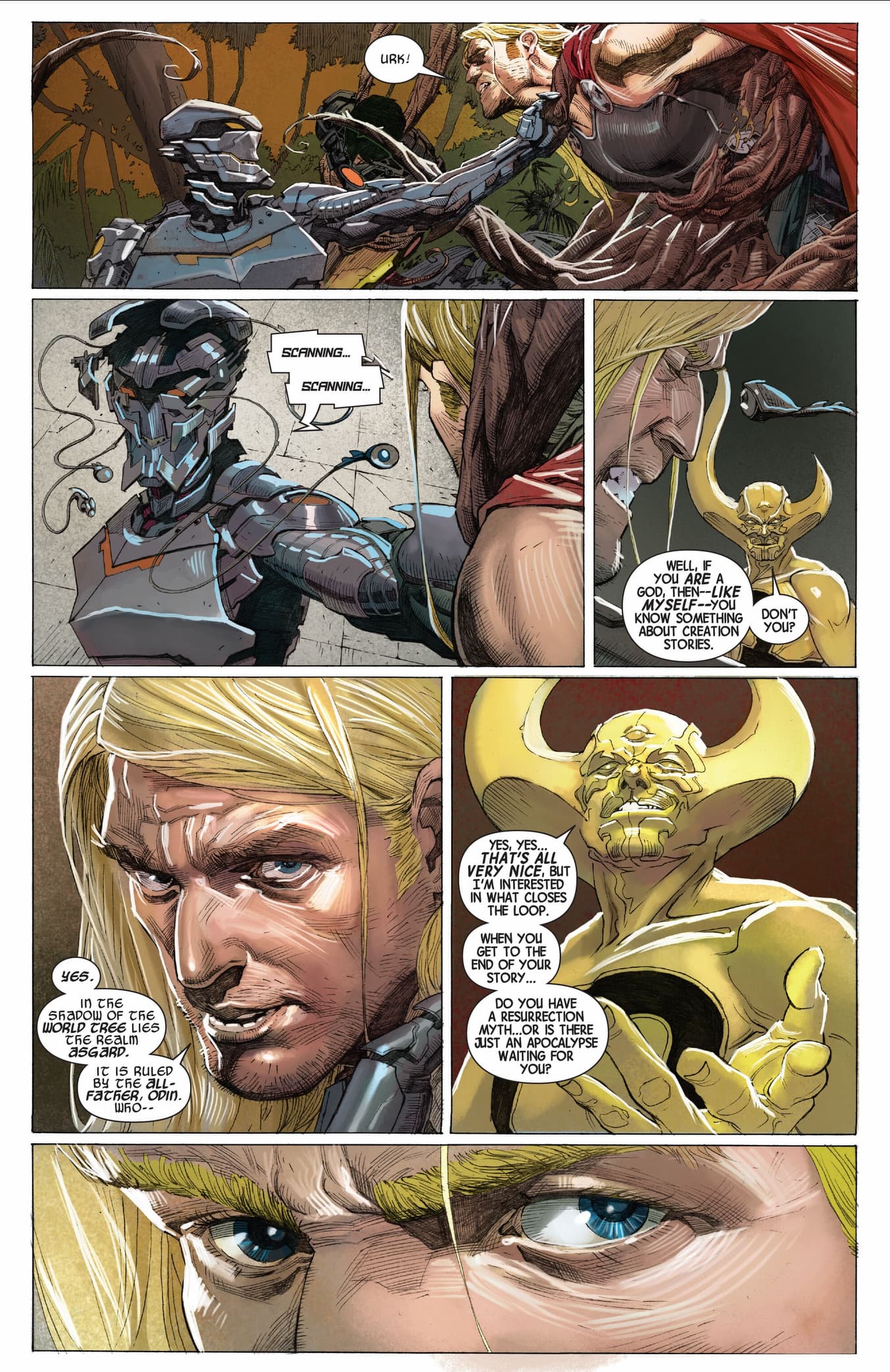
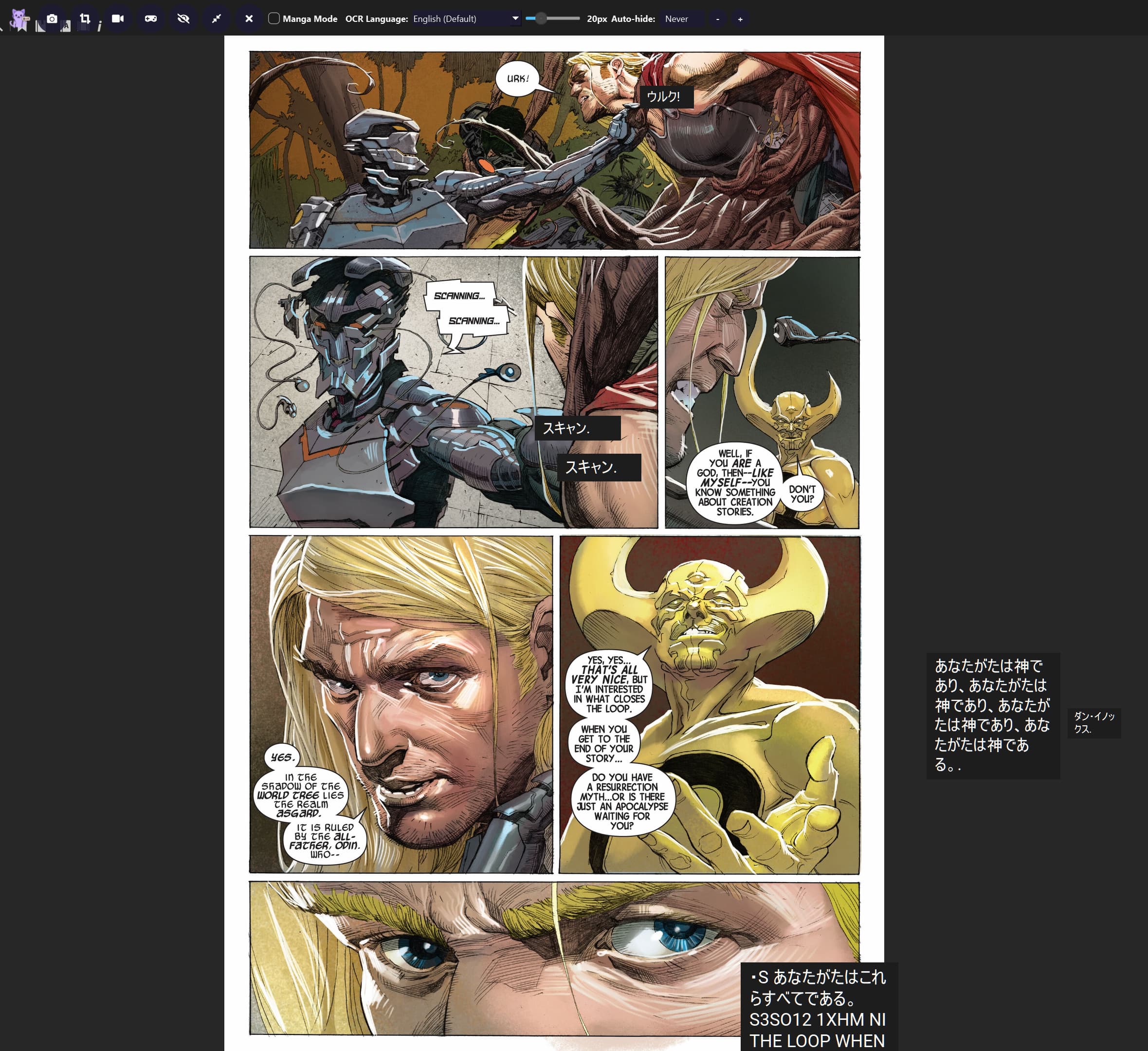
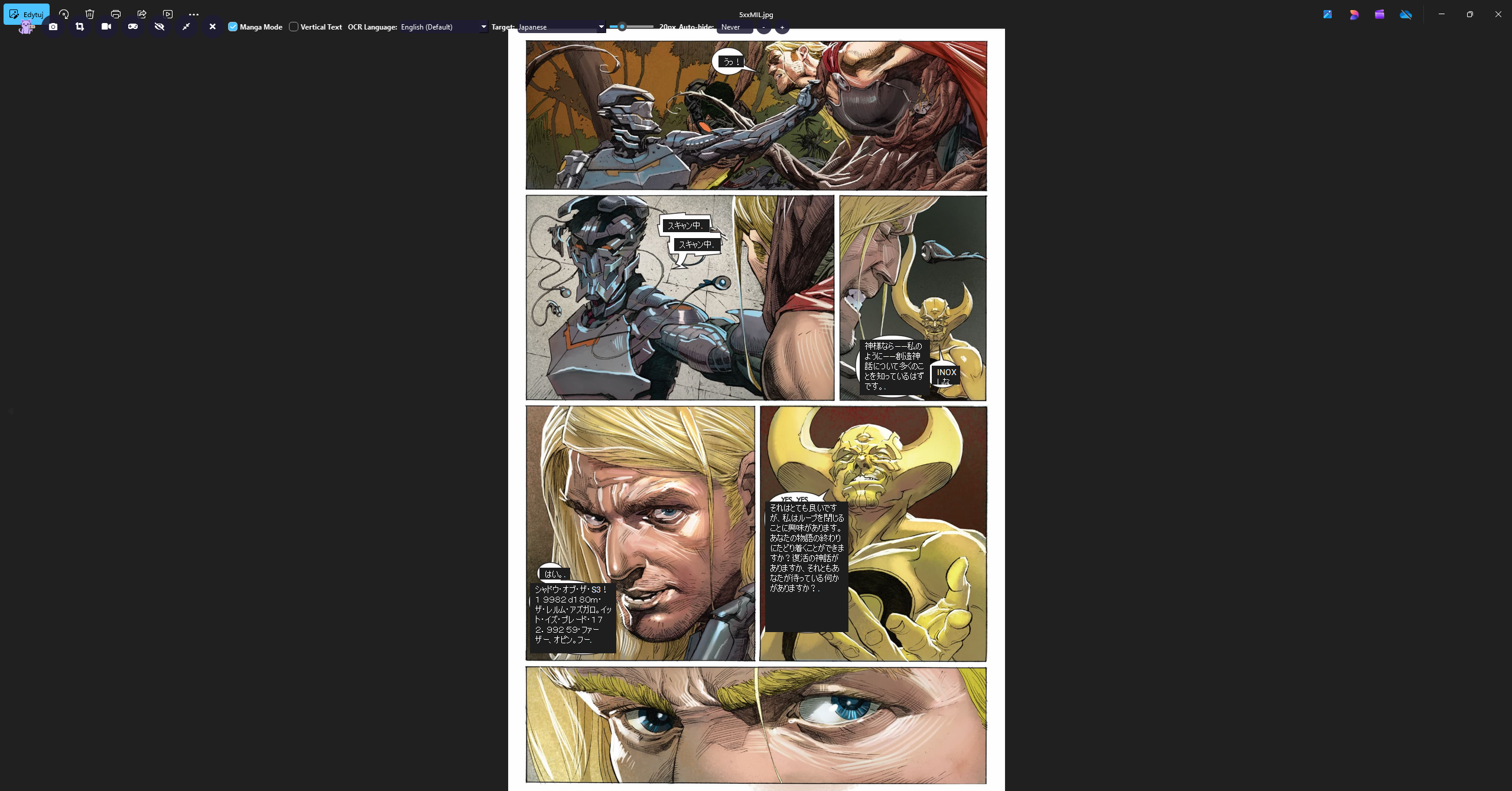
The Japanese translation boxes are still positioned away from the original English text. What I expected was for the Japanese translation to be placed directly over the original English text, as shown in the example images.
I have attached:
- Original Comic Page
- Incorrect Translation Overlay Position
- Diagnostic Build console logs
I did not change the OCR language while reproducing the issue; it remained set to English.
Could you please investigate this as a possible overlay positioning/layout issue?
Thank you.
Diagnostic Build console logs
[Thaluna] Starting... HOME=C:\Users\ciosm
[Thaluna] Paddle models: C:\Users\ciosm\AppData\Local\Thaluna\.paddleocr
[CUDA_DLL_DEBUG] add_dll_directory: C:\soft\thaluna-real-time-translator-thaluna-preview-3.0-diagnostic\_internal\paddle\libs
[CUDA_DLL_DEBUG] add_dll_directory: C:\soft\thaluna-real-time-translator-thaluna-preview-3.0-diagnostic\_internal\nvidia\cudnn\bin
[CUDA_DLL_DEBUG] add_dll_directory: C:\soft\thaluna-real-time-translator-thaluna-preview-3.0-diagnostic\_internal\nvidia\cuda_runtime\bin
[CUDA_DLL_DEBUG] add_dll_directory: C:\soft\thaluna-real-time-translator-thaluna-preview-3.0-diagnostic\_internal\nvidia\cuda_nvrtc\bin
[CUDA_DLL_DEBUG] add_dll_directory: C:\soft\thaluna-real-time-translator-thaluna-preview-3.0-diagnostic\_internal\nvidia\cublas\bin
[CUDA_DLL_DEBUG] add_dll_directory: C:\soft\thaluna-real-time-translator-thaluna-preview-3.0-diagnostic\_internal\nvidia\cufft\bin
[CUDA_DLL_DEBUG] add_dll_directory: C:\soft\thaluna-real-time-translator-thaluna-preview-3.0-diagnostic\_internal\nvidia\cusparse\bin
[CUDA_DLL_DEBUG] PATH prepended dirs=7
[TORCH_DLL_DEBUG] deferred torch dirs=1
[Thaluna] Models OK.
main.py:2588: DeprecationWarning: Enum value 'Qt::ApplicationAttribute.AA_EnableHighDpiScaling' is marked as deprecated, please check the documentation for more information.
main.py:2589: DeprecationWarning: Enum value 'Qt::ApplicationAttribute.AA_UseHighDpiPixmaps' is marked as deprecated, please check the documentation for more information.
[Thaluna] Starting... HOME=C:\Users\ciosm
[Thaluna] Paddle models: C:\Users\ciosm\AppData\Local\Thaluna\.paddleocr
[CUDA_DLL_DEBUG] add_dll_directory: C:\soft\thaluna-real-time-translator-thaluna-preview-3.0-diagnostic\_internal\paddle\libs
[CUDA_DLL_DEBUG] add_dll_directory: C:\soft\thaluna-real-time-translator-thaluna-preview-3.0-diagnostic\_internal\nvidia\cudnn\bin
[CUDA_DLL_DEBUG] add_dll_directory: C:\soft\thaluna-real-time-translator-thaluna-preview-3.0-diagnostic\_internal\nvidia\cuda_runtime\bin
[CUDA_DLL_DEBUG] add_dll_directory: C:\soft\thaluna-real-time-translator-thaluna-preview-3.0-diagnostic\_internal\nvidia\cuda_nvrtc\bin
[CUDA_DLL_DEBUG] add_dll_directory: C:\soft\thaluna-real-time-translator-thaluna-preview-3.0-diagnostic\_internal\nvidia\cublas\bin
[CUDA_DLL_DEBUG] add_dll_directory: C:\soft\thaluna-real-time-translator-thaluna-preview-3.0-diagnostic\_internal\nvidia\cufft\bin
[CUDA_DLL_DEBUG] add_dll_directory: C:\soft\thaluna-real-time-translator-thaluna-preview-3.0-diagnostic\_internal\nvidia\cusparse\bin
[TORCH_DLL_DEBUG] deferred torch dirs=1
qt.multimedia.ffmpeg: Using Qt multimedia with FFmpeg version 7.1.1 LGPL version 2.1 or later
[UI_DEBUG][translation_window.update_language_buttons] idx=8 engine=? model=English -> Japanese target='English' target_code='en' button='EN → JA' ocr_button='Japanese'
[STARTUP] Lazy OCR/model loading enabled; worker starts paused.
[LANG_RUNTIME][translation_window.apply_styles] idx=8 engine=? model='English -> Japanese' target_name='English' target_code='ja' font='Roboto' rtl=False
OCR language changed to: en
[UI_DEBUG][translation_window.update_language_buttons] idx=8 engine=? model=English -> Japanese target='English' target_code='en' button='EN → JA' ocr_button='English (Default)'
[DEBUG] Worker capture_active=False
[LENS_DEBUG][enter] main_idx=8 main_engine=None main_model=English -> Japanese worker_idx=8 worker_engine=? worker_model=English -> Japanese tw_idx=8 tw_engine=? tw_model=English -> Japanese ui_lang_button='EN → JA' main_ocr_device=auto worker_ocr_device=auto
[LENS_DEBUG][enter] target_visible=False (local model layout)
[LENS_DEBUG][snapshot_reader] lang=en persistent=False ocr_device_setting=auto use_gpu=True worker_idx=8 worker_engine=? worker_model=English -> Japanese
INFO: Could not find files for the given pattern(s).
paddle\utils\cpp_extension\extension_utils.py:711: UserWarning: No ccache found. Please be aware that recompiling all source files may be required. You can download and install ccache from: https://github.com/ccache/ccache/blob/master/doc/INSTALL.md
C:\soft\thaluna-real-time-translator-thaluna-preview-3.0-diagnostic\_internal\paddleocr\ppocr\postprocess\rec_postprocess.py:1229: SyntaxWarning: invalid escape sequence '\W'
noletter = "[\W_^\d]"
C:\soft\thaluna-real-time-translator-thaluna-preview-3.0-diagnostic\_internal\paddleocr\ppocr\postprocess\rec_postprocess.py:1455: SyntaxWarning: invalid escape sequence '\W'
noletter = "[\W_^\d]"
[2026/08/25 00:14:59] ppocr WARNING: The first GPU is used for inference by default, GPU ID: 0
[2026/08/25 00:15:01] ppocr WARNING: The first GPU is used for inference by default, GPU ID: 0
[2026/08/25 00:15:03] ppocr WARNING: The first GPU is used for inference by default, GPU ID: 0
[TORCH_DLL_DEBUG] preload: C:\soft\thaluna-real-time-translator-thaluna-preview-3.0-diagnostic\_internal\torch\lib\libiomp5md.dll
[TORCH_DLL_DEBUG] add_dll_directory: C:\soft\thaluna-real-time-translator-thaluna-preview-3.0-diagnostic\_internal\torch\lib
[TORCH_DLL_DEBUG] PATH prepended dirs=1
[LANG_RUNTIME][lens.refresh] mode=local engine=None model='English -> Japanese' target_name=None target_code='ja' font='Roboto' rtl=False source_name='English' source_code='en' groups=10
An error occurred executing the property metacall 2 on property "_language_button_glow" of TranslationWindow(0x2219cf911b0)
Traceback (most recent call last):
File "translation_window.py", line 371, in _set_language_button_glow