
Thanks for considering it man, appreciate!
MercySoft
Creator of
Recent community posts
Hi Daniel!
First off, the shader works great! It really is the only one of its type available that feels authentic.
Is it possible to add two enhancements/variables into the shader somewhere down the line? Obviously only if you're still working on the asset.
1) Reflection Mask Texture Slot: Is it possible to add a slot for a black and white texture, used to designate which parts of the material receive the cubemap reflections? White is reflective, black non-reflective.
2) Mip-Map Support Variable: Can you add a bool variable in the shader to enable/disable mip-map support?
Again, great shader! These are mostly wishful on my part, and only if possible, not sure how difficult it would be to add these two.
Thanks either way, it's good work!
Regards
Hi Daniel
I bought the shader pack and I'm very happy with it, it's very good work!
Is it okay if I ask for a feature to be added somewhere in the future? Obviously only if it fits within the scope of the project and if it's feasible.
What I'd like is a variable in the shader that allows you to assign a Reflective texture/mask, where you can assign a cubemap to have fake reflections on the material.
I saw this with another free PSX asset that has these fields, and it looks very accurate to how the older games looked, especially the racing/car games with their cubemapped reflections.
Here is a link to the asset I mentioned:
https://assetstore.unity.com/packages/vfx/shaders/psx-shader-kit-183591?srsltid=...
Here is how the shader looks in the Inspector to give a better idea of what I mean:
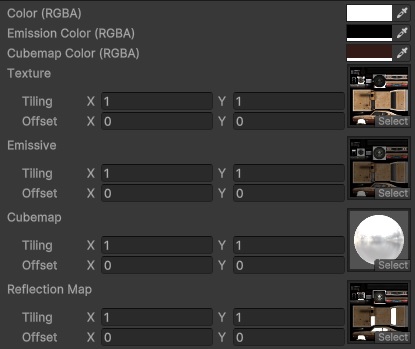
Again I don't want to be too forward asking for things I have no right to anyways, just wanted to pick your brain.
If this is beyond the scope or would disrupt the shaders too much I completely understand.
I'm terrible with making shaders, so I should be the last person make suggestions lol.
Anyways thanks again for the shaders, they're great!
Hi Daniel
Apologies if this is mentioned in the description and I'm just a moron with no reading comprehension.
Just wanted to ask whether the shaders support vertex colour painting, for instance how you can use ProBuilder to paint colours on mesh vertices. A lot of the OG PSX games used vertex painting to fake lighting and shadows.
Would that work with your PSX shaders?
Very interested in this package, looks great!
Hey man thanks! I am currently still waiting on Valve, I have started the submission process a few days ago, just waiting for the green light then I can put up. I'm still a bit unsure about asking for more than a dollar, don't want to ask more than it's worth, but I will keep your suggestion in my mind and I'll think about it :)
Thanks man glad you like it, it's a bit of a wack game so any enjoyment people get out of it is great news to me. It's currently just me working on this and I'm a bit terrible with social media stuff so this and indiedb are the only sites where I have communication, currently still waiting on Valve with the whole Steamworks process.
Hey man I have uploaded a new version of the demo that has a mouse sensitivity slider in the Settings menu, along with changes to the level itself. I hope it works for your current setup as I haven't done something like that in the past. Thanks for the suggestion and feel free to ask more if you want!


