
Indie game storeFree gamesFun gamesHorror games
Game developmentAssetsComics
SalesBundles
Jobs
TagsGame Engines

MisterIzix

4
Posts
2
Topics
1
Following
A member registered Dec 19, 2023

Recent community posts

Thank you for the advise, I will watch the video, I hope it's not too hard 😆

Actually :

- for static object I draw shadow on a surface and I create a sprite based on the surface. So I have to calculate one time shadow so it is very fast. I calculate shadow just if the position of the sun change

- but for dynamique object, I draw shadow on a surface for each step, and it's not very fast. I think it can be better to calculate the shadow only if the state of the object change
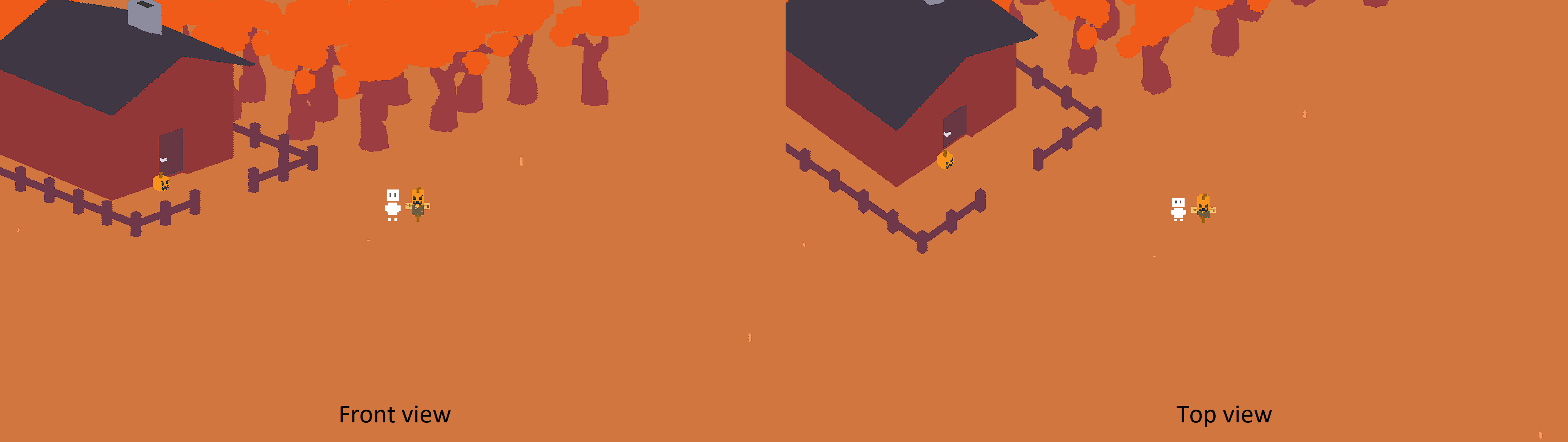
Hello gizmo199,

I hope you're well ! :)

Thank you very much for your framework Fauxton 3D, I love it very much !

I have created a shadow system for dynamic and static "3D "objects (in buffers) for my game (also for 2d sprites). The shadows are aligned with the x, y and z axes of the sun in the ‘WorldEnvironment’ object.

Unfortunately, I wouldn’t know how to integrate it into your framework for the community. I know you no longer have time to work on the framework, but if you ever feel like adding shadows to it, don’t hesitate to ask me for the code :). The code is very little.

Below is a preview of the shadow system using only static elements with the sun position updated every 0.5 scd:

Thanks for a quick response 😄

I succeeded by doing what you told me with this (ultimately no need for "draw_sprite_3d_ext") :

draw_sprite_3d(sprite_index, image_index, x, y, 0, -45, Camera.Forward, 0, 1, 1, 1, false);

Hi Gizmo199,

I hope you're well! 😄

I use the function draw_sprite_3d() to draw my character, but the sprite does not undergo any 3D effect.

Do you have any idea where the problem is coming from?